
Wayback Machinekoobas.hobune.stream
May JUN Jul
Previous capture 13 Next capture
2021 2022 2023
1 capture
13 Jun 22 - 13 Jun 22
sparklines
Close Help
  • Products
  • Solutions
  • Made with Unity
  • Learning
  • Support & Services
  • Community
  • Asset Store
  • Get Unity

UNITY ACCOUNT

You need a Unity Account to shop in the Online and Asset Stores, participate in the Unity Community and manage your license portfolio. Login Create account
  • Blog
  • Forums
  • Answers
  • Evangelists
  • User Groups
  • Beta Program
  • Advisory Panel

Navigation

  • Home
  • Products
  • Solutions
  • Made with Unity
  • Learning
  • Support & Services
  • Community
    • Blog
    • Forums
    • Answers
    • Evangelists
    • User Groups
    • Beta Program
    • Advisory Panel

Unity account

You need a Unity Account to shop in the Online and Asset Stores, participate in the Unity Community and manage your license portfolio. Login Create account

Language

  • Chinese
  • Spanish
  • Japanese
  • Korean
  • Portuguese
  • Ask a question
  • Spaces
    • Default
    • Help Room
    • META
    • Moderators
    • Topics
    • Questions
    • Users
    • Badges
  • Home /
avatar image
2
Question by Remingthon · Feb 08, 2013 at 09:34 PM · animationmecanimlayers

Animation Layer syncing

I have a issue about Animation Layer syncing (Documentation). I implemented the controller, added layer(with 'sync' and layer name), and I want to use it with the animation layers (WALK and RUN). In my script i use the Animator.SetLayerWeight method for switching between layers. That is ok and working. But the animations are played at different speeds, the animation of the first layer is fine, but the animation of the second layer is very fast. When I put the exact same animation on both layers - they also played at different speeds. 'speed' parameter of the State affects both layers at once. How to use layers? What are the requirements for an animation? How to adjust?

Thanks in advance for your help!
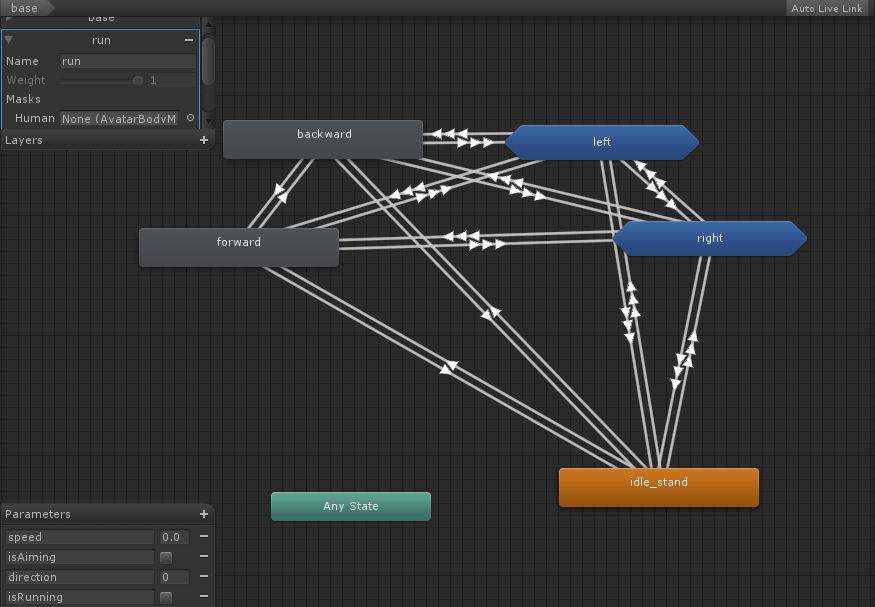
alt text

controller.jpg (229.0 kB)
Comment
Add comment
10 |3000 characters needed characters left characters exceeded
▼
  • Viewable by all users
  • Viewable by moderators
  • Viewable by moderators and the original poster
  • Advanced visibility
Viewable by all users

2 Replies

· Add your reply
  • Sort: 
avatar image
1

Answer by Vazili_KZ · May 10, 2020 at 12:05 AM

I want to UP this question because i'm having the same issue and still haven't found a solution

EDIT :
I have found that enabling "Timing" in the layer's settings solves that problem.
-Of couse this is assuming that you have syncing enabled- alt text
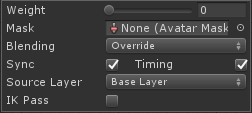
Apparently if the "Timing" is set to false, Mecanim will himself decide how long the animation should last, and therefore adjust it's speed accordingly. it does that to make sure that the animation duration on the 2nd Layer is the same as the one on the Base Layer.

If "Timing" is set to true, the animation length will be a balance for both animations.

This is explained in the doc here under the section "Animation Layer syncing".

Hope somebody who's facing the same issue finds this useful.


s1.png (6.1 kB)
Comment
Add comment · Share
10 |3000 characters needed characters left characters exceeded
▼
  • Viewable by all users
  • Viewable by moderators
  • Viewable by moderators and the original poster
  • Advanced visibility
Viewable by all users
avatar image
0

Answer by Bargle · Mar 29, 2013 at 11:34 PM

We're seeing some issues with this as well. We have two walk cycles, one per layer. The animation on the 2nd layer is essentially half as fast, however it plays double the speed we expect (matching the first layer's animation). We would expect to be able to blend smoothly between the two animations by changing the weight of each layer accordingly. However it (mecanim) appears to be manipulating the animation speed under the hood to have the 2nd animation match the 1st.

Perhaps our expectations are out of alignment.. The documentation is not exactly clear on what should happen.

Comment
Add comment · Share
10 |3000 characters needed characters left characters exceeded
▼
  • Viewable by all users
  • Viewable by moderators
  • Viewable by moderators and the original poster
  • Advanced visibility
Viewable by all users

Your answer

Hint: You can notify a user about this post by typing @username

Up to 2 attachments (including images) can be used with a maximum of 524.3 kB each and 1.0 MB total.

Follow this Question

Answers Answers and Comments

11 People are following this question.

avatar image avatar image avatar image avatar image avatar image avatar image avatar image avatar image avatar image avatar image avatar image

Related Questions

Possible to use different rig on layer mask? 0 Answers

Animation layers with Unity 2D mecanim 0 Answers

How to superimpose two animations using the animator? 0 Answers

Adding an eyeblink animation layer 0 Answers

Mecanim layers blending 0 Answers


Enterprise
Social Q&A

Social
Subscribe on YouTube social-youtube Follow on LinkedIn social-linkedin Follow on Twitter social-twitter Follow on Facebook social-facebook Follow on Instagram social-instagram

Footer

  • Purchase
    • Products
    • Subscription
    • Asset Store
    • Unity Gear
    • Resellers
  • Education
    • Students
    • Educators
    • Certification
    • Learn
    • Center of Excellence
  • Download
    • Unity
    • Beta Program
  • Unity Labs
    • Labs
    • Publications
  • Resources
    • Learn platform
    • Community
    • Documentation
    • Unity QA
    • FAQ
    • Services Status
    • Connect
  • About Unity
    • About Us
    • Blog
    • Events
    • Careers
    • Contact
    • Press
    • Partners
    • Affiliates
    • Security
Copyright © 2020 Unity Technologies
  • Legal
  • Privacy Policy
  • Cookies
  • Do Not Sell My Personal Information
  • Cookies Settings
"Unity", Unity logos, and other Unity trademarks are trademarks or registered trademarks of Unity Technologies or its affiliates in the U.S. and elsewhere (more info here). Other names or brands are trademarks of their respective owners.
  • Anonymous
  • Sign in
  • Create
  • Ask a question
  • Spaces
  • Default
  • Help Room
  • META
  • Moderators
  • Explore
  • Topics
  • Questions
  • Users
  • Badges
