 koobas.hobune.stream


how can i set up a wall detection to enable down movement?
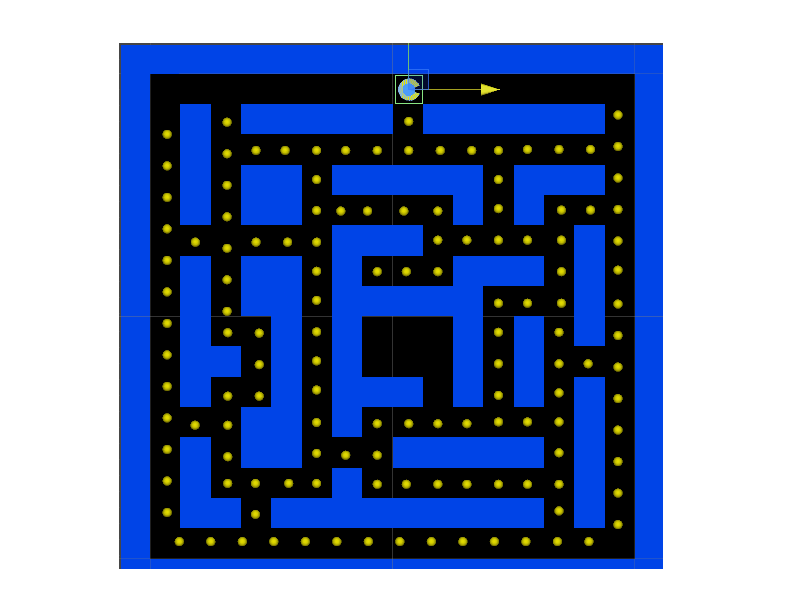
in this image, pacman is in a situation where he can go down.
is there a code that does this?
no wall> direction pad appears> click down/right> continue
hopefully this is understandable,
Thanks in advance!

i dont know if this is the most efficient way. try to find pacman tutorials on internet. I am sure that you can find something useful.

You could make a 2D array of bools (or some other datatype) to represent the map/grid, and set the grid tiles occupied by blocks to false. Then before you move pac-man all you have to do is get his current position in the array (x,y) and check if the tile beneath him (x, y+1) is false. If it is, you don't move.
To get his current array position you'd do something like dividing his x position by the grid tile width. Same for the y.
Edit: You could also use a 1D array if that's your preference.

use
Physics.Raycast();
for every direction, up,down,left and right. by this detect walls, if wall, can't move, if not ,can move. I would say, whenever you move in any direction, don't move using this basic movement statement:
transform.position = transform.position - Time.deltaTime *Speed;
I suggest.. whenever a direction key is pressed, move a particular distant in that direction , no matter what, like 1m.even if other key is pressed. this will make your player hard to manage themselves in tight spots, but at least that will save your character from getting stuck in wall and the road.
use,
Vector3.Lerp
to lerp between distants or move direct. Mark Question solved, if the problem is solved.



