
Wayback Machinekoobas.hobune.stream
May JUN Jul
Previous capture 13 Next capture
2021 2022 2023
1 capture
13 Jun 22 - 13 Jun 22
sparklines
Close Help
  • Products
  • Solutions
  • Made with Unity
  • Learning
  • Support & Services
  • Community
  • Asset Store
  • Get Unity

UNITY ACCOUNT

You need a Unity Account to shop in the Online and Asset Stores, participate in the Unity Community and manage your license portfolio. Login Create account
  • Blog
  • Forums
  • Answers
  • Evangelists
  • User Groups
  • Beta Program
  • Advisory Panel

Navigation

  • Home
  • Products
  • Solutions
  • Made with Unity
  • Learning
  • Support & Services
  • Community
    • Blog
    • Forums
    • Answers
    • Evangelists
    • User Groups
    • Beta Program
    • Advisory Panel

Unity account

You need a Unity Account to shop in the Online and Asset Stores, participate in the Unity Community and manage your license portfolio. Login Create account

Language

  • Chinese
  • Spanish
  • Japanese
  • Korean
  • Portuguese
  • Ask a question
  • Spaces
    • Default
    • Help Room
    • META
    • Moderators
    • Topics
    • Questions
    • Users
    • Badges
  • Home /
avatar image
1
Question by Bitcoon · Feb 18, 2014 at 10:29 AM · materialunity 2dchanging shader

Materials greyed out (2d game)

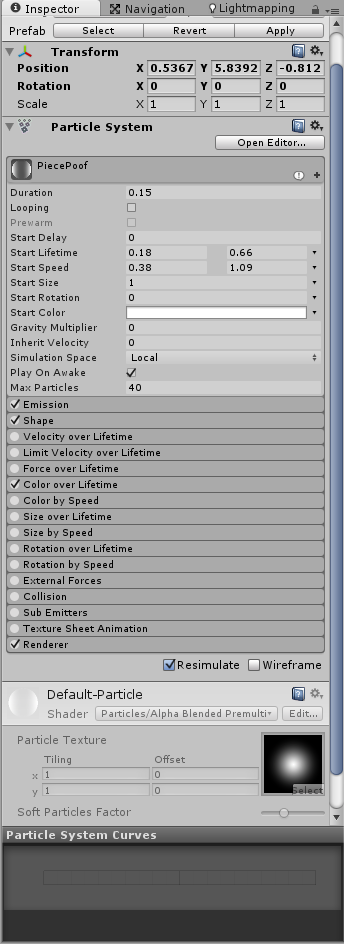
Alright, so this is my first time making a 2D game project targeted for mobile platforms and I'm using the newest version of Unity. But I'm finding that whenever I create a 3D object or particle effect, I can't change the materials at all. No swapping textures, changing colors, switching shaders, etc. I'm stuck with the defaults, even if I try to make prefabs or create new materials to apply to things.

I may be able to get by under these restrictions as I wasn't really planning on abusing particles or using 3D models (maybe for background effects, but unlikely) but I'd really like to know why those options are greyed out.

Comment
Add comment · Show 7
10 |3000 characters needed characters left characters exceeded
▼
  • Viewable by all users
  • Viewable by moderators
  • Viewable by moderators and the original poster
  • Advanced visibility
Viewable by all users
avatar image GameVortex · Feb 18, 2014 at 10:31 AM 0
Share

So you are saying that when you create a brand new material using the Create button at the top of the project view, you can still not change any settings on that material?

avatar image Bitcoon · Feb 18, 2014 at 11:55 PM 0
Share

No, actually I can create and change settings on materials at will, any time. The problem is, when I create a particle effect or 3D primitive, the material box is greyed out. I can't apply the custom material, and I can't change the settings of the default material already on the object.

I've never seen this happen in any of my 3D projects, but this is my first time doing a 2D project, and my first time starting a new project in the new version of Unity.

avatar image Bitcoon · Feb 18, 2014 at 11:57 PM 0
Share

I guess it might be relevant to mention, I haven't imported most of the standard assets. (though I have imported the whole mobile assets package)

avatar image Linus · Feb 19, 2014 at 12:20 AM 0
Share

A screen shot could be useful... Throwing in a link but it does not sound like it is this problem exactly http://forum.unity3d.com/threads/133832-$$anonymous$$y-Inspector-window-no-longer-shows-any-of-my-textures-for-my-materials

avatar image Bitcoon · Feb 19, 2014 at 03:19 AM 0
Share

Hopefully this is visible. There's a particle prefab I made. Notice how all the controls on the material are greyed out, and I can't interact with that part of the interface except to click the header part and collapse/expand the details for the material. (like the problem in the link you posted)
alt text

ansdu.png (56.7 kB)
Show more comments

2 Replies

· Add your reply
  • Sort: 
avatar image
1
Best Answer

Answer by GameVortex · Feb 19, 2014 at 08:27 AM

That is because the Default-Particle material is a default material from unity and you are not allowed to make changes to it. If you click on the Renderer to expand the settings there you can change the material slot to a different custom material. This will allow you to make changes.

Comment
Add comment · Show 2 · Share
10 |3000 characters needed characters left characters exceeded
▼
  • Viewable by all users
  • Viewable by moderators
  • Viewable by moderators and the original poster
  • Advanced visibility
Viewable by all users
avatar image hitoruna · Sep 13, 2017 at 08:16 AM 0
Share

@GameVortex:

Actually that does not work. No matter what element 0 you choose in the $$anonymous$$esh Renderer the Shader is still grey-out

What to do?

avatar image GameVortex hitoruna · Sep 13, 2017 at 08:41 AM 0
Share

Actually,that does work. If the shader dropdown is still grayed out, then you have not set the $$anonymous$$esh Renderer to use a custom material. You need to create a new material by using the Create button at the top of the Project window, this material you can modify as much as you want.

avatar image
0

Answer by Linus · Feb 19, 2014 at 12:44 PM

Use the Open Editor button on the top right The window started real small for me, might need to drag it all out to see the renderer option where you can set material.

Comment
Add comment · Share
10 |3000 characters needed characters left characters exceeded
▼
  • Viewable by all users
  • Viewable by moderators
  • Viewable by moderators and the original poster
  • Advanced visibility
Viewable by all users

Your answer

Hint: You can notify a user about this post by typing @username

Up to 2 attachments (including images) can be used with a maximum of 524.3 kB each and 1.0 MB total.

Follow this Question

Answers Answers and Comments

21 People are following this question.

avatar image avatar image avatar image avatar image avatar image avatar image avatar image avatar image avatar image avatar image avatar image avatar image avatar image avatar image avatar image avatar image avatar image avatar image avatar image avatar image avatar image

Related Questions

Sprite disappearing upon changing material 0 Answers

[Solved] Changing material through network PUN 1 Answer

Material doesn't have a color property '_Color' 4 Answers

Changing two different objects renderer colour 1 Answer

Q about Rigidbody.velocity automatically stop understanding 1 Answer


Enterprise
Social Q&A

Social
Subscribe on YouTube social-youtube Follow on LinkedIn social-linkedin Follow on Twitter social-twitter Follow on Facebook social-facebook Follow on Instagram social-instagram

Footer

  • Purchase
    • Products
    • Subscription
    • Asset Store
    • Unity Gear
    • Resellers
  • Education
    • Students
    • Educators
    • Certification
    • Learn
    • Center of Excellence
  • Download
    • Unity
    • Beta Program
  • Unity Labs
    • Labs
    • Publications
  • Resources
    • Learn platform
    • Community
    • Documentation
    • Unity QA
    • FAQ
    • Services Status
    • Connect
  • About Unity
    • About Us
    • Blog
    • Events
    • Careers
    • Contact
    • Press
    • Partners
    • Affiliates
    • Security
Copyright © 2020 Unity Technologies
  • Legal
  • Privacy Policy
  • Cookies
  • Do Not Sell My Personal Information
  • Cookies Settings
"Unity", Unity logos, and other Unity trademarks are trademarks or registered trademarks of Unity Technologies or its affiliates in the U.S. and elsewhere (more info here). Other names or brands are trademarks of their respective owners.
  • Anonymous
  • Sign in
  • Create
  • Ask a question
  • Spaces
  • Default
  • Help Room
  • META
  • Moderators
  • Explore
  • Topics
  • Questions
  • Users
  • Badges
