 koobas.hobune.stream


Boneweights for deformation?
Ok I made a jpg to show what I am trying to do, basically I want to create 4 bones on the corners, and scale my plane based on boneweights when I move a bone.
I am thinking something to do with their x,z values as I am building it in the (0,0) to (1,1) square.
So what I need is some help understanding boneweights...
I know that the weight of all 4 bones should not exceed 1, but I am having trouble grasping how it should be divided amongst them.
Thanks guys!
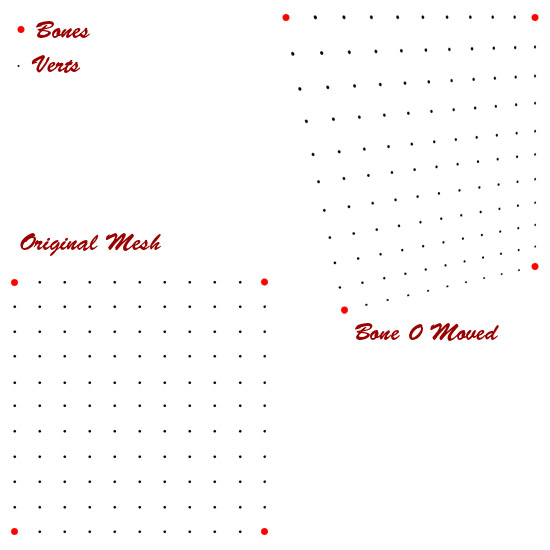
Here is what I have so far: But bones 2 and 3 seem to have no effect, are they Y based?
     using System.Collections.Generic;
     using UnityEditor;

     public class CubeScaler : MonoBehaviour {
         //GameObject hit;
         GameObject floor;
         MeshFilter filter;
         MeshCollider MC;
         public float units = 10;
         public Texture texture;
         Vector3[] vertices;
         List<Vector3> verts, normals;
         List<Vector2> uvs;
         List<int> triangles;

         // Use this for initialization
         void Start () {
             floor = GameObject.CreatePrimitive(PrimitiveType.Plane);
             filter = floor.gameObject.GetComponent<MeshFilter>();
             MC = new MeshCollider();
             verts = new List<Vector3>();
             normals = new List<Vector3>();
             uvs = new List<Vector2>();
             triangles = new List<int>();
             //make verts for floor
             for (int x = 0;x<=units;x++){
                 for (int z = 0;z<=units;z++){
                     verts.Add(new Vector3((x*.1f),0,(z*.1f)));
                 }
             }
             filter.mesh.vertices = verts.ToArray();
             for (int i = 0; i < filter.mesh.vertices.Length-(units+1); i++) {
                 if ((i+1)%(units+1)!=0){
                     triangles.AddRange(new int[]{i,i+1,i+(int)(units+1f),i+1,i+(int)(units+1f)+1,i+(int)(units+1f)});
                 }
             }
             filter.mesh.triangles = triangles.ToArray();
             vertices = new Vector3[filter.mesh.vertices.Length];
             vertices = filter.mesh.vertices;
             int sideVerts = filter.mesh.vertices.Length;
             for (int j = 0; j < sideVerts; j++) {
                 Vector3 vert = filter.mesh.vertices[j];
                 normals.Add(new Vector3(0,1,0));
                 uvs.Add (new Vector2(
                     (1f/(units+1f))*(j%(units+1f)),
                     (1f/(units+1f))*(Mathf.Floor(j/(units+1f)))));
             }
             filter.mesh.uv = uvs.ToArray();
             filter.mesh.normals = normals.ToArray();
             floor.name = "Floor";
             floor.gameObject.renderer.material.mainTexture = texture;
             floor.gameObject.renderer.material.mainTextureScale = new Vector2(units,units);
             floor.gameObject.AddComponent<MeshCollider>();
             floor.gameObject.AddComponent<SkinnedMeshRenderer>();
             SkinnedMeshRenderer renderer = floor.gameObject.GetComponent<SkinnedMeshRenderer>();
             filter.gameObject.GetComponent<MeshCollider>().sharedMesh = filter.mesh;
             BoneWeight[] weights = new BoneWeight[sideVerts];
             for (int i = 0; i < vertices.Length; i++) {
                 weights[i].boneIndex0 = 0;
                 weights[i].weight0 = (1f-vertices[i].x);
                 weights[i].boneIndex1 = 1;
                 weights[i].weight1 = (vertices[i].x);
                 weights[i].boneIndex2 = 2;
                 weights[i].weight2 = (vertices[i].z);
                 weights[i].boneIndex3 = 3;
                 weights[i].weight3 = (1f-vertices[i].z);
             }
             filter.mesh.boneWeights = weights;
             Transform[] bones = new Transform[4];
             Matrix4x4[] bindPoses = new Matrix4x4[4];
             for (int i = 0; i < 4; i++) {
                 bones[i] = new GameObject("Bone"+i).transform;
                 bones[i].transform.parent = transform;
                 bones[i].localRotation = Quaternion.identity;
                 bones[i].localPosition = Vector3.zero;
                 bindPoses[i] = bones[i].worldToLocalMatrix * transform.localToWorldMatrix;
             }
             filter.mesh.bindposes = bindPoses;
             renderer.bones = bones;
             renderer.sharedMesh = filter.mesh;
             filter.mesh.vertices = vertices;
         }

         // Update is called once per frame
         void Update () {
         //for(int side = 0;side < CubeSides.Count;side++){
                 //mesh1 = CubeSides[side].gameObject.GetComponent<MeshFilter>().mesh;
             /*for(int j = 0;j<filter.mesh.vertices.Length;j++){
                 Debug.DrawRay(filter.mesh.vertices[j], filter.mesh.normals[j], Color.green);
             }*/
         }
     }
Ok, I gave up, I will just use the 2 bone method.
though I am having some trouble with getting the MeshCollider to stay with the mesh...
I added this, and the MeshCollider mesh doesnt move at all.
However if I delete either mesh in the editor, I get NRE spamming all day long, so my targeting seems fine :(
 void Update () {
         //MC = MeshCollider for object, vertices = Vector3[]
         vertices = MC.sharedMesh.vertices;
         for(int j = 0;j<vertices.Length;j++){
             vertices[j] = renderer.sharedMesh.vertices[j];
         }
         MC.sharedMesh.vertices = vertices;
     }

Solved the $$anonymous$$esh Collider issue, gotta bake it into a temp mesh and assign it
$$anonymous$$esh mesh = new $$anonymous$$esh(); Skinned$$anonymous$$eshRendereInstance.Bake$$anonymous$$esh(mesh); $$anonymous$$eshColliderInstance.mesh = mesh;
Cake ;)

A fellow manual animator!
There's a 'bone quality' setting somewhere...
Here we go. Make sure your quality settings allow for four bone weights per vertex.
That was indeed the problem, however it starts doing some weird things when I used 4, so I am using 2 anyways!
But that solved it for sure ;)

Your bone weights add up to more than 1 if you use more that 2 bones in the quality settings using that code. The sum of all bone weights needs to be 1. Your problem is that a vertex in, say, the position of the top left bone in 0,0 has a weight of 2 - all of te z == 0 bone and all of the x == 0 bone.
  var bone1 = new Vector3(0,0,0);
  var bone2 = new Vector3(0,0,1);
  var bone3 = new Vector3(1,0,0);
  var bone4 = new Vector3(1,0,1);

      BoneWeight[] weights = new BoneWeight[sideVerts];
        for (int i = 0; i < vertices.Length; i++) {
          weights[i].boneIndex0 = 0;
          weights[i].weight0 = Mathf.Clamp01(1-(bone1 - vertices[i]).magnitude);
          weights[i].boneIndex1 = 1;
          weights[i].weight1 = Mathf.Clamp01(1-(bone2 - vertices[i]).magnitude);
          weights[i].boneIndex2 = 2;
          weights[i].weight2 = Mathf.Clamp01(1-(bone3 - vertices[i]).magnitude);
          weights[i].boneIndex3 = 3;
          weights[i].weight3 = Mathf.Clamp01(1-(bone4 - vertices[i]).magnitude);
        }

Or something like that - given that I've edited that 5 times already ;)
whydoidoit, you are my friggin hero man. I have been through some of your tutorials as well.
Win. (I did know the max weight part, but the Clamps are a great idea, as I have been playing with the idea of using trig functions for weighting)



