
Wayback Machinekoobas.hobune.stream
May JUN Jul
Previous capture 12 Next capture
2021 2022 2023
1 capture
12 Jun 22 - 12 Jun 22
sparklines
Close Help
  • Products
  • Solutions
  • Made with Unity
  • Learning
  • Support & Services
  • Community
  • Asset Store
  • Get Unity

UNITY ACCOUNT

You need a Unity Account to shop in the Online and Asset Stores, participate in the Unity Community and manage your license portfolio. Login Create account
  • Blog
  • Forums
  • Answers
  • Evangelists
  • User Groups
  • Beta Program
  • Advisory Panel

Navigation

  • Home
  • Products
  • Solutions
  • Made with Unity
  • Learning
  • Support & Services
  • Community
    • Blog
    • Forums
    • Answers
    • Evangelists
    • User Groups
    • Beta Program
    • Advisory Panel

Unity account

You need a Unity Account to shop in the Online and Asset Stores, participate in the Unity Community and manage your license portfolio. Login Create account

Language

  • Chinese
  • Spanish
  • Japanese
  • Korean
  • Portuguese
  • Ask a question
  • Spaces
    • Default
    • Help Room
    • META
    • Moderators
    • Topics
    • Questions
    • Users
    • Badges
  • Home /
  • Help Room /
avatar image
0
Question by Carl201010 · Mar 17, 2016 at 12:27 PM · 3dsmaxskinweights

Another skinning inconsistency 3DS Max and Unity
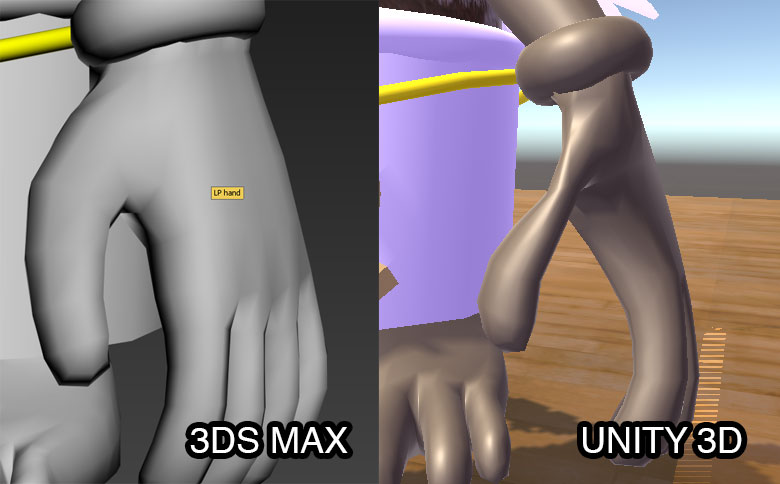
alt textHi, I have the following issue: versions are 3DS Max 2106 and Unity 5.3.2f1. The hand is skinned over a biped, I have exported with dual-quaternions both on and off with the same result. I have also tried setting blend weights to four bones in Unity, which did not change the result. Suggestions appreciated.

skin-problem.jpg (51.4 kB)
Comment
Add comment · Show 2
10 |3000 characters needed characters left characters exceeded
▼
  • Viewable by all users
  • Viewable by moderators
  • Viewable by moderators and the original poster
  • Advanced visibility
Viewable by all users
avatar image Carl201010 · Mar 17, 2016 at 12:40 PM 0
Share

I should add that I have set quality to 4 bones both globally and locally in the skinned mesh renderer with no effect (changing from auto; this does in fact get worse / more pronounced when I reduce the number of bones used).

avatar image Johnny3D83 · Jan 26, 2017 at 11:37 AM 0
Share

@Carl201010

I too am having a similar issue with some eyelids on a character that operate and look fine in max 2015 but in Unity they are stretched/squashed!

Did you ever come to a solution for this?

Thanks

1 Reply

· Add your reply
  • Sort: 
avatar image
0

Answer by Carl201010 · Jan 29, 2017 at 01:38 PM

It's been a while! Not a good solution, no. I ended up tweaking the max file to compensate for the effect - total kludge, but it reduced the damage, didn't eliminate it though. I considered trying other formats than FBX for the geometry only but didn't get round to actually trying this. I haven't repeated the exercise in 5.5 but suspect (by no means certain) it's an FBX issue anyway, so probably wouldn't make any difference. Messing with the max file or trying a separate format for import, but still using FBX for motion, seemed like the only two available options.

Comment
Add comment · Share
10 |3000 characters needed characters left characters exceeded
▼
  • Viewable by all users
  • Viewable by moderators
  • Viewable by moderators and the original poster
  • Advanced visibility
Viewable by all users

Your answer

Hint: You can notify a user about this post by typing @username

Up to 2 attachments (including images) can be used with a maximum of 524.3 kB each and 1.0 MB total.

Follow this Question

Answers Answers and Comments

51 People are following this question.

avatar image avatar image avatar image avatar image avatar image avatar image avatar image avatar image avatar image avatar image avatar image avatar image avatar image avatar image avatar image avatar image avatar image avatar image avatar image avatar image avatar image avatar image avatar image avatar image avatar image avatar image avatar image avatar image avatar image avatar image avatar image avatar image avatar image avatar image avatar image avatar image avatar image avatar image avatar image avatar image avatar image avatar image avatar image avatar image avatar image avatar image avatar image avatar image avatar image avatar image avatar image

Related Questions

UNITY 3D: how to create a lever to control animation of an object ..such as a trap 2 Answers

How 3ds MaxTimeline of 345 Frames bake in multiple FBX 1 Answer

Timing Animation Weight 0 Answers

Baking lights in 3ds Max with Vray - Metallic Reflections & Seperate Lightmap 0 Answers

How do I make a change skin button for my game 2 Answers


Enterprise
Social Q&A

Social
Subscribe on YouTube social-youtube Follow on LinkedIn social-linkedin Follow on Twitter social-twitter Follow on Facebook social-facebook Follow on Instagram social-instagram

Footer

  • Purchase
    • Products
    • Subscription
    • Asset Store
    • Unity Gear
    • Resellers
  • Education
    • Students
    • Educators
    • Certification
    • Learn
    • Center of Excellence
  • Download
    • Unity
    • Beta Program
  • Unity Labs
    • Labs
    • Publications
  • Resources
    • Learn platform
    • Community
    • Documentation
    • Unity QA
    • FAQ
    • Services Status
    • Connect
  • About Unity
    • About Us
    • Blog
    • Events
    • Careers
    • Contact
    • Press
    • Partners
    • Affiliates
    • Security
Copyright © 2020 Unity Technologies
  • Legal
  • Privacy Policy
  • Cookies
  • Do Not Sell My Personal Information
  • Cookies Settings
"Unity", Unity logos, and other Unity trademarks are trademarks or registered trademarks of Unity Technologies or its affiliates in the U.S. and elsewhere (more info here). Other names or brands are trademarks of their respective owners.
  • Anonymous
  • Sign in
  • Create
  • Ask a question
  • Spaces
  • Default
  • Help Room
  • META
  • Moderators
  • Explore
  • Topics
  • Questions
  • Users
  • Badges
