
Wayback Machinekoobas.hobune.stream
May JUN Jul
Previous capture 13 Next capture
2021 2022 2023
1 capture
13 Jun 22 - 13 Jun 22
sparklines
Close Help
  • Products
  • Solutions
  • Made with Unity
  • Learning
  • Support & Services
  • Community
  • Asset Store
  • Get Unity

UNITY ACCOUNT

You need a Unity Account to shop in the Online and Asset Stores, participate in the Unity Community and manage your license portfolio. Login Create account
  • Blog
  • Forums
  • Answers
  • Evangelists
  • User Groups
  • Beta Program
  • Advisory Panel

Navigation

  • Home
  • Products
  • Solutions
  • Made with Unity
  • Learning
  • Support & Services
  • Community
    • Blog
    • Forums
    • Answers
    • Evangelists
    • User Groups
    • Beta Program
    • Advisory Panel

Unity account

You need a Unity Account to shop in the Online and Asset Stores, participate in the Unity Community and manage your license portfolio. Login Create account

Language

  • Chinese
  • Spanish
  • Japanese
  • Korean
  • Portuguese
  • Ask a question
  • Spaces
    • Default
    • Help Room
    • META
    • Moderators
    • Topics
    • Questions
    • Users
    • Badges
  • Home /
avatar image
0
Question by JawJaw · Dec 06, 2014 at 04:03 PM · importblendshapescinema4d

Import Blendshapes from Cinema 4d

Is it possible to import blend shapes from Cinema 4D into Unity? I haven't been able to find instructions how to do so specifically for Cinema 4D. Is it possible directly? Or using some clever work around perhaps? Thanks.

Comment
Add comment · Show 1
10 |3000 characters needed characters left characters exceeded
▼
  • Viewable by all users
  • Viewable by moderators
  • Viewable by moderators and the original poster
  • Advanced visibility
Viewable by all users
avatar image designatron · May 21, 2015 at 09:11 AM 0
Share

Yes I second this request here! How can I go about doing this? I need to animate a characters body in Cinema 4D, yet use Salsa 3D text to speech plugin with facial blenshapes in Unity for the dynamic text possibilities. I'm totally lost! help, please someone!

4 Replies

· Add your reply
  • Sort: 
avatar image
1

Answer by GeneFerrol · Nov 05, 2018 at 01:06 AM

Yes..... Blend-Shapes are possible to export from Cinema 4D to Unity

There are two approaches to export Blendshapes from Cinema4D:

  • You export the C4D File (Morph-Tag with your morph-poses) and import it into Unity (Unity can import native C4D Files). Nothing more is required.

  • For FBX the same , if it does not work, You can build blendshapes (Meshes of your poses) and export all as FBX and import all into Unity

For the second approach, I explained the workflow below.

FBX-Workflow:
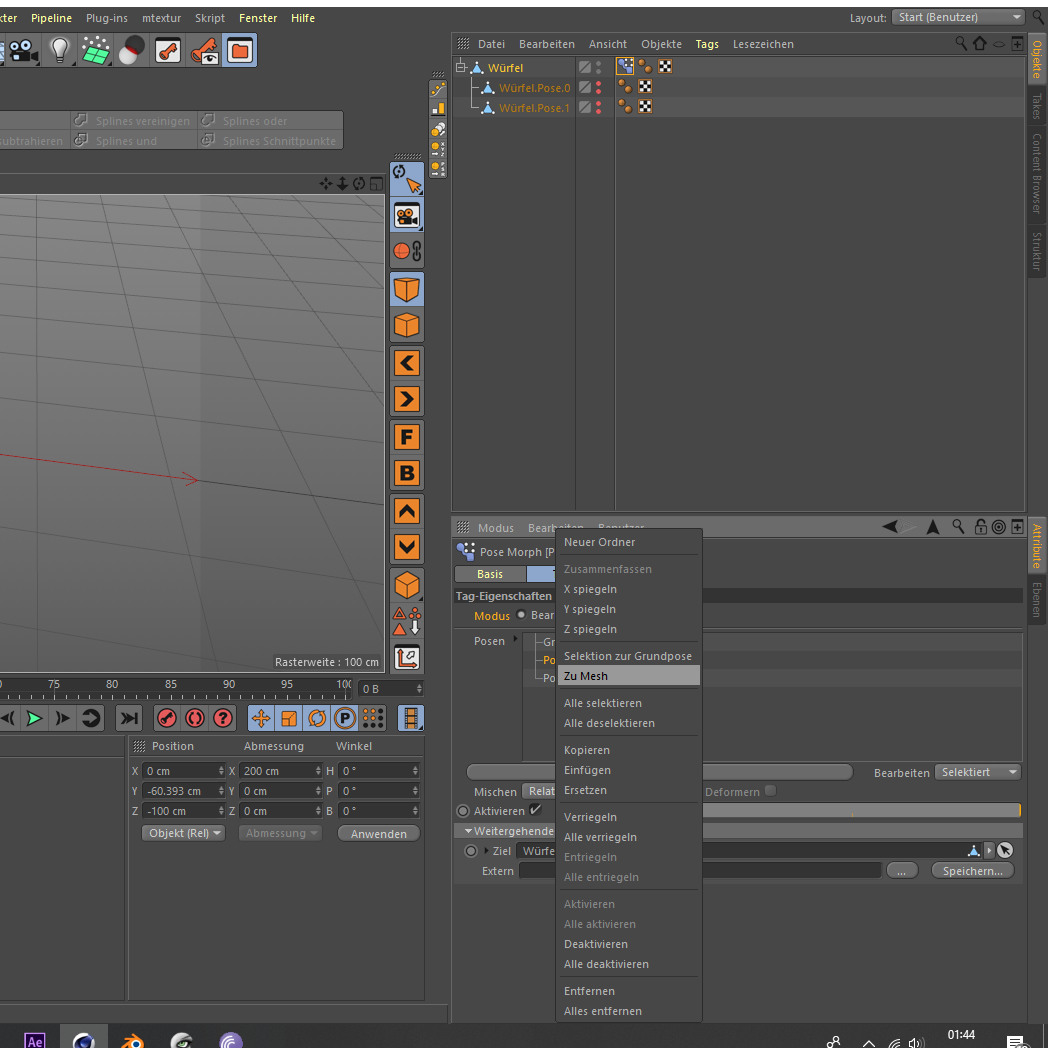
In Cinema 4D you have to create Meshes from the Poses. In the PoseMorph Tag in the Edit Tab you have to right click on a pose and choose "to Mesh". But be aware to set the slider to 100% before you choose the command. If not it creates a mesh of the pose with 0%.
After you have created all the meshes for your poses, you have to put each mesh as target in the link-tab in the posemorph Tag, to get Cinema to now to use the meshes. Then organize your Blendhapes as Childs or whatever for example under your Mesh and make them unvisible.
alt text


Then export the file as FBX

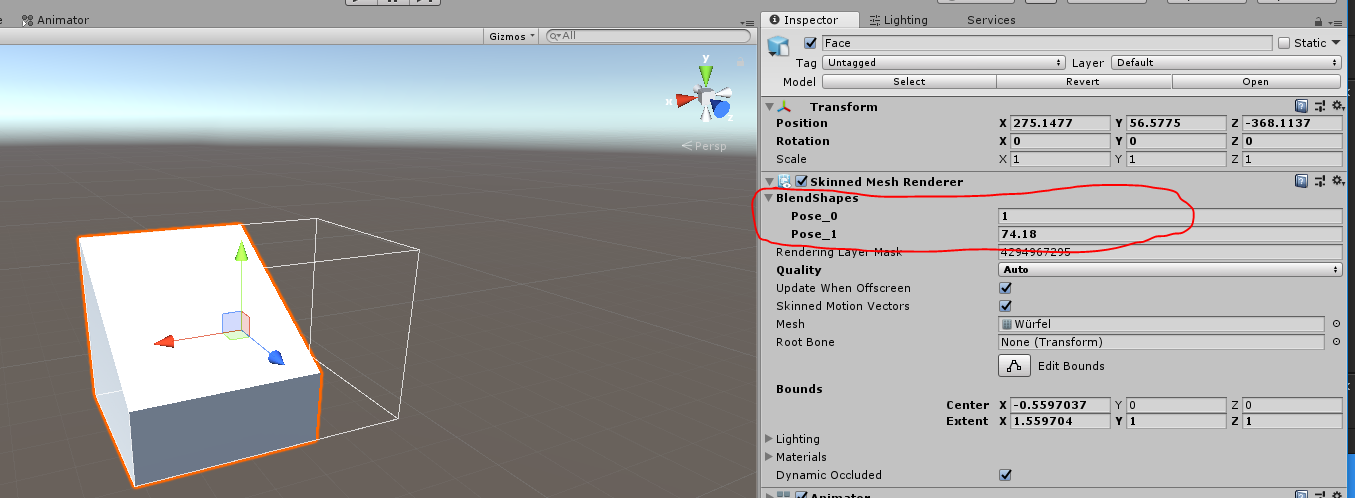
Import the FBX into unity and activate import Blendshapes if it is not checked in the inspector. Now drag your Model/Object into the hierarchy or SceneView and now you can see in Blendshapes in the inspector.
alt text


cinema4d.jpg (201.8 kB)
unityblendshapes.png (125.0 kB)
Comment
Add comment · Show 1 · Share
10 |3000 characters needed characters left characters exceeded
▼
  • Viewable by all users
  • Viewable by moderators
  • Viewable by moderators and the original poster
  • Advanced visibility
Viewable by all users
avatar image daniel_aeh · May 15, 2019 at 07:25 AM 0
Share

Hi GeneFerrol

I have created a character with bunch of pose morph tags, and followed exactly what you have taught and imported the FBX into Unity, but the problem now I'm having now is the file is so huge in size which has lots of meshes for the pose morph. Is there anyway to void those meshes just like the $$anonymous$$aya FBX Blend Shapes export? Thanks!

avatar image
0

Answer by union12 · Jun 05, 2015 at 04:11 PM

I used salsa 3d for a project and I created the blend shapes/pose morphs in cinema for all the mouth shapes and eye positions. Then exported to fbx using the 2011 preset (the newer ones didn't work with unity for some reason. Blend shapes didn't have names). Import the fbx into unity like normal and put the fbx into a scene. You will see the blend shapes in the Skinned Mesh Rendered section of the inspector. The only issue I have is that there are multiple copies of each blend shape, other than that salsa worked great.

Comment
Add comment · Share
10 |3000 characters needed characters left characters exceeded
▼
  • Viewable by all users
  • Viewable by moderators
  • Viewable by moderators and the original poster
  • Advanced visibility
Viewable by all users
avatar image
0

Answer by OnePoint618 · Mar 29, 2017 at 04:36 PM

Yes it is possible. To avoid the duplicate mesh issue set your c4d pose morphs to RELATIVE (meaning you won't have any additional meshes that are being referenced by the pose element).

Comment
Add comment · Show 1 · Share
10 |3000 characters needed characters left characters exceeded
▼
  • Viewable by all users
  • Viewable by moderators
  • Viewable by moderators and the original poster
  • Advanced visibility
Viewable by all users
avatar image JotaRata · Oct 10, 2017 at 09:41 PM 0
Share

I have c4d pose mixing set to Relative, but it doesnt work I'm still having duplicated meshes

avatar image
0

Answer by unity_x9KIkJ32ORicjA · May 03, 2020 at 04:31 PM

Hi. Im having the same issue even if i follow those steps. I have a bunch of rigged fbx models in a great pack from Unity store with blendshapes that i want to add an expression to in C4D. When i import the updated fbx into Unity i get all the blendshapes as new meshes in the hierarchy. Actually I get the same problem when I just open one of the fbx in C4D and export it without changing anything. Isn’t it possible to use c4d for this and in that case what tool should I use instead?

Comment
Add comment · Share
10 |3000 characters needed characters left characters exceeded
▼
  • Viewable by all users
  • Viewable by moderators
  • Viewable by moderators and the original poster
  • Advanced visibility
Viewable by all users

Your answer

Hint: You can notify a user about this post by typing @username

Up to 2 attachments (including images) can be used with a maximum of 524.3 kB each and 1.0 MB total.

Follow this Question

Answers Answers and Comments

32 People are following this question.

avatar image avatar image avatar image avatar image avatar image avatar image avatar image avatar image avatar image avatar image avatar image avatar image avatar image avatar image avatar image avatar image avatar image avatar image avatar image avatar image avatar image avatar image avatar image avatar image avatar image avatar image avatar image avatar image avatar image avatar image avatar image avatar image

Related Questions

Import Animated Textures/UV's into Unity 0 Answers

Problems with Textures, Cinema4D to Unity 3 Answers

What is the best practice to import Cinema4D animations? 1 Answer

Imported c4d file becomes smoother 1 Answer

Importing Cinema4D objects with animation 0 Answers


Enterprise
Social Q&A

Social
Subscribe on YouTube social-youtube Follow on LinkedIn social-linkedin Follow on Twitter social-twitter Follow on Facebook social-facebook Follow on Instagram social-instagram

Footer

  • Purchase
    • Products
    • Subscription
    • Asset Store
    • Unity Gear
    • Resellers
  • Education
    • Students
    • Educators
    • Certification
    • Learn
    • Center of Excellence
  • Download
    • Unity
    • Beta Program
  • Unity Labs
    • Labs
    • Publications
  • Resources
    • Learn platform
    • Community
    • Documentation
    • Unity QA
    • FAQ
    • Services Status
    • Connect
  • About Unity
    • About Us
    • Blog
    • Events
    • Careers
    • Contact
    • Press
    • Partners
    • Affiliates
    • Security
Copyright © 2020 Unity Technologies
  • Legal
  • Privacy Policy
  • Cookies
  • Do Not Sell My Personal Information
  • Cookies Settings
"Unity", Unity logos, and other Unity trademarks are trademarks or registered trademarks of Unity Technologies or its affiliates in the U.S. and elsewhere (more info here). Other names or brands are trademarks of their respective owners.
  • Anonymous
  • Sign in
  • Create
  • Ask a question
  • Spaces
  • Default
  • Help Room
  • META
  • Moderators
  • Explore
  • Topics
  • Questions
  • Users
  • Badges
