
Wayback Machinekoobas.hobune.stream
May JUN Jul
Previous capture 12 Next capture
2021 2022 2023
1 capture
12 Jun 22 - 12 Jun 22
sparklines
Close Help
  • Products
  • Solutions
  • Made with Unity
  • Learning
  • Support & Services
  • Community
  • Asset Store
  • Get Unity

UNITY ACCOUNT

You need a Unity Account to shop in the Online and Asset Stores, participate in the Unity Community and manage your license portfolio. Login Create account
  • Blog
  • Forums
  • Answers
  • Evangelists
  • User Groups
  • Beta Program
  • Advisory Panel

Navigation

  • Home
  • Products
  • Solutions
  • Made with Unity
  • Learning
  • Support & Services
  • Community
    • Blog
    • Forums
    • Answers
    • Evangelists
    • User Groups
    • Beta Program
    • Advisory Panel

Unity account

You need a Unity Account to shop in the Online and Asset Stores, participate in the Unity Community and manage your license portfolio. Login Create account

Language

  • Chinese
  • Spanish
  • Japanese
  • Korean
  • Portuguese
  • Ask a question
  • Spaces
    • Default
    • Help Room
    • META
    • Moderators
    • Topics
    • Questions
    • Users
    • Badges
  • Home /
  • Help Room /
avatar image
0
Question by baroquedub · Jan 03, 2017 at 12:14 AM · vrfpsgun movement

Slerp FPS gun rotation in VR

I'm trying to add a slight gun sway effect to a FPS gun in VR.

All works fine if I make the Gun a child of the VR camera but the rotation (aiming) of the gun is too exact - it follows the VR head movement too closely.

I'd like to move the Gun out of the GvrMain game object and use a script to make it follow the position and rotation of the VR head but with a slight delay (slerp).

I've done this successfully in another game with a spaceship cockpit, by adding this script to the cockpit:

 public class HudFloat : MonoBehaviour {
 
     private Transform mainCam;
 
         public float smoothTime = 0.15F;
 
     void Start () {
         mainCam = Camera.main.gameObject.transform;
     }
 
     void FixedUpdate() {
         transform.rotation = Quaternion.Slerp(transform.rotation, mainCam.rotation, smoothTime*Time.fixedDeltaTime);
     }
 }

but this worked because the cockpit and the camera shared the same centre of rotation.

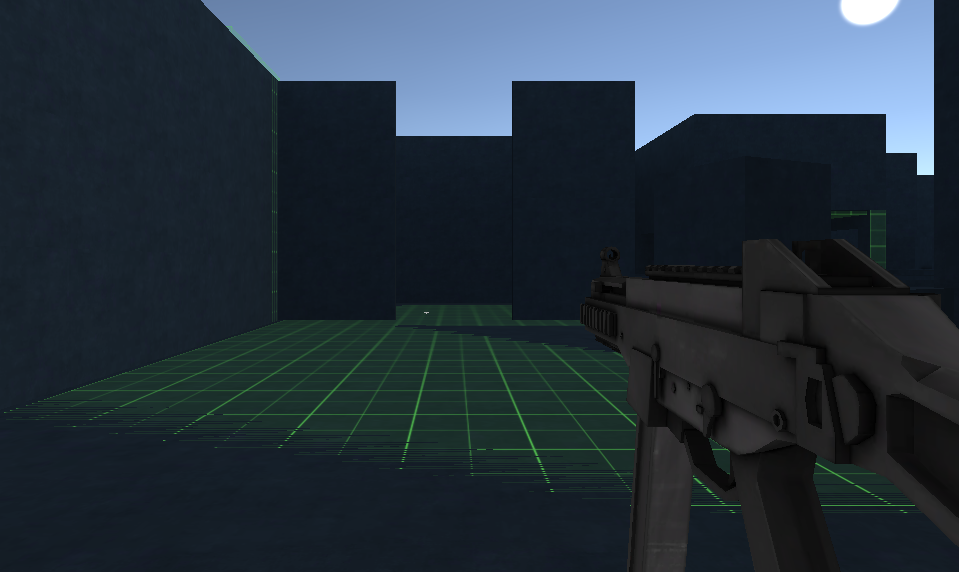
With my FPS the gun is offset from the centre of the camera: alt text
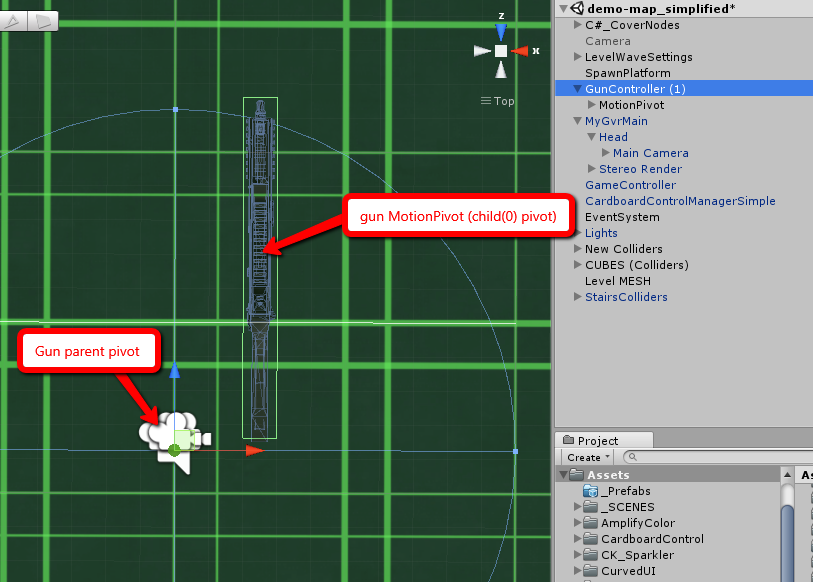
I've put the gun inside a parent object with its pivot centred on the camera, and I've used a similar script as before to make the guns' 'MotionPivot' rotate about its own pivot, along with the camera: alt text
 public class GunVrSway : MonoBehaviour {
 
     private Transform mainCam;
     private Transform gunPivot;
 
         public float smoothTime = 2.8F;
 
         public float positionOffsetX;
     public float positionOffsetY;
     public float positionOffsetZ;
 
     void Start () {
         mainCam = Camera.main.gameObject.transform;
         gunPivot = transform.GetChild(0);
     }
 
 
     void FixedUpdate() {
         Vector3 newPos = new Vector3(positionOffsetX, positionOffsetY, positionOffsetZ);
         transform.position = mainCam.position + newPos;
         transform.localRotation = mainCam.rotation;
 
         gunPivot.localRotation = Quaternion.Slerp(gunPivot.localRotation, mainCam.rotation, smoothTime*Time.fixedDeltaTime);
     }
 }

but the gun still pivots from left to right of the screen, not along the local axis of the MotionPivot child. I'd like it to stay to the right of the FPS view.

Here's a screencast of the problem (sorry not very good, lots of dropped frames in the screen capture) http://screencast.com/t/GMvs7xqE

Can anyone help? Would be much appreciated.

gun-pivot-1.png (254.8 kB)
gun-pivot-2.png (379.9 kB)
Comment
Add comment
10 |3000 characters needed characters left characters exceeded
▼
  • Viewable by all users
  • Viewable by moderators
  • Viewable by moderators and the original poster
  • Advanced visibility
Viewable by all users

1 Reply

· Add your reply
  • Sort: 
avatar image
0

Answer by baroquedub · Jan 27, 2017 at 08:56 PM

I'll answer my own question since I eventually found a solution.

First off, the working script was simple enough once I worked out that I needed to match both objects' forward vector rather than their rotation, which is what I'd done with the hub script.

Something that caught me out was that the MotionPivot object (the one assigned to the gunPivot variable in the above script) additionally had animations attached to it (for recoil on firing and reload and idle bobbing). Essentially, two things (script and animation) were trying the move the object at the same time. To get around that I just added an additional empty object in the hierarchy (GunController > SwayPivot > MotionPivot). In the script below, it's SwayPivot which is being referenced, while MotionPivot continues to be moved by the animation clips.

So here's the working script:

 using UnityEngine;
 using System.Collections;
 
 public class GunVrSway : MonoBehaviour {
 
     private Transform mainCam;
     private Transform gunPivot;
 
     public float smoothTime = 5f;
 
     void Start () {
         mainCam = Camera.main.gameObject.transform;
         gunPivot = transform.GetChild(0);
     }
 
 
     void FixedUpdate() {
         // track camera position
         transform.position = mainCam.position;
 
         Vector3 currentVector = transform.forward;
         Vector3 destinationVector = mainCam.transform.forward;
         transform.forward = Vector3.Slerp(currentVector, destinationVector, smoothTime*Time.fixedDeltaTime);
 
     }
 
 }

But probably most interesting, from a VR point of view, is that after having implemented what I wanted, I found that it looked wrong in VR. It made the playback a little laggy/stuttery (I assume because of the additional calculations I was introducing) but most importantly it felt oddly less real.

It's something I then remember hearing about on the excellent voices of vr podcast, you just don't need that kind of extra stuff in VR. The gun movement already feels right because it's following your head movement exactly. Once you introduce the smoothing, that delay just makes it feel wrong.

Lesson learned. I've now removed it.

Comment
Add comment · Share
10 |3000 characters needed characters left characters exceeded
▼
  • Viewable by all users
  • Viewable by moderators
  • Viewable by moderators and the original poster
  • Advanced visibility
Viewable by all users

Your answer

Hint: You can notify a user about this post by typing @username

Up to 2 attachments (including images) can be used with a maximum of 524.3 kB each and 1.0 MB total.

Follow this Question

Answers Answers and Comments

114 People are following this question.

avatar image avatar image avatar image avatar image avatar image avatar image avatar image avatar image avatar image avatar image avatar image avatar image avatar image avatar image avatar image avatar image avatar image avatar image avatar image avatar image avatar image avatar image avatar image avatar image avatar image avatar image avatar image avatar image avatar image avatar image avatar image avatar image avatar image avatar image avatar image avatar image avatar image avatar image avatar image avatar image avatar image avatar image avatar image avatar image avatar image avatar image avatar image avatar image avatar image avatar image avatar image avatar image avatar image avatar image avatar image avatar image avatar image avatar image avatar image avatar image avatar image avatar image avatar image avatar image avatar image avatar image avatar image avatar image avatar image avatar image avatar image avatar image avatar image avatar image avatar image avatar image avatar image avatar image avatar image avatar image avatar image avatar image avatar image avatar image avatar image avatar image avatar image avatar image avatar image avatar image avatar image avatar image avatar image avatar image avatar image avatar image avatar image avatar image avatar image avatar image avatar image avatar image avatar image avatar image avatar image avatar image avatar image avatar image avatar image avatar image avatar image avatar image avatar image avatar image

Related Questions

Update loop not giving accurate Frames Per Second (VR) 0 Answers

How do i make a pistol that can cock for VR 0 Answers

Need to limit character rotation vs camera daydream technical preview 0 Answers

Hello guys, I am new with Unity so I would like to ask for your help. 0 Answers

Stop Gun clipping into objects in Google VR (Cardboard) FPS game 1 Answer


Enterprise
Social Q&A

Social
Subscribe on YouTube social-youtube Follow on LinkedIn social-linkedin Follow on Twitter social-twitter Follow on Facebook social-facebook Follow on Instagram social-instagram

Footer

  • Purchase
    • Products
    • Subscription
    • Asset Store
    • Unity Gear
    • Resellers
  • Education
    • Students
    • Educators
    • Certification
    • Learn
    • Center of Excellence
  • Download
    • Unity
    • Beta Program
  • Unity Labs
    • Labs
    • Publications
  • Resources
    • Learn platform
    • Community
    • Documentation
    • Unity QA
    • FAQ
    • Services Status
    • Connect
  • About Unity
    • About Us
    • Blog
    • Events
    • Careers
    • Contact
    • Press
    • Partners
    • Affiliates
    • Security
Copyright © 2020 Unity Technologies
  • Legal
  • Privacy Policy
  • Cookies
  • Do Not Sell My Personal Information
  • Cookies Settings
"Unity", Unity logos, and other Unity trademarks are trademarks or registered trademarks of Unity Technologies or its affiliates in the U.S. and elsewhere (more info here). Other names or brands are trademarks of their respective owners.
  • Anonymous
  • Sign in
  • Create
  • Ask a question
  • Spaces
  • Default
  • Help Room
  • META
  • Moderators
  • Explore
  • Topics
  • Questions
  • Users
  • Badges
