
Wayback Machinekoobas.hobune.stream
May JUN Jul
Previous capture 12 Next capture
2021 2022 2023
1 capture
12 Jun 22 - 12 Jun 22
sparklines
Close Help
  • Products
  • Solutions
  • Made with Unity
  • Learning
  • Support & Services
  • Community
  • Asset Store
  • Get Unity

UNITY ACCOUNT

You need a Unity Account to shop in the Online and Asset Stores, participate in the Unity Community and manage your license portfolio. Login Create account
  • Blog
  • Forums
  • Answers
  • Evangelists
  • User Groups
  • Beta Program
  • Advisory Panel

Navigation

  • Home
  • Products
  • Solutions
  • Made with Unity
  • Learning
  • Support & Services
  • Community
    • Blog
    • Forums
    • Answers
    • Evangelists
    • User Groups
    • Beta Program
    • Advisory Panel

Unity account

You need a Unity Account to shop in the Online and Asset Stores, participate in the Unity Community and manage your license portfolio. Login Create account

Language

  • Chinese
  • Spanish
  • Japanese
  • Korean
  • Portuguese
  • Ask a question
  • Spaces
    • Default
    • Help Room
    • META
    • Moderators
    • Topics
    • Questions
    • Users
    • Badges
  • Home /
  • Help Room /
avatar image
1
Question by danidel3d · May 27, 2018 at 03:48 AM · vroculusriftstereoscopicvideos

VR 180 stereoscopic videos

I'm doing a project in which I need to show a 180-degree stereoscopic video in Oculus Rift.
I want to do something like the Amaze application in Oculus Appstore, a 180 degree video in front of the user and the rest is a background. The object where the videos are played has degraded edges and it combines very well with the background. How can I do that?

But I have a problem, configure the scenes ...

I'm trying two ways to show the videos ...

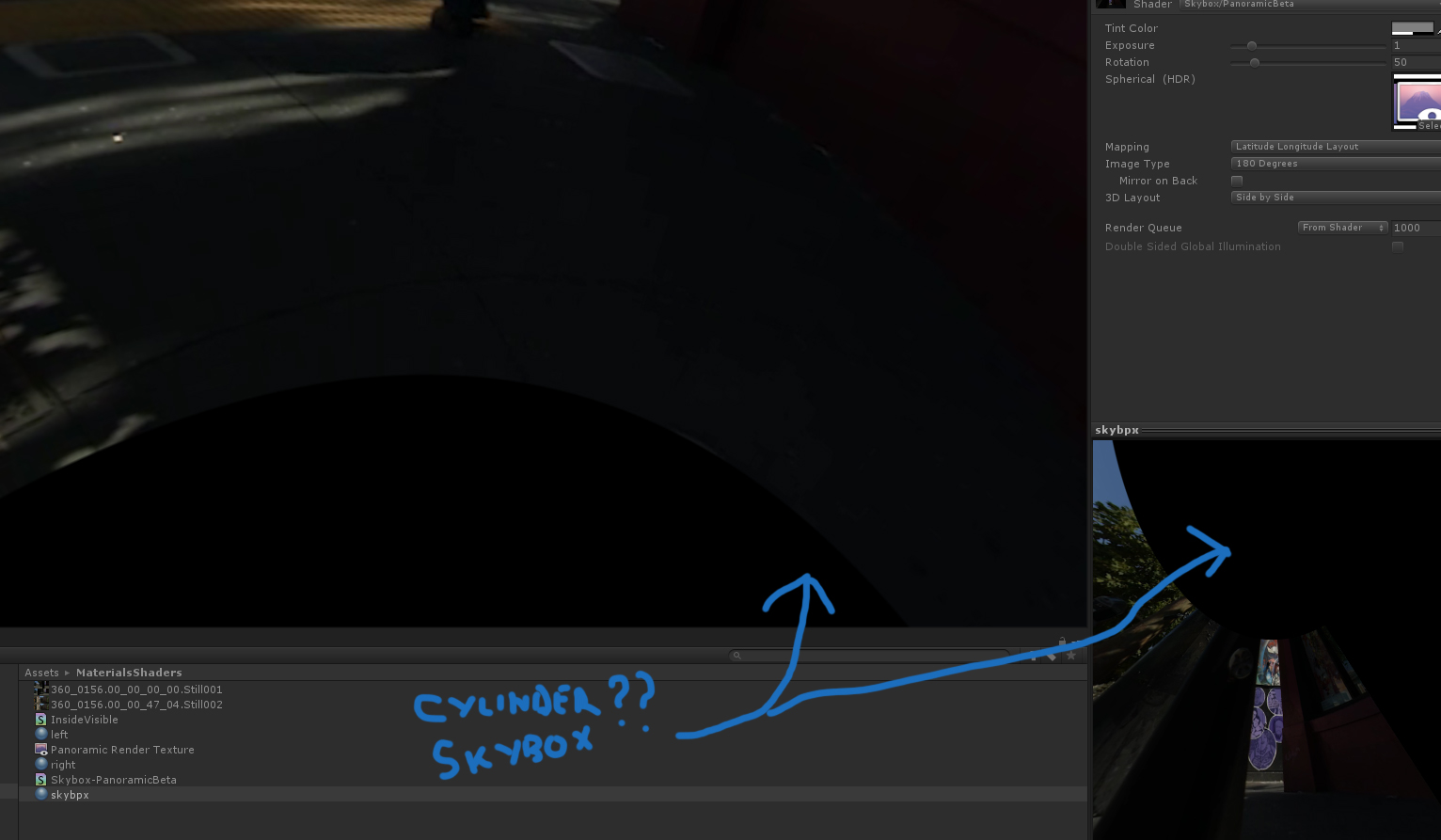
One with the Skybox Panoramic Beta shader, with the 3d Layout video side by side, image Type of 180 degree image and mapping: latitude and longitude .

The problem I have with this method is that the video is executed inside a cylinder, without covers, without a floor, ... it is not very immersive, and the stereoscopic effect is lost ... also I don't have control of the skybox as gameobject... I need control, for effects and interactive functions.
alt text

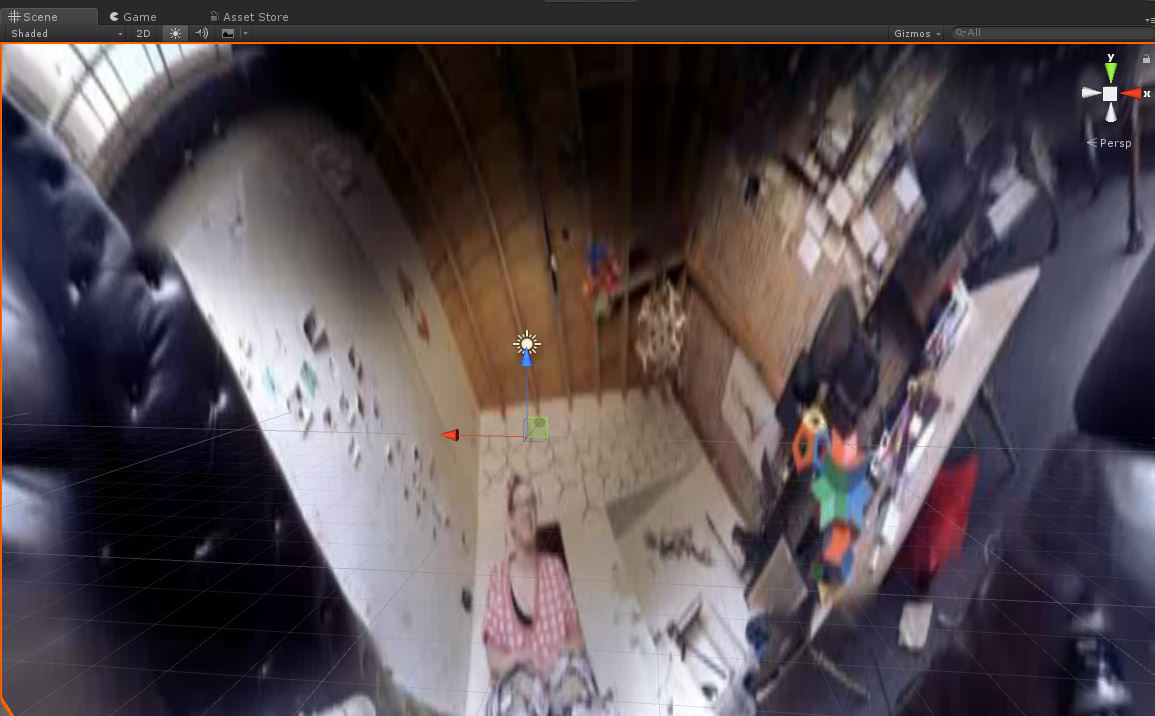
My second test was the use of a left and right camera, each one eliminating two layers: left and right. each layer had an object, a hemisphere with a uvw map with flat coordinates, this works better than the first ... but ... the effect is not achieved completely. alt text
Can anybody help me?

1.jpg (222.0 kB)
2.jpg (341.4 kB)
Comment
Add comment
10 |3000 characters needed characters left characters exceeded
▼
  • Viewable by all users
  • Viewable by moderators
  • Viewable by moderators and the original poster
  • Advanced visibility
Viewable by all users

3 Replies

· Add your reply
  • Sort: 
avatar image
0

Answer by Abby-Q · Nov 20, 2018 at 09:26 PM

Good lord I want to know the answer here as well

Comment
Add comment · Share
10 |3000 characters needed characters left characters exceeded
▼
  • Viewable by all users
  • Viewable by moderators
  • Viewable by moderators and the original poster
  • Advanced visibility
Viewable by all users
avatar image
0

Answer by Philkrom · May 21, 2019 at 05:52 AM

Hi @Danidel3D, did you find any solution ? Maybe converting 180 to 360 (adding black ?) would help ? I found this, not tested yet : https://github.com/aosoft/VR180MeshProjection Please keep me informed ! I suppose you are French (or speak french) ?

Comment
Add comment · Share
10 |3000 characters needed characters left characters exceeded
▼
  • Viewable by all users
  • Viewable by moderators
  • Viewable by moderators and the original poster
  • Advanced visibility
Viewable by all users
avatar image
0

Answer by cyenketswamy · Jul 07, 2020 at 02:20 PM

There is a product on the Unity Asset store that was aimed at developers looking to create anaglyph viewers for use with Windows Mixed Reality headsets. It shows you how to configure a scene projecting separate input to each eye of the VR headset with two cameras. In your case you wouldn't require the cyan/red filters as you have stereoscopic input. The only thing you will do different is change the projection screen. The demos cover a flat plane screen and a 90 degree curved screen model. So you will need a 180 degree curved screen for 180 degree VR video. This you can create in any 3D modeling software. Just make sure to apply smooth shading and flip the normals.

Comment
Add comment · Share
10 |3000 characters needed characters left characters exceeded
▼
  • Viewable by all users
  • Viewable by moderators
  • Viewable by moderators and the original poster
  • Advanced visibility
Viewable by all users

Your answer

Hint: You can notify a user about this post by typing @username

Up to 2 attachments (including images) can be used with a maximum of 524.3 kB each and 1.0 MB total.

Follow this Question

Answers Answers and Comments

174 People are following this question.

avatar image avatar image avatar image avatar image avatar image avatar image avatar image avatar image avatar image avatar image avatar image avatar image avatar image avatar image avatar image avatar image avatar image avatar image avatar image avatar image avatar image avatar image avatar image avatar image avatar image avatar image avatar image avatar image avatar image avatar image avatar image avatar image avatar image avatar image avatar image avatar image avatar image avatar image avatar image avatar image avatar image avatar image avatar image avatar image avatar image avatar image avatar image avatar image avatar image avatar image avatar image avatar image avatar image avatar image avatar image avatar image avatar image avatar image avatar image avatar image avatar image avatar image avatar image avatar image avatar image avatar image avatar image avatar image avatar image avatar image avatar image avatar image avatar image avatar image avatar image avatar image avatar image avatar image avatar image avatar image avatar image avatar image avatar image avatar image avatar image avatar image avatar image avatar image avatar image avatar image avatar image avatar image avatar image avatar image avatar image avatar image avatar image avatar image avatar image avatar image avatar image avatar image avatar image avatar image avatar image avatar image avatar image avatar image avatar image avatar image avatar image avatar image avatar image avatar image avatar image avatar image avatar image avatar image avatar image avatar image avatar image avatar image avatar image avatar image avatar image avatar image avatar image avatar image avatar image avatar image avatar image avatar image avatar image avatar image avatar image avatar image avatar image avatar image avatar image avatar image avatar image avatar image avatar image avatar image avatar image avatar image avatar image avatar image avatar image avatar image avatar image avatar image avatar image avatar image avatar image avatar image avatar image avatar image avatar image avatar image avatar image avatar image avatar image avatar image avatar image avatar image avatar image avatar image avatar image avatar image avatar image avatar image avatar image avatar image

Related Questions

Changing the impression of 3d depth 0 Answers

Unity Input and Oculus Rift with Touch Controllers in Unity 2018.3.7f1 1 Answer

How to have view within view in VR? 0 Answers

Unity 5 Oculus DK2 Game Crashes When Loading Parse Scoreboard Scene - HELP? 2 Answers

How do you make configurable joints play nice with VR controllers? 0 Answers


Enterprise
Social Q&A

Social
Subscribe on YouTube social-youtube Follow on LinkedIn social-linkedin Follow on Twitter social-twitter Follow on Facebook social-facebook Follow on Instagram social-instagram

Footer

  • Purchase
    • Products
    • Subscription
    • Asset Store
    • Unity Gear
    • Resellers
  • Education
    • Students
    • Educators
    • Certification
    • Learn
    • Center of Excellence
  • Download
    • Unity
    • Beta Program
  • Unity Labs
    • Labs
    • Publications
  • Resources
    • Learn platform
    • Community
    • Documentation
    • Unity QA
    • FAQ
    • Services Status
    • Connect
  • About Unity
    • About Us
    • Blog
    • Events
    • Careers
    • Contact
    • Press
    • Partners
    • Affiliates
    • Security
Copyright © 2020 Unity Technologies
  • Legal
  • Privacy Policy
  • Cookies
  • Do Not Sell My Personal Information
  • Cookies Settings
"Unity", Unity logos, and other Unity trademarks are trademarks or registered trademarks of Unity Technologies or its affiliates in the U.S. and elsewhere (more info here). Other names or brands are trademarks of their respective owners.
  • Anonymous
  • Sign in
  • Create
  • Ask a question
  • Spaces
  • Default
  • Help Room
  • META
  • Moderators
  • Explore
  • Topics
  • Questions
  • Users
  • Badges
