
Wayback Machinekoobas.hobune.stream
May JUN Jul
Previous capture 13 Next capture
2021 2022 2023
1 capture
13 Jun 22 - 13 Jun 22
sparklines
Close Help
  • Products
  • Solutions
  • Made with Unity
  • Learning
  • Support & Services
  • Community
  • Asset Store
  • Get Unity

UNITY ACCOUNT

You need a Unity Account to shop in the Online and Asset Stores, participate in the Unity Community and manage your license portfolio. Login Create account
  • Blog
  • Forums
  • Answers
  • Evangelists
  • User Groups
  • Beta Program
  • Advisory Panel

Navigation

  • Home
  • Products
  • Solutions
  • Made with Unity
  • Learning
  • Support & Services
  • Community
    • Blog
    • Forums
    • Answers
    • Evangelists
    • User Groups
    • Beta Program
    • Advisory Panel

Unity account

You need a Unity Account to shop in the Online and Asset Stores, participate in the Unity Community and manage your license portfolio. Login Create account

Language

  • Chinese
  • Spanish
  • Japanese
  • Korean
  • Portuguese
  • Ask a question
  • Spaces
    • Default
    • Help Room
    • META
    • Moderators
    • Topics
    • Questions
    • Users
    • Badges
  • Home /
  • Help Room /
avatar image
0
Question by unity_XhzfeugeOnejbw · Oct 12, 2021 at 01:23 PM · fbximporter

How do I fix the fbx import settings?

Problem description: Animation fbx files stopped working. Trying to change any of the Model/Rig/Animation settings just get reverted back to the wrong settings once I click "Apply": alt text
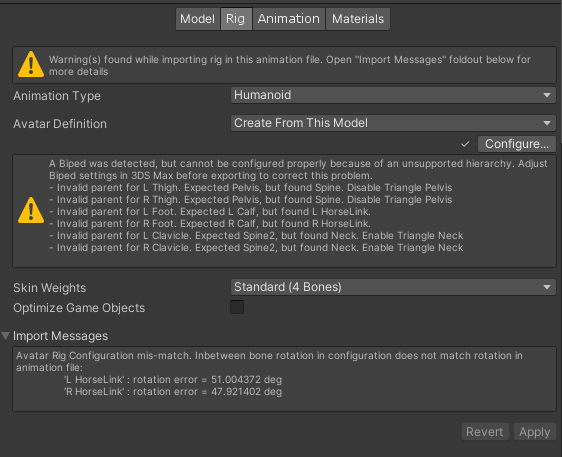
Here the animation type is supposed to be generic, and I believe the avatar definition is provided in the same fbx file, though I can't chose it, and in the projects where. everything is fine have "(Missing) Avatar" as definition, not to be confused with no avatar definition.

There are import warnings I have no idea what to do about, the models are not ours. For example, the hand animations that come with the free Oculus Integration package in the Asset Store. The result is that, for example an oculus build, would have hands that don't animate and I tehrefore can't use them to interact with any menus or objects.

How to reproduce:

No idea. This just seemed to suddenly be an issue after years of no issues. I use git to work on projects with others, and on their computers everything is fine. It gets weirder: I have a project with certain models that are used in the other projects as well, where everything is fine. I recently made a clone of the git project on my ssd drive to make builds faster. But that project has the same import issues I got on the project focusing on the Oculus.

Things I've tried:

  1. Reimporting the files including dependencies.

  2. Exporting the files from one project where everything is fine, and importing them in the clone project on the same computer but other drive.

  3. Manually changing the import settings.

  4. Reverting to an older commit of the git project.

Nothing seems to work, and I'm out of ideas. What's also curious is how the meta files are written differently in the project where these issues crop up as git points out. Here is how they are written in the projects that work fine: alt text
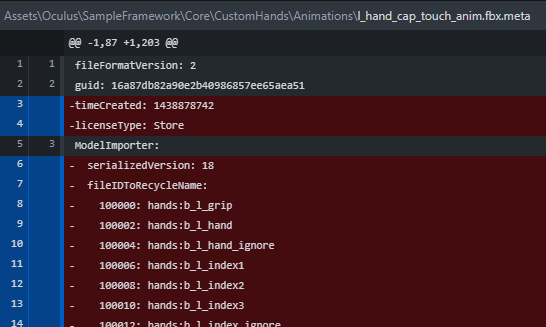
But this is what unity keeps changing that "fileIDToRecycleName" into even if I revert the metadata changes: internalIDToNameTable:

 internalIDToNameTable:
   - first:
       1: 100000
     second: hands:b_l_grip
   - first:
       1: 100002
     second: hands:b_l_hand
   - first:
       1: 100004
     second: hands:b_l_hand_ignore
   - first:
       1: 100006
     second: hands:b_l_index1

etc.

So if someone can explain what's going on or even better: How to fix it. That would be great

wrong.png (41.1 kB)
oldmeta.png (25.7 kB)
Comment
Add comment
10 |3000 characters needed characters left characters exceeded
▼
  • Viewable by all users
  • Viewable by moderators
  • Viewable by moderators and the original poster
  • Advanced visibility
Viewable by all users

0 Replies

· Add your reply
  • Sort: 

Your answer

Hint: You can notify a user about this post by typing @username

Up to 2 attachments (including images) can be used with a maximum of 524.3 kB each and 1.0 MB total.

Follow this Question

Answers Answers and Comments

167 People are following this question.

avatar image avatar image avatar image avatar image avatar image avatar image avatar image avatar image avatar image avatar image avatar image avatar image avatar image avatar image avatar image avatar image avatar image avatar image avatar image avatar image avatar image avatar image avatar image avatar image avatar image avatar image avatar image avatar image avatar image avatar image avatar image avatar image avatar image avatar image avatar image avatar image avatar image avatar image avatar image avatar image avatar image avatar image avatar image avatar image avatar image avatar image avatar image avatar image avatar image avatar image avatar image avatar image avatar image avatar image avatar image avatar image avatar image avatar image avatar image avatar image avatar image avatar image avatar image avatar image avatar image avatar image avatar image avatar image avatar image avatar image avatar image avatar image avatar image avatar image avatar image avatar image avatar image avatar image avatar image avatar image avatar image avatar image avatar image avatar image avatar image avatar image avatar image avatar image avatar image avatar image avatar image avatar image avatar image avatar image avatar image avatar image avatar image avatar image avatar image avatar image avatar image avatar image avatar image avatar image avatar image avatar image avatar image avatar image avatar image avatar image avatar image avatar image avatar image avatar image avatar image avatar image avatar image avatar image avatar image avatar image avatar image avatar image avatar image avatar image avatar image avatar image avatar image avatar image avatar image avatar image avatar image avatar image avatar image avatar image avatar image avatar image avatar image avatar image avatar image avatar image avatar image avatar image avatar image avatar image avatar image avatar image avatar image avatar image avatar image avatar image avatar image avatar image avatar image avatar image avatar image avatar image avatar image avatar image avatar image avatar image avatar image avatar image avatar image avatar image avatar image avatar image avatar image

Related Questions

importing .fbx file breaks into many polymesh 1 Answer

Using Unity FBX exporter in standalone build 0 Answers

Trying to import FBX Custom user string properties. Not Showing up? 0 Answers

Import .fbx runtime and apply animations 0 Answers

Import high-res sphere from Blender into Unity and add Material 0 Answers


Enterprise
Social Q&A

Social
Subscribe on YouTube social-youtube Follow on LinkedIn social-linkedin Follow on Twitter social-twitter Follow on Facebook social-facebook Follow on Instagram social-instagram

Footer

  • Purchase
    • Products
    • Subscription
    • Asset Store
    • Unity Gear
    • Resellers
  • Education
    • Students
    • Educators
    • Certification
    • Learn
    • Center of Excellence
  • Download
    • Unity
    • Beta Program
  • Unity Labs
    • Labs
    • Publications
  • Resources
    • Learn platform
    • Community
    • Documentation
    • Unity QA
    • FAQ
    • Services Status
    • Connect
  • About Unity
    • About Us
    • Blog
    • Events
    • Careers
    • Contact
    • Press
    • Partners
    • Affiliates
    • Security
Copyright © 2020 Unity Technologies
  • Legal
  • Privacy Policy
  • Cookies
  • Do Not Sell My Personal Information
  • Cookies Settings
"Unity", Unity logos, and other Unity trademarks are trademarks or registered trademarks of Unity Technologies or its affiliates in the U.S. and elsewhere (more info here). Other names or brands are trademarks of their respective owners.
  • Anonymous
  • Sign in
  • Create
  • Ask a question
  • Spaces
  • Default
  • Help Room
  • META
  • Moderators
  • Explore
  • Topics
  • Questions
  • Users
  • Badges
