 koobas.hobune.stream


The question is answered, right answer was accepted

Snake Head should be Followed by body and tail like classic snake game
Hi Guys i've posted below my code.... It works fine though means body of snake (in my case its a cube) which adds to its Head when it consumes Apple & that body in attached using Hinge joint So it follows Head, also another body i.e cube is attached it also follow Head & So on..... But MY PROBLEM IS THAT rest of Body movement is not like CLASSIC SNAKE GAME in this case snake's body Moves like Rope... :(
 using UnityEngine;
 using System.Collections;

 public class snakeHeadMovement : MonoBehaviour
 {
     public float MovementSpeed =5.0f;
     public float TurnSpeed = 20.0f;
     public GameObject TailPrefab, ApplePrefab;
     private GameObject lastChain=null;
     private float moveSpeed = 1.7f;
     private int counter = 0;
     public int Score = 0, Lives = 3;

     void snake_addTail()
     {

         if(lastChain == null)
         lastChain = gameObject;

         GameObject newChain  = (GameObject) Instantiate(TailPrefab, lastChain.transform.position - lastChain.transform.forward, Quaternion.identity);
         newChain.transform.rotation = lastChain.transform.rotation;
         HingeJoint hingeJoint = (HingeJoint) newChain.GetComponent<HingeJoint>();

         if(hingeJoint != null)
         {
         hingeJoint.connectedBody = lastChain.rigidbody;
         lastChain = newChain;
         }
         counter++;
         rigidbody.mass++; // make the head weight greater so it can carry it's tail... lol
         moveSpeed += 0.05f;
     }
 // Use this for initialization
     void Start ()
     {
           snake_addTail();
     }

     void OnGUI()
     {
         GUI.color = Color.magenta;
         GUI.Label(new Rect(410, 20, 100, 20), "Score: " + Score);
         GUI.Label(new Rect(490, 20, 100, 20), "Lives: " + Lives);
     }

     void OnCollisionEnter(Collision collision)
     {

     if(collision.gameObject.name == "apple" || collision.gameObject.name == "applePrefab(Clone)" )
     {
         Destroy(collision.gameObject);
         Score++;
         snake_addTail();
         return;
     }
     if((collision.gameObject.tag == "boundry")||(collision.gameObject.name=="tailPrefab(Clone)"))

     {
            Lives--;
     }
     }

 // Update is called once per frame

     void Update ()
     {
         transform.Translate(Vector3.forward * MovementSpeed * Time.deltaTime);


         if(Input.GetKey(KeyCode.UpArrow))
         {
             transform.Translate ( new Vector3(1,0,1) );
             transform.Rotate(0,180,0);
             transform.Translate ( new Vector3(0,0,1) );
         }

         if(Input.GetKey(KeyCode.RightArrow))
         {
             //transform.Rotate(new Vector3(0,90,0));

         }

         if(Input.GetKey(KeyCode.LeftArrow))
         {
 //            transform.Rotate(new Vector3(0,-90,0));

         }

         if(Input.GetKey(KeyCode.DownArrow))
         {
             transform.Translate ( new Vector3(1,0,1) );
             transform.Rotate(0,180,0);
             transform.Translate ( new Vector3(0,0,-1) );
         }


         float r = Random.Range(0, 100);
         if(r > 90 && GameObject.FindWithTag("apple") == null)
         {
         float range = 5.0f;
         Vector3 pos = new Vector3(Random.Range(-range,range), 0, Random.Range(-range,range));
         Instantiate(ApplePrefab, pos, Quaternion.identity);
         }
     }
 }
I want movement like Head(cube1)->Body(cube2)->Body(cube3).... and so on but every attached Body Should follow transform, rotations(if any) of its previous body attached

You could make a Cube Prefab with a script component. This script would have two GameObject variables (objectHolder, formerObject), which will be set to the next cube in line. You could then, add Cubes through a recursive function (look it up if you don't know how recursiveness works), that:
 searches through the tail
 finds the end (where objectHolder == null)
 then instantiates a new cube, like objectHolder = (GameObject)Instantiate('funtion parameters')
 Have the new Cube know about the other. Like objectHolder.formerObject = this.gameObject
When you want to move the snake you can then use a similar approach for every cube to take the position of the other. Finding them through another recursive function.
This approach is similar to that of Linked-lists.
Another approach could be to use parent-child relations as you add the new cubes.
I hope this was helpful.
EDIT: Okay, to clarify, the structure we are looking for here is that of a linked list, with bi-directional links. Meaning that any object in the list (or chain of objects) know of the next object, and the former. As show in the figure below
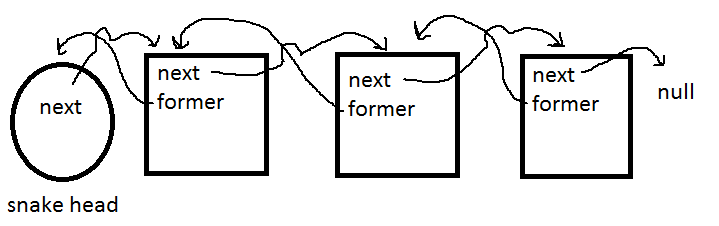
'next' and 'former', being "pointers" or variables that leads to the next or former object in the object chain.
You would then use a recursive method or a while loop, to put the last object in a temporary variable. You have a script on the snakes head, or a gameController script that has a variable that points to the snakes head. You should then be able to do something like this.
 while(next != null)
 {
 temporaryObject = next;
 }
And you would then have temporaryObject set to the last object in the chain, as well as be able to instantiate a new object, and set the "next"-variable of the last object equal to this new instance of the prefab.
Next step is to move them. Which is different but the involves the "former"-variable as well. Find the last object with the while-loop. Then set the position of the last object to that of the former object, and set the temporaryObject variable to the former. (These will at this time have the same position, but not to worry, as we will move the current object onto the position of the former.) Continuing all the way to the snake head, which will be set to the new wanted position.
This might not be very clear. It took me a great while to get the hang of linked lists, and how they work. Here is a youtube-link to a video explaining the concept of single-direction linked lists. Maybe this will help with clarification.
Enjoy ^^

Thanx for your answer & time Niklas Ammitzbøll Rasmussen ..........
What i don't get is:: "objectHolder.formerObject = this.gameObject" Can you briefly explain it?

Yes I will try ^^ Gonna go ahead and edit the post. $$anonymous$$aybe add a figure.



