
Wayback Machinekoobas.hobune.stream
May JUN Jul
Previous capture 12 Next capture
2021 2022 2023
1 capture
12 Jun 22 - 12 Jun 22
sparklines
Close Help
  • Products
  • Solutions
  • Made with Unity
  • Learning
  • Support & Services
  • Community
  • Asset Store
  • Get Unity

UNITY ACCOUNT

You need a Unity Account to shop in the Online and Asset Stores, participate in the Unity Community and manage your license portfolio. Login Create account
  • Blog
  • Forums
  • Answers
  • Evangelists
  • User Groups
  • Beta Program
  • Advisory Panel

Navigation

  • Home
  • Products
  • Solutions
  • Made with Unity
  • Learning
  • Support & Services
  • Community
    • Blog
    • Forums
    • Answers
    • Evangelists
    • User Groups
    • Beta Program
    • Advisory Panel

Unity account

You need a Unity Account to shop in the Online and Asset Stores, participate in the Unity Community and manage your license portfolio. Login Create account

Language

  • Chinese
  • Spanish
  • Japanese
  • Korean
  • Portuguese
  • Ask a question
  • Spaces
    • Default
    • Help Room
    • META
    • Moderators
    • Topics
    • Questions
    • Users
    • Badges
  • Home /
avatar image
0
Question by superxkai · Oct 18, 2016 at 04:27 PM · errorsceneimportrespawningmanagement

import SceneMangement not working?

I
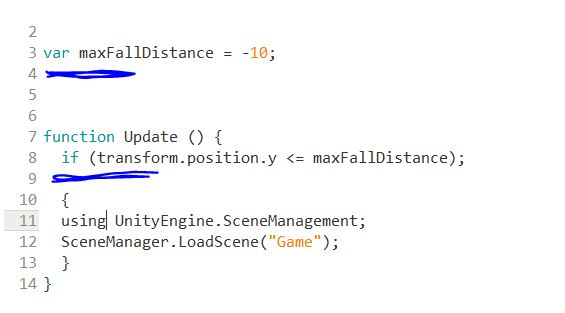
- switched from Application.LoadLevel to SceneManager.LoadScene because Unity said it was obsolete.
- Added using UnityEngine.SceneManagment;
- Changed using to import.
- Placed the code in different spots since I am unsure where this line is actually supposed to go.


Here's a picture of what I currently have (keep in mind, while it says using I did try import already). The blue lines indicate the other places that I tried placing the code with no luck. alt text
I'm sure it's a simple fix, but I am a complete nooob & have only the slightest idea of what I'm doing lol. Thanks in advance for any help.

capture.jpg (26.9 kB)
Comment
Add comment
10 |3000 characters needed characters left characters exceeded
▼
  • Viewable by all users
  • Viewable by moderators
  • Viewable by moderators and the original poster
  • Advanced visibility
Viewable by all users

1 Reply

· Add your reply
  • Sort: 
avatar image
0

Answer by doublemax · Oct 18, 2016 at 04:31 PM

As you're using JS, you need "import", not "using". And it should be at the top of the file.

From the documentation:

 #pragma strict
 import UnityEngine.SceneManagement;
 
 public class ExampleClass extends MonoBehaviour {
     function Start() {
         // Only specifying the sceneName or sceneBuildIndex will load the scene with the Single mode
         SceneManager.LoadScene("OtherSceneName");
     }
 }

https://docs.unity3d.com/550/Documentation/ScriptReference/SceneManagement.SceneManager.LoadScene.html

Comment
Add comment · Share
10 |3000 characters needed characters left characters exceeded
▼
  • Viewable by all users
  • Viewable by moderators
  • Viewable by moderators and the original poster
  • Advanced visibility
Viewable by all users

Your answer

Hint: You can notify a user about this post by typing @username

Up to 2 attachments (including images) can be used with a maximum of 524.3 kB each and 1.0 MB total.

Follow this Question

Answers Answers and Comments

4 People are following this question.

avatar image avatar image avatar image avatar image

Related Questions

Unity error 2 Answers

Problems Importing Scene 1 Answer

what is the scene management algorithm may be used in Unity? 1 Answer

Vuforia imported. Too many errors. 0 Answers

completely lost noob 1 Answer


Enterprise
Social Q&A

Social
Subscribe on YouTube social-youtube Follow on LinkedIn social-linkedin Follow on Twitter social-twitter Follow on Facebook social-facebook Follow on Instagram social-instagram

Footer

  • Purchase
    • Products
    • Subscription
    • Asset Store
    • Unity Gear
    • Resellers
  • Education
    • Students
    • Educators
    • Certification
    • Learn
    • Center of Excellence
  • Download
    • Unity
    • Beta Program
  • Unity Labs
    • Labs
    • Publications
  • Resources
    • Learn platform
    • Community
    • Documentation
    • Unity QA
    • FAQ
    • Services Status
    • Connect
  • About Unity
    • About Us
    • Blog
    • Events
    • Careers
    • Contact
    • Press
    • Partners
    • Affiliates
    • Security
Copyright © 2020 Unity Technologies
  • Legal
  • Privacy Policy
  • Cookies
  • Do Not Sell My Personal Information
  • Cookies Settings
"Unity", Unity logos, and other Unity trademarks are trademarks or registered trademarks of Unity Technologies or its affiliates in the U.S. and elsewhere (more info here). Other names or brands are trademarks of their respective owners.
  • Anonymous
  • Sign in
  • Create
  • Ask a question
  • Spaces
  • Default
  • Help Room
  • META
  • Moderators
  • Explore
  • Topics
  • Questions
  • Users
  • Badges
