
Wayback Machinekoobas.hobune.stream
May JUN Jul
Previous capture 13 Next capture
2021 2022 2023
1 capture
13 Jun 22 - 13 Jun 22
sparklines
Close Help
  • Products
  • Solutions
  • Made with Unity
  • Learning
  • Support & Services
  • Community
  • Asset Store
  • Get Unity

UNITY ACCOUNT

You need a Unity Account to shop in the Online and Asset Stores, participate in the Unity Community and manage your license portfolio. Login Create account
  • Blog
  • Forums
  • Answers
  • Evangelists
  • User Groups
  • Beta Program
  • Advisory Panel

Navigation

  • Home
  • Products
  • Solutions
  • Made with Unity
  • Learning
  • Support & Services
  • Community
    • Blog
    • Forums
    • Answers
    • Evangelists
    • User Groups
    • Beta Program
    • Advisory Panel

Unity account

You need a Unity Account to shop in the Online and Asset Stores, participate in the Unity Community and manage your license portfolio. Login Create account

Language

  • Chinese
  • Spanish
  • Japanese
  • Korean
  • Portuguese
  • Ask a question
  • Spaces
    • Default
    • Help Room
    • META
    • Moderators
    • Topics
    • Questions
    • Users
    • Badges
  • Home /
avatar image
0
Question by siddharth3322 · May 06, 2015 at 03:49 PM · animationfbxunity 4.6assetstore

Create animation sequence from different FBX models

For my game, I have purchased following assets from store. Giganotosaurus - Low Poly & Animated Dinosaur

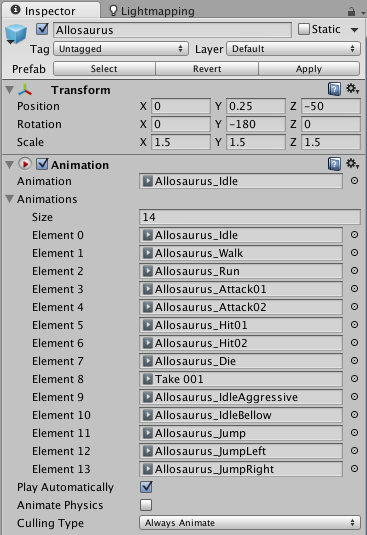
In this you can see that there is different fbx files for run, bite, chase, walk, death etc. I want to create dinosaur animation sequence and want to play directly through animator all animation. But at present all animation exist in different fbx files so how to merge all animation in single file.

I want something like following image so that directly change animation through script :
alt text

Please give some suggestion in this.

screen-shot-2015-05-06-at-91705-pm.png (49.9 kB)
Comment
Add comment
10 |3000 characters needed characters left characters exceeded
▼
  • Viewable by all users
  • Viewable by moderators
  • Viewable by moderators and the original poster
  • Advanced visibility
Viewable by all users

1 Reply

· Add your reply
  • Sort: 
avatar image
1

Answer by flashframe · May 06, 2015 at 04:13 PM

If all the animations are using the same model, just in different files, you can attach them to an Animator Controller on your game object.

If you twirl down the FBX prefab in the project window, then you will see the animation clips. You can drag and drop these individually into your Animation or a new Animator Controller. I would use an Animator Controller.

You can also rename the animations in the FBX import settings.

Comment
Add comment · Show 12 · Share
10 |3000 characters needed characters left characters exceeded
▼
  • Viewable by all users
  • Viewable by moderators
  • Viewable by moderators and the original poster
  • Advanced visibility
Viewable by all users
avatar image siddharth3322 · May 06, 2015 at 04:17 PM 0
Share

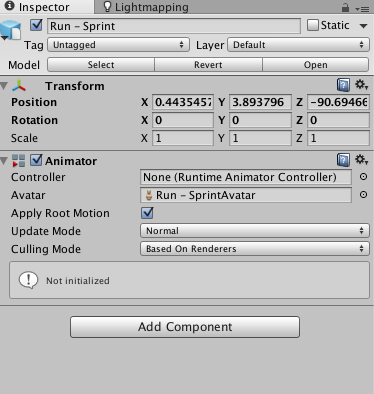
If I add any fbx model in project window then it has following inspector window.
alt text

Now what I have to do next?

screen-shot-2015-05-06-at-94630-pm.png (38.7 kB)
avatar image flashframe · May 06, 2015 at 04:21 PM 0
Share

In the Project window, create a new Animator Controller. Drag that controller into the Controller field in the inspector window.

Open the Animator window.

Then in the project window, find your FBX files. They should have a little arrow on them that you can twirl down to reveal their contents. Inside, you will find the Animation Clips (they have little play button icons). You can now drag and drop those clips into the Animator controller for your game object.

You can drag and drop all the animations onto one model, and then use code to control which animation to play.

avatar image siddharth3322 · May 07, 2015 at 07:44 AM 0
Share

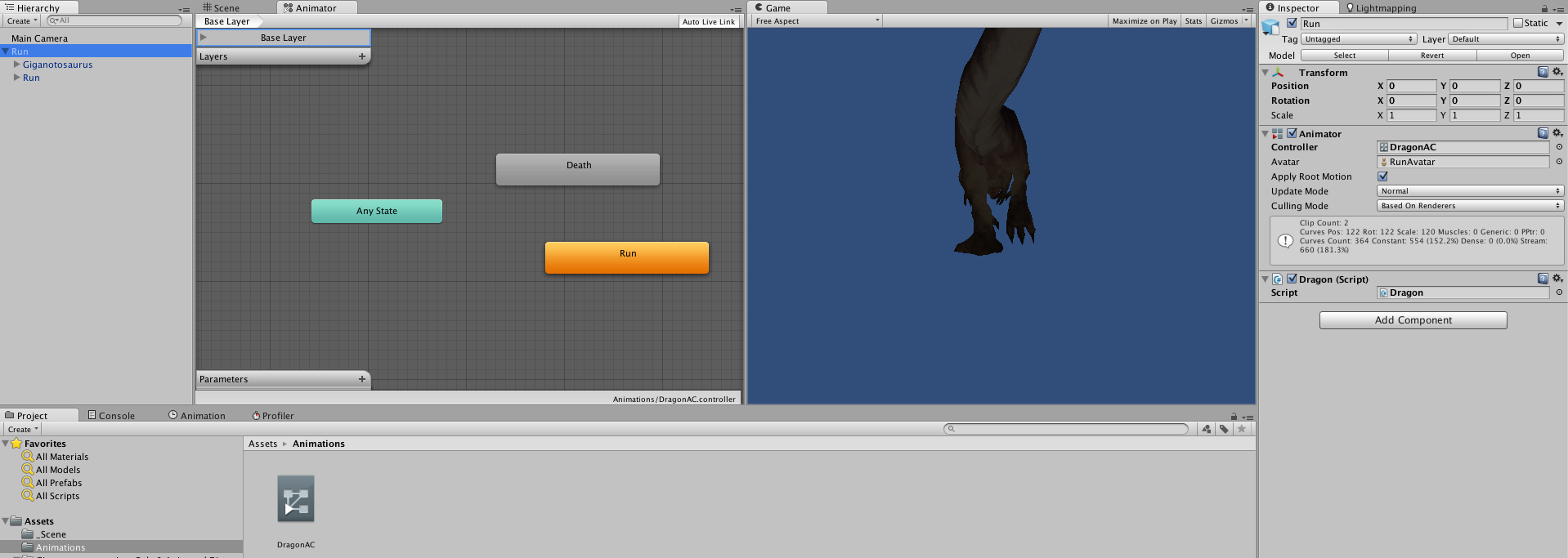
I am not getting success in playing multiple animations. I have created Animator and assign two animation over there. Following image represent what I have done.
alt text

In script I have written this code :

             Animator dragonAC;
     
         void Start ()
         {
             dragonAC = GetComponent<Animator> ();
             StartCoroutine (DeathAnimation ());
         }
     
         IEnumerator DeathAnimation ()
         {
             yield return new WaitForSeconds (2f);
     
             dragonAC.Play ("Death");
         }

Now actual animation change to Death but not any movement shown in dragon. Please give me some suggestion.

screen-shot-2015-05-07-at-11234-pm.png (171.6 kB)
avatar image flashframe · May 07, 2015 at 08:23 AM 0
Share

You only need one of the FBX models in your scene. I'm presu$$anonymous$$g each animation uses the exact same model. Correct me if I'm wrong,

At the moment you have your Animator Controller applied to an empty game object, so there is nothing for the animation to manipulate. Try adding the animator and script to either the Gigantosaurus or Run gameobject, and delete the other from the scene.

You can test it in the editor, by opening the Animation window, and selecting the different animations from the drop down menu and scrubbing playback.

avatar image siddharth3322 · May 07, 2015 at 08:32 AM 0
Share

I have dragged one fbx model into Hierarchy window. I have done nothing else from my side. Empty object created by itself.

Fbx models detail available in this form.

alt text

What I have to do next?

screen-shot-2015-05-07-at-20108-pm.png (37.0 kB)
Show more comments

Your answer

Hint: You can notify a user about this post by typing @username

Up to 2 attachments (including images) can be used with a maximum of 524.3 kB each and 1.0 MB total.

Follow this Question

Answers Answers and Comments

20 People are following this question.

avatar image avatar image avatar image avatar image avatar image avatar image avatar image avatar image avatar image avatar image avatar image avatar image avatar image avatar image avatar image avatar image avatar image avatar image avatar image avatar image

Related Questions

Why won't my exported FBX file work in Unity? 2 Answers

Humanoid Animation type character position problem, Generic work fine 1 Answer

FBX Importing Problem 1 Answer

Animation: Are multiple bindposes in a rig supported? 1 Answer

Problem in Game mode with animation 0 Answers


Enterprise
Social Q&A

Social
Subscribe on YouTube social-youtube Follow on LinkedIn social-linkedin Follow on Twitter social-twitter Follow on Facebook social-facebook Follow on Instagram social-instagram

Footer

  • Purchase
    • Products
    • Subscription
    • Asset Store
    • Unity Gear
    • Resellers
  • Education
    • Students
    • Educators
    • Certification
    • Learn
    • Center of Excellence
  • Download
    • Unity
    • Beta Program
  • Unity Labs
    • Labs
    • Publications
  • Resources
    • Learn platform
    • Community
    • Documentation
    • Unity QA
    • FAQ
    • Services Status
    • Connect
  • About Unity
    • About Us
    • Blog
    • Events
    • Careers
    • Contact
    • Press
    • Partners
    • Affiliates
    • Security
Copyright © 2020 Unity Technologies
  • Legal
  • Privacy Policy
  • Cookies
  • Do Not Sell My Personal Information
  • Cookies Settings
"Unity", Unity logos, and other Unity trademarks are trademarks or registered trademarks of Unity Technologies or its affiliates in the U.S. and elsewhere (more info here). Other names or brands are trademarks of their respective owners.
  • Anonymous
  • Sign in
  • Create
  • Ask a question
  • Spaces
  • Default
  • Help Room
  • META
  • Moderators
  • Explore
  • Topics
  • Questions
  • Users
  • Badges
