
Wayback Machinekoobas.hobune.stream
May JUN Jul
Previous capture 13 Next capture
2021 2022 2023
1 capture
13 Jun 22 - 13 Jun 22
sparklines
Close Help
  • Products
  • Solutions
  • Made with Unity
  • Learning
  • Support & Services
  • Community
  • Asset Store
  • Get Unity

UNITY ACCOUNT

You need a Unity Account to shop in the Online and Asset Stores, participate in the Unity Community and manage your license portfolio. Login Create account
  • Blog
  • Forums
  • Answers
  • Evangelists
  • User Groups
  • Beta Program
  • Advisory Panel

Navigation

  • Home
  • Products
  • Solutions
  • Made with Unity
  • Learning
  • Support & Services
  • Community
    • Blog
    • Forums
    • Answers
    • Evangelists
    • User Groups
    • Beta Program
    • Advisory Panel

Unity account

You need a Unity Account to shop in the Online and Asset Stores, participate in the Unity Community and manage your license portfolio. Login Create account

Language

  • Chinese
  • Spanish
  • Japanese
  • Korean
  • Portuguese
  • Ask a question
  • Spaces
    • Default
    • Help Room
    • META
    • Moderators
    • Topics
    • Questions
    • Users
    • Badges
  • Home /
avatar image
0
Question by growling_egg · Jun 13, 2014 at 03:32 PM · animationrigidbodygravityiskinematic

Basic unit movement woes, a little help greatly appreciated!

Working on an RTS with Mecanim-animated units. The controllers work, the pathfinding works, I've almost got the basic framework upon which to base all my units. alt text
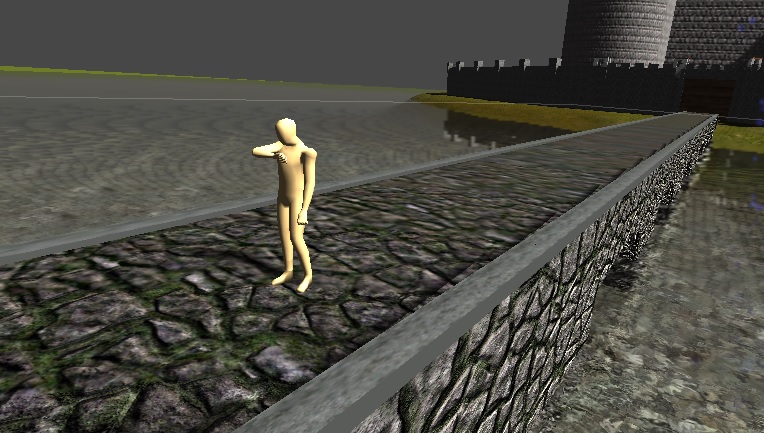
However, when the units begin moving, I get some moon gravity stuff going on.alt text
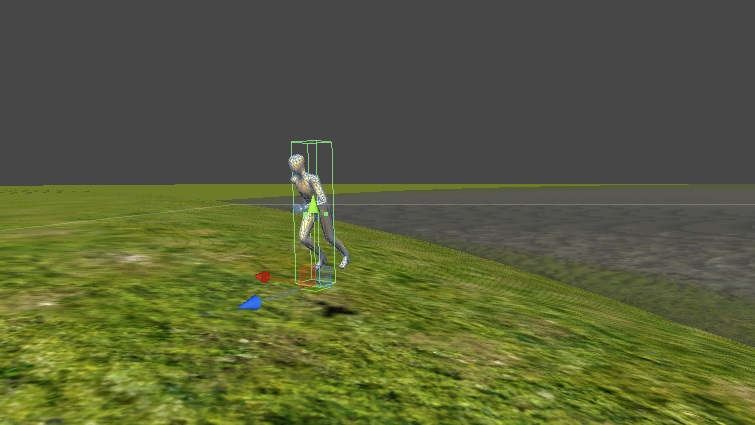
I'm familiar with rigidbodies, but here's the problem: If I turn on "Use Gravity," my character falls forward on his face as soon as he starts walking. If I then try "Is Kinematic," he starts running through terrain and causing other clipping issues.

I need my units to reliably stay upright while moving along the surface of a curved terrain in a predictable manner. This seems like a simple issue but I can't figure it out... Programming is more my forte, I flounder a little when it comes to animation and 3D stuff. Any tips?

bridgeman.jpg (131.7 kB)
runningman.jpg (79.1 kB)
Comment
Add comment · Show 5
10 |3000 characters needed characters left characters exceeded
▼
  • Viewable by all users
  • Viewable by moderators
  • Viewable by moderators and the original poster
  • Advanced visibility
Viewable by all users
avatar image Malapropos · Jun 13, 2014 at 03:53 PM 0
Share

For your "falls over forward on his face" problem, have you tried Constraints -> "Freeze rotation" options in your Rigidbody component? I usually lock them all and handle the rotations manually somewhere in code.

avatar image growling_egg · Jun 13, 2014 at 04:24 PM 0
Share

I gave that a try, but it seems to have no effect, he still just topples over when he starts walking.

avatar image Malapropos · Jun 13, 2014 at 04:54 PM 0
Share

That's odd. Could be a problem with hierarchy of the objects, because that shouldn't happen if you freeze the rotations. Could you show a picture of object inspector of the object where Rigidbody component is attached?

avatar image growling_egg · Jun 13, 2014 at 05:07 PM 0
Share

I went to get a screenshot and the rotation freeze decided to start cooperating. It seems like the falling over issue is resolved, though now when he sprints up a hill, the vertical offset in the terrain pushes him backwards. He runs a few feet uphill and bounces several feet back... $$anonymous$$aybe just some pathfinding parameter tweaks, you think?

avatar image Malapropos · Jun 13, 2014 at 06:17 PM 0
Share

That could be so many things. It's hard to say what is going on unless I see a bit more of the occurring problem (code, inspector view of the object and/or maybe a video of what is happening).

2 Replies

· Add your reply
  • Sort: 
avatar image
0
Best Answer

Answer by growling_egg · Jun 13, 2014 at 06:19 PM

I did away with the whole rigidbody/collider mess, added a Character Controller, and magically it all works. I have some other (mostly unrelated) questions now but I'll save them for a different post.

Comment
Add comment · Share
10 |3000 characters needed characters left characters exceeded
▼
  • Viewable by all users
  • Viewable by moderators
  • Viewable by moderators and the original poster
  • Advanced visibility
Viewable by all users
avatar image
1

Answer by OllyNicholson · Jun 13, 2014 at 03:53 PM

Hi - this could a be a number of things, so whilst not exactly the definitive answer you might be looking for, I would take a look at how they do it with the new sample assets. Also linked is my character tutorial to run through how to setup your character with these scripts:

https://www.assetstore.unity3d.com/en/#!/content/14474

http://blogs.unity3d.com/2014/04/14/turn-your-character-into-a-player/

Comment
Add comment · Show 1 · Share
10 |3000 characters needed characters left characters exceeded
▼
  • Viewable by all users
  • Viewable by moderators
  • Viewable by moderators and the original poster
  • Advanced visibility
Viewable by all users
avatar image growling_egg · Jun 13, 2014 at 06:20 PM 1
Share

Thanks man, looking at the sample assets steered me in the right direction.

Your answer

Hint: You can notify a user about this post by typing @username

Up to 2 attachments (including images) can be used with a maximum of 524.3 kB each and 1.0 MB total.

Follow this Question

Answers Answers and Comments

23 People are following this question.

avatar image avatar image avatar image avatar image avatar image avatar image avatar image avatar image avatar image avatar image avatar image avatar image avatar image avatar image avatar image avatar image avatar image avatar image avatar image avatar image avatar image avatar image avatar image

Related Questions

Gravity does not work with animation. 2 Answers

Animation clip removed when isKinematic is unchecked 0 Answers

My Mecanim-Generic is screwing with the gravity 2 Answers

Go to sleep. 0 Answers

Tranform Animation Curve ruins Gravity 1 Answer


Enterprise
Social Q&A

Social
Subscribe on YouTube social-youtube Follow on LinkedIn social-linkedin Follow on Twitter social-twitter Follow on Facebook social-facebook Follow on Instagram social-instagram

Footer

  • Purchase
    • Products
    • Subscription
    • Asset Store
    • Unity Gear
    • Resellers
  • Education
    • Students
    • Educators
    • Certification
    • Learn
    • Center of Excellence
  • Download
    • Unity
    • Beta Program
  • Unity Labs
    • Labs
    • Publications
  • Resources
    • Learn platform
    • Community
    • Documentation
    • Unity QA
    • FAQ
    • Services Status
    • Connect
  • About Unity
    • About Us
    • Blog
    • Events
    • Careers
    • Contact
    • Press
    • Partners
    • Affiliates
    • Security
Copyright © 2020 Unity Technologies
  • Legal
  • Privacy Policy
  • Cookies
  • Do Not Sell My Personal Information
  • Cookies Settings
"Unity", Unity logos, and other Unity trademarks are trademarks or registered trademarks of Unity Technologies or its affiliates in the U.S. and elsewhere (more info here). Other names or brands are trademarks of their respective owners.
  • Anonymous
  • Sign in
  • Create
  • Ask a question
  • Spaces
  • Default
  • Help Room
  • META
  • Moderators
  • Explore
  • Topics
  • Questions
  • Users
  • Badges