
Wayback Machinekoobas.hobune.stream
May JUN Jul
Previous capture 12 Next capture
2021 2022 2023
1 capture
12 Jun 22 - 12 Jun 22
sparklines
Close Help
  • Products
  • Solutions
  • Made with Unity
  • Learning
  • Support & Services
  • Community
  • Asset Store
  • Get Unity

UNITY ACCOUNT

You need a Unity Account to shop in the Online and Asset Stores, participate in the Unity Community and manage your license portfolio. Login Create account
  • Blog
  • Forums
  • Answers
  • Evangelists
  • User Groups
  • Beta Program
  • Advisory Panel

Navigation

  • Home
  • Products
  • Solutions
  • Made with Unity
  • Learning
  • Support & Services
  • Community
    • Blog
    • Forums
    • Answers
    • Evangelists
    • User Groups
    • Beta Program
    • Advisory Panel

Unity account

You need a Unity Account to shop in the Online and Asset Stores, participate in the Unity Community and manage your license portfolio. Login Create account

Language

  • Chinese
  • Spanish
  • Japanese
  • Korean
  • Portuguese
  • Ask a question
  • Spaces
    • Default
    • Help Room
    • META
    • Moderators
    • Topics
    • Questions
    • Users
    • Badges
  • Home /
avatar image
0
Question by SpencerSmith · Sep 18, 2016 at 02:41 PM · animationmecanimblend tree

Negative parameters in mecanim blend tree not animating

Hello!

Background

I'm making a top-down 2.5d game where the player character looks towards the cursor at all times and the WASD keys move the character up, left, down, and right irrespective of the player's rotation. To accommodate this in animation, I used a 2D blend tree to blend a few animations from Mixamo. The problem I've run into, though is that when the character needs to move backwards, the animation freezes.

Details

To accommodate this in animation, I built the following blend tree to blend movement: alt text
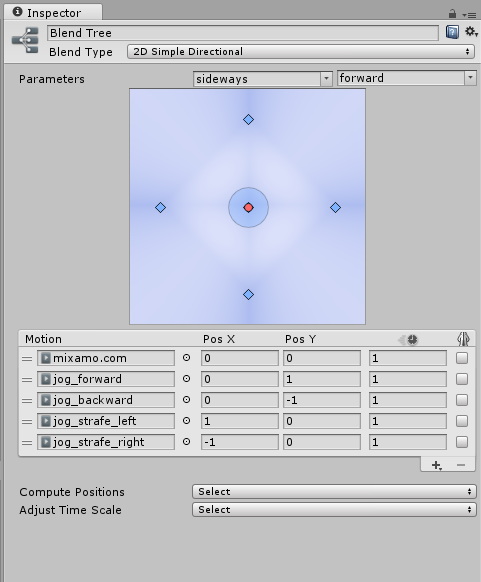
When I play with the parameters in the animator window, everything runs smoothly in the Inspector preview.

In order to figure out how much the player is moving forward and sideways relative to the cursor, I use the following code:

     float moveAngle = (Vector2.Angle(Vector2.right, movement) * Mathf.Sign(movement.y) - Body.rotation) % 360;
     float forward = Mathf.Cos(Mathf.Deg2Rad * moveAngle);
     float sideways = Mathf.Sin(Mathf.Deg2Rad * moveAngle);
     Anim.SetFloat("forward", forward);
     Anim.SetFloat("sideways", sideways);

(Where "movement" is a Vector2 with its x being "Input.GetAxisRaw("Horizontal")" and its y being "Input.GetAxisRaw("Vertical")". Body refers to the Rigidbody2D component of the gameobject.)

I've used Debug.Log to check the output of each part of the process, and it all matches up with what I've expected. Nevertheless, whenever the "forward" or "sideways" parameter is negative in testing, the animation freezes (which, again, does not occur in the preview window).

I've tested this by going directly towards and away from the cursor at a number of angles and directions, as well as circling (more like squaring, really) the cursor, which is the most interesting because the animation plays until during each movement across the side of the square, the cursor is crossed, at which point it freezes.

Any help would be super appreciated. If what I'm describing doesn't make much sense, I'll try to see what I can do about getting a video or something up. Thank you!

blendtree.png (51.2 kB)
Comment
Add comment · Show 1
10 |3000 characters needed characters left characters exceeded
▼
  • Viewable by all users
  • Viewable by moderators
  • Viewable by moderators and the original poster
  • Advanced visibility
Viewable by all users
avatar image Fariborzzn · Dec 07, 2019 at 09:06 PM 0
Share

its old but im getting same problem blendtree in inspector works fine but with same value through code it behave very strange (its negative value ) what is goinnn onnn !!

0 Replies

· Add your reply
  • Sort: 

Your answer

Hint: You can notify a user about this post by typing @username

Up to 2 attachments (including images) can be used with a maximum of 524.3 kB each and 1.0 MB total.

Follow this Question

Answers Answers and Comments

4 People are following this question.

avatar image avatar image avatar image avatar image

Related Questions

UnityEditor.Animations.AnimatorControllerLayer.SetOverrideMotion not working 0 Answers

Leg crossing while blending strafe animations? 0 Answers

U4.3.4: Mecanim blend trees, no more old docs? 1 Answer

Are mecanim blend trees linear? 2 Answers

Walk/Run right animations seem hard to come by 1 Answer


Enterprise
Social Q&A

Social
Subscribe on YouTube social-youtube Follow on LinkedIn social-linkedin Follow on Twitter social-twitter Follow on Facebook social-facebook Follow on Instagram social-instagram

Footer

  • Purchase
    • Products
    • Subscription
    • Asset Store
    • Unity Gear
    • Resellers
  • Education
    • Students
    • Educators
    • Certification
    • Learn
    • Center of Excellence
  • Download
    • Unity
    • Beta Program
  • Unity Labs
    • Labs
    • Publications
  • Resources
    • Learn platform
    • Community
    • Documentation
    • Unity QA
    • FAQ
    • Services Status
    • Connect
  • About Unity
    • About Us
    • Blog
    • Events
    • Careers
    • Contact
    • Press
    • Partners
    • Affiliates
    • Security
Copyright © 2020 Unity Technologies
  • Legal
  • Privacy Policy
  • Cookies
  • Do Not Sell My Personal Information
  • Cookies Settings
"Unity", Unity logos, and other Unity trademarks are trademarks or registered trademarks of Unity Technologies or its affiliates in the U.S. and elsewhere (more info here). Other names or brands are trademarks of their respective owners.
  • Anonymous
  • Sign in
  • Create
  • Ask a question
  • Spaces
  • Default
  • Help Room
  • META
  • Moderators
  • Explore
  • Topics
  • Questions
  • Users
  • Badges
