
Wayback Machinekoobas.hobune.stream
May JUN Jul
Previous capture 13 Next capture
2021 2022 2023
1 capture
13 Jun 22 - 13 Jun 22
sparklines
Close Help
  • Products
  • Solutions
  • Made with Unity
  • Learning
  • Support & Services
  • Community
  • Asset Store
  • Get Unity

UNITY ACCOUNT

You need a Unity Account to shop in the Online and Asset Stores, participate in the Unity Community and manage your license portfolio. Login Create account
  • Blog
  • Forums
  • Answers
  • Evangelists
  • User Groups
  • Beta Program
  • Advisory Panel

Navigation

  • Home
  • Products
  • Solutions
  • Made with Unity
  • Learning
  • Support & Services
  • Community
    • Blog
    • Forums
    • Answers
    • Evangelists
    • User Groups
    • Beta Program
    • Advisory Panel

Unity account

You need a Unity Account to shop in the Online and Asset Stores, participate in the Unity Community and manage your license portfolio. Login Create account

Language

  • Chinese
  • Spanish
  • Japanese
  • Korean
  • Portuguese
  • Ask a question
  • Spaces
    • Default
    • Help Room
    • META
    • Moderators
    • Topics
    • Questions
    • Users
    • Badges
  • Home /
This question was closed Jul 13, 2015 at 10:53 AM by meat5000 for the following reason:

The question is answered, right answer was accepted

avatar image
0
Question by Hedonsoft · Aug 05, 2014 at 02:42 AM · animationmecanimblend tree

Walk/Run right animations seem hard to come by

I did the Mecanim tutorial with the walk/run left/right animations but any animation packs I've bought don't have these types of walks or runs. In Maya can I turn a straight forward motion into a turn? How do people typically create blend trees for walks?

Comment
Add comment · Show 3
10 |3000 characters needed characters left characters exceeded
▼
  • Viewable by all users
  • Viewable by moderators
  • Viewable by moderators and the original poster
  • Advanced visibility
Viewable by all users
avatar image thornekey · Aug 05, 2014 at 02:53 AM 0
Share

why don't you make your own in blender?

avatar image Hedonsoft · Aug 05, 2014 at 02:57 AM 0
Share

I don't use Blender only $$anonymous$$aya and don't animate

avatar image Hedonsoft · Aug 05, 2014 at 03:08 AM 0
Share

Thanks just what I was wondering :D

1 Reply

  • Sort: 
avatar image
3
Best Answer

Answer by meat5000 · Aug 05, 2014 at 03:06 AM

Time to learn?

Some people split motion between lower and upper body. Check the AngryBots tutorial.

I don't do that. I Blended a walk and run animation. Same number of frames, footsteps synced.

Next I created a walk round in circle left and right, same frames, synced footsteps and blended these with my walk/run blendtree.

So with varying degrees of Joystick tilt I can achieve Rest->Sprint smooth changing and can turn left and right while walking running or at rest.

Blending animations requires synchronisation of motion in each blended clip.

The Blendtree doesn't look very elegant but it's smooth as silk and the character looks great with the Blended animations.
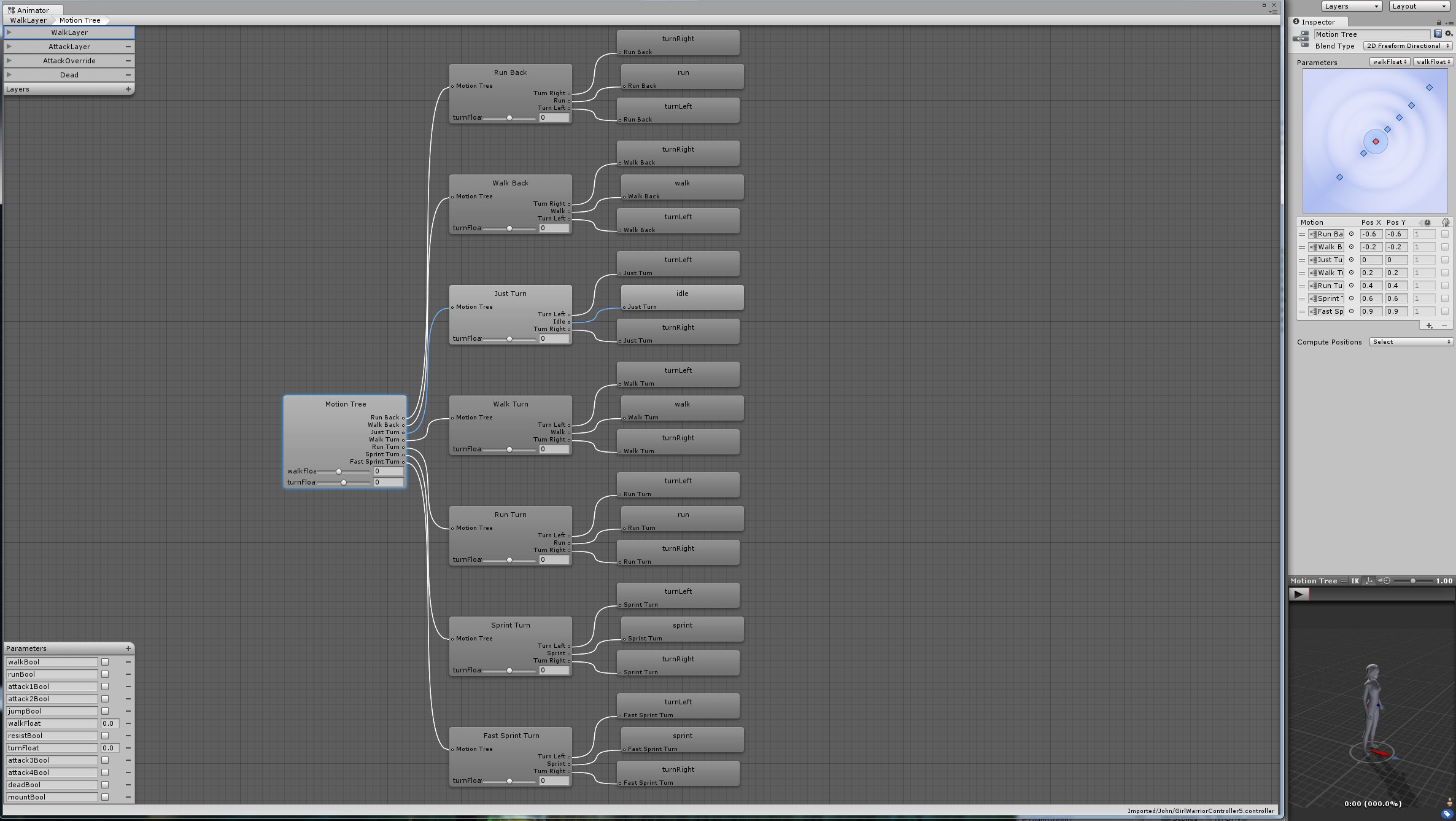
alt text


walkblend.jpg (517.5 kB)
Comment
Add comment · Show 3 · Share
10 |3000 characters needed characters left characters exceeded
▼
  • Viewable by all users
  • Viewable by moderators
  • Viewable by moderators and the original poster
  • Advanced visibility
Viewable by all users
avatar image supamigit · Jul 13, 2015 at 09:20 AM 0
Share

Thanks for the BLend Image i vae similar but not as DEEP as ypurs loooks Good

any incite to the C# used to implement this?

Anim.SetFloat ("Speed", $$anonymous$$athf.Atan2 (v) 180.0f / 3.14159f, DirectionDampTime, Time.deltaTime); Anim.SetFloat ("Direction", $$anonymous$$athf.Atan2 (h) 180.0f / 3.14159f, DirectionDampTime, Time.deltaTime); Anim.SetBool ("Running", Input.Get$$anonymous$$ey ($$anonymous$$eyCode.LeftShift));

etc.....?

avatar image meat5000 ♦ · Jul 13, 2015 at 10:53 AM 0
Share

Its just the same as for 1 animation. The whole tree can be controlled with 2 parameters, so anim.SetFloat is usually the one to use. Tried digging out the script but its an old project, cant find it.

Basically the Characters AnimController script should act like a bit of a joystick, mapping input to output. Dont hard link any input in that script.

This way, anything is free to reference your player and you can feed it movement with a simple Vector2. Useful for cutscenes and other interaction. Also keeps the animation script simple and responsive.

avatar image meat5000 ♦ · Jul 31, 2015 at 12:20 AM 0
Share

Adding this in for a better overview of the above technique.

This answer describes the script which runs the above blend tree.

Follow this Question

Answers Answers and Comments

24 People are following this question.

avatar image avatar image avatar image avatar image avatar image avatar image avatar image avatar image avatar image avatar image avatar image avatar image avatar image avatar image avatar image avatar image avatar image avatar image avatar image avatar image avatar image avatar image avatar image avatar image

Related Questions

Negative parameters in mecanim blend tree not animating 0 Answers

Are mecanim blend trees linear? 2 Answers

Mecanim: 2D Blend Trees, Unable to Compute Positions. 0 Answers

Can't set animator bool to True 1 Answer

UnityEditor.Animations.AnimatorControllerLayer.SetOverrideMotion not working 0 Answers


Enterprise
Social Q&A

Social
Subscribe on YouTube social-youtube Follow on LinkedIn social-linkedin Follow on Twitter social-twitter Follow on Facebook social-facebook Follow on Instagram social-instagram

Footer

  • Purchase
    • Products
    • Subscription
    • Asset Store
    • Unity Gear
    • Resellers
  • Education
    • Students
    • Educators
    • Certification
    • Learn
    • Center of Excellence
  • Download
    • Unity
    • Beta Program
  • Unity Labs
    • Labs
    • Publications
  • Resources
    • Learn platform
    • Community
    • Documentation
    • Unity QA
    • FAQ
    • Services Status
    • Connect
  • About Unity
    • About Us
    • Blog
    • Events
    • Careers
    • Contact
    • Press
    • Partners
    • Affiliates
    • Security
Copyright © 2020 Unity Technologies
  • Legal
  • Privacy Policy
  • Cookies
  • Do Not Sell My Personal Information
  • Cookies Settings
"Unity", Unity logos, and other Unity trademarks are trademarks or registered trademarks of Unity Technologies or its affiliates in the U.S. and elsewhere (more info here). Other names or brands are trademarks of their respective owners.
  • Anonymous
  • Sign in
  • Create
  • Ask a question
  • Spaces
  • Default
  • Help Room
  • META
  • Moderators
  • Explore
  • Topics
  • Questions
  • Users
  • Badges
