
Wayback Machinekoobas.hobune.stream
May JUN Jul
Previous capture 12 Next capture
2021 2022 2023
1 capture
12 Jun 22 - 12 Jun 22
sparklines
Close Help
  • Products
  • Solutions
  • Made with Unity
  • Learning
  • Support & Services
  • Community
  • Asset Store
  • Get Unity

UNITY ACCOUNT

You need a Unity Account to shop in the Online and Asset Stores, participate in the Unity Community and manage your license portfolio. Login Create account
  • Blog
  • Forums
  • Answers
  • Evangelists
  • User Groups
  • Beta Program
  • Advisory Panel

Navigation

  • Home
  • Products
  • Solutions
  • Made with Unity
  • Learning
  • Support & Services
  • Community
    • Blog
    • Forums
    • Answers
    • Evangelists
    • User Groups
    • Beta Program
    • Advisory Panel

Unity account

You need a Unity Account to shop in the Online and Asset Stores, participate in the Unity Community and manage your license portfolio. Login Create account

Language

  • Chinese
  • Spanish
  • Japanese
  • Korean
  • Portuguese
  • Ask a question
  • Spaces
    • Default
    • Help Room
    • META
    • Moderators
    • Topics
    • Questions
    • Users
    • Badges
  • Home /
avatar image
1
Question by ProgrammerAdam12 · Jun 25, 2018 at 07:42 PM · 3d models

3D Model is Translucent

Hi everyone, I recently looked at implementing some characters from mixamo.com into my game when I came across a problem. Wherever another part of the model overlaps a different bit, one part goes translucent. I have an example in the screenshot provided (this happens in scene and game view as well). Any help appreciated.alt text
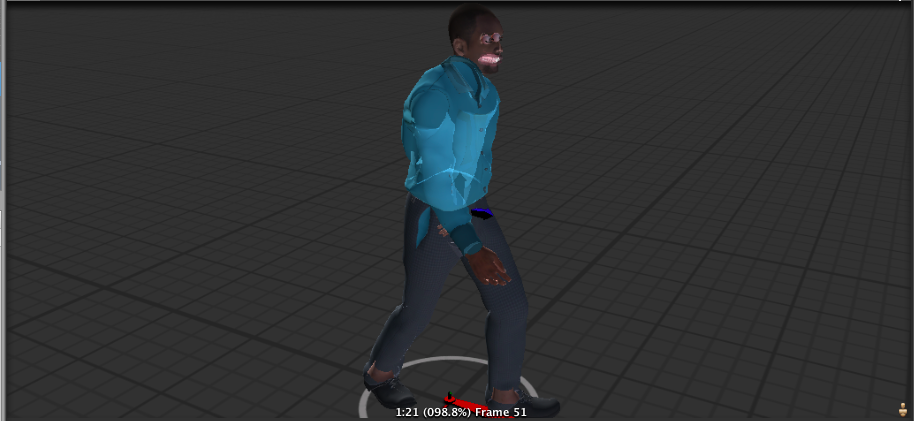
screen-shot-2018-06-25-at-204038.png (285.0 kB)
Comment
Add comment
10 |3000 characters needed characters left characters exceeded
▼
  • Viewable by all users
  • Viewable by moderators
  • Viewable by moderators and the original poster
  • Advanced visibility
Viewable by all users

2 Replies

· Add your reply
  • Sort: 
avatar image
0
Best Answer

Answer by dan_wipf · Jun 25, 2018 at 09:45 PM

use another shader maybe?


EDIT: @ProgrammerAdam12


Ok its quite some work. At Mixamo you have to Download your Model as a Colladad(.dae) file.

Then you need to import the whole Folder which you downloaded at Mixamo. now in the Folder you should see two things:


  1. Your Model

  2. A Folder called textures


now press on the model. in the inspector there should be now the Importer Window (Something like "Samba Dancing Import Settings") hit the Materials Button.


  1. if the Checkmark "Import Material" is disabled, enable it.

  2. Dropdown Location should be : "Use Embedded Materials".

  3. Hit the Button Extract Materials. (best save it to the Models Folder).

  4. Now the Material part of the Import Settings shouldn't be "Empty (Material)" anymore.


Now we need to remap the Materials.

  1. Go the Folder where you saved the New Materials.

  2. Click on the first Material(like "Bodymat").

  3. In the Top of the Inspector there you can choose your Shader. For now Standard (by Default) is fine.

  4. Be sure RenderingMode is set to Opaque.

  5. Re-asign now following Textures to the Material(Normalmap to Normalmap,Specular to Metallic,Gloss to Occlusion). Just be sure to take the right Texture to the right Material(body Texture to body Material and so on).


You can tweak around in the Material settings as you like =) if it's to shiny turn down Metallic Smoothness or Occlusion.

Hope this answer helps you.

Comment
Add comment · Show 3 · Share
10 |3000 characters needed characters left characters exceeded
▼
  • Viewable by all users
  • Viewable by moderators
  • Viewable by moderators and the original poster
  • Advanced visibility
Viewable by all users
avatar image ProgrammerAdam12 · Jun 25, 2018 at 10:22 PM 0
Share

Hi there, thanks for fast reply. How would I change the shader and which one would I change to to? Sorry, I’m beginner. any replies appreciated.

avatar image ProgrammerAdam12 · Jun 26, 2018 at 09:08 PM 1
Share

Thanks a bunch. This seemed to work great. Fixed a major problem.

avatar image dan_wipf · Jun 26, 2018 at 09:33 PM 0
Share

glad i could help

avatar image
0

Answer by wicke · Jun 26, 2018 at 01:41 AM

I dont use mixamo, but this looks like the normals are messed up. Use a program like blender to see how the normals are configured for this mesh. This might help : Normals

Comment
Add comment · Share
10 |3000 characters needed characters left characters exceeded
▼
  • Viewable by all users
  • Viewable by moderators
  • Viewable by moderators and the original poster
  • Advanced visibility
Viewable by all users

Your answer

Hint: You can notify a user about this post by typing @username

Up to 2 attachments (including images) can be used with a maximum of 524.3 kB each and 1.0 MB total.

Follow this Question

Answers Answers and Comments

88 People are following this question.

avatar image avatar image avatar image avatar image avatar image avatar image avatar image avatar image avatar image avatar image avatar image avatar image avatar image avatar image avatar image avatar image avatar image avatar image avatar image avatar image avatar image avatar image avatar image avatar image avatar image avatar image avatar image avatar image avatar image avatar image avatar image avatar image avatar image avatar image avatar image avatar image avatar image avatar image avatar image avatar image avatar image avatar image avatar image avatar image avatar image avatar image avatar image avatar image avatar image avatar image avatar image avatar image avatar image avatar image avatar image avatar image avatar image avatar image avatar image avatar image avatar image avatar image avatar image avatar image avatar image avatar image avatar image avatar image avatar image avatar image avatar image avatar image avatar image avatar image avatar image avatar image avatar image avatar image avatar image avatar image avatar image avatar image avatar image avatar image avatar image avatar image avatar image avatar image

Related Questions

AI Bogging Down Game 0 Answers

Problem with collider 1 Answer

Best method for Skyrim-Like character customization? 1 Answer

Scale 3d models as per screen resolution 0 Answers

Can I use unity assets with three.js? 0 Answers


Enterprise
Social Q&A

Social
Subscribe on YouTube social-youtube Follow on LinkedIn social-linkedin Follow on Twitter social-twitter Follow on Facebook social-facebook Follow on Instagram social-instagram

Footer

  • Purchase
    • Products
    • Subscription
    • Asset Store
    • Unity Gear
    • Resellers
  • Education
    • Students
    • Educators
    • Certification
    • Learn
    • Center of Excellence
  • Download
    • Unity
    • Beta Program
  • Unity Labs
    • Labs
    • Publications
  • Resources
    • Learn platform
    • Community
    • Documentation
    • Unity QA
    • FAQ
    • Services Status
    • Connect
  • About Unity
    • About Us
    • Blog
    • Events
    • Careers
    • Contact
    • Press
    • Partners
    • Affiliates
    • Security
Copyright © 2020 Unity Technologies
  • Legal
  • Privacy Policy
  • Cookies
  • Do Not Sell My Personal Information
  • Cookies Settings
"Unity", Unity logos, and other Unity trademarks are trademarks or registered trademarks of Unity Technologies or its affiliates in the U.S. and elsewhere (more info here). Other names or brands are trademarks of their respective owners.
  • Anonymous
  • Sign in
  • Create
  • Ask a question
  • Spaces
  • Default
  • Help Room
  • META
  • Moderators
  • Explore
  • Topics
  • Questions
  • Users
  • Badges
