 koobas.hobune.stream


iTween move nodes position
Hello everyone. I'm using iTweenPath and I wonder if it is possible to move all nodes at once. I'm using an empty parent object and the path is the child object. move the parent object but the path does not change. Someone to help?

What specific iTween command are you using to move along the path?
Did you construct your path out of Transforms or Vector3s?
What does "the path is the child object" mean?
Any thing else that helps paint a clearer picture of your setup would be appreciated.

I'm using iTween.PutOnPath () and iTween.PointOnPath ()
I tried to move the path (pathChild) moving the 'gameObjectEmpty' but nothing happens.
I want to do in a way that I can move all the nodes at once
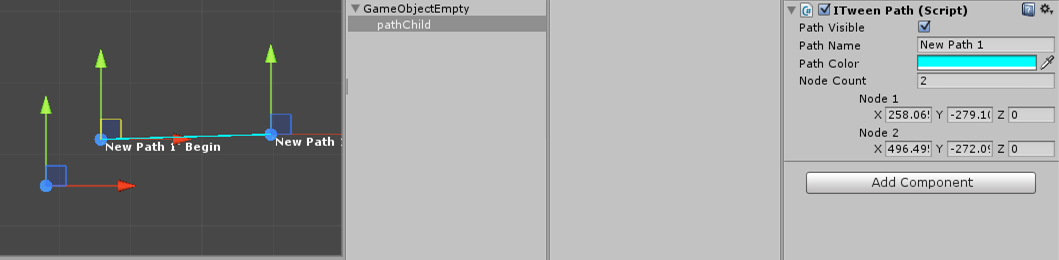
I don't know how you are building your path...maybe the Visual Path Editor? I've only played with the path editor for a few $$anonymous$$utes, and don't know much about the kind of path it creates. iTween.PutOnPath() and iTween.PointOnPath() can take a path in one of two forms: array of Transforms, or an array of Vector3s. If path is built out of Transforms that are all children of a common parent, then moving the parent, will move the entire path. I just tried it to me absolutely sure. If it is built out of Vector3s, then you will need to walk the array and update all the Vector3s in the array to move the path.
Yes I am using Visual Path Editor and it creates an array of vectors. What I need then is an array of Transform, right? Need to change the class of ITween the code to create array of Transform?
I don't know anything about the Path Editor. To run my test to make sure that Transforms would work, I created a parent object with several children for the path.
Then in a script I declared a public array of Transforms:
var path : Transform[];
After attaching the script with the above declaration to a game object, I opened 'path' in the Inspector, set the size to the number of child objects, and dragged and dropped each object into one of the slots in the array. I then use 'path' in the iTween.PointOnPath() call. While the app was running, I modified the position of the parent object. The children moved as did the path iTween was following.
Note if you want to use an array of Vector3s, the cost is $$anonymous$$imal to moving all the Vector3s in an array.

It is old, But I needed the same thing and couldn't find it any place, Hope it helps someone :D
I edited the Editor file to be something like this, please check ,
 //by Bob Berkebile : Pixelplacement : http://www.pixelplacement.com

 using UnityEngine;
 using UnityEditor;
 using System.Collections;

 [CustomEditor(typeof(iTweenPath))]
 public class iTweenPathEditor : Editor
 {
     iTweenPath _target;
     GUIStyle style = new GUIStyle();
     public static int count = 0;
     Vector3 OrigianlPosition;

     bool GlobalMovment;


     void OnEnable(){
         //i like bold handle labels since I'm getting old:
         style.fontStyle = FontStyle.Bold;
         style.normal.textColor = Color.white;
         _target = (iTweenPath)target;

         //lock in a default path name:
         if(!_target.initialized){
             _target.initialized = true;
             _target.pathName = "New Path " + ++count;
             _target.initialName = _target.pathName;
             OrigianlPosition = Vector3.zero;
         }
     }

     public override void OnInspectorGUI(){
         //path name:
         EditorGUILayout.BeginHorizontal();
         EditorGUILayout.PrefixLabel("Path Name");
         _target.pathName = EditorGUILayout.TextField(_target.pathName);
         EditorGUILayout.EndHorizontal();

         if(_target.pathName == ""){
             _target.pathName = _target.initialName;
         }

         //path color:
         EditorGUILayout.BeginHorizontal();
         EditorGUILayout.PrefixLabel("Path Color");
         _target.pathColor = EditorGUILayout.ColorField(_target.pathColor);
         EditorGUILayout.EndHorizontal();

         //exploration segment count control:
         EditorGUILayout.BeginHorizontal();
         EditorGUILayout.PrefixLabel("Node Count");
         _target.nodeCount =  Mathf.Clamp(EditorGUILayout.IntSlider(_target.nodeCount, 0, 15), 2,100);
         EditorGUILayout.EndHorizontal();

         //add node?
         if(_target.nodeCount > _target.nodes.Count){
             for (int i = 0; i < _target.nodeCount - _target.nodes.Count; i++) {
                 _target.nodes.Add(Vector3.zero);
             }
         }

         //remove node?
         if(_target.nodeCount < _target.nodes.Count){
             if(EditorUtility.DisplayDialog("Remove path node?","Shortening the node list will permantently destory parts of your path. This operation cannot be undone.", "OK", "Cancel")){
                 int removeCount = _target.nodes.Count - _target.nodeCount;
                 _target.nodes.RemoveRange(_target.nodes.Count-removeCount,removeCount);
             }else{
                 _target.nodeCount = _target.nodes.Count;
             }
         }

         //node display:
         EditorGUI.indentLevel = 4;
         for (int i = 0; i < _target.nodes.Count; i++) {
             _target.nodes[i] = EditorGUILayout.Vector3Field("Node " + (i+1), _target.nodes[i]);
         }

         GlobalMovment = EditorGUILayout.Toggle ("GlobalMovment", GlobalMovment);

         if(!GlobalMovment){
             OrigianlPosition = Vector3.zero;
         }

         //update and redraw:
         if(GUI.changed){
             EditorUtility.SetDirty(_target);
         }
     }

     void OnSceneGUI(){
         if(_target.enabled) { // dkoontz
             if(_target.nodes.Count > 0){
                 //allow path adjustment undo:
                 Undo.SetSnapshotTarget(_target,"Adjust iTween Path");

                 if (GlobalMovment) {
                     Vector3 newPo = Handles.PositionHandle (OrigianlPosition, Quaternion.identity);
                     for (int i = 0; i < _target.nodes.Count; i++) {
                         _target.nodes [i] = _target.nodes [i] - OrigianlPosition + newPo;
                     }
                     OrigianlPosition = newPo;
                 } else {
                     //path begin and end labels:
                     Handles.Label(_target.nodes[0], "'" + _target.pathName + "' Begin", style);
                     Handles.Label(_target.nodes[_target.nodes.Count-1], "'" + _target.pathName + "' End", style);
                     //node handle display:
                     for (int i = 0; i < _target.nodes.Count; i++) {
                         _target.nodes [i] = Handles.FreeMoveHandle (_target.nodes [i], Quaternion.identity, 0.25f, Vector3.zero, Handles.RectangleCap);
                     }
                 }
             }
         } // dkoontz
     }
 }
Now you will have a CheckBox that you can use to move all the points at Once, a minor catch ( that you can easily change ) is that the Global Movement Handle is drawn at Vector3.zero



