Wayback Machinekoobas.hobune.stream
May JUN Jul
Previous capture 11 Next capture
2021 2022 2023
1 capture
11 Jun 22 - 11 Jun 22
sparklines
Close Help
  • Products
  • Solutions
  • Made with Unity
  • Learning
  • Support & Services
  • Community
  • Asset Store
  • Get Unity

UNITY ACCOUNT

You need a Unity Account to shop in the Online and Asset Stores, participate in the Unity Community and manage your license portfolio. Login Create account
  • Blog
  • Forums
  • Answers
  • Evangelists
  • User Groups
  • Beta Program
  • Advisory Panel

Navigation

  • Home
  • Products
  • Solutions
  • Made with Unity
  • Learning
  • Support & Services
  • Community
    • Blog
    • Forums
    • Answers
    • Evangelists
    • User Groups
    • Beta Program
    • Advisory Panel

Unity account

You need a Unity Account to shop in the Online and Asset Stores, participate in the Unity Community and manage your license portfolio. Login Create account

Language

  • Chinese
  • Spanish
  • Japanese
  • Korean
  • Portuguese
  • Ask a question
  • Spaces
    • Default
    • Help Room
    • META
    • Moderators
    • Topics
    • Questions
    • Users
    • Badges
  • Home /
avatar image
0
Question by Pio98 · Jul 07, 2015 at 04:44 PM · renderingbugissuedrawcalls

Gfx.waitForPresent kills performances

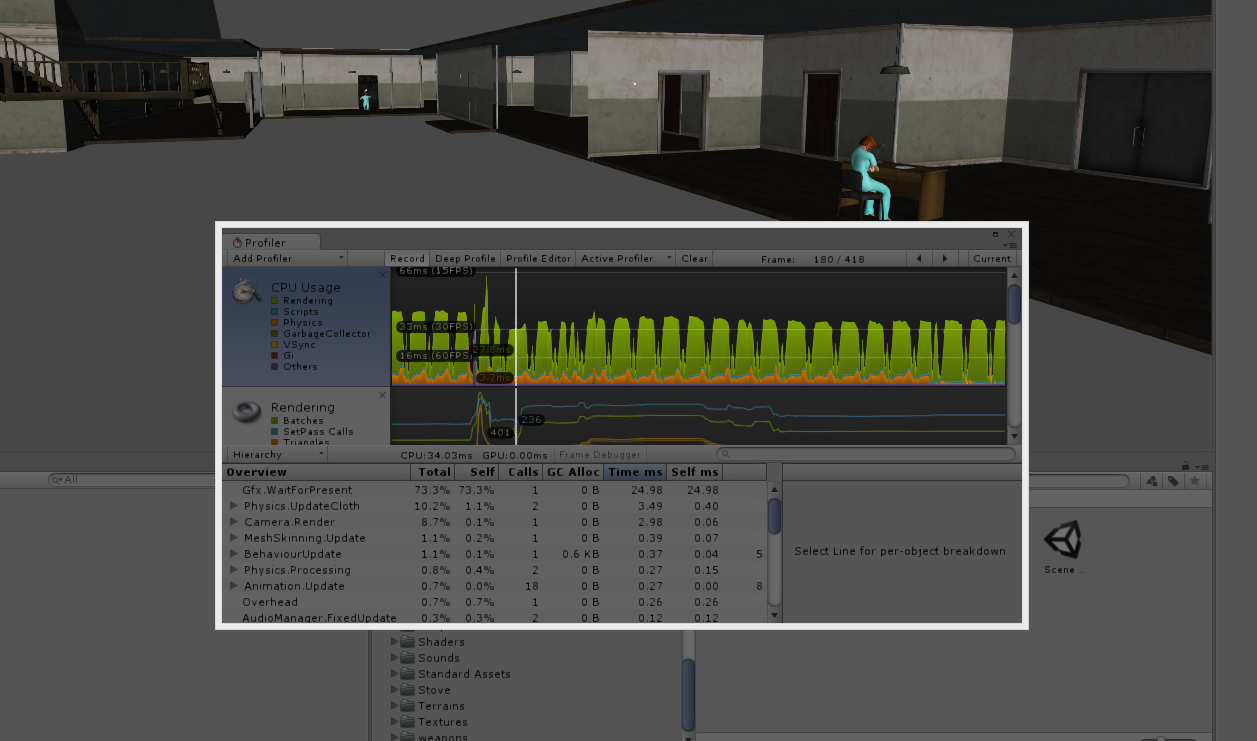
Hi there, I'm using Unity 5.1.1f1 Personal Edition and I have an issue in a scene in my game: it is quite big, but it is also well optimized with occlusion culling, LOD groups, etc. Testing the scene it shutters somethimes. Opening the Profiler, I discovered that was 'Gfx.WaitForPresent' causing the shuttering and I've tried to disabiliting the VSync and the shadows but it didn't work. 'Gfx.WaitForPresent' appears in both Forward and Deferred Rendering. What could I do?

My PC Specifications:

Windows 8.1 Pro 64 bit

Intel Core i5 4460 3.4 GHz

8 GB System RAM

NVidia GeForce GTX 745 whit 4GB VRAM
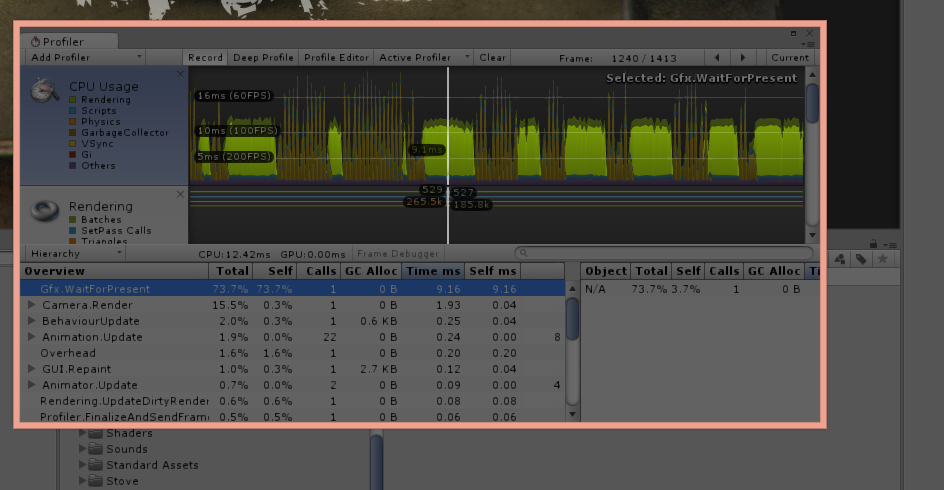
Forward Rendering The Scene in Deferred lightning

immagine.png (409.1 kB)
immagine.png (160.0 kB)
Comment
Add comment
10 |3000 characters needed characters left characters exceeded
▼
  • Viewable by all users
  • Viewable by moderators
  • Viewable by moderators and the original poster
  • Advanced visibility
Viewable by all users

1 Reply

· Add your reply
  • Sort: 
avatar image
0

Answer by WillNode · Jul 15, 2015 at 11:44 AM

Gfx.WaitForPresent is a wait time takes into next frame.

Wait time is needed for your game since your FPS has beyond than Monitor can do (it's around 60 Hz). if wait time isn't used, your game will do unnecessary calculations and just heating your PC up.

but somebody (i don't remember where) said that if your run unity in Compabitily mode (Windows XP Service 3). this Gfx.WaitForPresent will be not popped out on profiler.

Comment
Add comment · Show 3 · Share
10 |3000 characters needed characters left characters exceeded
▼
  • Viewable by all users
  • Viewable by moderators
  • Viewable by moderators and the original poster
  • Advanced visibility
Viewable by all users
avatar image Pio98 · Jul 15, 2015 at 02:01 PM 0
Share

Yeah, I know that is a sort of VSync or something like that, but the fps are around 25fps. I have the same issue with a terrain.

avatar image WillNode · Jul 15, 2015 at 02:19 PM 0
Share

running game with some editor tab opened (heavy task like inspector & profiler) also could make this Gfx more increased.

maybe you could try to maximize the game window while playing.

avatar image Pio98 · Jul 15, 2015 at 04:08 PM 0
Share

The game runs better in a $$anonymous$$imized player (maximized resolution=1600x900 (20/25 fps) vs $$anonymous$$imized resolution=720x480 (45/50fps)). I've fixed this issue in the occluded scene with occlusion culling and dividing the scene in different parts and activating them only when passing though loading doors, but I still don't know what to do with the "open-air" scene.

Your answer

Hint: You can notify a user about this post by typing @username

Up to 2 attachments (including images) can be used with a maximum of 524.3 kB each and 1.0 MB total.

Follow this Question

Answers Answers and Comments

3 People are following this question.

avatar image avatar image avatar image

Related Questions

Unity 2018.1 Stuck In Loop 1 Answer

Specular Glitch on iOS Build 0 Answers

Unity Colors become weird when scene changed 1 Answer

Rendering issue: Webplayer, Windows 8 only 0 Answers

Why on the mobile do the elements seem to have a very unstable position? 0 Answers


Enterprise
Social Q&A

Social
Subscribe on YouTube social-youtube Follow on LinkedIn social-linkedin Follow on Twitter social-twitter Follow on Facebook social-facebook Follow on Instagram social-instagram

Footer

  • Purchase
    • Products
    • Subscription
    • Asset Store
    • Unity Gear
    • Resellers
  • Education
    • Students
    • Educators
    • Certification
    • Learn
    • Center of Excellence
  • Download
    • Unity
    • Beta Program
  • Unity Labs
    • Labs
    • Publications
  • Resources
    • Learn platform
    • Community
    • Documentation
    • Unity QA
    • FAQ
    • Services Status
    • Connect
  • About Unity
    • About Us
    • Blog
    • Events
    • Careers
    • Contact
    • Press
    • Partners
    • Affiliates
    • Security
Copyright © 2020 Unity Technologies
  • Legal
  • Privacy Policy
  • Cookies
  • Do Not Sell My Personal Information
  • Cookies Settings
"Unity", Unity logos, and other Unity trademarks are trademarks or registered trademarks of Unity Technologies or its affiliates in the U.S. and elsewhere (more info here). Other names or brands are trademarks of their respective owners.
  • Anonymous
  • Sign in
  • Create
  • Ask a question
  • Spaces
  • Default
  • Help Room
  • META
  • Moderators
  • Explore
  • Topics
  • Questions
  • Users
  • Badges