
Wayback Machinekoobas.hobune.stream
May JUN Jul
Previous capture 13 Next capture
2021 2022 2023
1 capture
13 Jun 22 - 13 Jun 22
sparklines
Close Help
  • Products
  • Solutions
  • Made with Unity
  • Learning
  • Support & Services
  • Community
  • Asset Store
  • Get Unity

UNITY ACCOUNT

You need a Unity Account to shop in the Online and Asset Stores, participate in the Unity Community and manage your license portfolio. Login Create account
  • Blog
  • Forums
  • Answers
  • Evangelists
  • User Groups
  • Beta Program
  • Advisory Panel

Navigation

  • Home
  • Products
  • Solutions
  • Made with Unity
  • Learning
  • Support & Services
  • Community
    • Blog
    • Forums
    • Answers
    • Evangelists
    • User Groups
    • Beta Program
    • Advisory Panel

Unity account

You need a Unity Account to shop in the Online and Asset Stores, participate in the Unity Community and manage your license portfolio. Login Create account

Language

  • Chinese
  • Spanish
  • Japanese
  • Korean
  • Portuguese
  • Ask a question
  • Spaces
    • Default
    • Help Room
    • META
    • Moderators
    • Topics
    • Questions
    • Users
    • Badges
  • Home /
avatar image
0
Question by russellstephens · Dec 07, 2014 at 11:16 PM · particlesfog

How do I make a particle effect show through fog?

I have a game where the fog turns up to a very high density and I want some particle effects to be unaffected by this fog.

Pretty new to Unity.

Thanks in advance!

Comment
Add comment
10 |3000 characters needed characters left characters exceeded
▼
  • Viewable by all users
  • Viewable by moderators
  • Viewable by moderators and the original poster
  • Advanced visibility
Viewable by all users

3 Replies

· Add your reply
  • Sort: 
avatar image
2
Best Answer

Answer by MrSoad · Dec 08, 2014 at 10:32 PM

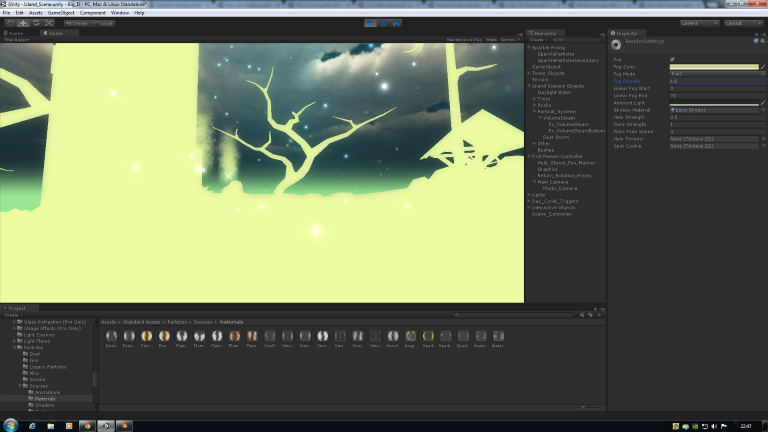
Ok try this instead(Disable your new camera and set your Main Cam back how it was before). Find your particle materials, click on the material in the particle renderer component to do this. Now change the shader on each of these particle materials(for each material in each particle renderer) to "Mobile/Particles/Additive Culled" (This shader is part of the std Mobile Assets, import if you have not already done so). Now with a bit of luck you will see your particles again.

Here is a pic of the Sparkle particle effect showing through the fog(Density set to 1(max)) with this shader applied to the Sparkle Materials :
alt text


show_through_fog.png (161.3 kB)
Comment
Add comment · Show 12 · Share
10 |3000 characters needed characters left characters exceeded
▼
  • Viewable by all users
  • Viewable by moderators
  • Viewable by moderators and the original poster
  • Advanced visibility
Viewable by all users
avatar image russellstephens · Dec 08, 2014 at 10:50 PM 0
Share

Thanks! I only have $$anonymous$$obile/Particles/Additive which didn't work?

avatar image russellstephens · Dec 08, 2014 at 10:52 PM 0
Share

Sorry, saw your note, imported in $$anonymous$$obile assets. Trying now...

avatar image MrSoad · Dec 08, 2014 at 10:53 PM 0
Share

link text

Here you go :)

mobile particles additive culled.zip (643 B)
avatar image russellstephens · Dec 08, 2014 at 10:56 PM 0
Share

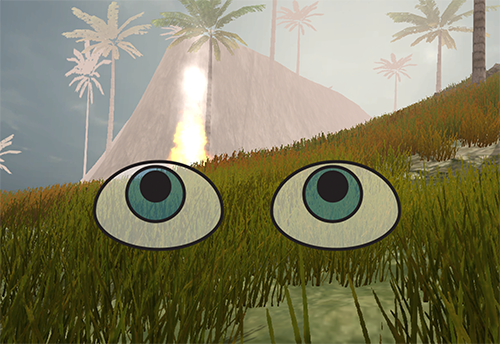
Didn't work... Attached are the two states (high fog density vs low fog density) and the particles are not showing through...

alt text alt text

screen shot 2014-12-08 at 5.52.46 pm.png (309.9 kB)
screen shot 2014-12-08 at 5.52.48 pm.png (88.2 kB)
avatar image MrSoad · Dec 08, 2014 at 10:57 PM 0
Share

Which particle are you trying to get to show? The flames?

Show more comments
avatar image
0

Answer by static_cast · Dec 07, 2014 at 11:21 PM

Just an idea, but you could have another camera render the special particle effects seperately. Here's how you would do so:

  1. Make a new camera. You should probably parent it to the main camera.

  2. Make a new Layer. This layer is called "VisibleParticles". Set all of the particle effects you want to show through smoke's layer to VisibleParticles

  3. Go to the main camera and turn off VisibleParticles in the culling mask

  4. Go to the new camera and set every other layer off except VisibleParticles in the culling mask.

  5. Set the new camera's Clear Flags to Depth Only.

Comment
Add comment · Show 8 · Share
10 |3000 characters needed characters left characters exceeded
▼
  • Viewable by all users
  • Viewable by moderators
  • Viewable by moderators and the original poster
  • Advanced visibility
Viewable by all users
avatar image russellstephens · Dec 08, 2014 at 09:49 PM 0
Share

Thanks! This is a great approach.

I'm super new though... How can I make it so that the two cameras are both showing through the first person controller at once? At the moment, I can't see the "VisibleParticles" layer because I think everything is just going through $$anonymous$$ain Camera. I've added the other camera as a child of $$anonymous$$ain Camera.

Thanks again!

avatar image Cherno · Dec 08, 2014 at 09:55 PM 0
Share

For this, you just have to remove the layer that the FPC is in from the new camera's culling mask.

avatar image russellstephens · Dec 08, 2014 at 10:00 PM 0
Share

Thanks! At the moment...

The FPC controller is in the Default layer. The $$anonymous$$ain Camera has the following in the culling mask: Default, TransparentFX, Ignore Raycast, Water, UI The New Camera has this in the culling mask: Visible Particles

So the new camera doesn't have the FPC's layer in its culling mask. And it's still not showing up in the view.

Am I misunderstanding something? Thanks again for your help.

avatar image MrSoad · Dec 08, 2014 at 10:08 PM 0
Share

Look at the camera "Depth" setting on the cameras. This affects which camera draws over the other. Alter this setting on the New Camera to a value above the $$anonymous$$ain Camera so it draws over it.

avatar image russellstephens · Dec 08, 2014 at 10:12 PM 0
Share

Great! That was it.

Unfortunately it's still not solving my original problem... The fog in the render settings is at a very high density and the particles are still getting hidden it. I want the particles in the "VisibleParticles" layer to shine through the fog.

Am trying to figure out if there's a way to apply fog to a specific camera rather than all cameras now...

Show more comments
avatar image
0

Answer by CraftyMaelyss · Mar 06, 2017 at 05:54 AM

I just want to add something on Mrsoad's comment which helped me get the same effect which is useful if you don't have the Mobile st asset:

Create a C# script and add this to it:

using UnityEngine; [RequireComponent( typeof( Camera ) )] public class CameraFogSetting : MonoBehaviour { [SerializeField] bool enableFog = true;

  1.   bool previousFogState;
    
  2.   void OnPreRender()
    
  3.   {
    
  4.       previousFogState = RenderSettings.fog;
    
  5.       RenderSettings.fog = enableFog;
    
  6.   }
    
  7.   void OnPostRender()
    
  8.   {
    
  9.       RenderSettings.fog = previousFogState;            
    
  10.   }    
    

}

Then drag and drop this scrip on both your cameras. You can mark fog on for one camera and leave the other unmarked and viola, you can see lights and things through fog(you still have to add another layer and assign objects/lights/particles to said layer like Mrsoad said though) Hope this helps someone! :D

Comment
Add comment · Share
10 |3000 characters needed characters left characters exceeded
▼
  • Viewable by all users
  • Viewable by moderators
  • Viewable by moderators and the original poster
  • Advanced visibility
Viewable by all users

Your answer

Hint: You can notify a user about this post by typing @username

Up to 2 attachments (including images) can be used with a maximum of 524.3 kB each and 1.0 MB total.

Follow this Question

Answers Answers and Comments

5 People are following this question.

avatar image avatar image avatar image avatar image avatar image

Related Questions

How to change camera visibility after certain distance? 0 Answers

How do you make fog, that works in a day level, work in a night level? 0 Answers

Fog location 2 Answers

Use of particles with built in fog 0 Answers

What is the best way to create volume fog effect for a space sim without compromising performance ? 0 Answers


Enterprise
Social Q&A

Social
Subscribe on YouTube social-youtube Follow on LinkedIn social-linkedin Follow on Twitter social-twitter Follow on Facebook social-facebook Follow on Instagram social-instagram

Footer

  • Purchase
    • Products
    • Subscription
    • Asset Store
    • Unity Gear
    • Resellers
  • Education
    • Students
    • Educators
    • Certification
    • Learn
    • Center of Excellence
  • Download
    • Unity
    • Beta Program
  • Unity Labs
    • Labs
    • Publications
  • Resources
    • Learn platform
    • Community
    • Documentation
    • Unity QA
    • FAQ
    • Services Status
    • Connect
  • About Unity
    • About Us
    • Blog
    • Events
    • Careers
    • Contact
    • Press
    • Partners
    • Affiliates
    • Security
Copyright © 2020 Unity Technologies
  • Legal
  • Privacy Policy
  • Cookies
  • Do Not Sell My Personal Information
  • Cookies Settings
"Unity", Unity logos, and other Unity trademarks are trademarks or registered trademarks of Unity Technologies or its affiliates in the U.S. and elsewhere (more info here). Other names or brands are trademarks of their respective owners.
  • Anonymous
  • Sign in
  • Create
  • Ask a question
  • Spaces
  • Default
  • Help Room
  • META
  • Moderators
  • Explore
  • Topics
  • Questions
  • Users
  • Badges
