
Wayback Machinekoobas.hobune.stream
May JUN Jul
Previous capture 13 Next capture
2021 2022 2023
1 capture
13 Jun 22 - 13 Jun 22
sparklines
Close Help
  • Products
  • Solutions
  • Made with Unity
  • Learning
  • Support & Services
  • Community
  • Asset Store
  • Get Unity

UNITY ACCOUNT

You need a Unity Account to shop in the Online and Asset Stores, participate in the Unity Community and manage your license portfolio. Login Create account
  • Blog
  • Forums
  • Answers
  • Evangelists
  • User Groups
  • Beta Program
  • Advisory Panel

Navigation

  • Home
  • Products
  • Solutions
  • Made with Unity
  • Learning
  • Support & Services
  • Community
    • Blog
    • Forums
    • Answers
    • Evangelists
    • User Groups
    • Beta Program
    • Advisory Panel

Unity account

You need a Unity Account to shop in the Online and Asset Stores, participate in the Unity Community and manage your license portfolio. Login Create account

Language

  • Chinese
  • Spanish
  • Japanese
  • Korean
  • Portuguese
  • Ask a question
  • Spaces
    • Default
    • Help Room
    • META
    • Moderators
    • Topics
    • Questions
    • Users
    • Badges
  • Home /
avatar image
0
Question by KiraHoshii · Oct 25, 2012 at 11:05 PM · collisioncharacter controllerslope

Character falls through upwards slope

I have a 3D game in unity, with a camera perspective mimicing that of games the likes of Diablo II. I have a script that is moving the character around based on where the mouse is clicked. The character moves down the slope fine, following the levels but when the character is moved back up the slope it passes through and continues to fall the level and I am slightly confused. Also, the rotation is not working properly but I am unsure why.

Any hep would be greatly appreciated.

 private var move : boolean = false;
 var hit : RaycastHit;
 var smooth : float = 2.5;
 
 function Update () 
 {
     if (Input.GetButton ("Fire1"))
     {
         var ray = Camera.main.ScreenPointToRay (Input.mousePosition);
         if(Physics.Raycast(Camera.main.transform.position, ray.direction, hit, 1000))
         {
          move = true ;
         }
     } 
 
     if(move)
     {
         var targetPosition = new Vector3(hit.point.x, this.transform.position.y,     hit.point.z);
         this.transform.LookAt(targetPosition);
         var wantedPosition = Vector3(hit.point.x, targetPosition.y, hit.point.z);
 
         transform.position = Vector3.MoveTowards(transform.position, wantedPosition, Time.deltaTime * smooth); 
 
         if(Vector3.Distance(transform.position, wantedPosition) < 0.01)
         { 
               move = false;
         }
     }
 }

Here is a screenshot of my character set up. I'm not sure if it is already utilising this move function that you are referring to and if it isn't how do I go about implementing it to prevent this error?
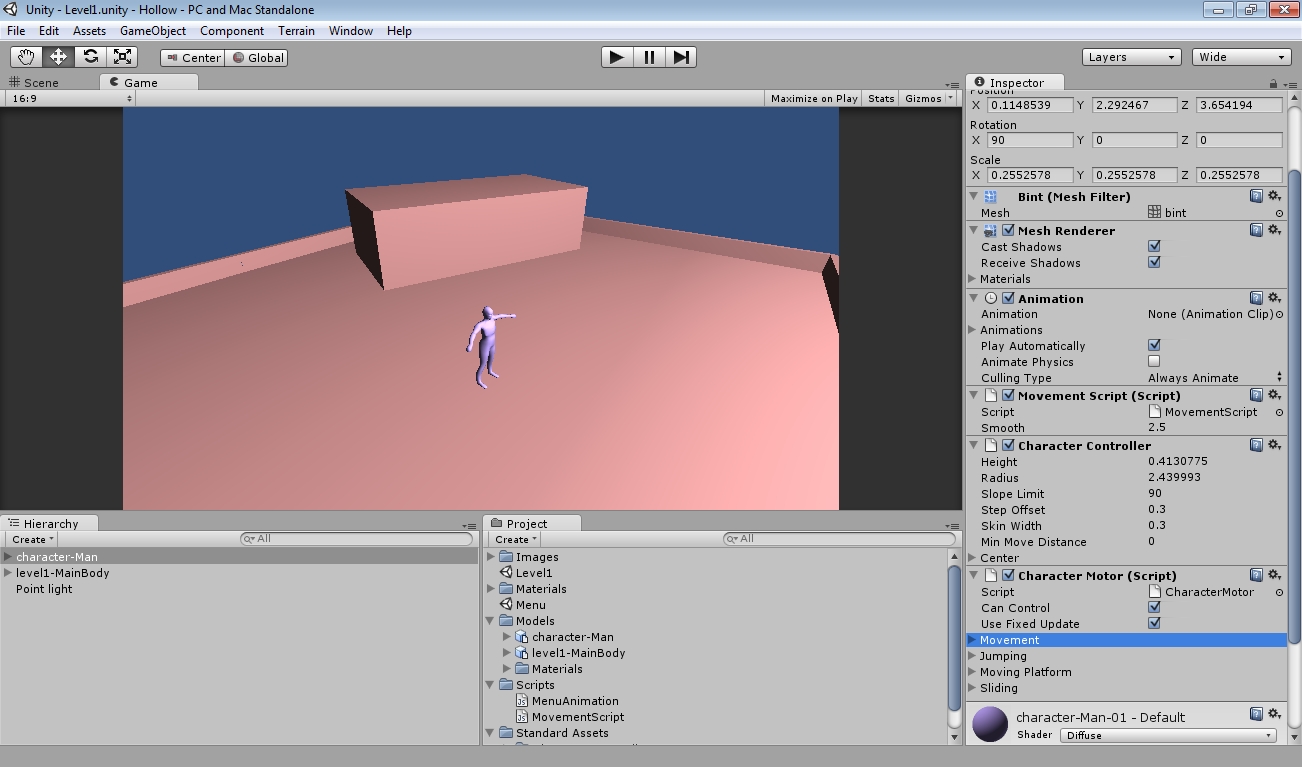
alt text

unity-project-screenshot.jpg (263.0 kB)
Comment
Add comment · Show 2
10 |3000 characters needed characters left characters exceeded
▼
  • Viewable by all users
  • Viewable by moderators
  • Viewable by moderators and the original poster
  • Advanced visibility
Viewable by all users
avatar image Loius · Oct 26, 2012 at 01:14 AM 0
Share

The CharacterController component has a $$anonymous$$ove function which accounts for slopes on its own. It's generally far easier to use that rather than attempt to replicate it with translations.

avatar image KiraHoshii · Oct 26, 2012 at 05:58 PM 0
Share

Please see above for some additional information and thank you for your response

0 Replies

· Add your reply
  • Sort: 

Your answer

Hint: You can notify a user about this post by typing @username

Up to 2 attachments (including images) can be used with a maximum of 524.3 kB each and 1.0 MB total.

Follow this Question

Answers Answers and Comments

10 People are following this question.

avatar image avatar image avatar image avatar image avatar image avatar image avatar image avatar image avatar image avatar image

Related Questions

A Character Controller with another shape. 0 Answers

colliding characters and meshes 0 Answers

Controller area of collision/contact 0 Answers

Not colliding with a box collider? 2 Answers

Character Controller giving false collisions 0 Answers


Enterprise
Social Q&A

Social
Subscribe on YouTube social-youtube Follow on LinkedIn social-linkedin Follow on Twitter social-twitter Follow on Facebook social-facebook Follow on Instagram social-instagram

Footer

  • Purchase
    • Products
    • Subscription
    • Asset Store
    • Unity Gear
    • Resellers
  • Education
    • Students
    • Educators
    • Certification
    • Learn
    • Center of Excellence
  • Download
    • Unity
    • Beta Program
  • Unity Labs
    • Labs
    • Publications
  • Resources
    • Learn platform
    • Community
    • Documentation
    • Unity QA
    • FAQ
    • Services Status
    • Connect
  • About Unity
    • About Us
    • Blog
    • Events
    • Careers
    • Contact
    • Press
    • Partners
    • Affiliates
    • Security
Copyright © 2020 Unity Technologies
  • Legal
  • Privacy Policy
  • Cookies
  • Do Not Sell My Personal Information
  • Cookies Settings
"Unity", Unity logos, and other Unity trademarks are trademarks or registered trademarks of Unity Technologies or its affiliates in the U.S. and elsewhere (more info here). Other names or brands are trademarks of their respective owners.
  • Anonymous
  • Sign in
  • Create
  • Ask a question
  • Spaces
  • Default
  • Help Room
  • META
  • Moderators
  • Explore
  • Topics
  • Questions
  • Users
  • Badges
