Wayback Machinekoobas.hobune.stream
May JUN Jul
Previous capture 13 Next capture
2021 2022 2023
1 capture
13 Jun 22 - 13 Jun 22
sparklines
Close Help
  • Products
  • Solutions
  • Made with Unity
  • Learning
  • Support & Services
  • Community
  • Asset Store
  • Get Unity

UNITY ACCOUNT

You need a Unity Account to shop in the Online and Asset Stores, participate in the Unity Community and manage your license portfolio. Login Create account
  • Blog
  • Forums
  • Answers
  • Evangelists
  • User Groups
  • Beta Program
  • Advisory Panel

Navigation

  • Home
  • Products
  • Solutions
  • Made with Unity
  • Learning
  • Support & Services
  • Community
    • Blog
    • Forums
    • Answers
    • Evangelists
    • User Groups
    • Beta Program
    • Advisory Panel

Unity account

You need a Unity Account to shop in the Online and Asset Stores, participate in the Unity Community and manage your license portfolio. Login Create account

Language

  • Chinese
  • Spanish
  • Japanese
  • Korean
  • Portuguese
  • Ask a question
  • Spaces
    • Default
    • Help Room
    • META
    • Moderators
    • Topics
    • Questions
    • Users
    • Badges
  • Home /
avatar image
0
Question by zmeinaz · Jul 04, 2012 at 05:17 AM · ioslightingmultiple objects

Why does the lighting on an object change when multiple objects are within camera view (iOS)?

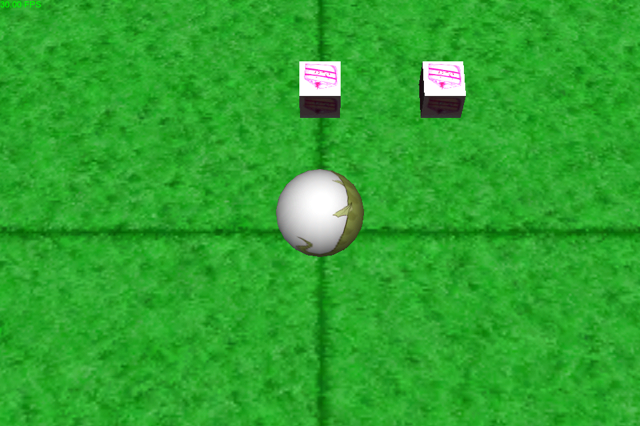
I cannot figure this out for the life of me. Whenever there is more than one object within the camera view, the lighting on the objects changes. When only one object is within camera view the lighting on the object appears as expected. This issue is not occurring in the editor and is only on the device. I have a total of 3 directional lights set up (one to illuminate the front and one for each side), but the issue still occurs if I only use one directional light. Any help is greatly appreciated.

Here are some screens:

Lighting on single object (expected): http://i.imgur.com/Zisis.png
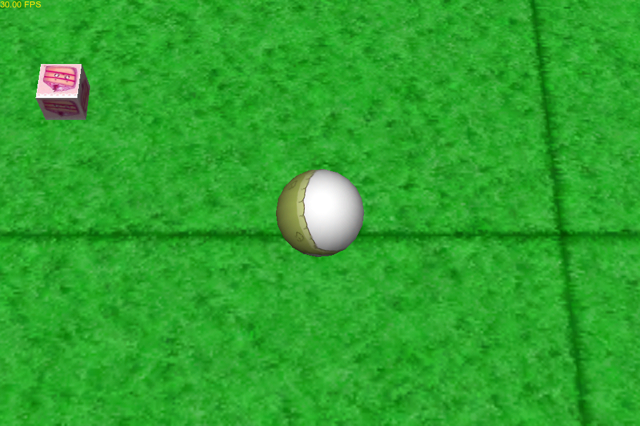
Lighting on multiple objects: http://i.imgur.com/BrnRX.png

EDIT 1: This appears to have something to do with the scale of the objects. In the above screenshots the scale is .5 for all axis. I changed the scale to 1 and the problem went away... Any ideas why the scale would make a difference?

Comment
Add comment
10 |3000 characters needed characters left characters exceeded
▼
  • Viewable by all users
  • Viewable by moderators
  • Viewable by moderators and the original poster
  • Advanced visibility
Viewable by all users

1 Reply

· Add your reply
  • Sort: 
avatar image
0

Answer by whydoidoit · Jul 04, 2012 at 06:32 AM

It's due to the quality settings for the default phone mode (which will be Fastest if you haven't changed it). The maximum number of point lights affecting an object is normally 1 in this mode for performance reasons.

Edit>Project Settings>Quality

Comment
Add comment · Show 3 · Share
10 |3000 characters needed characters left characters exceeded
▼
  • Viewable by all users
  • Viewable by moderators
  • Viewable by moderators and the original poster
  • Advanced visibility
Viewable by all users
avatar image zmeinaz · Jul 04, 2012 at 07:35 AM 0
Share

I bumped it up to 'Beautiful' (3 pixel lights) and I'm getting the same result. It appears that this only affects certain objects as my other objects do not display this behavior, only the little cake cubes. I've tried replacing the material with the one from my other working objects, but I get the same effect.

Also the cake cubes are instances of a prefab if that makes any difference...

avatar image whydoidoit · Jul 05, 2012 at 04:39 AM 0
Share

What shader are you using on those materials?

avatar image zmeinaz · Jul 05, 2012 at 01:49 PM 0
Share

Turns out that this is actually a bug in Unity.

See this thread: http://answers.unity3d.com/questions/278313/how-do-i-fix-directional-light-problem-with-multip.html

Your answer

Hint: You can notify a user about this post by typing @username

Up to 2 attachments (including images) can be used with a maximum of 524.3 kB each and 1.0 MB total.

Follow this Question

Answers Answers and Comments

5 People are following this question.

avatar image avatar image avatar image avatar image avatar image

Related Questions

Why are my lightmapped gameObjects flickering in my builds, but not in the Editor? [Videos Included],Why are my Game Objects flickering in my build, but not in the Unity Editor? [Videos Included] 0 Answers

multiplying transform.localScale causing lighting issues 1 Answer

Behavior of Realtime Shadows on iOS 1 Answer

Alternatives for using vertex colors + vertex lighting, IOS 1 Answer

How to create sun shafts for iOS? 2 Answers


Enterprise
Social Q&A

Social
Subscribe on YouTube social-youtube Follow on LinkedIn social-linkedin Follow on Twitter social-twitter Follow on Facebook social-facebook Follow on Instagram social-instagram

Footer

  • Purchase
    • Products
    • Subscription
    • Asset Store
    • Unity Gear
    • Resellers
  • Education
    • Students
    • Educators
    • Certification
    • Learn
    • Center of Excellence
  • Download
    • Unity
    • Beta Program
  • Unity Labs
    • Labs
    • Publications
  • Resources
    • Learn platform
    • Community
    • Documentation
    • Unity QA
    • FAQ
    • Services Status
    • Connect
  • About Unity
    • About Us
    • Blog
    • Events
    • Careers
    • Contact
    • Press
    • Partners
    • Affiliates
    • Security
Copyright © 2020 Unity Technologies
  • Legal
  • Privacy Policy
  • Cookies
  • Do Not Sell My Personal Information
  • Cookies Settings
"Unity", Unity logos, and other Unity trademarks are trademarks or registered trademarks of Unity Technologies or its affiliates in the U.S. and elsewhere (more info here). Other names or brands are trademarks of their respective owners.
  • Anonymous
  • Sign in
  • Create
  • Ask a question
  • Spaces
  • Default
  • Help Room
  • META
  • Moderators
  • Explore
  • Topics
  • Questions
  • Users
  • Badges