Wayback Machinekoobas.hobune.stream
May JUN Jul
Previous capture 12 Next capture
2021 2022 2023
1 capture
12 Jun 22 - 12 Jun 22
sparklines
Close Help
  • Products
  • Solutions
  • Made with Unity
  • Learning
  • Support & Services
  • Community
  • Asset Store
  • Get Unity

UNITY ACCOUNT

You need a Unity Account to shop in the Online and Asset Stores, participate in the Unity Community and manage your license portfolio. Login Create account
  • Blog
  • Forums
  • Answers
  • Evangelists
  • User Groups
  • Beta Program
  • Advisory Panel

Navigation

  • Home
  • Products
  • Solutions
  • Made with Unity
  • Learning
  • Support & Services
  • Community
    • Blog
    • Forums
    • Answers
    • Evangelists
    • User Groups
    • Beta Program
    • Advisory Panel

Unity account

You need a Unity Account to shop in the Online and Asset Stores, participate in the Unity Community and manage your license portfolio. Login Create account

Language

  • Chinese
  • Spanish
  • Japanese
  • Korean
  • Portuguese
  • Ask a question
  • Spaces
    • Default
    • Help Room
    • META
    • Moderators
    • Topics
    • Questions
    • Users
    • Badges
  • Home /
avatar image
0
Question by $$anonymous$$ · Oct 31, 2017 at 09:11 AM · movementmousefreeze

Mouse Look Freeze on Pause?

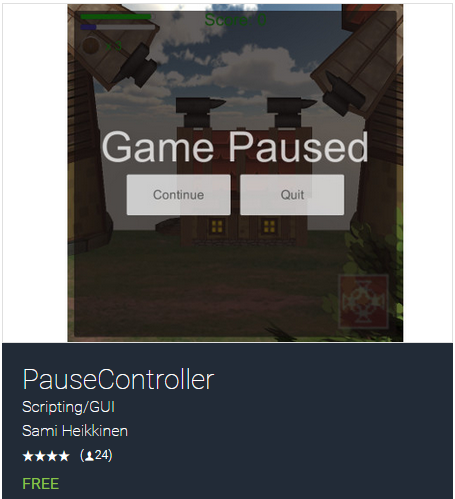
Hey can someone help me with freezing mouse look when I pause? I've looked at loads of posts but I don't understand them so ye. I'm using the original mouse look from the first person standard assets Unity comes with but I can't figure out how to freeze the looking around when selecting between 'continue' and 'quit'. I got a pause menu asset called Pause Controller (Picture included) and draged 'PauseController.prefab' into the Hierarchy and it works but I want the camera to stop looking around when selecting.

 using System;
 using UnityEngine;
 using UnityStandardAssets.CrossPlatformInput;
 
 namespace UnityStandardAssets.Characters.FirstPerson
 {
     [Serializable]
     public class MouseLook
     {
         public float XSensitivity = 2f;
         public float YSensitivity = 2f;
         public bool clampVerticalRotation = true;
         public float MinimumX = -90F;
         public float MaximumX = 90F;
         public bool smooth;
         public float smoothTime = 5f;
         public bool lockCursor = true;
 
 
         private Quaternion m_CharacterTargetRot;
         private Quaternion m_CameraTargetRot;
         private bool m_cursorIsLocked = true;
 
         public void Init(Transform character, Transform camera)
         {
             m_CharacterTargetRot = character.localRotation;
             m_CameraTargetRot = camera.localRotation;
         }
 
 
         public void LookRotation(Transform character, Transform camera)
         {
             float yRot = CrossPlatformInputManager.GetAxis("Mouse X") * XSensitivity;
             float xRot = CrossPlatformInputManager.GetAxis("Mouse Y") * YSensitivity;
 
             m_CharacterTargetRot *= Quaternion.Euler (0f, yRot, 0f);
             m_CameraTargetRot *= Quaternion.Euler (-xRot, 0f, 0f);
 
             if(clampVerticalRotation)
                 m_CameraTargetRot = ClampRotationAroundXAxis (m_CameraTargetRot);
 
             if(smooth)
             {
                 character.localRotation = Quaternion.Slerp (character.localRotation, m_CharacterTargetRot,
                     smoothTime * Time.deltaTime);
                 camera.localRotation = Quaternion.Slerp (camera.localRotation, m_CameraTargetRot,
                     smoothTime * Time.deltaTime);
             }
             else
             {
                 character.localRotation = m_CharacterTargetRot;
                 camera.localRotation = m_CameraTargetRot;
             }
 
             UpdateCursorLock();
         }
 
         public void SetCursorLock(bool value)
         {
             lockCursor = value;
             if(!lockCursor)
             {//we force unlock the cursor if the user disable the cursor locking helper
                 Cursor.lockState = CursorLockMode.None;
                 Cursor.visible = true;
             }
         }
 
         public void UpdateCursorLock()
         {
             //if the user set "lockCursor" we check & properly lock the cursos
             if (lockCursor)
                 InternalLockUpdate();
         }
 
         private void InternalLockUpdate()
         {
             if(Input.GetKeyUp(KeyCode.Escape))
             {
                 m_cursorIsLocked = false;
             }
             else if(Input.GetMouseButtonUp(0))
             {
                 m_cursorIsLocked = true;
             }
 
             if (m_cursorIsLocked)
             {
                 Cursor.lockState = CursorLockMode.Locked;
                 Cursor.visible = false;
             }
             else if (!m_cursorIsLocked)
             {
                 Cursor.lockState = CursorLockMode.None;
                 Cursor.visible = true;
             }
         }
 
         Quaternion ClampRotationAroundXAxis(Quaternion q)
         {
             q.x /= q.w;
             q.y /= q.w;
             q.z /= q.w;
             q.w = 1.0f;
 
             float angleX = 2.0f * Mathf.Rad2Deg * Mathf.Atan (q.x);
 
             angleX = Mathf.Clamp (angleX, MinimumX, MaximumX);
 
             q.x = Mathf.Tan (0.5f * Mathf.Deg2Rad * angleX);
 
             return q;
         }
 
     }
 }

][1]

Thanks in Regards :)

Comment
Add comment · Show 1
10 |3000 characters needed characters left characters exceeded
▼
  • Viewable by all users
  • Viewable by moderators
  • Viewable by moderators and the original poster
  • Advanced visibility
Viewable by all users
avatar image $$anonymous$$ · Oct 31, 2017 at 09:12 AM 0
Share

alt text

capture.png (224.5 kB)

1 Reply

· Add your reply
  • Sort: 
avatar image
0

Answer by AidanHorton · Oct 31, 2017 at 09:21 AM

Create a variable in the pause script which holds a reference to the 'mouselook' script, then when the game is paused, disable the script. Something like this:

 public MouseLook mouseLook;
 
 void OnPause() 
 {
     mouseLook.enabled = false;
 }
 
 void OnContinue()
 {
     mouseLook.enabled = true;
 }

Obviously the script will have its own pause and resume functions, so just stick the disable/enable methods in their respective functions and it should work fine.

Comment
Add comment · Share
10 |3000 characters needed characters left characters exceeded
▼
  • Viewable by all users
  • Viewable by moderators
  • Viewable by moderators and the original poster
  • Advanced visibility
Viewable by all users

Your answer

Hint: You can notify a user about this post by typing @username

Up to 2 attachments (including images) can be used with a maximum of 524.3 kB each and 1.0 MB total.

Follow this Question

Answers Answers and Comments

108 People are following this question.

avatar image avatar image avatar image avatar image avatar image avatar image avatar image avatar image avatar image avatar image avatar image avatar image avatar image avatar image avatar image avatar image avatar image avatar image avatar image avatar image avatar image avatar image avatar image avatar image avatar image avatar image avatar image avatar image avatar image avatar image avatar image avatar image avatar image avatar image avatar image avatar image avatar image avatar image avatar image avatar image avatar image avatar image avatar image avatar image avatar image avatar image avatar image avatar image avatar image avatar image avatar image avatar image avatar image avatar image avatar image avatar image avatar image avatar image avatar image avatar image avatar image avatar image avatar image avatar image avatar image avatar image avatar image avatar image avatar image avatar image avatar image avatar image avatar image avatar image avatar image avatar image avatar image avatar image avatar image avatar image avatar image avatar image avatar image avatar image avatar image avatar image avatar image avatar image avatar image avatar image avatar image avatar image avatar image avatar image avatar image avatar image avatar image avatar image avatar image avatar image avatar image avatar image avatar image avatar image avatar image avatar image avatar image avatar image

Related Questions

Detect mouse movement 1 Answer

How to select one prefab from more ? 0 Answers

Having a first person player look at the mouse on the y axis 1 Answer

Problem with Alt + Middle Click Drag for Camera (Windows) 3 Answers

Invert movement in editor? 0 Answers


Enterprise
Social Q&A

Social
Subscribe on YouTube social-youtube Follow on LinkedIn social-linkedin Follow on Twitter social-twitter Follow on Facebook social-facebook Follow on Instagram social-instagram

Footer

  • Purchase
    • Products
    • Subscription
    • Asset Store
    • Unity Gear
    • Resellers
  • Education
    • Students
    • Educators
    • Certification
    • Learn
    • Center of Excellence
  • Download
    • Unity
    • Beta Program
  • Unity Labs
    • Labs
    • Publications
  • Resources
    • Learn platform
    • Community
    • Documentation
    • Unity QA
    • FAQ
    • Services Status
    • Connect
  • About Unity
    • About Us
    • Blog
    • Events
    • Careers
    • Contact
    • Press
    • Partners
    • Affiliates
    • Security
Copyright © 2020 Unity Technologies
  • Legal
  • Privacy Policy
  • Cookies
  • Do Not Sell My Personal Information
  • Cookies Settings
"Unity", Unity logos, and other Unity trademarks are trademarks or registered trademarks of Unity Technologies or its affiliates in the U.S. and elsewhere (more info here). Other names or brands are trademarks of their respective owners.
  • Anonymous
  • Sign in
  • Create
  • Ask a question
  • Spaces
  • Default
  • Help Room
  • META
  • Moderators
  • Explore
  • Topics
  • Questions
  • Users
  • Badges