
Wayback Machinekoobas.hobune.stream
May JUN Jul
Previous capture 13 Next capture
2021 2022 2023
1 capture
13 Jun 22 - 13 Jun 22
sparklines
Close Help
  • Products
  • Solutions
  • Made with Unity
  • Learning
  • Support & Services
  • Community
  • Asset Store
  • Get Unity

UNITY ACCOUNT

You need a Unity Account to shop in the Online and Asset Stores, participate in the Unity Community and manage your license portfolio. Login Create account
  • Blog
  • Forums
  • Answers
  • Evangelists
  • User Groups
  • Beta Program
  • Advisory Panel

Navigation

  • Home
  • Products
  • Solutions
  • Made with Unity
  • Learning
  • Support & Services
  • Community
    • Blog
    • Forums
    • Answers
    • Evangelists
    • User Groups
    • Beta Program
    • Advisory Panel

Unity account

You need a Unity Account to shop in the Online and Asset Stores, participate in the Unity Community and manage your license portfolio. Login Create account

Language

  • Chinese
  • Spanish
  • Japanese
  • Korean
  • Portuguese
  • Ask a question
  • Spaces
    • Default
    • Help Room
    • META
    • Moderators
    • Topics
    • Questions
    • Users
    • Badges
  • Home /
avatar image
1
Question by Vire · Jul 06, 2012 at 06:59 AM · settingsantialias

Weak Anti-Aliasing at 8x - Why?

Hey guys,

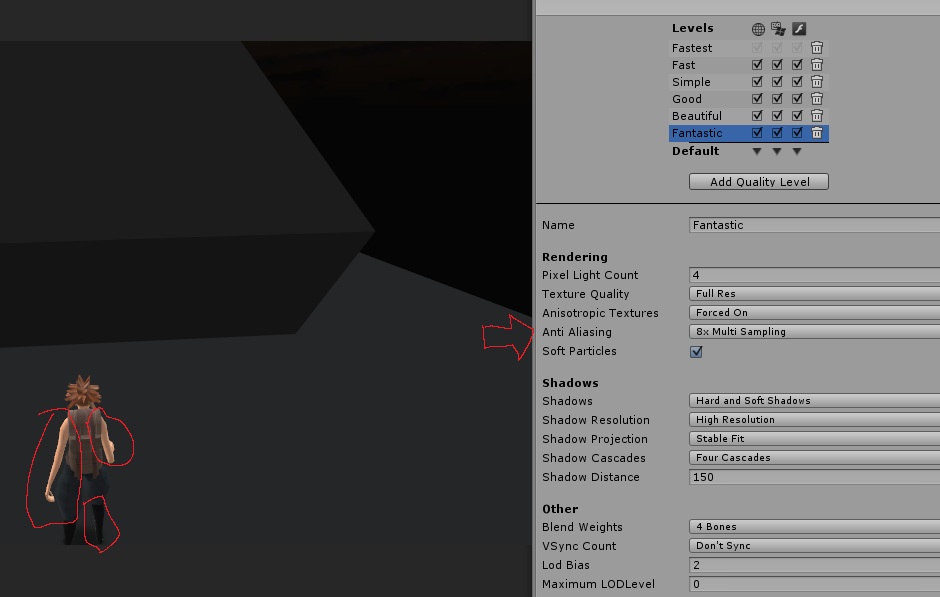
Quick question - why is the anti-aliasing so bad at 8x? Am I missing a vital setting somewhere?

Here is an image - and it looks significantly worse in-game (definitely doesn't help that things are moving!) of the jagged edges - gets so much worse once lights are in there "helping" things out! I've always wondered this but never taken the time to ask.

Ok posting image anyway, at least then you can see my settings, but it's auto-resized small enough that you may not notice the horrendous AA in this image.
alt text

unity_badaa.jpg (76.6 kB)
Comment
Add comment · Show 12
10 |3000 characters needed characters left characters exceeded
▼
  • Viewable by all users
  • Viewable by moderators
  • Viewable by moderators and the original poster
  • Advanced visibility
Viewable by all users
avatar image whydoidoit · Jul 06, 2012 at 07:00 AM 0
Share

Are you actually using the Fantastic setting on the built platform? I.e. it is the default setting for that platform or you specifically select it?

avatar image asafsitner · Jul 06, 2012 at 07:07 AM 0
Share

Are you in Forward Lighting of Deferred Lighting modes? The 'native' AA works only in Forward Lighting mode. When using Deferred Lighting you'll have to use the AA as post process image-effect.

Also take note that AA doesn't work when the edge is in front of a shadow. e.g. the character's leg, where intersecting the shadow it casts, will appear jagged while the rest of the leg will appear smooth.

avatar image Vire · Jul 06, 2012 at 09:52 AM 0
Share

asafsitner - I am in forward lighting, when switching between AA modes I can see the effect, but at 8x it is still very jagged, at the rate it increases I'd need literally 32-64x AA just to get a smooth edge! I also don't have shadows, what you see under him is a shadow blob projector parented under him that only affects the ground.

whydoidoit - I am using fantastic on the built, and it is the default, specifically selecting any though has no difference than if they are the default for me

avatar image asafsitner · Jul 06, 2012 at 11:46 AM 0
Share

Interesting. Looking at the cubes's edges they appear to be smooth as expected.

Perhaps it's a problem with your model?

avatar image Vire · Jul 06, 2012 at 11:47 AM 0
Share

Hi there, the cubes are in fact the same - they are simply blending in better due to lower contrast with the background, whereas the characters arms are blatantly light and the environment is dark. It's also very hard to see in that image due to scaling.

Show more comments

0 Replies

· Add your reply
  • Sort: 

Your answer

Hint: You can notify a user about this post by typing @username

Up to 2 attachments (including images) can be used with a maximum of 524.3 kB each and 1.0 MB total.

Follow this Question

Answers Answers and Comments

8 People are following this question.

avatar image avatar image avatar image avatar image avatar image avatar image avatar image avatar image

Related Questions

AirPlay not antialiasing in dual display 0 Answers

FBX importer settings 2 Answers

Trouble with animation wrap mode-animation plays randomly 1 Answer

How to add skybox to scene Unity 3.5.5 2 Answers

Halo animations will not display 0 Answers


Enterprise
Social Q&A

Social
Subscribe on YouTube social-youtube Follow on LinkedIn social-linkedin Follow on Twitter social-twitter Follow on Facebook social-facebook Follow on Instagram social-instagram

Footer

  • Purchase
    • Products
    • Subscription
    • Asset Store
    • Unity Gear
    • Resellers
  • Education
    • Students
    • Educators
    • Certification
    • Learn
    • Center of Excellence
  • Download
    • Unity
    • Beta Program
  • Unity Labs
    • Labs
    • Publications
  • Resources
    • Learn platform
    • Community
    • Documentation
    • Unity QA
    • FAQ
    • Services Status
    • Connect
  • About Unity
    • About Us
    • Blog
    • Events
    • Careers
    • Contact
    • Press
    • Partners
    • Affiliates
    • Security
Copyright © 2020 Unity Technologies
  • Legal
  • Privacy Policy
  • Cookies
  • Do Not Sell My Personal Information
  • Cookies Settings
"Unity", Unity logos, and other Unity trademarks are trademarks or registered trademarks of Unity Technologies or its affiliates in the U.S. and elsewhere (more info here). Other names or brands are trademarks of their respective owners.
  • Anonymous
  • Sign in
  • Create
  • Ask a question
  • Spaces
  • Default
  • Help Room
  • META
  • Moderators
  • Explore
  • Topics
  • Questions
  • Users
  • Badges
