
Wayback Machinekoobas.hobune.stream
May JUN Jul
Previous capture 12 Next capture
2021 2022 2023
1 capture
12 Jun 22 - 12 Jun 22
sparklines
Close Help
  • Products
  • Solutions
  • Made with Unity
  • Learning
  • Support & Services
  • Community
  • Asset Store
  • Get Unity

UNITY ACCOUNT

You need a Unity Account to shop in the Online and Asset Stores, participate in the Unity Community and manage your license portfolio. Login Create account
  • Blog
  • Forums
  • Answers
  • Evangelists
  • User Groups
  • Beta Program
  • Advisory Panel

Navigation

  • Home
  • Products
  • Solutions
  • Made with Unity
  • Learning
  • Support & Services
  • Community
    • Blog
    • Forums
    • Answers
    • Evangelists
    • User Groups
    • Beta Program
    • Advisory Panel

Unity account

You need a Unity Account to shop in the Online and Asset Stores, participate in the Unity Community and manage your license portfolio. Login Create account

Language

  • Chinese
  • Spanish
  • Japanese
  • Korean
  • Portuguese
  • Ask a question
  • Spaces
    • Default
    • Help Room
    • META
    • Moderators
    • Topics
    • Questions
    • Users
    • Badges
  • Home /
This question was closed Jul 26, 2017 at 07:05 AM by Zytronic_Touch.
avatar image
0
Question by Zytronic_Touch · Jul 26, 2017 at 02:14 PM · multitouchmultiple-monitorsmultiple cameras

Multi-Display - Multi Touch Screen Issues

I am currently working on a project which is using three touch sensors with two displays. I am having an issue with mapping the touches to the correct display.

This diagram shows the desired mapping:alt text
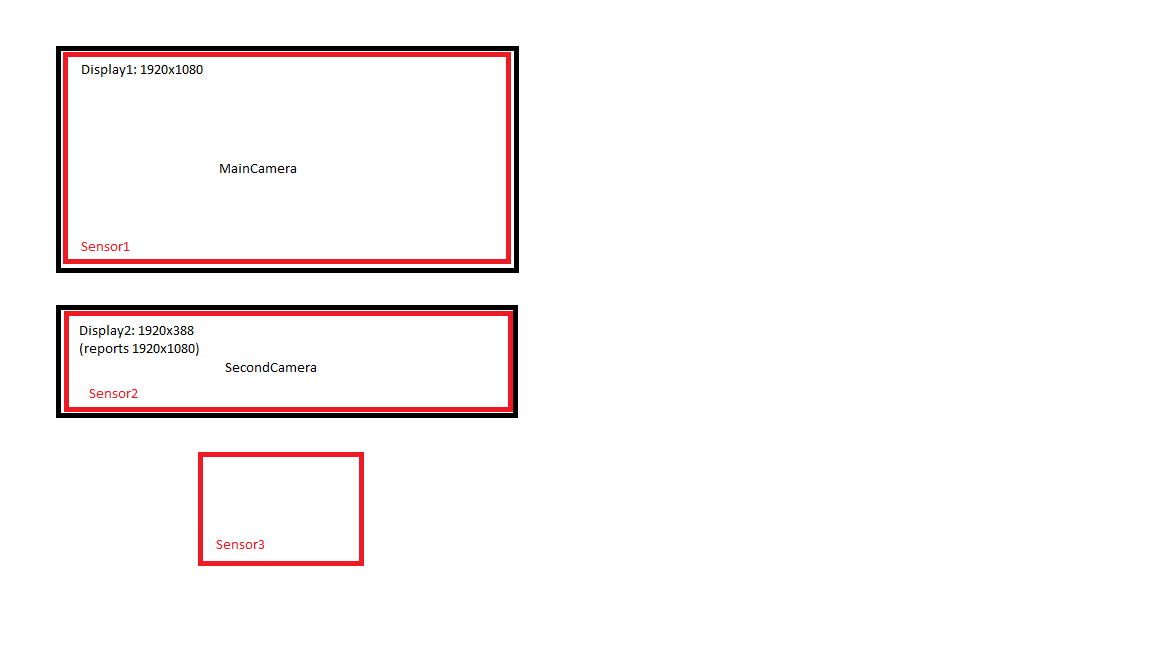
So to do this I am using this:

 void Update () {
         Debug.Log(Input.touchCount);
         for (int i = 0; i < Input.touches.Length; i++)
         {
             Touch touch = Input.GetTouch(i);
             if (touch.phase == TouchPhase.Began)
             {
                 Ray ray = Camera.main.ScreenPointToRay(touch.position);
                 Debug.DrawRay(ray.origin, ray.direction * 10, Color.yellow);
             }
         }
     }

The issue is that every touch to any sensor is showing on Display1. I believe this is down to: Camera.main.ScreenPointToRay(touch.position);

But I cant find a way to detect which screen is being touched to use the correct camera. Is there a way around this issue?

sensorlayout.png (10.9 kB)
Comment
Add comment · Show 4
10 |3000 characters needed characters left characters exceeded
▼
  • Viewable by all users
  • Viewable by moderators
  • Viewable by moderators and the original poster
  • Advanced visibility
Viewable by all users
avatar image joshstiemsma · Aug 28, 2018 at 07:55 PM 0
Share

hey did you ever figure this out? I have the same issue

avatar image Zytronic_Touch joshstiemsma · Aug 29, 2018 at 06:52 AM 0
Share

It was some time ago I resolved this but I believe this script may be of some help to you.

 using System;
 using System.Reflection;
 #if (UNITY_EDITOR)
 using UnityEditor;
 #endif
 using UnityEngine;
 
 public static class DebugScreenPosition
 {
 #if (UNITY_EDITOR)
     public static Vector3 DebugRelative$$anonymous$$ouseAt()
     {
         var mouseOverWindow = EditorWindow.mouseOverWindow;
         System.Reflection.Assembly assembly = typeof(UnityEditor.EditorWindow).Assembly;
         Type type = assembly.GetType("UnityEditor.GameView");
 
         int displayID = 0;
         if (type.IsInstanceOfType(mouseOverWindow))
         {
             var displayField = type.GetField("m_TargetDisplay", BindingFlags.NonPublic | BindingFlags.Instance);
             displayID = (int)displayField.GetValue(mouseOverWindow);
         }
 
         var pos = Input.mousePosition;
         pos[2] = displayID;
         return pos;
     }
     public static Vector3 Relative$$anonymous$$ouseAt()
     {
         var mouseOverWindow = EditorWindow.mouseOverWindow;
         System.Reflection.Assembly assembly = typeof(UnityEditor.EditorWindow).Assembly;
         Type type = assembly.GetType("UnityEditor.GameView");
 
         int displayID = 0;
         if (type.IsInstanceOfType(mouseOverWindow))
         {
             var displayField = type.GetField("m_TargetDisplay", BindingFlags.NonPublic | BindingFlags.Instance);
             displayID = (int)displayField.GetValue(mouseOverWindow);
         }
 
         var pos = Input.mousePosition;
         pos[2] = displayID;
         return pos;
     }
 #endif
 
     public static Camera GetCameraFromDisplayIndex(int ID)
     {
         foreach (Camera camera in Camera.allCameras)
         {
             if (camera.targetDisplay == ID)
                 return camera;
         }
         return null;
     }
 }

avatar image joshstiemsma Zytronic_Touch · Aug 29, 2018 at 12:25 PM 0
Share

oh wow thank you, this is super freakin helpful!

Show more comments

0 Replies

  • Sort: 

Follow this Question

Answers Answers and Comments

69 People are following this question.

avatar image avatar image avatar image avatar image avatar image avatar image avatar image avatar image avatar image avatar image avatar image avatar image avatar image avatar image avatar image avatar image avatar image avatar image avatar image avatar image avatar image avatar image avatar image avatar image avatar image avatar image avatar image avatar image avatar image avatar image avatar image avatar image avatar image avatar image avatar image avatar image avatar image avatar image avatar image avatar image avatar image avatar image avatar image avatar image avatar image avatar image avatar image avatar image avatar image avatar image avatar image avatar image avatar image avatar image avatar image avatar image avatar image avatar image avatar image avatar image avatar image avatar image avatar image avatar image avatar image avatar image avatar image avatar image avatar image

Related Questions

(2) Cameras, (2) Displays, all UI events seem to go to one camera 1 Answer

Issue with Multi Touch Screens. 4 Answers

Multiple Display UI Issues 1 Answer

Main display hijacked after enabling Render Pipeline 1 Answer

Crashing in build version NOT in Editor 0 Answers


Enterprise
Social Q&A

Social
Subscribe on YouTube social-youtube Follow on LinkedIn social-linkedin Follow on Twitter social-twitter Follow on Facebook social-facebook Follow on Instagram social-instagram

Footer

  • Purchase
    • Products
    • Subscription
    • Asset Store
    • Unity Gear
    • Resellers
  • Education
    • Students
    • Educators
    • Certification
    • Learn
    • Center of Excellence
  • Download
    • Unity
    • Beta Program
  • Unity Labs
    • Labs
    • Publications
  • Resources
    • Learn platform
    • Community
    • Documentation
    • Unity QA
    • FAQ
    • Services Status
    • Connect
  • About Unity
    • About Us
    • Blog
    • Events
    • Careers
    • Contact
    • Press
    • Partners
    • Affiliates
    • Security
Copyright © 2020 Unity Technologies
  • Legal
  • Privacy Policy
  • Cookies
  • Do Not Sell My Personal Information
  • Cookies Settings
"Unity", Unity logos, and other Unity trademarks are trademarks or registered trademarks of Unity Technologies or its affiliates in the U.S. and elsewhere (more info here). Other names or brands are trademarks of their respective owners.
  • Anonymous
  • Sign in
  • Create
  • Ask a question
  • Spaces
  • Default
  • Help Room
  • META
  • Moderators
  • Explore
  • Topics
  • Questions
  • Users
  • Badges
