
Wayback Machinekoobas.hobune.stream
May JUN Jul
Previous capture 12 Next capture
2021 2022 2023
1 capture
12 Jun 22 - 12 Jun 22
sparklines
Close Help
  • Products
  • Solutions
  • Made with Unity
  • Learning
  • Support & Services
  • Community
  • Asset Store
  • Get Unity

UNITY ACCOUNT

You need a Unity Account to shop in the Online and Asset Stores, participate in the Unity Community and manage your license portfolio. Login Create account
  • Blog
  • Forums
  • Answers
  • Evangelists
  • User Groups
  • Beta Program
  • Advisory Panel

Navigation

  • Home
  • Products
  • Solutions
  • Made with Unity
  • Learning
  • Support & Services
  • Community
    • Blog
    • Forums
    • Answers
    • Evangelists
    • User Groups
    • Beta Program
    • Advisory Panel

Unity account

You need a Unity Account to shop in the Online and Asset Stores, participate in the Unity Community and manage your license portfolio. Login Create account

Language

  • Chinese
  • Spanish
  • Japanese
  • Korean
  • Portuguese
  • Ask a question
  • Spaces
    • Default
    • Help Room
    • META
    • Moderators
    • Topics
    • Questions
    • Users
    • Badges
  • Home /
  • Help Room /
avatar image
3
Question by Arishtanemi1998 · Oct 04, 2015 at 07:42 AM · lightmappingmeshesbakelighting bug

Lightmapping stuck at "12/16 Bake Indirect 1 jobs"

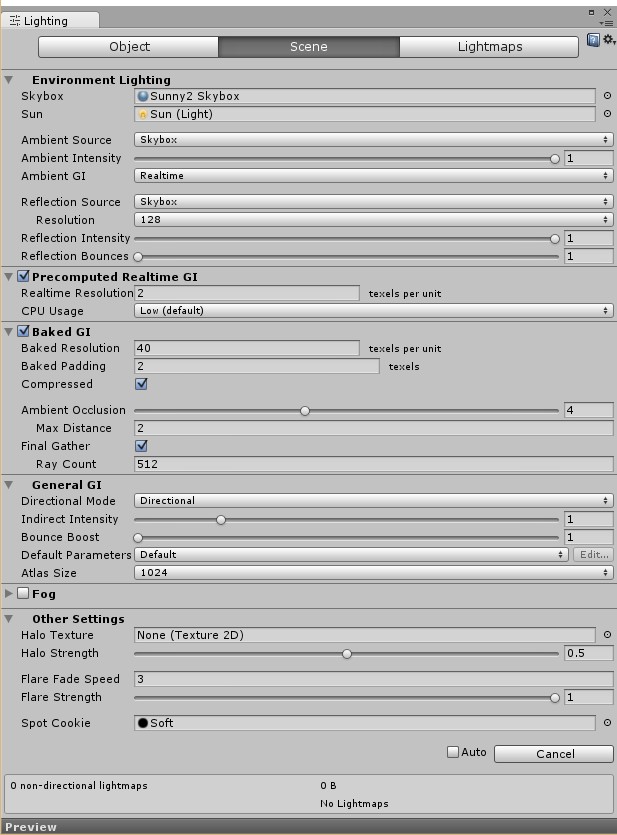
hey i have a big map in unity with a lot of meshes(all set to static and lightmapping static)alt text and lights(all set to bake mode).so i try to build a light map with the settings as in the pic below,but the editor gets stuck at "12/16 Bake Indirect 1 jobs" without any error message in the console.this has been this way for two hours+.please help!
screen.jpg (120.2 kB)
Comment
Add comment
10 |3000 characters needed characters left characters exceeded
▼
  • Viewable by all users
  • Viewable by moderators
  • Viewable by moderators and the original poster
  • Advanced visibility
Viewable by all users

14 Replies

· Add your reply
  • Sort: 
avatar image
1

Answer by Kristian Bonne · Oct 24, 2015 at 09:35 AM

was this issue ever solved ? Because i have exactly the same issue on several machines (both windows and mac) and in the same project/scene where the light baking gets stuck on "12/16 Baking Indirect". However, one machine that I work on occasionally, can bake the lighting. It's not a more powerfull machine so i have no idea what should make it work on that exact machine.

geometry is set to static, lights are set to bake, and i've attached an image of my bake settings:
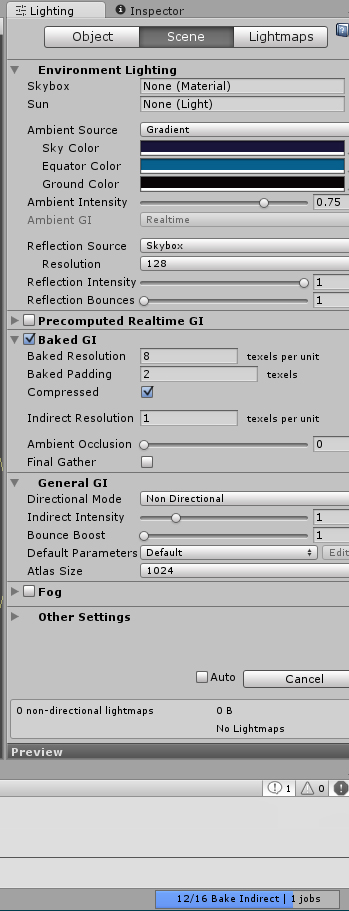
alt text


bakeissue.jpg (151.1 kB)
Comment
Add comment · Show 1 · Share
10 |3000 characters needed characters left characters exceeded
▼
  • Viewable by all users
  • Viewable by moderators
  • Viewable by moderators and the original poster
  • Advanced visibility
Viewable by all users
avatar image Arishtanemi1998 · Oct 29, 2015 at 03:56 PM 0
Share

no buddy i seem to be having the same error at bake indirect.the lightmapping was good till 5.1 but when i updated to unity 5.2 the editor simple crashes or shuts down the pc during creating bake syatems!

avatar image
1

Answer by Bendik Stang · Feb 14, 2016 at 12:48 PM

I'm having the same problem. It seems to be totally random what scenes gets stuck on 12/16 Bake indirect. The processer is only running at 17% and it|s been at it for 48 hours now.

This is a scene that should bake normally in 15 - 20 minutes.

I have optimized the scene, so it's not that it's too big resolution or anything. This is a bug. I'm using the same bake settings on some 75 other scenes in the game. Most bake fine and fast. Some gets stuck.

I'm baking AO as this is mostly why we are baking in the first place. Else I have pretty much the same settings as Kristian above.

Does anyone know of a workaround?

We are stressing to get the game ready for XboxOne cert so any help here would be deeply appreciated.

Comment
Add comment · Share
10 |3000 characters needed characters left characters exceeded
▼
  • Viewable by all users
  • Viewable by moderators
  • Viewable by moderators and the original poster
  • Advanced visibility
Viewable by all users
avatar image
1

Answer by Storm_The_Gates · Feb 24, 2016 at 04:46 PM

I am also experiencing this issue on 5.3.2f1. It's quite a large scene, and I have manually created the UV channels in MODO. It was sitting on "12/16 Bake Indirect 1 jobs" for three hours. I'm still going through tweaking various settings to see if it makes any difference.

Comment
Add comment · Share
10 |3000 characters needed characters left characters exceeded
▼
  • Viewable by all users
  • Viewable by moderators
  • Viewable by moderators and the original poster
  • Advanced visibility
Viewable by all users
avatar image
1

Answer by NicoLocke · Mar 04, 2016 at 05:20 PM

Ran into this issue the other day, all started when I swapped a model for a model with an increased amount of meshes. Prior to this scene was baking perfectly. I ended up using the Simple Mesh Combiner asset from the Asset Store, only had to combine a few of my meshes in the scene and now I can successfully bake the scene.

Comment
Add comment · Show 1 · Share
10 |3000 characters needed characters left characters exceeded
▼
  • Viewable by all users
  • Viewable by moderators
  • Viewable by moderators and the original poster
  • Advanced visibility
Viewable by all users
avatar image NicoLocke · Mar 04, 2016 at 05:21 PM 0
Share

Will combine meshes per material, so if you have lots of meshes in your scene that are using the same material then I believe this will help no end.

avatar image
1

Answer by GBCoder · Apr 07, 2016 at 01:15 PM

I began having this same problem when I upgraded from 8 Gigs of RAM to 32. AFAIK no other changes were made. To the scene or the system. I'm using 5.3.3f1

Comment
Add comment · Share
10 |3000 characters needed characters left characters exceeded
▼
  • Viewable by all users
  • Viewable by moderators
  • Viewable by moderators and the original poster
  • Advanced visibility
Viewable by all users
  • 1
  • 2
  • 3
  • ›

Your answer

Hint: You can notify a user about this post by typing @username

Up to 2 attachments (including images) can be used with a maximum of 524.3 kB each and 1.0 MB total.

Follow this Question

Answers Answers and Comments

43 People are following this question.

avatar image avatar image avatar image avatar image avatar image avatar image avatar image avatar image avatar image avatar image avatar image avatar image avatar image avatar image avatar image avatar image avatar image avatar image avatar image avatar image avatar image avatar image avatar image avatar image avatar image avatar image avatar image avatar image avatar image avatar image avatar image avatar image avatar image avatar image avatar image avatar image avatar image avatar image avatar image avatar image avatar image avatar image avatar image

Related Questions

Baked shadow artifacts [images provided] 1 Answer

Lightmapping Bounce Artifacts (Visible Seam when using 3d tiles) 0 Answers

Unity5.3.1烘焙卡着不会动了怎么办? 1 Answer

URP all Objects suddenly invisible on Scene Change - The object of type 'Material' has been destroyed but you are still trying to access it 0 Answers

How can I get lightmaps to work with assetbundles on android and Ios ? 0 Answers


Enterprise
Social Q&A

Social
Subscribe on YouTube social-youtube Follow on LinkedIn social-linkedin Follow on Twitter social-twitter Follow on Facebook social-facebook Follow on Instagram social-instagram

Footer

  • Purchase
    • Products
    • Subscription
    • Asset Store
    • Unity Gear
    • Resellers
  • Education
    • Students
    • Educators
    • Certification
    • Learn
    • Center of Excellence
  • Download
    • Unity
    • Beta Program
  • Unity Labs
    • Labs
    • Publications
  • Resources
    • Learn platform
    • Community
    • Documentation
    • Unity QA
    • FAQ
    • Services Status
    • Connect
  • About Unity
    • About Us
    • Blog
    • Events
    • Careers
    • Contact
    • Press
    • Partners
    • Affiliates
    • Security
Copyright © 2020 Unity Technologies
  • Legal
  • Privacy Policy
  • Cookies
  • Do Not Sell My Personal Information
  • Cookies Settings
"Unity", Unity logos, and other Unity trademarks are trademarks or registered trademarks of Unity Technologies or its affiliates in the U.S. and elsewhere (more info here). Other names or brands are trademarks of their respective owners.
  • Anonymous
  • Sign in
  • Create
  • Ask a question
  • Spaces
  • Default
  • Help Room
  • META
  • Moderators
  • Explore
  • Topics
  • Questions
  • Users
  • Badges
