 koobas.hobune.stream


WWW.movie doesn't work
I can't seem to download the movie and play the movie, I keep getting this red box then it doesn't download. The WWW.error is not reporting any problems but it seems to refuse to download. I even have a while loop that only goes through once and I believe it shouldn't be.
Here is my code for it
 IEnumerator GetMovie(string Path)
     {
         WWW www = new WWW("file:///"+Path);
         MovieTexture DownloadedMovie;
         DownloadedMovie = www.movie;
         while(!www.isDone)
         {
             yield return new WaitForFixedUpdate();
             Debug.Log("Waiting");
         }
         yield return www;

         if(www.error == null)
         {
             isMovie = true;
             isMovieSelection = false;
             TempMovie = DownloadedMovie;
             TempClip = TempMovie.audioClip;

         }
         else
         {
             Debug.Log(www.error);
         }


     }
And this is the picture of the result.
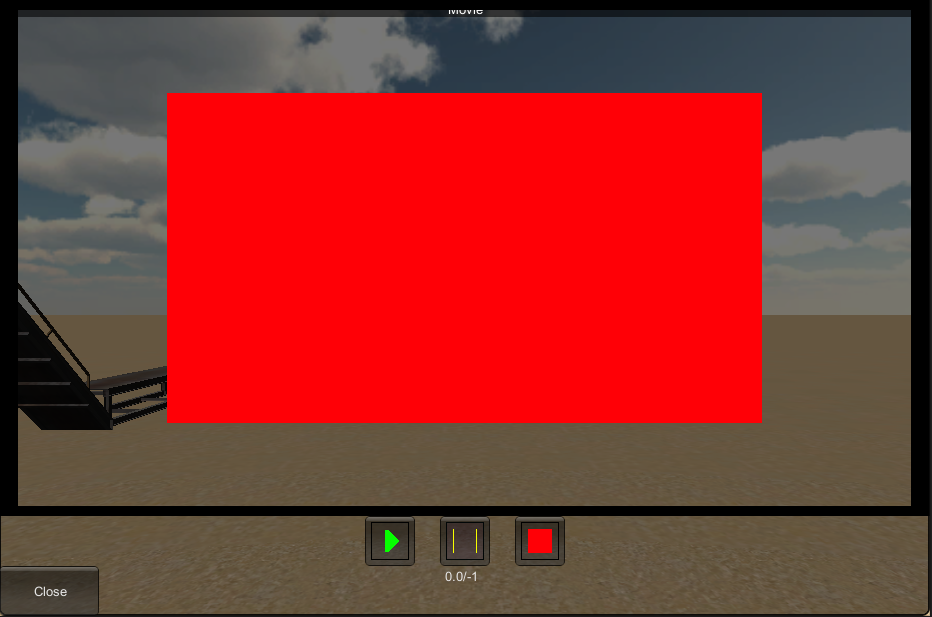
So if anyone has any suggestions that would be great, I did look at the www.movie script reference and I believe it should work the way I have it for this code

I would like to also note that the video is in ogg format using the "vlc" player. Does anyone else have a problem with this?

Where are you assigning the $$anonymous$$ovieTexture to the renderer in-scene? We'll need to see that code and where you're calling Play() before we can help you.
This is my code to start video
void Start$$anonymous$$ovie(int WindowID) {
     if(duration >= Temp$$anonymous$$ovie.duration)
     {
         Temp$$anonymous$$ovie.Stop();
         isDuration = false;
         duration = 0;
     }
     if(isDuration)
     {
         duration += Time.deltaTime/2;
     }
     if(GUI.Button(new Rect(0,Screen.height-50,100,50),"Close"))
     {
         is$$anonymous$$ovie = false;
         is$$anonymous$$ovieSelection = true;

         isDuration = false;
         Temp$$anonymous$$ovie.Stop();
         TempStart.Stop();
         //TempStart.clip = null;
         //Temp$$anonymous$$ovie = null;
         duration = 0;
     }
     if(GUI.Button(new Rect($$anonymous$$ovieWindow.width/2-100,Screen.height-100,50,50),Play))
     {
         isDuration = true;
         TempStart.clip = Temp$$anonymous$$ovie.audioClip;
         Temp$$anonymous$$ovie.Play();
         TempStart.Play();
     }
     if(GUI.Button(new Rect($$anonymous$$ovieWindow.width/2-25,Screen.height-100,50,50),Pause))
     {
         isDuration = false;
         TempStart.clip = Temp$$anonymous$$ovie.audioClip;
         Temp$$anonymous$$ovie.Pause();
         TempStart.Pause();
     }
     if(GUI.Button(new Rect($$anonymous$$ovieWindow.width/2+50,Screen.height-100,50,50),Stop))
     {
         isDuration = false;
         duration = 0;
         TempStart.clip = Temp$$anonymous$$ovie.audioClip;
         Temp$$anonymous$$ovie.Stop();
         TempStart.Stop();
     }
     string DuraStr = string.Format("{0:0.0}",duration);
     //GUI.Label(new Rect(0,0,$$anonymous$$ovieWindow.width,$$anonymous$$ovieWindow.height),Temp$$anonymous$$ovie);
     GUI.DrawTexture(new Rect(0,0,$$anonymous$$ovieWindow.width,$$anonymous$$ovieWindow.height-100),Temp$$anonymous$$ovie);
     GUI.Label(new Rect($$anonymous$$ovieWindow.width/2-20,$$anonymous$$ovieWindow.height-50,60,50),DuraStr+"/"+Temp$$anonymous$$ovie.duration.ToString());
 }
The Problem isn't in this function though, the problem is that www.movie isn't downloading the video requested. To note that its finding file on local drive and www doesn't give any errors to the file not being correct

Are you sure the path string states ".ogv" and not ".ogg"? It could also depend on encryption. I recommend converting a video format to .ogv here: http://video.online-convert.com/convert-to-ogg - It has never failed me when importing to Unity. I hope this helps. :)
its not really the importing the problem, my intentions is to load the video off the harddrive into my program. I have tried the ogv, ogg and I believe now the video does load but all I get is a black screen and duration is -1
unity is only letting me watch video if its on a website and not on the computer itself. Are you experiencing this issue. Its not on the editor this is going to be a add and delete in the build.
I'm updating that this was a bug and was fixed a while back. Sorry about the delay. I'll mark your answer as correct for having the only answer on here.



