 koobas.hobune.stream


Detecting possible movements in a 2 range of cells in a turn based game
Hi, I’m trying to implement a turn based game where player could move in a maximum of two steps in every turn.
I have a small board for my first test that you can see in the next image. Every cell has an ID and every time the player wants to make a move, you can see the possible movements but just in 4 directions, for example:
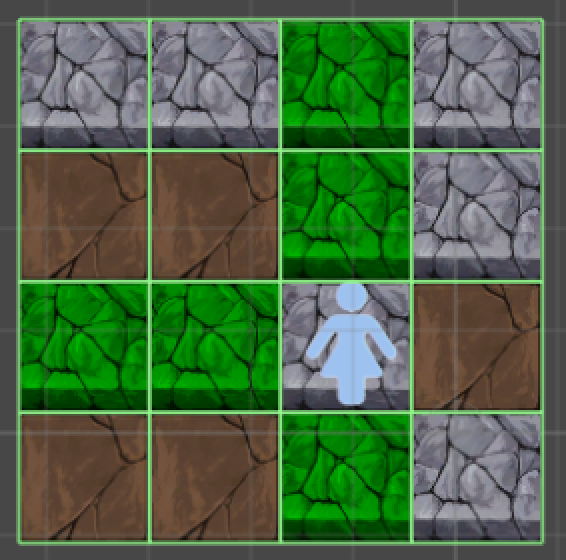
You can see that possible paths are painted green with a maximum of 2 cells for every path.
The thing is that when you see it closely, you can note that would also be possible to make more movements in a range of 2 cells by turn as you can see here:
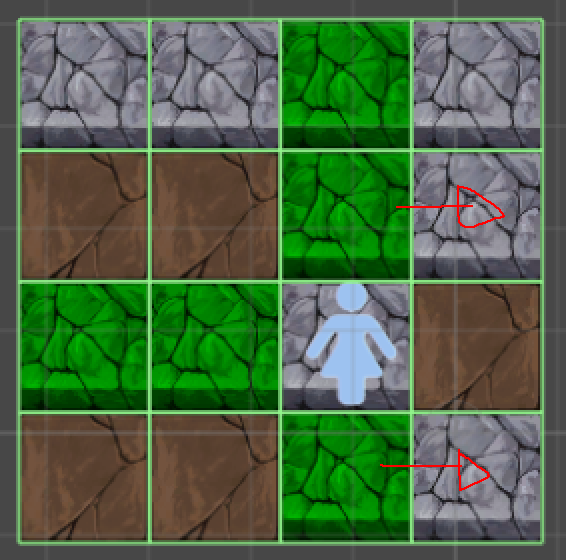
I’m using an approach with an ID based to detect the possible ways now, so my current code looks like this:
 // This receives a GO (from where touch started)
 public void CheckAdjacentCell(GameObject go) {

         string text = go.name;
         int cellId = int.Parse(text.Split(' ')[1]);

         // Check UP cells (3 is the id of latest cell in first row)
         if(cellId > 3) {

             GameObject upGO = GameObject.Find("Cell " + (cellId - upDownDistance));

             Debug.Log("I have UP cell and is: " + upGO.name);

             if(upGO.GetComponent<CellInfo>().isCellActive) {

                 if(color) {SetGreenCellColor(upGO);}
                 else ResetCellColor(upGO);

                 string secondGOText = upGO.name;
                 int secondCellId = int.Parse(secondGOText.Split(' ')[1]);

                 if(secondCellId > 3) {
                     GameObject secondUpGO = GameObject.Find("Cell " + (secondCellId - upDownDistance));
                     if(secondUpGO.GetComponent<CellInfo>().isCellActive) {
                         if(color) {SetGreenCellColor(secondUpGO);}
                         else ResetCellColor(secondUpGO);
                     }
                 }
             }
         }

         // Check DOWN cells (12 is the id of first cell in latest row)
         if(cellId < 12) {

             GameObject downGO = GameObject.Find("Cell " + (cellId + upDownDistance));

             Debug.Log("I have DOWN cell and is: " + downGO.name);

             if(downGO.GetComponent<CellInfo>().isCellActive) {

                 if(color) {SetGreenCellColor(downGO);}
                 else ResetCellColor(downGO);

                 string secondGOText = downGO.name;
                 int secondCellId = int.Parse(secondGOText.Split(' ')[1]);

                 if(secondCellId < 12) {
                     GameObject secondDownGO = GameObject.Find("Cell " + (secondCellId + upDownDistance));
                     if(secondDownGO.GetComponent<CellInfo>().isCellActive) {
                         if(color) {SetGreenCellColor(secondDownGO);}
                         else ResetCellColor(secondDownGO);
                     }
                 }
             }
         }

         // Check LEFT cells (4 is the number of cells by row)
         if(cellId % 4 != 0) {

             GameObject leftGO = GameObject.Find("Cell " + (cellId - 1));

             Debug.Log("I have LEFT cell and is: " + leftGO.name);

             if(leftGO.GetComponent<CellInfo>().isCellActive) {

                 if(color) {SetGreenCellColor(leftGO);}
                 else ResetCellColor(leftGO);

                 string secondGOText = leftGO.name;
                 int secondCellId = int.Parse(secondGOText.Split(' ')[1]);

                 if(secondCellId % 4 != 0) {
                     GameObject secondLeftGO = GameObject.Find("Cell " + (secondCellId - 1));
                     if(secondLeftGO.GetComponent<CellInfo>().isCellActive) {
                         if(color) {SetGreenCellColor(secondLeftGO);}
                         else ResetCellColor(secondLeftGO);
                     }
                 }
             }
         }

         // Check RIGHT cells (4 is the number of cells by row, 3 the module between cellId and latest cell of row)
         if(cellId % 4 < 3) {

             GameObject rightGO = GameObject.Find("Cell " + (cellId + 1));

             Debug.Log("I have RIGHT cell and is: " + rightGO.name);

             if(rightGO.GetComponent<CellInfo>().isCellActive) {

                 if(color) {SetGreenCellColor(rightGO);}
                 else ResetCellColor(rightGO);

                 string secondGOText = rightGO.name;
                 int secondCellId = int.Parse(secondGOText.Split(' ')[1]);

                 if(secondCellId % 4 < 3) {
                     GameObject secondRightGO = GameObject.Find("Cell " + (secondCellId + 1));
                     if(secondRightGO.GetComponent<CellInfo>().isCellActive) {
                         if(color) {SetGreenCellColor(secondRightGO);}
                         else ResetCellColor(secondRightGO);
                     }
                 }
             }
         }
     }
So if I continue with this approach I think there will be necessary a lot of code to check the available cells in every turn. Do you know in your expertise if there could be a better way to get the behavior I want to implement?
Thanks a lot for your help!

That code looks a bit messy. I think I would use a grid numbered similar to a a chessboard.
That way if the player were on say D4 you know that D5 and D6 need to be highlighted for forward movement, E4 and F4 highlighted for right movement etc. Store all the cells in an array beforehand rather than constantly running gameObject.Find and then just highlight the appropriate cells from that array.





