
Wayback Machinekoobas.hobune.stream
May JUN Jul
Previous capture 12 Next capture
2021 2022 2023
1 capture
12 Jun 22 - 12 Jun 22
sparklines
Close Help
  • Products
  • Solutions
  • Made with Unity
  • Learning
  • Support & Services
  • Community
  • Asset Store
  • Get Unity

UNITY ACCOUNT

You need a Unity Account to shop in the Online and Asset Stores, participate in the Unity Community and manage your license portfolio. Login Create account
  • Blog
  • Forums
  • Answers
  • Evangelists
  • User Groups
  • Beta Program
  • Advisory Panel

Navigation

  • Home
  • Products
  • Solutions
  • Made with Unity
  • Learning
  • Support & Services
  • Community
    • Blog
    • Forums
    • Answers
    • Evangelists
    • User Groups
    • Beta Program
    • Advisory Panel

Unity account

You need a Unity Account to shop in the Online and Asset Stores, participate in the Unity Community and manage your license portfolio. Login Create account

Language

  • Chinese
  • Spanish
  • Japanese
  • Korean
  • Portuguese
  • Ask a question
  • Spaces
    • Default
    • Help Room
    • META
    • Moderators
    • Topics
    • Questions
    • Users
    • Badges
  • Home /
This question was closed Jul 16, 2019 at 05:07 PM by CCnockaert for the following reason:

The question is answered, right answer was accepted

avatar image
0
Question by CCnockaert · Jul 16, 2019 at 04:04 PM · lightinglightlightmap

Ideas to make the scene darker.

Hello,

I'm currently working on lights, to discover things I can do with it. I'm trying to reproduce the effect of the Night Time in the game Don't Starve : alt text
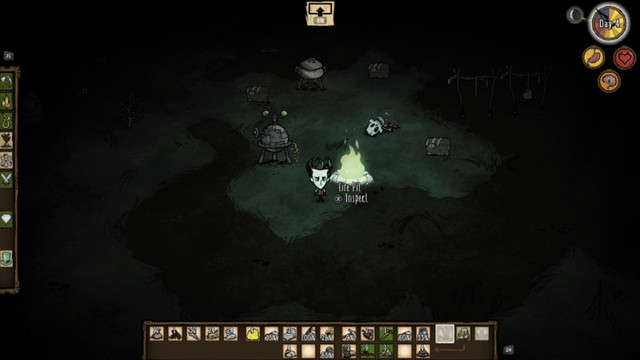
I kinda want to shroud the whole map with a dark veil, the player itself is a source of light, so to discover the area he needs to get close to objects. I already tried to make a directional black light, and it works well ... but the problem is that it makes the scene editing quite hard, because I don't see anything haha.

I don't know if I got the right idea, or if there is other ways to reproduce this kind of Light effect.

Thanks a lot !

Comment
Add comment
10 |3000 characters needed characters left characters exceeded
▼
  • Viewable by all users
  • Viewable by moderators
  • Viewable by moderators and the original poster
  • Advanced visibility
Viewable by all users

2 Replies

  • Sort: 
avatar image
2
Best Answer

Answer by ryanmillerca · Jul 16, 2019 at 04:12 PM

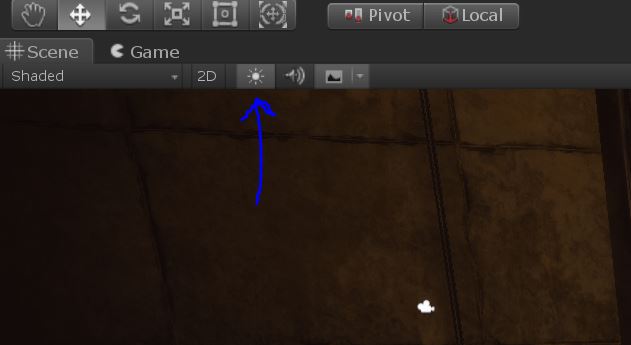
A black directional light is a bit of an odd approach. Provided your ambient light color is set to black (in Window > Rendering > Light Settings), you should be able to get darkness easily. In order to "see in the dark" for editing purposes, use the lights toggle in the scene view toolbar to disable lighting. alt text
If you're looking for another approach entirely, you could light your scene in order to make it not black, and then color correct darker using post processing. This is how they film night scenes in TV/Film.


light.jpg (24.5 kB)
Comment
Add comment · Show 7 · Share
10 |3000 characters needed characters left characters exceeded
▼
  • Viewable by all users
  • Viewable by moderators
  • Viewable by moderators and the original poster
  • Advanced visibility
Viewable by all users
avatar image CCnockaert · Jul 16, 2019 at 04:33 PM 0
Share

Hello.

Can you explain to me the differences between having a directional black light and setting the environment light to black, because I tried and it works perfectly too same result :)

I forgot about the light button in the scene view, thanks a lot ! Thanks for the post-processing idea too :D

avatar image pyramidhead01 CCnockaert · Jul 16, 2019 at 04:40 PM 0
Share

Honestly, this probably is the best solution for you, $$anonymous$$e is pretty hard for a beginner and this might even be closer to what you are asking for; my the solution I was trying to point you towards would be to create a fog of war and you can ONLY see what is within the defined area (this how objects appear invisible until a light is shown on them for example), where this $$anonymous$$UCH SI$$anonymous$$PLER solution just gives the game a darker feel and depending on how well you setup the light on your player is probably going to do what the fog of war would do.

avatar image CCnockaert pyramidhead01 · Jul 16, 2019 at 04:46 PM 0
Share

That was a pretty cool idea and i'll still check how to do a Fog of War, because it might be useful later :)

avatar image ryanmillerca CCnockaert · Jul 16, 2019 at 04:41 PM 0
Share

Adding a directional light (or any light) will incur a performance cost, while ambient light always exists. If you don't want directional lighting or shadows, a directional light isn't appropriate. Though, if it works, it works!

avatar image CCnockaert ryanmillerca · Jul 16, 2019 at 04:50 PM 0
Share

Ohhhh, I see ! I didn't think about the fact that the directional light will cast shadows, even if it's a black light.

Shadows will be casted by a simple point light on the player, so having a directional light doing the same thing is pretty useless. Btw, do you recommend me to use the Post-Processing Assets from Unity Tech. ?

Show more comments
avatar image
1

Answer by pyramidhead01 · Jul 16, 2019 at 04:15 PM

It requires a setup with multiple cameras to create that "can't see in the distance effect", it's confusing at first but starts to make sense.

I haven't watched this, but I think this should get you in the right direction: https://www.youtube.com/watch?v=bbnVpPiQ_rU

Comment
Add comment · Show 1 · Share
10 |3000 characters needed characters left characters exceeded
▼
  • Viewable by all users
  • Viewable by moderators
  • Viewable by moderators and the original poster
  • Advanced visibility
Viewable by all users
avatar image CCnockaert · Jul 16, 2019 at 04:34 PM 0
Share

Thanks a lot, i'll watch this :)

Follow this Question

Answers Answers and Comments

148 People are following this question.

avatar image avatar image avatar image avatar image avatar image avatar image avatar image avatar image avatar image avatar image avatar image avatar image avatar image avatar image avatar image avatar image avatar image avatar image avatar image avatar image avatar image avatar image avatar image avatar image avatar image avatar image avatar image avatar image avatar image avatar image avatar image avatar image avatar image avatar image avatar image avatar image avatar image avatar image avatar image avatar image avatar image avatar image avatar image avatar image avatar image avatar image avatar image avatar image avatar image avatar image avatar image avatar image avatar image avatar image avatar image avatar image avatar image avatar image avatar image avatar image avatar image avatar image avatar image avatar image avatar image avatar image avatar image avatar image avatar image avatar image avatar image avatar image avatar image avatar image avatar image avatar image avatar image avatar image avatar image avatar image avatar image avatar image avatar image avatar image avatar image avatar image avatar image avatar image avatar image avatar image avatar image avatar image avatar image avatar image avatar image avatar image avatar image avatar image avatar image avatar image avatar image avatar image avatar image avatar image avatar image avatar image avatar image avatar image avatar image avatar image avatar image avatar image avatar image avatar image avatar image avatar image avatar image avatar image avatar image avatar image avatar image avatar image avatar image avatar image avatar image avatar image avatar image avatar image avatar image avatar image avatar image avatar image avatar image avatar image avatar image avatar image avatar image avatar image avatar image avatar image avatar image avatar image avatar image avatar image avatar image avatar image avatar image avatar image

Related Questions

Black squares on the lightmap 0 Answers

Why Does Lightmapping make everything Super Bright? 0 Answers

Why does some lights change after using generate lighting ? 1 Answer

floor lighting and item lighting is unbalanced 0 Answers

Ambient Occlusion overriding point light? 0 Answers


Enterprise
Social Q&A

Social
Subscribe on YouTube social-youtube Follow on LinkedIn social-linkedin Follow on Twitter social-twitter Follow on Facebook social-facebook Follow on Instagram social-instagram

Footer

  • Purchase
    • Products
    • Subscription
    • Asset Store
    • Unity Gear
    • Resellers
  • Education
    • Students
    • Educators
    • Certification
    • Learn
    • Center of Excellence
  • Download
    • Unity
    • Beta Program
  • Unity Labs
    • Labs
    • Publications
  • Resources
    • Learn platform
    • Community
    • Documentation
    • Unity QA
    • FAQ
    • Services Status
    • Connect
  • About Unity
    • About Us
    • Blog
    • Events
    • Careers
    • Contact
    • Press
    • Partners
    • Affiliates
    • Security
Copyright © 2020 Unity Technologies
  • Legal
  • Privacy Policy
  • Cookies
  • Do Not Sell My Personal Information
  • Cookies Settings
"Unity", Unity logos, and other Unity trademarks are trademarks or registered trademarks of Unity Technologies or its affiliates in the U.S. and elsewhere (more info here). Other names or brands are trademarks of their respective owners.
  • Anonymous
  • Sign in
  • Create
  • Ask a question
  • Spaces
  • Default
  • Help Room
  • META
  • Moderators
  • Explore
  • Topics
  • Questions
  • Users
  • Badges