Wayback Machinekoobas.hobune.stream
May JUN Jul
Previous capture 12 Next capture
2021 2022 2023
1 capture
12 Jun 22 - 12 Jun 22
sparklines
Close Help
  • Products
  • Solutions
  • Made with Unity
  • Learning
  • Support & Services
  • Community
  • Asset Store
  • Get Unity

UNITY ACCOUNT

You need a Unity Account to shop in the Online and Asset Stores, participate in the Unity Community and manage your license portfolio. Login Create account
  • Blog
  • Forums
  • Answers
  • Evangelists
  • User Groups
  • Beta Program
  • Advisory Panel

Navigation

  • Home
  • Products
  • Solutions
  • Made with Unity
  • Learning
  • Support & Services
  • Community
    • Blog
    • Forums
    • Answers
    • Evangelists
    • User Groups
    • Beta Program
    • Advisory Panel

Unity account

You need a Unity Account to shop in the Online and Asset Stores, participate in the Unity Community and manage your license portfolio. Login Create account

Language

  • Chinese
  • Spanish
  • Japanese
  • Korean
  • Portuguese
  • Ask a question
  • Spaces
    • Default
    • Help Room
    • META
    • Moderators
    • Topics
    • Questions
    • Users
    • Badges
  • Home /
  • Help Room /
avatar image
0
Question by ajlert11 · Sep 23, 2016 at 04:45 PM · spriteshadersstencil

Question about the Sprite mask implemented with the Stencil buffer

Hi. am looking for someone who is familiar with the shaders. So, there is a simple example of what I'm asking about. I have a Plane with the next shader

 Shader "Custom/World Fog Of War" {
     Properties{
         _Color("Main Color", Color) = (1,1,1,1)
         _MainTex("Base (RGB) Trans (A)", 2D) = "white" {}
     }
 
         SubShader{
         Tags{ "Queue" = "Geometry+3" "IgnoreProjector" = "True" "RenderType" = "Transparent" }
         LOD 200
         ZWrite off
 
         Stencil{
         Ref 1
         Comp notequal
         Pass replace
     }
 
         CGPROGRAM
 #pragma surface surf Lambert alpha:fade
 
         sampler2D _MainTex;
     fixed4 _Color;
 
     struct Input {
         float2 uv_MainTex;
     };
 
     void surf(Input IN, inout SurfaceOutput o) {
         fixed4 c = tex2D(_MainTex, IN.uv_MainTex) * _Color;
         o.Albedo = c.rgb;
         o.Alpha = c.a;
     }
     ENDCG
     }
 
         Fallback "Legacy Shaders/Transparent/VertexLit"
 }

And also a Sprite with this shader

 Shader "Sprites/Occluder1"
 {
     Properties
     {
         [PerRendererData] _MainTex("Sprite Texture", 2D) = "black" {}
         _Color("Tint", Color) = (1, 1, 1, 1)
         [MaterialToggle] PixelSnap("Pixel snap", Float) = 0
         _AlphaCutoff("Alpha Cutoff", Range(0.01, 1.0)) = 0.1
     }
         SubShader
     {
         Tags
     {
         "Queue" = "Geometry+2"
         "IgnoreProjector" = "True"
         "RenderType" = "TransparentCutout"
         "PreviewType" = "Plane"
         "CanUseSpriteAtlas" = "True"
     }
         Cull Off
         Lighting Off
         ZWrite Off
         Blend One OneMinusSrcAlpha
 
         Pass
     {
         Stencil
     {
         Ref 1
         Comp notequal
         Pass Incrsat
     }
 
         CGPROGRAM
 #pragma vertex vert
 #pragma fragment frag
 #pragma multi_compile _ PIXELSNAP_ON
 #include "UnityCG.cginc"
 
     struct appdata_t
     {
         float4 vertex   : POSITION;
         float4 color    : COLOR;
         float2 texcoord : TEXCOORD0;
     };
 
     struct v2f
     {
         float4 vertex   : SV_POSITION;
         fixed4 color : COLOR;
         half2 texcoord  : TEXCOORD0;
     };
 
     fixed4 _Color;
     fixed _AlphaCutoff;
 
     v2f vert(appdata_t IN)
     {
         v2f OUT;
         OUT.vertex = mul(UNITY_MATRIX_MVP, IN.vertex);
         OUT.texcoord = IN.texcoord;
         OUT.color = IN.color * _Color;
 #ifdef PIXELSNAP_ON
         OUT.vertex = UnityPixelSnap(OUT.vertex);
 #endif
 
         return OUT;
     }
 
     sampler2D _MainTex;
     sampler2D _AlphaTex;
 
     fixed4 frag(v2f IN) : SV_Target
     {
         fixed4 c = tex2D(_MainTex, IN.texcoord) * IN.color;
     c.rgb *= c.a;
 
     // here we discard pixels below our _AlphaCutoff so the stencil buffer only gets written to
     // where there are actual pixels returned. If the occluders are all tight meshes (such as solid rectangles)
     // this is not necessary and a non-transparent shader would be a better fit.
     clip(_AlphaCutoff - c.a);
 
     return c;
     }
         ENDCG
     }
     }
 }

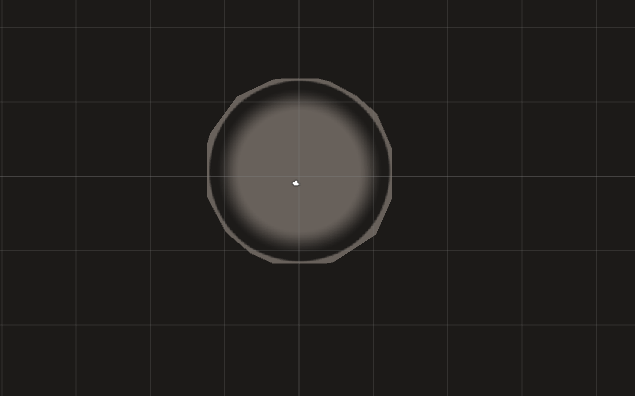
This is a Sprite picture - a black ring with a transparency inside and outside it. alt text And the result is looking like that alt text

The questions are:

  1. How can I remove this transparent area outside the sprite?

  2. Why this happens?

Thanks for the replies.

untitled-2.png (20.7 kB)
18.png (25.3 kB)
Comment
Add comment
10 |3000 characters needed characters left characters exceeded
▼
  • Viewable by all users
  • Viewable by moderators
  • Viewable by moderators and the original poster
  • Advanced visibility
Viewable by all users

1 Reply

· Add your reply
  • Sort: 
avatar image
0

Answer by Quooler · Nov 25, 2017 at 12:00 PM

You could try to replace outside alpha to black.

Comment
Add comment · Share
10 |3000 characters needed characters left characters exceeded
▼
  • Viewable by all users
  • Viewable by moderators
  • Viewable by moderators and the original poster
  • Advanced visibility
Viewable by all users

Your answer

Hint: You can notify a user about this post by typing @username

Up to 2 attachments (including images) can be used with a maximum of 524.3 kB each and 1.0 MB total.

Follow this Question

Answers Answers and Comments

90 People are following this question.

avatar image avatar image avatar image avatar image avatar image avatar image avatar image avatar image avatar image avatar image avatar image avatar image avatar image avatar image avatar image avatar image avatar image avatar image avatar image avatar image avatar image avatar image avatar image avatar image avatar image avatar image avatar image avatar image avatar image avatar image avatar image avatar image avatar image avatar image avatar image avatar image avatar image avatar image avatar image avatar image avatar image avatar image avatar image avatar image avatar image avatar image avatar image avatar image avatar image avatar image avatar image avatar image avatar image avatar image avatar image avatar image avatar image avatar image avatar image avatar image avatar image avatar image avatar image avatar image avatar image avatar image avatar image avatar image avatar image avatar image avatar image avatar image avatar image avatar image avatar image avatar image avatar image avatar image avatar image avatar image avatar image avatar image avatar image avatar image avatar image avatar image avatar image avatar image avatar image avatar image

Related Questions

Lighting and shadows for 2D sprites. 0 Answers

How to make headlight effects on a sprite? (Increasing emission of sprite material) 0 Answers

Sprite does not appear when using Color property in Shader graph (Sprite Lit Master Graph) 0 Answers

Shader Graph for 2D gradient drop shadow 0 Answers

How to use stencil buffer in an HDRP project? 0 Answers


Enterprise
Social Q&A

Social
Subscribe on YouTube social-youtube Follow on LinkedIn social-linkedin Follow on Twitter social-twitter Follow on Facebook social-facebook Follow on Instagram social-instagram

Footer

  • Purchase
    • Products
    • Subscription
    • Asset Store
    • Unity Gear
    • Resellers
  • Education
    • Students
    • Educators
    • Certification
    • Learn
    • Center of Excellence
  • Download
    • Unity
    • Beta Program
  • Unity Labs
    • Labs
    • Publications
  • Resources
    • Learn platform
    • Community
    • Documentation
    • Unity QA
    • FAQ
    • Services Status
    • Connect
  • About Unity
    • About Us
    • Blog
    • Events
    • Careers
    • Contact
    • Press
    • Partners
    • Affiliates
    • Security
Copyright © 2020 Unity Technologies
  • Legal
  • Privacy Policy
  • Cookies
  • Do Not Sell My Personal Information
  • Cookies Settings
"Unity", Unity logos, and other Unity trademarks are trademarks or registered trademarks of Unity Technologies or its affiliates in the U.S. and elsewhere (more info here). Other names or brands are trademarks of their respective owners.
  • Anonymous
  • Sign in
  • Create
  • Ask a question
  • Spaces
  • Default
  • Help Room
  • META
  • Moderators
  • Explore
  • Topics
  • Questions
  • Users
  • Badges