
Wayback Machinekoobas.hobune.stream
May JUN Jul
Previous capture 13 Next capture
2021 2022 2023
1 capture
13 Jun 22 - 13 Jun 22
sparklines
Close Help
  • Products
  • Solutions
  • Made with Unity
  • Learning
  • Support & Services
  • Community
  • Asset Store
  • Get Unity

UNITY ACCOUNT

You need a Unity Account to shop in the Online and Asset Stores, participate in the Unity Community and manage your license portfolio. Login Create account
  • Blog
  • Forums
  • Answers
  • Evangelists
  • User Groups
  • Beta Program
  • Advisory Panel

Navigation

  • Home
  • Products
  • Solutions
  • Made with Unity
  • Learning
  • Support & Services
  • Community
    • Blog
    • Forums
    • Answers
    • Evangelists
    • User Groups
    • Beta Program
    • Advisory Panel

Unity account

You need a Unity Account to shop in the Online and Asset Stores, participate in the Unity Community and manage your license portfolio. Login Create account

Language

  • Chinese
  • Spanish
  • Japanese
  • Korean
  • Portuguese
  • Ask a question
  • Spaces
    • Default
    • Help Room
    • META
    • Moderators
    • Topics
    • Questions
    • Users
    • Badges
  • Home /
avatar image
0
Question by Abacab · Apr 14, 2015 at 08:50 PM · cameraraycasthitwall

RaycastHit and Camera through walls

Hello!

I've been trying to make my camera not move through walls with RaycastHit, but I really can't get it to work. This is what I've come up with so far.

 void Update ()
         {
                 RaycastHit wallHit = new RaycastHit ();
                 Ray wallRay = new Ray (car.transform.position, camera.transform.position);
         
                 if (Physics.Raycast (wallRay, out wallHit, distance)) {
                         if (wallHit.collider.tag == "Wall") {
                                 camera.transform.position = wallHit.point;
                         }
                 } 
         }

Can you spot what I am doing wrong? Any help is massively appreciated!

Comment
Add comment
10 |3000 characters needed characters left characters exceeded
▼
  • Viewable by all users
  • Viewable by moderators
  • Viewable by moderators and the original poster
  • Advanced visibility
Viewable by all users

1 Reply

· Add your reply
  • Sort: 
avatar image
0

Answer by Eno-Khaon · Apr 14, 2015 at 08:58 PM

The direction of your ray is way off.

Think of it this way: Your car is at (50, 10000, 20), so your camera is at, say, (50, 10005, 25). Your ray is shooting from (50, 10000, 20) and going to (100, 20005, 45).

Your ray needs to be:

 Ray wallRay = new Ray (car.transform.position, camera.transform.position - car.transform.position);
Comment
Add comment · Show 7 · Share
10 |3000 characters needed characters left characters exceeded
▼
  • Viewable by all users
  • Viewable by moderators
  • Viewable by moderators and the original poster
  • Advanced visibility
Viewable by all users
avatar image Abacab · Apr 14, 2015 at 09:01 PM 0
Share

Thank you, that makes sense. It still doesn't work though. :(

avatar image Eno-Khaon · Apr 14, 2015 at 09:17 PM 0
Share

The only other not-as-clear thing I see right now is the "distance" variable, which I assume is simply a maximum distance the camera will be from the car? If (camera.transform.position - car.transform.position).magnitude is greater than "distance" your check may not work correctly.

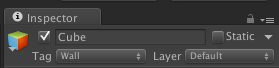
As an alternative, with tags, it's always integral to double- and triple-check capitalization. As a third party, I can't ensure that "Wall" is spelled with a capital "W" for your tag and that every wall has that tag on it.
avatar image Abacab · Apr 14, 2015 at 09:19 PM 0
Share

alt text

 public float distance = 6.4f;
 
 transform.position = car.position;
 transform.position -= currentRotation * Vector3.forward * distance;

screen-shot-2015-04-15-at-001816.png (13.3 kB)
avatar image maccabbe · Apr 14, 2015 at 09:24 PM 0
Share

Part of the problem is that you are using the car's position as the ray origin

 Ray wallRay = new Ray (car.transform.position, camera.transform.position - car.transform.position);

Use the camera's position as the ray origin

 Ray wallRay = new Ray (camera.transform.position, car.transform.position - camera.transform.position);

Right now it might be hitting the wrong side of the cube

However the whole script you provided seems wrong. If you want the Camera to not move if there is a block in the way, why are you moving the camera only if the ray hits an obstacle?

avatar image Abacab · Apr 14, 2015 at 09:27 PM 0
Share

That almost fixed it!

When I slowly reverse my car into a wall, it doesn't go through it, but when I get closer the camera starts to "crawl" down the wall. Any way to NOT make that happen? :)

Thanks a lot to both of you for your help so far!

Show more comments

Your answer

Hint: You can notify a user about this post by typing @username

Up to 2 attachments (including images) can be used with a maximum of 524.3 kB each and 1.0 MB total.

Follow this Question

Answers Answers and Comments

19 People are following this question.

avatar image avatar image avatar image avatar image avatar image avatar image avatar image avatar image avatar image avatar image avatar image avatar image avatar image avatar image avatar image avatar image avatar image avatar image avatar image

Related Questions

Zoom Camera when it hits a wall (edited) 1 Answer

RE: RaycastHit and camera through walls 0 Answers

Raycast hitting objects to the left of my player 1 Answer

Detecting when camera's near clip plane is hit 2 Answers

camera detecting walls 1 Answer


Enterprise
Social Q&A

Social
Subscribe on YouTube social-youtube Follow on LinkedIn social-linkedin Follow on Twitter social-twitter Follow on Facebook social-facebook Follow on Instagram social-instagram

Footer

  • Purchase
    • Products
    • Subscription
    • Asset Store
    • Unity Gear
    • Resellers
  • Education
    • Students
    • Educators
    • Certification
    • Learn
    • Center of Excellence
  • Download
    • Unity
    • Beta Program
  • Unity Labs
    • Labs
    • Publications
  • Resources
    • Learn platform
    • Community
    • Documentation
    • Unity QA
    • FAQ
    • Services Status
    • Connect
  • About Unity
    • About Us
    • Blog
    • Events
    • Careers
    • Contact
    • Press
    • Partners
    • Affiliates
    • Security
Copyright © 2020 Unity Technologies
  • Legal
  • Privacy Policy
  • Cookies
  • Do Not Sell My Personal Information
  • Cookies Settings
"Unity", Unity logos, and other Unity trademarks are trademarks or registered trademarks of Unity Technologies or its affiliates in the U.S. and elsewhere (more info here). Other names or brands are trademarks of their respective owners.
  • Anonymous
  • Sign in
  • Create
  • Ask a question
  • Spaces
  • Default
  • Help Room
  • META
  • Moderators
  • Explore
  • Topics
  • Questions
  • Users
  • Badges