
Wayback Machinekoobas.hobune.stream
May JUN Jul
Previous capture 13 Next capture
2021 2022 2023
1 capture
13 Jun 22 - 13 Jun 22
sparklines
Close Help
  • Products
  • Solutions
  • Made with Unity
  • Learning
  • Support & Services
  • Community
  • Asset Store
  • Get Unity

UNITY ACCOUNT

You need a Unity Account to shop in the Online and Asset Stores, participate in the Unity Community and manage your license portfolio. Login Create account
  • Blog
  • Forums
  • Answers
  • Evangelists
  • User Groups
  • Beta Program
  • Advisory Panel

Navigation

  • Home
  • Products
  • Solutions
  • Made with Unity
  • Learning
  • Support & Services
  • Community
    • Blog
    • Forums
    • Answers
    • Evangelists
    • User Groups
    • Beta Program
    • Advisory Panel

Unity account

You need a Unity Account to shop in the Online and Asset Stores, participate in the Unity Community and manage your license portfolio. Login Create account

Language

  • Chinese
  • Spanish
  • Japanese
  • Korean
  • Portuguese
  • Ask a question
  • Spaces
    • Default
    • Help Room
    • META
    • Moderators
    • Topics
    • Questions
    • Users
    • Badges
  • Home /
avatar image
0
Question by Reverend-Speed · Mar 06, 2015 at 03:57 PM · lightingunity5bakingspotlightshading

Why is a spotlight giving me a stepped gradient in Unity5?

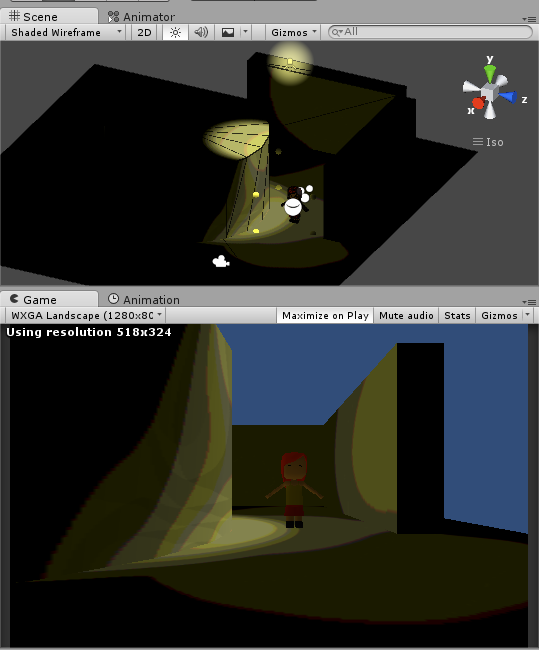
Hey folks, taking some time to get used to all the new toys in U5. I've run into a couple of lighting issues and while I've read all the Unity docs I can find on Enlighten in Unity, I'm still in the dark. Here's one problem:
alt text

I would expect a smooth gradient from the yellow spotlight spilling off the cylinder and bouncing off the ground and wall. Instead, I get undesirable stepping and artifacts. What gives?

That's the default scene with a couple of cubes, a cylinder, a ground quad and a custom character, all using the new Standard shader. I've turned off the directional light, set the skymap to empty, the ambient light to black (to isolate one light for experimentation) and I'm just playing around with baking a spotlight.

Continuous baking is turned off.

The spotlight is set to... Type: spot Baking: mixed Range: 11.6507 Spot angle: 47 Color: 255r, 254b, 144g. Intensity: 2.36 Bounce Intensity: 2 Shadow Type: No Shadows Cookie: None Draw Halo: True Flare: None Render Mode: Auto Culling Mask: Everything

The current build target is Android (a Nexus 7 tablet).

My computer is a cheap Dell Inspiron 3531 laptop, running Windows 8.1, with Intel Celeron CPU N2830 @ 2.16GHz with 4GB of ram and a x64-based processor. For Unity4 it was just tickety boo for building small projects and going to gamejams and it looks like it'll be mostly good for 5 if I leave continuous baking off.

I imagine this is just a teething problem or some silly, obvious setting I've neglected. I look forward to your gouts of undiluted wisdom!

--Rev

EDIT: Here's a package of the test level, complete with character

steppedgradient.png (56.9 kB)
Comment
Add comment
10 |3000 characters needed characters left characters exceeded
▼
  • Viewable by all users
  • Viewable by moderators
  • Viewable by moderators and the original poster
  • Advanced visibility
Viewable by all users

1 Reply

· Add your reply
  • Sort: 
avatar image
0
Best Answer

Answer by Reverend-Speed · Mar 08, 2015 at 07:40 PM

The key to the stepping artifacts appears to be the 'compressed' setting, found in the Lighting menu under Baked GI. Untick compressed, bake your scene, hey-presto, perfectly smooth lighting.

I assume that 'compressed' is active by default as Enlighten can use the lower-frequency baked lighting as a reference for the realtime GI - which is awesome, but not so helpful when you're trying to get it to work on a lower-spec machine. =)

--Rev

Comment
Add comment · Share
10 |3000 characters needed characters left characters exceeded
▼
  • Viewable by all users
  • Viewable by moderators
  • Viewable by moderators and the original poster
  • Advanced visibility
Viewable by all users

Your answer

Hint: You can notify a user about this post by typing @username

Up to 2 attachments (including images) can be used with a maximum of 524.3 kB each and 1.0 MB total.

Follow this Question

Answers Answers and Comments

20 People are following this question.

avatar image avatar image avatar image avatar image avatar image avatar image avatar image avatar image avatar image avatar image avatar image avatar image avatar image avatar image avatar image avatar image avatar image avatar image avatar image avatar image

Related Questions

How can I make Unity5 lighting work with these assets? 0 Answers

Unity Terrain looking strange and dark 0 Answers

What will be the best light baking settings when baking for mobile devices in Unity 5 1 Answer

Unity 5 Baking issue 0 Answers

Unity 5 Spot Light no shadows or break in the light 2 Answers


Enterprise
Social Q&A

Social
Subscribe on YouTube social-youtube Follow on LinkedIn social-linkedin Follow on Twitter social-twitter Follow on Facebook social-facebook Follow on Instagram social-instagram

Footer

  • Purchase
    • Products
    • Subscription
    • Asset Store
    • Unity Gear
    • Resellers
  • Education
    • Students
    • Educators
    • Certification
    • Learn
    • Center of Excellence
  • Download
    • Unity
    • Beta Program
  • Unity Labs
    • Labs
    • Publications
  • Resources
    • Learn platform
    • Community
    • Documentation
    • Unity QA
    • FAQ
    • Services Status
    • Connect
  • About Unity
    • About Us
    • Blog
    • Events
    • Careers
    • Contact
    • Press
    • Partners
    • Affiliates
    • Security
Copyright © 2020 Unity Technologies
  • Legal
  • Privacy Policy
  • Cookies
  • Do Not Sell My Personal Information
  • Cookies Settings
"Unity", Unity logos, and other Unity trademarks are trademarks or registered trademarks of Unity Technologies or its affiliates in the U.S. and elsewhere (more info here). Other names or brands are trademarks of their respective owners.
  • Anonymous
  • Sign in
  • Create
  • Ask a question
  • Spaces
  • Default
  • Help Room
  • META
  • Moderators
  • Explore
  • Topics
  • Questions
  • Users
  • Badges
