 koobas.hobune.stream


Only choosing the surrounding tiles on a checkerboard
I just asked a question regarding this issue but unfortunately I'm still having issues. I want to choose a tile and then choose another tile but only if it is next to the first tile chosen. I am getting the following output:
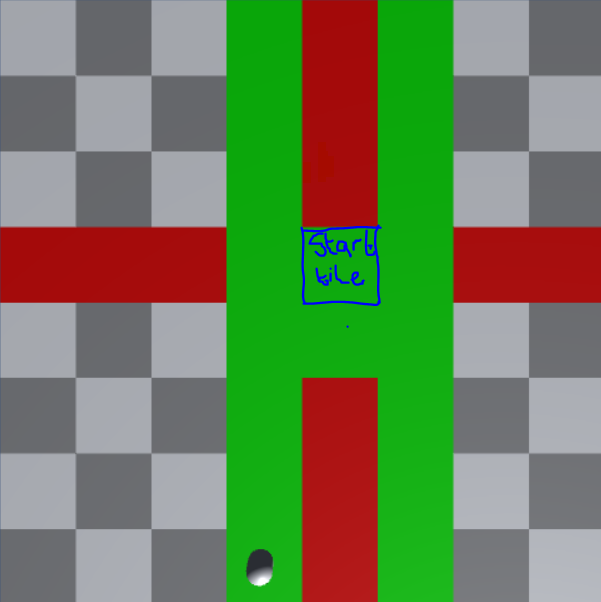
Green tiles represent which tiles I am allowed to choose, red tiles indicate which ones i should not be allowed choose.
The tile in which I have highlighted is the first tile chosen. I want only to be able to chose the other 8 tiles that surround it, but as you can see, I am able to choose tiles further away from the starting one as shown by the green H on the board.
If anyone can help me out here, I'd appreciate it. My tiles are 3 spaces apart each and are 0.3 in scale along the x and z.
 //Checks if the ray has hit anything and if the user has clicked
         if (Physics.Raycast(ray, out hit) && Input.GetButtonDown("Fire1"))
         {
             if (hit.collider.tag == "Tiles")
             {
                 //nothing is selected
                 if (!isSelected)
                 {
                     firstTile = hit.transform.position;
                     hit.transform.GetComponent<Renderer>().material.color = Color.green;
                     isSelected = true;
                 }
                 else
                 {
                     Debug.Log(hit.transform.position);
                     Debug.Log(Mathf.Abs(firstTile.x - hit.transform.position.x));

                     if (Mathf.Abs(firstTile.x - hit.transform.position.x) == 3 || Mathf.Abs(firstTile.z - hit.transform.position.z) == 3)
                     {
                         hit.transform.GetComponent<Renderer>().material.color = Color.green;
                     }
                     else
                     {
                         hit.transform.GetComponent<Renderer>().material.color = Color.red;
                     }
                 }
             }
         }

wasn't my code working? also why are you checking the Z axis? is this not a 2D checkerboard? anyway try:
if ($$anonymous$$athf.Abs(firstTile.x - hit.transform.position.x) < 2 || $$anonymous$$athf.Abs(firstTile.z - hit.transform.position.z) < 2)

Hey, I thought it was, I only checked it along the x-axis though, which worked fine, I then just tried to clean it up a bit with my current code above, but both yours and $$anonymous$$e are returning the same results when trying along the other axis.
Its actually going to be within a 3d world, so the z axis is the one I need to modify.
The code you posted returns the following image:
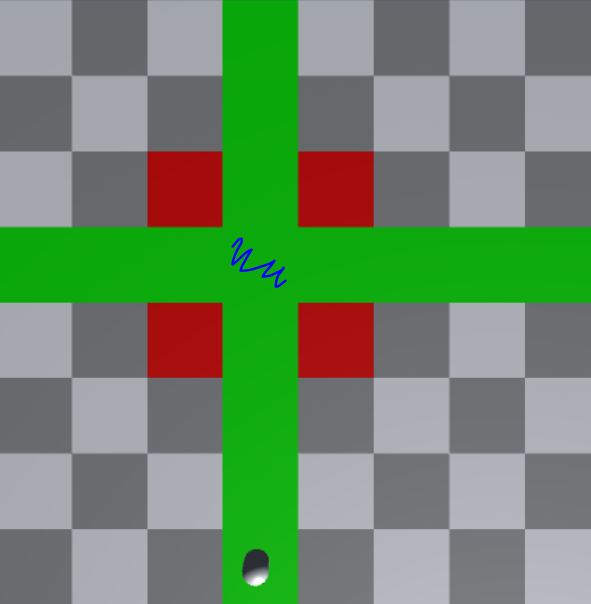
This might actually help. Try figure the logic out. :P 

Back to my original code, but modified a bit by the picture.
     //bools outside of method
         Vector3 currentSelected;
         bool isSelected;

     //the rest inside of method
     if (Physics.Raycast(ray, out hit) && Input.GetMouseButtonDown(0))
     {
         if (hit.collider.tag == "Tiles" && !isSelected) {
             Debug.Log("test");
             isSelected = true;
             currentSelected = hit.transform.position;//grab its current pos
             hit.transform.GetComponent<Renderer>().material.color = Color.yellow;
         } else if (hit.collider.tag == "Tiles" && isSelected) {
             if ((currentSelected.x == hit.transform.position.x +1 && currentSelected.y == hit.transform.position.y +1) ||
                 (currentSelected.x == hit.transform.position.x +1 && currentSelected.y == hit.transform.position.y -1) ||
                 (currentSelected.x == hit.transform.position.x -1 && currentSelected.y == hit.transform.position.y -1) ||
                 (currentSelected.x == hit.transform.position.x -1 && currentSelected.y == hit.transform.position.y +1)) {
                 //4 corner adjacent tiles
                 Debug.Log("corner adjacent x:" + currentSelected.x + " y:" + currentSelected.y);
                 hit.transform.GetComponent<Renderer>().material.color = Color.green;
                 currentSelected = Vector3.zero;
             } else if ((currentSelected.x == hit.transform.position.x +1 && currentSelected.y == hit.transform.position.y)
                        || (currentSelected.x == hit.transform.position.x -1 && currentSelected.y == hit.transform.position.y)
                        || (currentSelected.y == hit.transform.position.y +1 && currentSelected.x == hit.transform.position.x)
                        || (currentSelected.y == hit.transform.position.y -1 && currentSelected.x == hit.transform.position.x)) {
                 //4 directly adjacent tiles
                 Debug.Log("direct adjacent x:" + currentSelected.x + " y:" + currentSelected.y);
                 hit.transform.GetComponent<Renderer>().material.color = Color.green;
                 currentSelected = Vector3.zero; //delete this if you don't set isSelected to false
             } else {
                 Debug.Log("false x:" + currentSelected.x + " y:" + currentSelected.y);
                 hit.transform.GetComponent<Renderer>().material.color = Color.red;
             }
             //setting this to false again will make sure u have to click
             //another 2 tiles to check if you can keep checking the next tiles
             isSelected = false;  //< this ^
         }
     }
Works, I've tested it. =) 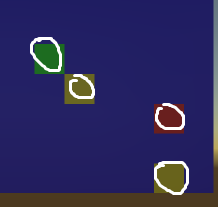
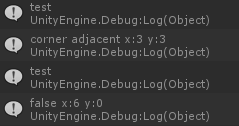
Hey man, thanks for this, appreciate the time you took for me, i cant try this right now but you seem to have tested and got it working :P Thanks again

or you could use a 2d array





