
Wayback Machinekoobas.hobune.stream
May JUN Jul
Previous capture 13 Next capture
2021 2022 2023
1 capture
13 Jun 22 - 13 Jun 22
sparklines
Close Help
  • Products
  • Solutions
  • Made with Unity
  • Learning
  • Support & Services
  • Community
  • Asset Store
  • Get Unity

UNITY ACCOUNT

You need a Unity Account to shop in the Online and Asset Stores, participate in the Unity Community and manage your license portfolio. Login Create account
  • Blog
  • Forums
  • Answers
  • Evangelists
  • User Groups
  • Beta Program
  • Advisory Panel

Navigation

  • Home
  • Products
  • Solutions
  • Made with Unity
  • Learning
  • Support & Services
  • Community
    • Blog
    • Forums
    • Answers
    • Evangelists
    • User Groups
    • Beta Program
    • Advisory Panel

Unity account

You need a Unity Account to shop in the Online and Asset Stores, participate in the Unity Community and manage your license portfolio. Login Create account

Language

  • Chinese
  • Spanish
  • Japanese
  • Korean
  • Portuguese
  • Ask a question
  • Spaces
    • Default
    • Help Room
    • META
    • Moderators
    • Topics
    • Questions
    • Users
    • Badges
  • Home /
  • Help Room /
avatar image
0
Question by BlackSoldier · Jul 08, 2013 at 01:48 PM · paint

Paint Brush size

Hi,

I've a question about paint brush size. When I want to paint some trees on my terrain my paint size (100) is okay, is a good scale. But when I want to paint the grass, with the same size (100), I've a big one, very big! And I've just few grass although my grass density is max ! My second problem is when I want to paint a way with my texture my paint brsuh is 1*1 but I've a big square !alt text This square is 130 m long but I would like just 3m. Some people have an idea? I work with a big environnement. An island, 50km/50km. Represent on a Unity terrain 50 000 1800 50 000. My heighMap resolution is 4097,baseMap resolution 512, details resolution 1024 and detail per patch 128. I use Terrain Composer to make my Terrain. And Tom Terrain Tool to place my tree. Thanks a lot in advance.
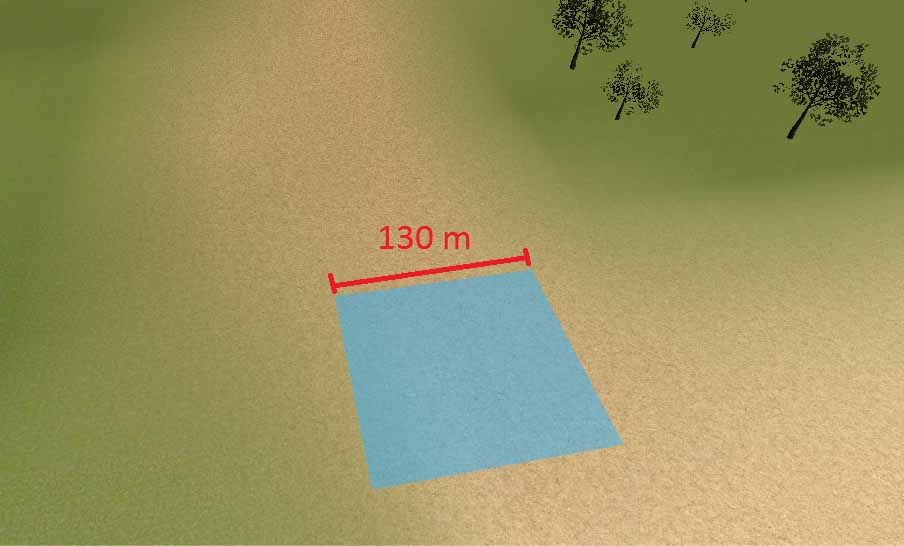
brushsize.jpg (42.5 kB)
Comment
Add comment
10 |3000 characters needed characters left characters exceeded
▼
  • Viewable by all users
  • Viewable by moderators
  • Viewable by moderators and the original poster
  • Advanced visibility
Viewable by all users

2 Replies

· Add your reply
  • Sort: 
avatar image
1

Answer by The Pirate Duck · Jul 08, 2013 at 02:43 PM

If you want to paint terrain textures more precisely (have a smaller paint brush square) you need to increase control texture resolution.

Comment
Add comment · Show 1 · Share
10 |3000 characters needed characters left characters exceeded
▼
  • Viewable by all users
  • Viewable by moderators
  • Viewable by moderators and the original poster
  • Advanced visibility
Viewable by all users
avatar image Owen-Reynolds · Jul 08, 2013 at 03:58 PM 0
Share

In the terrain Assets, if you expand the Terrain, then the Control Textures are listed as Splat0, Splat1 ... . Texture 1,2,3,4 are stored as RGBA. When you paint that single blue square above with texture2, you are really changing 1 pixel of the control map to greener.

Just looking at the Splat for a painted terrain should give you a pretty good feel for how the control map works.

avatar image
0

Answer by Gnostine_Bosonz · Jul 25, 2017 at 05:04 PM

I know this is an old thread, but I've spent hours looking for a similar question that I could not find the answer to.

Click on your terrain, this should bring up the terrain tools in the inspector window. Click on the gear icon, scroll down to control texture and adjust it from there.

I am working with real world terrains and have been trying to adjust it through the RWT settings, but when I changed my settings the said way above it finally allowed my paint brush to be a smaller size.

Again sorry for replying to a 4 year old thread but this is the first link on google so if others have this issue in the future perhaps they will be less frustrated and break less things, in their alt textgame and real life, looking for an answer.
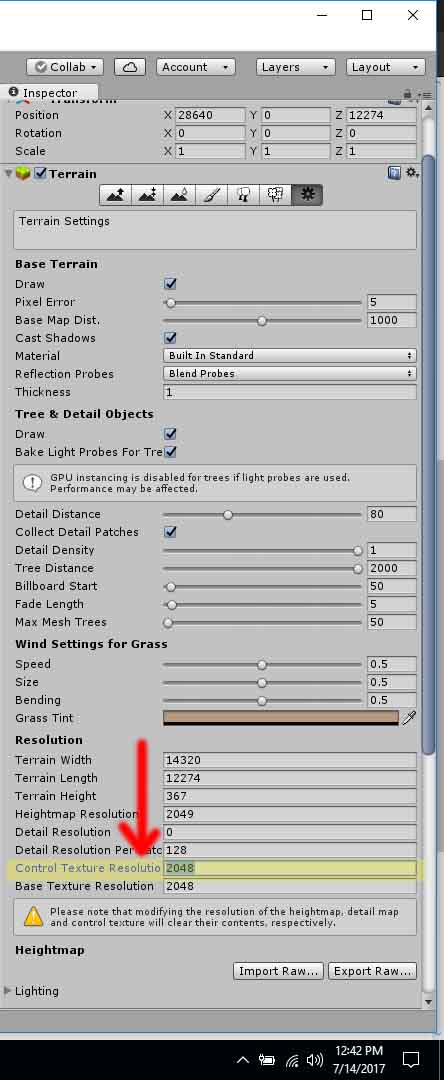

terrain-menu.jpg (79.1 kB)
Comment
Add comment · Show 1 · Share
10 |3000 characters needed characters left characters exceeded
▼
  • Viewable by all users
  • Viewable by moderators
  • Viewable by moderators and the original poster
  • Advanced visibility
Viewable by all users
avatar image Owen-Reynolds · Jul 25, 2017 at 05:15 PM 0
Share

To be fair, googling "unity control texture resolution" took me to a page in the official Unity manual with this same picture (but it didn't have the arrow or yellow highlight.) Sometimes the problem is just being overwhelmed with so much new stuff.

Your answer

Hint: You can notify a user about this post by typing @username

Up to 2 attachments (including images) can be used with a maximum of 524.3 kB each and 1.0 MB total.

Follow this Question

Answers Answers and Comments

18 People are following this question.

avatar image avatar image avatar image avatar image avatar image avatar image avatar image avatar image avatar image avatar image avatar image avatar image avatar image avatar image avatar image avatar image avatar image avatar image

Related Questions

Terrain detail mesh not rendering 1 Answer

How do I create good paint splatter effects 0 Answers

How to paint sprite texture on tilepalette ? 0 Answers

How to paint a sprite with an other sprite 0 Answers

LWRP paint details not working 0 Answers


Enterprise
Social Q&A

Social
Subscribe on YouTube social-youtube Follow on LinkedIn social-linkedin Follow on Twitter social-twitter Follow on Facebook social-facebook Follow on Instagram social-instagram

Footer

  • Purchase
    • Products
    • Subscription
    • Asset Store
    • Unity Gear
    • Resellers
  • Education
    • Students
    • Educators
    • Certification
    • Learn
    • Center of Excellence
  • Download
    • Unity
    • Beta Program
  • Unity Labs
    • Labs
    • Publications
  • Resources
    • Learn platform
    • Community
    • Documentation
    • Unity QA
    • FAQ
    • Services Status
    • Connect
  • About Unity
    • About Us
    • Blog
    • Events
    • Careers
    • Contact
    • Press
    • Partners
    • Affiliates
    • Security
Copyright © 2020 Unity Technologies
  • Legal
  • Privacy Policy
  • Cookies
  • Do Not Sell My Personal Information
  • Cookies Settings
"Unity", Unity logos, and other Unity trademarks are trademarks or registered trademarks of Unity Technologies or its affiliates in the U.S. and elsewhere (more info here). Other names or brands are trademarks of their respective owners.
  • Anonymous
  • Sign in
  • Create
  • Ask a question
  • Spaces
  • Default
  • Help Room
  • META
  • Moderators
  • Explore
  • Topics
  • Questions
  • Users
  • Badges
