
Wayback Machinekoobas.hobune.stream
May JUN Jul
Previous capture 12 Next capture
2021 2022 2023
1 capture
12 Jun 22 - 12 Jun 22
sparklines
Close Help
  • Products
  • Solutions
  • Made with Unity
  • Learning
  • Support & Services
  • Community
  • Asset Store
  • Get Unity

UNITY ACCOUNT

You need a Unity Account to shop in the Online and Asset Stores, participate in the Unity Community and manage your license portfolio. Login Create account
  • Blog
  • Forums
  • Answers
  • Evangelists
  • User Groups
  • Beta Program
  • Advisory Panel

Navigation

  • Home
  • Products
  • Solutions
  • Made with Unity
  • Learning
  • Support & Services
  • Community
    • Blog
    • Forums
    • Answers
    • Evangelists
    • User Groups
    • Beta Program
    • Advisory Panel

Unity account

You need a Unity Account to shop in the Online and Asset Stores, participate in the Unity Community and manage your license portfolio. Login Create account

Language

  • Chinese
  • Spanish
  • Japanese
  • Korean
  • Portuguese
  • Ask a question
  • Spaces
    • Default
    • Help Room
    • META
    • Moderators
    • Topics
    • Questions
    • Users
    • Badges
  • Home /
avatar image
0
Question by Xleg · Apr 29, 2020 at 09:15 PM · camera2d gamewrapwrapper

Cinemachine 2D Level Wrap

Hello,
I'm new to Unity and I'm trying to create a 2D shoot ’em up game. I got one level and I want to create a seamless horizontal wrap effect. I decided to implement the effect with 2 duplications of my level, each on one side. I created the sprites so that they merge seamlessly into each other.

For the camera movement I'm using cinemachine. My virtual camera is following my player. Futhermore I added a confiner to the virtual camera to keep the camera record my level. The bounding shape of the confiner is set to the whole level included the duplicates on the sides.

On the ends of my main level instance, I placed two 2D BoxColliders. When the Player enters a BoxCollider it is teleported to the opposite side. Here is my script, which is added to the colliders:

 using Cinemachine;
 using UnityEngine;
 
 public class WorldWrapper : MonoBehaviour
 {
     public GameObject player;
     public CinemachineVirtualCamera vCam1;
 
     private CinemachineComponentBase _myCamera;
     private void Start()
     {
         _myCamera = vCam1.GetCinemachineComponent<CinemachineComponentBase>();
     }
 
     private void OnTriggerEnter2D(Collider2D other)
     {
         Vector3 playerPos = player.transform.position;
         Vector3 camPos = vCam1.transform.position;
         
         if (player)
         {
             player.transform.position = new Vector3(-playerPos.x, playerPos.y, playerPos.z);
             Vector3 positionDelta = new Vector3(-camPos.x - camPos.x, 0, 0);
             _myCamera.OnTargetObjectWarped(player.transform, positionDelta);
         }
     }


This is working but, I got a problem with the camera positioning on players teleport. After the the player is teleported, the camera is not showing the exact picture of the level as before. The camera is a little bit offset, that's why the wrap is noticeable.

Currently I have no idea how to fix the camera position so the wrap isn't noticeable. I would be pleased about solution suggestions.


Update


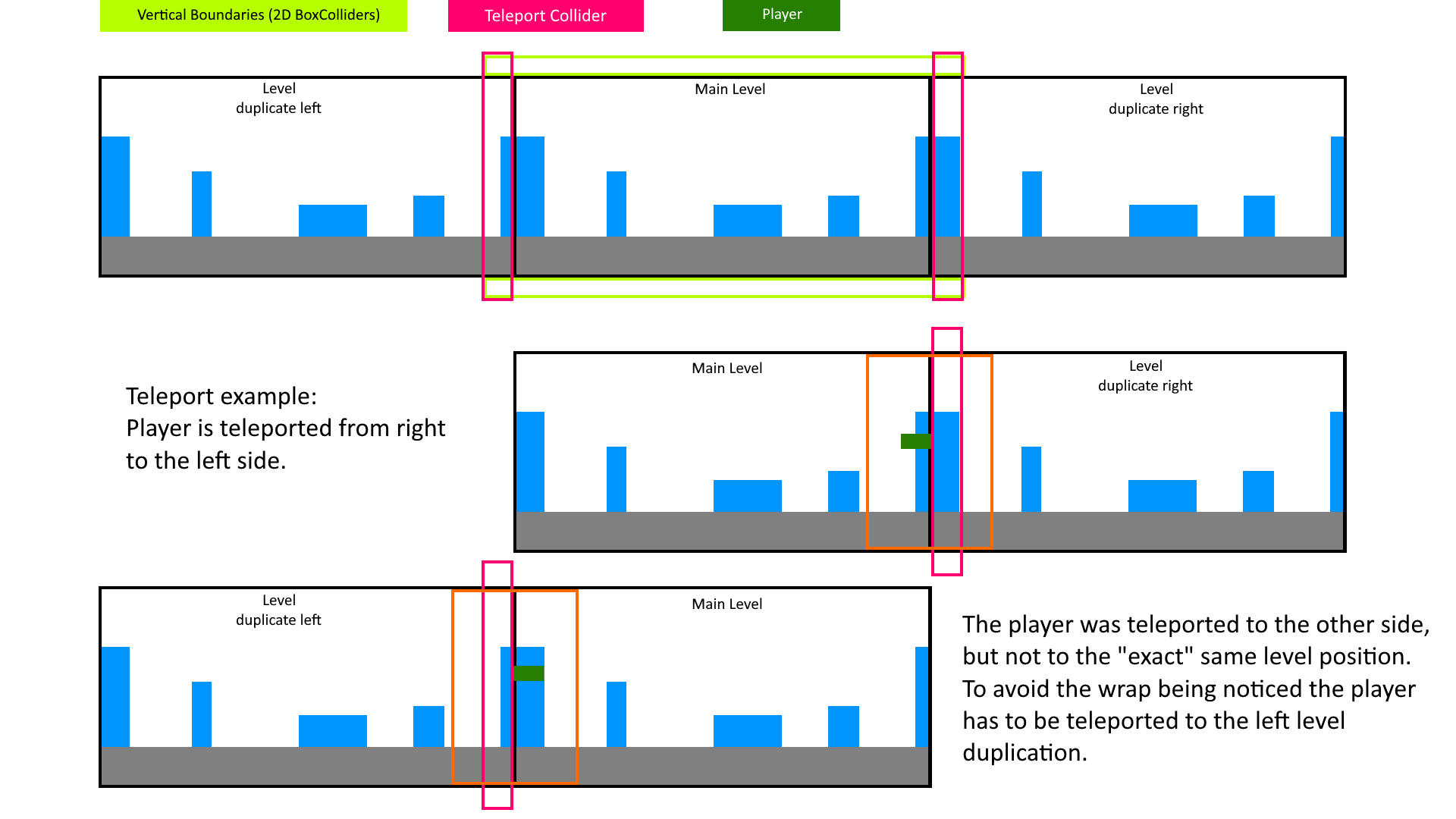
I think I figured out my problem. It's not a probelm of the camera or of the script. It is a error in my reasoning. The teleport collider does not have to teleport the player to the opposite side of the main level. It has to teleport to player to the end of the opposite level duplication, which is adjacent to the main level.

For better unterstanding I created a sketch of my problem:
alt text


I think this will cause a problem with the current positions of my teleport colliders. What is the best way to solve this problem?

problem-scenario.png (99.7 kB)
Comment
Add comment · Show 3
10 |3000 characters needed characters left characters exceeded
▼
  • Viewable by all users
  • Viewable by moderators
  • Viewable by moderators and the original poster
  • Advanced visibility
Viewable by all users
avatar image icehex · May 01, 2020 at 02:18 AM 0
Share

That makes sense. Reposition your colliders to the correct spots. Or if you have an actual strip of levels like that, maybe create a gap between them for the collider to reside in.

avatar image Xleg icehex · May 02, 2020 at 01:36 PM 0
Share

Ok, thanks. I went for moving the player by the world size. Also I repositionated the colliders. Now it's working.

avatar image icehex Xleg · May 02, 2020 at 05:22 PM 0
Share

Great. I've added my comment to the answer below since it completes the solution to your issue

1 Reply

· Add your reply
  • Sort: 
avatar image
0
Best Answer

Answer by icehex · Apr 30, 2020 at 12:54 AM

Edit: That makes sense. Reposition your colliders to the correct spots. Or if you have an actual strip of levels like that, maybe create a gap between them for the collider to reside in.


For the script to work correctly if your camera and player do not have the exact same X coordinate --- positionDelta is meant to be the target's position change. https://docs.unity3d.com/Packages/com.unity.cinemachine@2.1/api/Cinemachine.ICinemachineCamera.html

Try:

  using Cinemachine;
  using UnityEngine;
  
  public class WorldWrapper : MonoBehaviour
  {
      public GameObject player;
      public CinemachineVirtualCamera vCam1;
  
      private CinemachineComponentBase _myCamera;
      private void Start()
      {
          _myCamera = vCam1.GetCinemachineComponent<CinemachineComponentBase>();
      }
  
      private void OnTriggerEnter2D(Collider2D other)
      {
          Vector3 playerPos = player.transform.position;
          Vector3 camPos = vCam1.transform.position;
          
          if (player)
          {
              player.transform.position = new Vector3(-playerPos.x, playerPos.y, playerPos.z);
              Vector3 positionDelta = new Vector3(-playerPos.x - playerPos.x, 0, 0);
              _myCamera.OnTargetObjectWarped(player.transform, positionDelta);
          }
      }
 

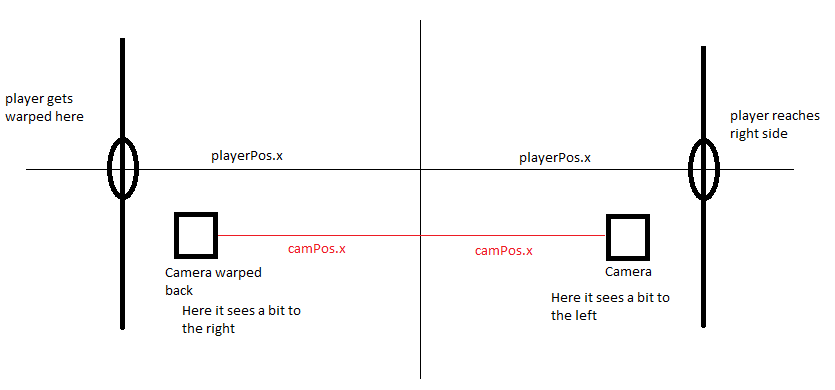
Here's what I'm seeing in my head: alt text

cameraissue.png (8.9 kB)
Comment
Add comment · Show 3 · Share
10 |3000 characters needed characters left characters exceeded
▼
  • Viewable by all users
  • Viewable by moderators
  • Viewable by moderators and the original poster
  • Advanced visibility
Viewable by all users
avatar image Xleg · Apr 30, 2020 at 06:22 AM 0
Share

Thanks for your suggestion. I already tried that before I posted my question, but it had no effect to my problem. It doesn't matter if I calculate the cameras or players position change. The problem still remains, that on the right bound, when the player is in front oft the collider the camera shows more of the left level terrain. On the left side it's exactly the opposite, the camera shows more of the right level terrain. That's why the wrap is noticeable. But the camera and the player are correctly teleported to the exact opposite position. Nevertheless camera is not showing the same picture.

avatar image icehex Xleg · Apr 30, 2020 at 06:50 AM 0
Share

That's interesting because the behavior you describe observing is what using -2*(camPos.x) would give you, but not -2*playerPos.x, with the assumption that your camera and player are not on fixed to the same x coordinate to begin with. I couldn't add an image to my comment here so I uploaded it to my answer above to show you what I'm thinking. Are the player and the camera at the same X coordinate at all times?


I checked the source code for Cinemachine and the behavior of OnTargetObjectWarped is that it will add the positionDelta to the camera's current or last frame position, depending on which camera options you're using. So only other possibility I can think of at the moment is that you're using a camera option that puts you 1 frame behind somehow.

avatar image Xleg icehex · Apr 30, 2020 at 06:38 PM 0
Share

Yes, the player and the camera are on the same X coordinate all the time. I also updated my question. I realized that it's a problem with the position where the player is moved. But currently I have no idea how to fix it. What is the best way to handle it? Creating connected portals?

Your answer

Hint: You can notify a user about this post by typing @username

Up to 2 attachments (including images) can be used with a maximum of 524.3 kB each and 1.0 MB total.

Follow this Question

Answers Answers and Comments

220 People are following this question.

avatar image avatar image avatar image avatar image avatar image avatar image avatar image avatar image avatar image avatar image avatar image avatar image avatar image avatar image avatar image avatar image avatar image avatar image avatar image avatar image avatar image avatar image avatar image avatar image avatar image avatar image avatar image avatar image avatar image avatar image avatar image avatar image avatar image avatar image avatar image avatar image avatar image avatar image avatar image avatar image avatar image avatar image avatar image avatar image avatar image avatar image avatar image avatar image avatar image avatar image avatar image avatar image avatar image avatar image avatar image avatar image avatar image avatar image avatar image avatar image avatar image avatar image avatar image avatar image avatar image avatar image avatar image avatar image avatar image avatar image avatar image avatar image avatar image avatar image avatar image avatar image avatar image avatar image avatar image avatar image avatar image avatar image avatar image avatar image avatar image avatar image avatar image avatar image avatar image avatar image avatar image avatar image avatar image avatar image avatar image avatar image avatar image avatar image avatar image avatar image avatar image avatar image avatar image avatar image avatar image avatar image avatar image avatar image avatar image avatar image avatar image avatar image avatar image avatar image avatar image avatar image avatar image avatar image avatar image avatar image avatar image avatar image avatar image avatar image avatar image avatar image avatar image avatar image avatar image avatar image avatar image avatar image avatar image avatar image avatar image avatar image avatar image avatar image avatar image avatar image avatar image avatar image avatar image avatar image avatar image avatar image avatar image avatar image avatar image avatar image avatar image avatar image avatar image avatar image avatar image avatar image avatar image avatar image avatar image avatar image avatar image avatar image avatar image avatar image avatar image avatar image avatar image avatar image avatar image avatar image avatar image avatar image avatar image avatar image avatar image avatar image avatar image avatar image avatar image avatar image avatar image avatar image avatar image avatar image avatar image avatar image avatar image avatar image avatar image avatar image avatar image avatar image avatar image avatar image avatar image avatar image avatar image avatar image avatar image avatar image avatar image avatar image avatar image avatar image avatar image avatar image avatar image avatar image avatar image avatar image avatar image avatar image avatar image avatar image avatar image avatar image avatar image avatar image avatar image avatar image

Related Questions

How to create a multilayered 2D effect? 1 Answer

Cinemachine camera shake on button press 0 Answers

Unity 3D Render Camera Bug!!! 1 Answer

Scale game vertically only 0 Answers

Making main camera focus on trigger 1 Answer


Enterprise
Social Q&A

Social
Subscribe on YouTube social-youtube Follow on LinkedIn social-linkedin Follow on Twitter social-twitter Follow on Facebook social-facebook Follow on Instagram social-instagram

Footer

  • Purchase
    • Products
    • Subscription
    • Asset Store
    • Unity Gear
    • Resellers
  • Education
    • Students
    • Educators
    • Certification
    • Learn
    • Center of Excellence
  • Download
    • Unity
    • Beta Program
  • Unity Labs
    • Labs
    • Publications
  • Resources
    • Learn platform
    • Community
    • Documentation
    • Unity QA
    • FAQ
    • Services Status
    • Connect
  • About Unity
    • About Us
    • Blog
    • Events
    • Careers
    • Contact
    • Press
    • Partners
    • Affiliates
    • Security
Copyright © 2020 Unity Technologies
  • Legal
  • Privacy Policy
  • Cookies
  • Do Not Sell My Personal Information
  • Cookies Settings
"Unity", Unity logos, and other Unity trademarks are trademarks or registered trademarks of Unity Technologies or its affiliates in the U.S. and elsewhere (more info here). Other names or brands are trademarks of their respective owners.
  • Anonymous
  • Sign in
  • Create
  • Ask a question
  • Spaces
  • Default
  • Help Room
  • META
  • Moderators
  • Explore
  • Topics
  • Questions
  • Users
  • Badges
