
Wayback Machinekoobas.hobune.stream
May JUN Jul
Previous capture 12 Next capture
2021 2022 2023
1 capture
12 Jun 22 - 12 Jun 22
sparklines
Close Help
  • Products
  • Solutions
  • Made with Unity
  • Learning
  • Support & Services
  • Community
  • Asset Store
  • Get Unity

UNITY ACCOUNT

You need a Unity Account to shop in the Online and Asset Stores, participate in the Unity Community and manage your license portfolio. Login Create account
  • Blog
  • Forums
  • Answers
  • Evangelists
  • User Groups
  • Beta Program
  • Advisory Panel

Navigation

  • Home
  • Products
  • Solutions
  • Made with Unity
  • Learning
  • Support & Services
  • Community
    • Blog
    • Forums
    • Answers
    • Evangelists
    • User Groups
    • Beta Program
    • Advisory Panel

Unity account

You need a Unity Account to shop in the Online and Asset Stores, participate in the Unity Community and manage your license portfolio. Login Create account

Language

  • Chinese
  • Spanish
  • Japanese
  • Korean
  • Portuguese
  • Ask a question
  • Spaces
    • Default
    • Help Room
    • META
    • Moderators
    • Topics
    • Questions
    • Users
    • Badges
  • Home /
avatar image
0
Question by Drakeus2000 · Aug 24, 2015 at 11:27 AM · videodesigntoolslive

Developing a FMV adventure game

Hi Guys,

I was going trough some of my older stuff and found a lot of videos I made for a never realised movie. I was wondering is it posible to, when turned into sprites, make a FMV adventure game.

The design would be something of a Japanese style visual novel where characters pop on screen to talk on a live action background (that might be dynamic, a a short clip moving in a loop?). The player would have a ABC choice at the bottom of the screen.
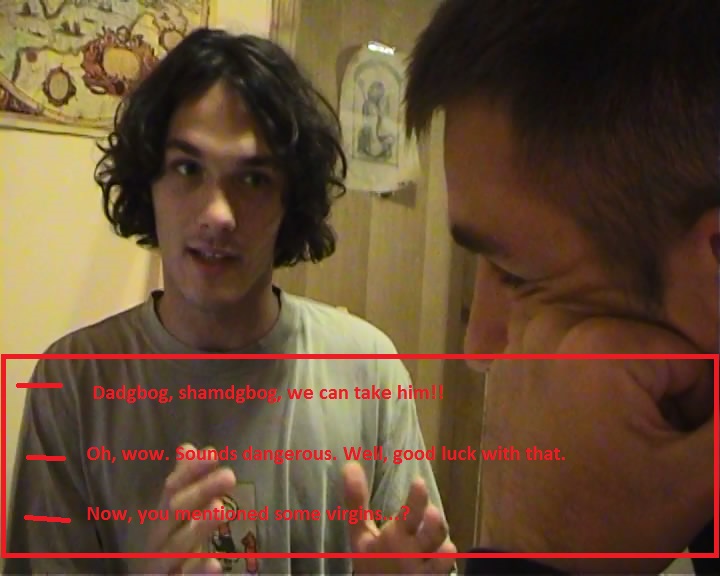
alt text

alt text

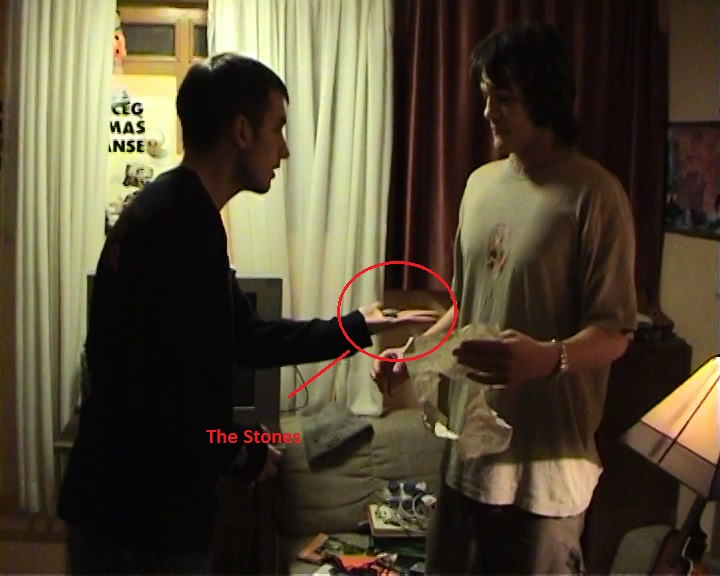
At points, player would have the entire scene where he might click on a Gameobject (that lights up on MouseOver() function) to see a clip based FMV ("Last Express" style).

Does anyone have any advice if there is a tool on the market that might make this easier to make, or just some general advice (like "Don't make a 30fps video as Android might not play it properly" idk.)?

Any advice is welcome. :))

Thanks.

milutin-ceo-1m4v-snapshot-0301-20150822-173733.jpg (83.4 kB)
povratak-1m4v-snapshot-0036-20150822-173617.jpg (79.9 kB)
Comment
Add comment · Show 2
10 |3000 characters needed characters left characters exceeded
▼
  • Viewable by all users
  • Viewable by moderators
  • Viewable by moderators and the original poster
  • Advanced visibility
Viewable by all users
avatar image Drakeus2000 · Aug 22, 2015 at 11:52 PM 0
Share

Anyone? Anyone at all?

avatar image theandyirish · Jun 17, 2016 at 03:57 PM 0
Share

@Drakeus2000 I'm looking to do something similar and I've been searching for answers everywhere without much luck. Did you ever find the tools you were looking for?

1 Reply

· Add your reply
  • Sort: 
avatar image
0

Answer by r67en · Oct 11, 2016 at 04:51 AM

This is actually fairly straightforward, tho a bit tedious.

Your videos must be in the correct format - Ogg Theora is best, MP4 with H.264 compression is ok. You'll have to have Quicktime Player installed on your machine also.

Then, create a 2d Plane (or Quad), and drag the video on that object as you would any texture you're assigning to a mesh. Stretch and position the quad/plane in front of the camera.

Next, play the video using code:

https://docs.unity3d.com/ScriptReference/MovieTexture.Play.html

As far as your clickable hotspots go (The stones in the above image), you'll just need to create a quad/2dPlane with a collider to capture and handle the mouseclick. If the hotspot is only available at a certain time in the video, you'll have to programmatically enable it at a certain time interval, or cut the video at certain points.

I know this topic is ages old, just stumbled across it on a similar search, thought I'd answer in case it helped someone else. I'd love to see more FMV games.

Comment
Add comment · Share
10 |3000 characters needed characters left characters exceeded
▼
  • Viewable by all users
  • Viewable by moderators
  • Viewable by moderators and the original poster
  • Advanced visibility
Viewable by all users

Your answer

Hint: You can notify a user about this post by typing @username

Up to 2 attachments (including images) can be used with a maximum of 524.3 kB each and 1.0 MB total.

Follow this Question

Answers Answers and Comments

5 People are following this question.

avatar image avatar image avatar image avatar image avatar image

Related Questions

Video on Unity3D ( Free Version) 1 Answer

Remote Desktop in Unity3D: How to setup VLC(?) and Unity? 1 Answer

How to use RTMP or RTSP in untiy. 1 Answer

Play RTMP Livestream inside Unity 0 Answers

How to display a live streaming video in Unity? 0 Answers


Enterprise
Social Q&A

Social
Subscribe on YouTube social-youtube Follow on LinkedIn social-linkedin Follow on Twitter social-twitter Follow on Facebook social-facebook Follow on Instagram social-instagram

Footer

  • Purchase
    • Products
    • Subscription
    • Asset Store
    • Unity Gear
    • Resellers
  • Education
    • Students
    • Educators
    • Certification
    • Learn
    • Center of Excellence
  • Download
    • Unity
    • Beta Program
  • Unity Labs
    • Labs
    • Publications
  • Resources
    • Learn platform
    • Community
    • Documentation
    • Unity QA
    • FAQ
    • Services Status
    • Connect
  • About Unity
    • About Us
    • Blog
    • Events
    • Careers
    • Contact
    • Press
    • Partners
    • Affiliates
    • Security
Copyright © 2020 Unity Technologies
  • Legal
  • Privacy Policy
  • Cookies
  • Do Not Sell My Personal Information
  • Cookies Settings
"Unity", Unity logos, and other Unity trademarks are trademarks or registered trademarks of Unity Technologies or its affiliates in the U.S. and elsewhere (more info here). Other names or brands are trademarks of their respective owners.
  • Anonymous
  • Sign in
  • Create
  • Ask a question
  • Spaces
  • Default
  • Help Room
  • META
  • Moderators
  • Explore
  • Topics
  • Questions
  • Users
  • Badges
