Wayback Machinekoobas.hobune.stream
May JUN Jul
Previous capture 13 Next capture
2021 2022 2023
1 capture
13 Jun 22 - 13 Jun 22
sparklines
Close Help
  • Products
  • Solutions
  • Made with Unity
  • Learning
  • Support & Services
  • Community
  • Asset Store
  • Get Unity

UNITY ACCOUNT

You need a Unity Account to shop in the Online and Asset Stores, participate in the Unity Community and manage your license portfolio. Login Create account
  • Blog
  • Forums
  • Answers
  • Evangelists
  • User Groups
  • Beta Program
  • Advisory Panel

Navigation

  • Home
  • Products
  • Solutions
  • Made with Unity
  • Learning
  • Support & Services
  • Community
    • Blog
    • Forums
    • Answers
    • Evangelists
    • User Groups
    • Beta Program
    • Advisory Panel

Unity account

You need a Unity Account to shop in the Online and Asset Stores, participate in the Unity Community and manage your license portfolio. Login Create account

Language

  • Chinese
  • Spanish
  • Japanese
  • Korean
  • Portuguese
  • Ask a question
  • Spaces
    • Default
    • Help Room
    • META
    • Moderators
    • Topics
    • Questions
    • Users
    • Badges
  • Home /
avatar image
0
Question by ger122 · Dec 23, 2014 at 03:02 PM · instatiate

Instantiate cloning TOO MANY!

my rocket is shooting one at first key press

then 4 then 10 then like triple then huge amount more?? and after about 5 seconds I am not even able to shoot more nothing comes out..

These scripts are java and c+ 2D game Again this is all 2D !

why is this happening I have 3 scripts on the rocket and prefab rocket

1 rocket

2 forces

3 destrooyrocket

please help and if possible post corrected script and point out what im doing wrong, its clearly something in scripting I think something with addforce and insatiate. I have checked related questions and tutorials.. and for 2d addforce is tricky and different but I cant find what to put ..most info in tutorials is for 3d on addforce not 2d ?

thanks

script 1 rocket--

 #pragma strict
 
 public var rocketPrefab : Rigidbody2D;
 public var barrelEnd : Transform;


 function Update ()
 {
     if(Input.GetButtonDown("Fire1"))
     {
         var rocketInstance : Rigidbody2D;
         rocketInstance = Instantiate(rocketPrefab, barrelEnd.position, barrelEnd.rotation);
         rocketInstance.AddForce(barrelEnd.forward * 3000);
         
         //rigidbody2D.AddForce(Vector3.up.down * Time.deltaTime);


     }
 }


script 2 forces--

 using UnityEngine;
 using System.Collections;
 
 public class forces : MonoBehaviour 
 {
 
 
         public float moveSpeed = 22f;
         
         
         void Update()
        {
             
                 //Jump Script
         rigidbody2D.AddForce(Vector2.up * Time.deltaTime);
             }
     }


script 3 destrooyrocket--

 #pragma strict
 
 function Start ()
 {
     Destroy (gameObject, 1.5f);
 }

Comment
Add comment · Show 6
10 |3000 characters needed characters left characters exceeded
▼
  • Viewable by all users
  • Viewable by moderators
  • Viewable by moderators and the original poster
  • Advanced visibility
Viewable by all users
avatar image jeffreymarkbaldridge · Dec 23, 2014 at 03:25 PM 0
Share

Where are these scripts located?

avatar image ger122 · Dec 23, 2014 at 03:44 PM 0
Share

on the rocket

avatar image tanoshimi · Dec 23, 2014 at 03:46 PM 0
Share

Yes.... do you see the problem now?

avatar image ger122 · Dec 23, 2014 at 03:46 PM 0
Share

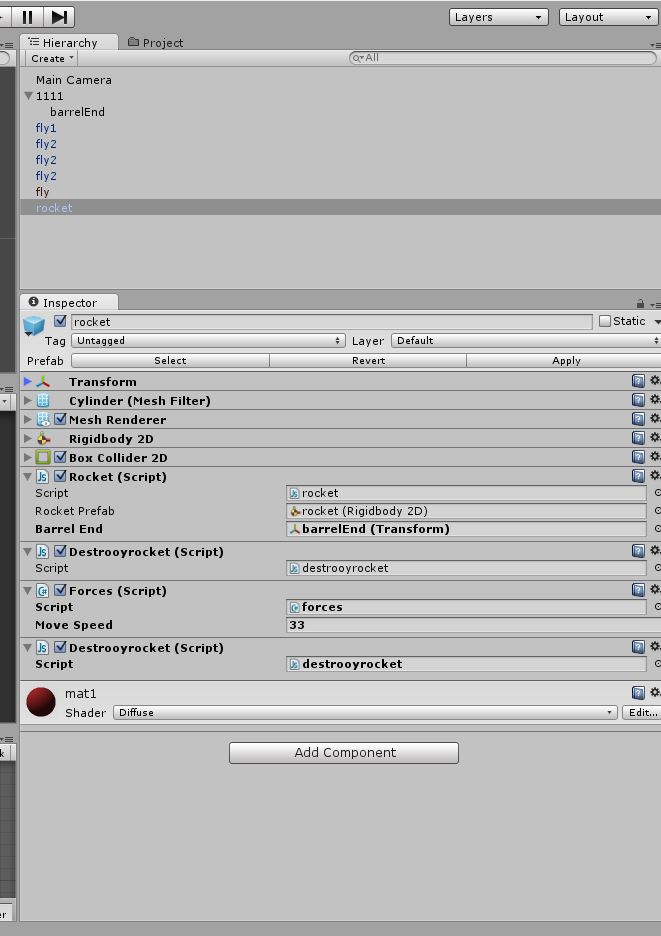
this is rockets inspector

alt text

redddd.jpg (89.4 kB)
avatar image ger122 · Dec 23, 2014 at 03:47 PM 0
Share

tanoshimi I think your right so where do I put the instantiate script to? the barrel End transform?

Show more comments

2 Replies

· Add your reply
  • Sort: 
avatar image
0

Answer by jeffreymarkbaldridge · Dec 23, 2014 at 04:05 PM

When I run into problems like this in my own code, I like to break it down into the simplest possible solutions. So with that in mind I suggest just focusing on the Instancing issue first, then worry about adding forces. Play around with just creating a single empty object with the correct input. Then when you have that working, start playing with the rigidbodies to get things moving. Then when that is working, add in other behaviours. Programming can become very messy very quickly, and fighting against complexity should be your main objective. It's really difficult to limit one's self to doing one thing at a time, but the result is much cleaner code.

Comment
Add comment · Share
10 |3000 characters needed characters left characters exceeded
▼
  • Viewable by all users
  • Viewable by moderators
  • Viewable by moderators and the original poster
  • Advanced visibility
Viewable by all users
avatar image
0

Answer by billyuji · Oct 13, 2016 at 10:55 AM

make sure your clone object itself didn't have a clone object attached.

Comment
Add comment · Show 1 · Share
10 |3000 characters needed characters left characters exceeded
▼
  • Viewable by all users
  • Viewable by moderators
  • Viewable by moderators and the original poster
  • Advanced visibility
Viewable by all users
avatar image Cherno · Oct 13, 2016 at 11:53 AM 0
Share

Dude... This topic is over two years old and the solution has kinda been psoted in the comments ;)

Your answer

Hint: You can notify a user about this post by typing @username

Up to 2 attachments (including images) can be used with a maximum of 524.3 kB each and 1.0 MB total.

Follow this Question

Answers Answers and Comments

5 People are following this question.

avatar image avatar image avatar image avatar image avatar image

Related Questions

Struggling with Instatiating a prefab 2 Answers

Object name not found? 1 Answer

Instatiate does not work on the client 1 Answer

I'm frustrated, please help. (For cycle + instatiate) 0 Answers

Instantiating an object - unexpected rotation. 1 Answer


Enterprise
Social Q&A

Social
Subscribe on YouTube social-youtube Follow on LinkedIn social-linkedin Follow on Twitter social-twitter Follow on Facebook social-facebook Follow on Instagram social-instagram

Footer

  • Purchase
    • Products
    • Subscription
    • Asset Store
    • Unity Gear
    • Resellers
  • Education
    • Students
    • Educators
    • Certification
    • Learn
    • Center of Excellence
  • Download
    • Unity
    • Beta Program
  • Unity Labs
    • Labs
    • Publications
  • Resources
    • Learn platform
    • Community
    • Documentation
    • Unity QA
    • FAQ
    • Services Status
    • Connect
  • About Unity
    • About Us
    • Blog
    • Events
    • Careers
    • Contact
    • Press
    • Partners
    • Affiliates
    • Security
Copyright © 2020 Unity Technologies
  • Legal
  • Privacy Policy
  • Cookies
  • Do Not Sell My Personal Information
  • Cookies Settings
"Unity", Unity logos, and other Unity trademarks are trademarks or registered trademarks of Unity Technologies or its affiliates in the U.S. and elsewhere (more info here). Other names or brands are trademarks of their respective owners.
  • Anonymous
  • Sign in
  • Create
  • Ask a question
  • Spaces
  • Default
  • Help Room
  • META
  • Moderators
  • Explore
  • Topics
  • Questions
  • Users
  • Badges