
Wayback Machinekoobas.hobune.stream
May JUN Jul
Previous capture 12 Next capture
2021 2022 2023
1 capture
12 Jun 22 - 12 Jun 22
sparklines
Close Help
  • Products
  • Solutions
  • Made with Unity
  • Learning
  • Support & Services
  • Community
  • Asset Store
  • Get Unity

UNITY ACCOUNT

You need a Unity Account to shop in the Online and Asset Stores, participate in the Unity Community and manage your license portfolio. Login Create account
  • Blog
  • Forums
  • Answers
  • Evangelists
  • User Groups
  • Beta Program
  • Advisory Panel

Navigation

  • Home
  • Products
  • Solutions
  • Made with Unity
  • Learning
  • Support & Services
  • Community
    • Blog
    • Forums
    • Answers
    • Evangelists
    • User Groups
    • Beta Program
    • Advisory Panel

Unity account

You need a Unity Account to shop in the Online and Asset Stores, participate in the Unity Community and manage your license portfolio. Login Create account

Language

  • Chinese
  • Spanish
  • Japanese
  • Korean
  • Portuguese
  • Ask a question
  • Spaces
    • Default
    • Help Room
    • META
    • Moderators
    • Topics
    • Questions
    • Users
    • Badges
  • Home /
avatar image
6
Question by PharaohZeus · Oct 11, 2015 at 03:08 PM · lightingocclusion culling

Enabling occlusion culling stops point lights (which cast shadows) from rendering in Unity 5.2p3

The title says it all. My lights look fine in scene view, wont render in game view.

Comment
Add comment · Show 6
10 |3000 characters needed characters left characters exceeded
▼
  • Viewable by all users
  • Viewable by moderators
  • Viewable by moderators and the original poster
  • Advanced visibility
Viewable by all users
avatar image Leaflux · Oct 11, 2015 at 05:26 PM 0
Share

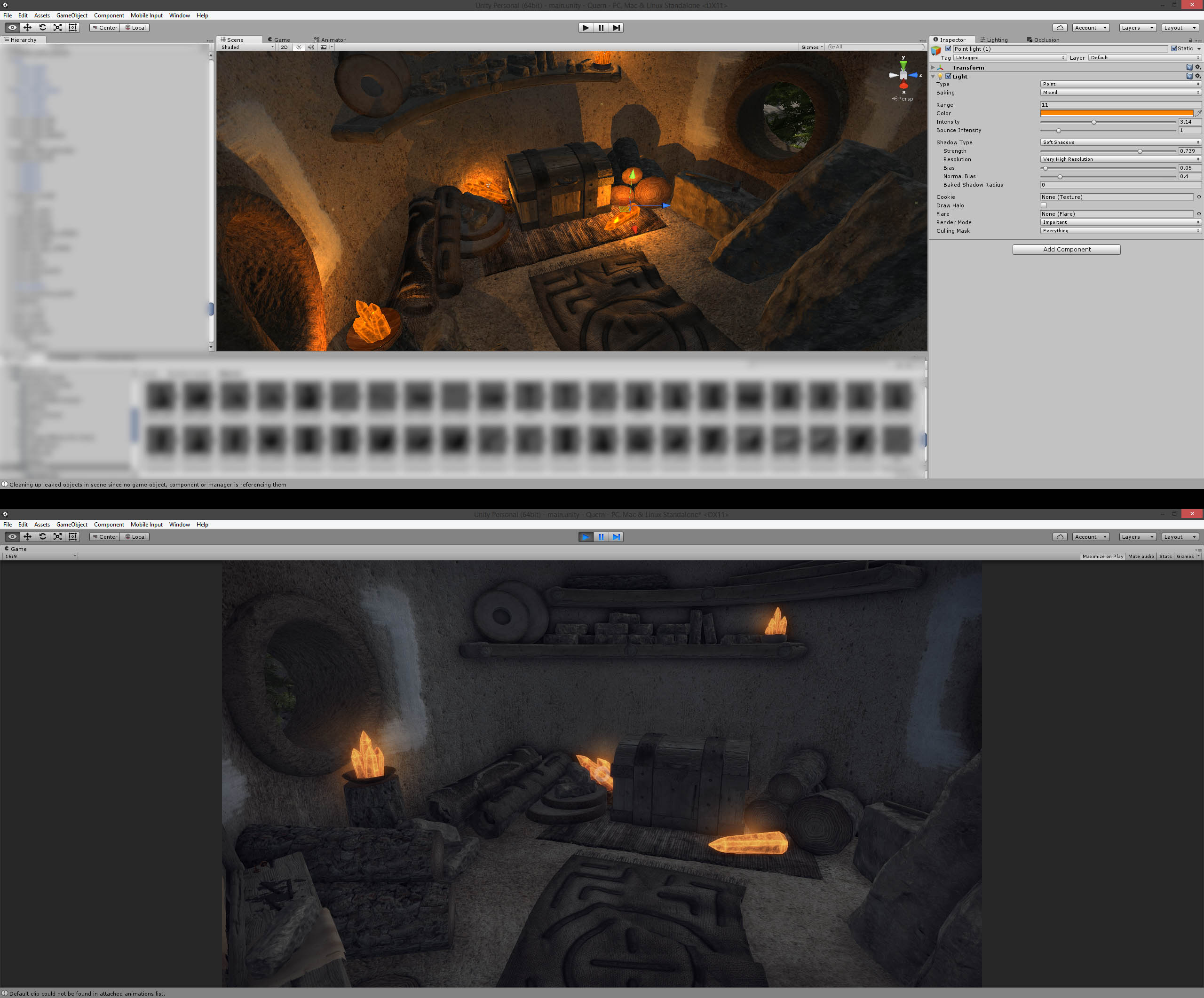
Same here! Our point lights are dead with the occlusion culling. Baking a new one doesn't help either.
alt text

dead-lights-2.jpg (469.3 kB)
avatar image Salierri · Oct 12, 2015 at 01:11 PM 1
Share

It also happens every time for us. Reproduction steps are simple, just create a new scene with a point light and a plane, then enable occlusion culling.

avatar image Chris-Crafty · Oct 16, 2015 at 10:58 PM 0
Share

I experience the same and have tried to reproduce the error in order to send a bug report to unity. Problem is that I can't seem to find what exactly is the cause. I have set up a supersimple test scene in my existing project, being imported from Unity 4.6 directly to Unity 5.2.1p4 , and the bug is easily reproduced. I have then tried to set up a new project to avoid sending a 30-Gb-Project to Unity. With the result that within the new project the exact same setup works just fine.

I have also tried to reproduce it by setting up within Unity 4.6 and then upgrading to 5.2, with the same, fully operational result. I suspect that it has something to do with specific settings made in the big project, but I have yet to find the culprit. $$anonymous$$aybe someone else has any insights here, this bug makes using the lights on the player inside my dungeons impossible and therefore breaks the whole dungeon exploration gameplay...

avatar image Chris-Crafty Chris-Crafty · Oct 16, 2015 at 11:00 PM 0
Share

Damn, that's it, shadow casting! Ok, sending bug report to Unity, they've got to fix that!

Did it, there is now two issues open for this problem, 733005 and 736979, let's hope that get on top of that really soon.

avatar image Radiangames2 · Oct 21, 2015 at 05:13 PM 0
Share

I'm having the exact same issue. Turn off shadow casting and lights work fine with Occlusion Culling. Turn on shadow casting and the light is completely disabled. Do you have a link to the Issue Tracker page? I tried searching by number but nothing showed up.

Thanks!

avatar image Radiangames2 Radiangames2 · Oct 21, 2015 at 05:22 PM 1
Share

Found it:

https://issuetracker.unity3d.com/issues/occlusionculling-baking-occlusion-data-causes-existing-realtime-lights-to-not-function

Current status: Fixed in future release.

1 Reply

· Add your reply
  • Sort: 
avatar image
0

Answer by Recluse · Nov 09, 2015 at 10:54 AM

Same issue here! I hope they fix this soon.

Comment
Add comment · Share
10 |3000 characters needed characters left characters exceeded
▼
  • Viewable by all users
  • Viewable by moderators
  • Viewable by moderators and the original poster
  • Advanced visibility
Viewable by all users

Your answer

Hint: You can notify a user about this post by typing @username

Up to 2 attachments (including images) can be used with a maximum of 524.3 kB each and 1.0 MB total.

Follow this Question

Answers Answers and Comments

8 People are following this question.

avatar image avatar image avatar image avatar image avatar image avatar image avatar image avatar image

Related Questions

WaterProDayTime Lighting issues and flickering when moving in certain positions. 0 Answers

Can you disable shadows that are not seen by the camera ? 1 Answer

Light visibility optimization 0 Answers

How to achieve this type of Occlusion? 3 Answers

Tree Soft Occlusion Bark lighting problem 0 Answers


Enterprise
Social Q&A

Social
Subscribe on YouTube social-youtube Follow on LinkedIn social-linkedin Follow on Twitter social-twitter Follow on Facebook social-facebook Follow on Instagram social-instagram

Footer

  • Purchase
    • Products
    • Subscription
    • Asset Store
    • Unity Gear
    • Resellers
  • Education
    • Students
    • Educators
    • Certification
    • Learn
    • Center of Excellence
  • Download
    • Unity
    • Beta Program
  • Unity Labs
    • Labs
    • Publications
  • Resources
    • Learn platform
    • Community
    • Documentation
    • Unity QA
    • FAQ
    • Services Status
    • Connect
  • About Unity
    • About Us
    • Blog
    • Events
    • Careers
    • Contact
    • Press
    • Partners
    • Affiliates
    • Security
Copyright © 2020 Unity Technologies
  • Legal
  • Privacy Policy
  • Cookies
  • Do Not Sell My Personal Information
  • Cookies Settings
"Unity", Unity logos, and other Unity trademarks are trademarks or registered trademarks of Unity Technologies or its affiliates in the U.S. and elsewhere (more info here). Other names or brands are trademarks of their respective owners.
  • Anonymous
  • Sign in
  • Create
  • Ask a question
  • Spaces
  • Default
  • Help Room
  • META
  • Moderators
  • Explore
  • Topics
  • Questions
  • Users
  • Badges
