
Wayback Machinekoobas.hobune.stream
May JUN Jul
Previous capture 12 Next capture
2021 2022 2023
1 capture
12 Jun 22 - 12 Jun 22
sparklines
Close Help
  • Products
  • Solutions
  • Made with Unity
  • Learning
  • Support & Services
  • Community
  • Asset Store
  • Get Unity

UNITY ACCOUNT

You need a Unity Account to shop in the Online and Asset Stores, participate in the Unity Community and manage your license portfolio. Login Create account
  • Blog
  • Forums
  • Answers
  • Evangelists
  • User Groups
  • Beta Program
  • Advisory Panel

Navigation

  • Home
  • Products
  • Solutions
  • Made with Unity
  • Learning
  • Support & Services
  • Community
    • Blog
    • Forums
    • Answers
    • Evangelists
    • User Groups
    • Beta Program
    • Advisory Panel

Unity account

You need a Unity Account to shop in the Online and Asset Stores, participate in the Unity Community and manage your license portfolio. Login Create account

Language

  • Chinese
  • Spanish
  • Japanese
  • Korean
  • Portuguese
  • Ask a question
  • Spaces
    • Default
    • Help Room
    • META
    • Moderators
    • Topics
    • Questions
    • Users
    • Badges
  • Home /
avatar image
0
Question by meMUmar · Jan 03, 2019 at 05:48 AM · physicsgamerotation axisbike

Rotation problem in a Stunt Game

Hello Everyone.

I have a bike with which i want to perform a stunt i.e when bike is in air it can rotate 360 on xAxis. Problem is i have spent hours in rectifying the best possible way to do this but unable to do so. I used transform.Rotate function but it doesn't work because on xAxis it rotates from -90 to 90 then change the y-Axis and rotates again. Similarly same problems encountered when I used transform.eularAngles and in Quaternion angles as well.

Now i also worked with torque and you can rotate it to a certain degree. Please help me with this, i'm stuck with it from long time.

I am working on a stunt game. Is there is any way to work for that.

Here's my Code for Rotating Bike:

using System.Collections;

using System.Collections.Generic;

using UnityEngine;

public class RotatingStunt : MonoBehaviour {

 private float currentAngleX, lastAngleX = 0, currentAngleY, currentAngleZ;  
 private float staticXAxis, staticYAngle;  
 private bool rotateLeft, rotateRight;
 private BikeController bikeController;
 public Rigidbody rb;

 // Use this for initialization
 void Start () {
     rotateLeft = false;
     rotateRight = false;
     staticXAxis = transform.position.x;
     staticYAngle = 0;
     rb = gameObject.GetComponent<Rigidbody>();
 }
 
 void FindBikeController() {
     bikeController = gameObject.GetComponent<BikeController >();
 }


 // Update is called once per frame
 void FixedUpdate () {
     if(!bikeController)
         FindBikeController();
     if(rotateRight && bikeController.speedOfBike != 0) {    // Rotating Bike to Right Side
         rb.AddTorque (transform.right * 1000f * Time.fixedDeltaTime, ForceMode.Acceleration);
         // Quaternion target = Quaternion.Euler(currentAngleX, 0, 0);

         // // Dampen towards the target rotation
         // transform.rotation = Quaternion.Slerp(transform.rotation, target,  Time.deltaTime * 5.0f);
         // rb.AddTorque(10,0,0);
         // currentAngleX += 150 * Time.deltaTime;
         // transform.eulerAngles = new Vector3(currentAngleX, currentAngleY, currentAngleZ);
         // transform.rotation = Quaternion.Euler(new Vector3(currentAngleX, currentAngleY, currentAngleZ));
         // print("Right = "  + transform.rotation);
     } else if(rotateLeft && bikeController.speedOfBike != 0) {    // Rotating Bike to Left Side
         rb.AddTorque(-transform.right * 1000f * Time.fixedDeltaTime, ForceMode.Acceleration);
         // currentAngleX -= 150 * Time.deltaTime;
         // Quaternion localRotation = Quaternion.Euler(currentAngleX - lastAngleX, 0, 0);
         // transform.rotation = transform.rotation * localRotation;
         // transform.eulerAngles = new Vector3(currentAngleX, currentAngleY, currentAngleZ);
         // print("Left = " + transform.rotation);
     }


     currentAngleZ = 0;
     
     currentAngleX = transform.eulerAngles.x;
     currentAngleZ = transform.eulerAngles.z;
     if(!(transform.position.x < (staticXAxis + 0.01) && transform.position.x > (staticXAxis - 0.01)))        // Trying to put bike on xAxis as bike will move straight
         transform.position = new Vector3(staticXAxis, transform.position.y, transform.position.z);            
     if(staticYAngle != transform.eulerAngles.y) {            // Trying to put bike on original yAxis if bike turn on wrong side while rotating
         currentAngleY = staticYAngle;
         transform.eulerAngles = new Vector3(currentAngleX, staticYAngle, currentAngleZ);    
     }
     // transform.eulerAngles = new Vector3(currentAngleX, currentAngleY, currentAngleZ);
     // }
     // print("Left = " + transform.eulerAngles.x);
 }

 public void RotatePlayerToLeft() {
     rotateLeft = true;
     rotateRight = false;
     currentAngleX = transform.eulerAngles.x;
     currentAngleY = transform.eulerAngles.y;
     currentAngleZ = transform.eulerAngles.z;
 }
 public void RotatePlayerToRight() {
     rotateRight = true;
     rotateLeft = false;
     currentAngleX = transform.eulerAngles.x;
     currentAngleY = transform.eulerAngles.y;
     currentAngleZ = transform.eulerAngles.z;
 }
 public void DontRotate() {
     rotateLeft = false;
     rotateRight = false;
 }

}

Through Buttons i'm calling functions for rotating left or right and in update applied torque.

Looking forward for your response.

Thanks in Advance

Comment
Add comment · Show 5
10 |3000 characters needed characters left characters exceeded
▼
  • Viewable by all users
  • Viewable by moderators
  • Viewable by moderators and the original poster
  • Advanced visibility
Viewable by all users
avatar image NathanGG · Dec 31, 2018 at 02:32 PM 0
Share

Could you please post the code, so I can see if I can help.

avatar image meMUmar NathanGG · Jan 01, 2019 at 05:22 AM 0
Share

@NathanGG Thank you for your response. I have edited my question and added code in it.

avatar image meMUmar · Jan 01, 2019 at 05:32 AM 0
Share

Hi @c_Feng can you please help me with this. Got Stuck in it from a long time. Thanks

avatar image Ady_M · Jan 04, 2019 at 01:18 AM 0
Share

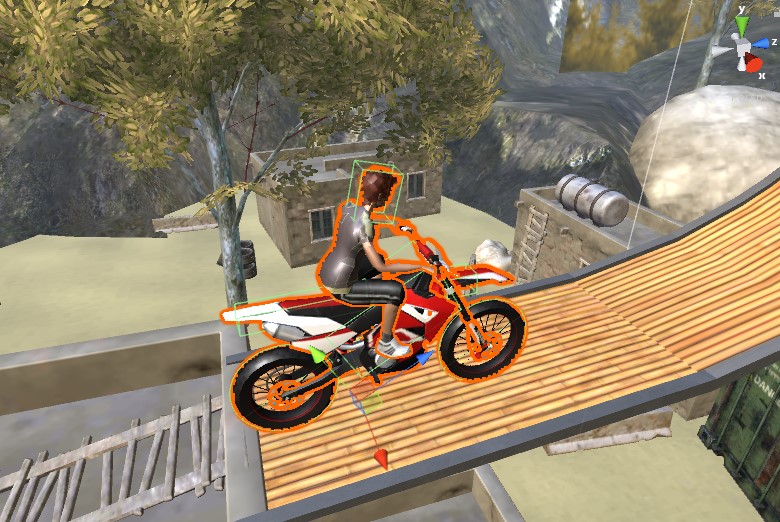
Your Bike's forward axis isn't Z? How can you rotate right by using rb.AddTorque (transform.right)? Shouldn't it be transform.up? It may sound like an off-topic question, but if your forward axis is not Z then you have to tell us.


AddTorque (transform.right) would usually pitch your object downwards (meaning clockwise if the object is viewed from its right side).
avatar image meMUmar Ady_M · Jan 07, 2019 at 08:21 AM 0
Share

alt text

As you can see in image i'm moving my bike in Z-Axis.

screenshot-1.jpg (153.8 kB)

0 Replies

· Add your reply
  • Sort: 

Your answer

Hint: You can notify a user about this post by typing @username

Up to 2 attachments (including images) can be used with a maximum of 524.3 kB each and 1.0 MB total.

Follow this Question

Answers Answers and Comments

192 People are following this question.

avatar image avatar image avatar image avatar image avatar image avatar image avatar image avatar image avatar image avatar image avatar image avatar image avatar image avatar image avatar image avatar image avatar image avatar image avatar image avatar image avatar image avatar image avatar image avatar image avatar image avatar image avatar image avatar image avatar image avatar image avatar image avatar image avatar image avatar image avatar image avatar image avatar image avatar image avatar image avatar image avatar image avatar image avatar image avatar image avatar image avatar image avatar image avatar image avatar image avatar image avatar image avatar image avatar image avatar image avatar image avatar image avatar image avatar image avatar image avatar image avatar image avatar image avatar image avatar image avatar image avatar image avatar image avatar image avatar image avatar image avatar image avatar image avatar image avatar image avatar image avatar image avatar image avatar image avatar image avatar image avatar image avatar image avatar image avatar image avatar image avatar image avatar image avatar image avatar image avatar image avatar image avatar image avatar image avatar image avatar image avatar image avatar image avatar image avatar image avatar image avatar image avatar image avatar image avatar image avatar image avatar image avatar image avatar image avatar image avatar image avatar image avatar image avatar image avatar image avatar image avatar image avatar image avatar image avatar image avatar image avatar image avatar image avatar image avatar image avatar image avatar image avatar image avatar image avatar image avatar image avatar image avatar image avatar image avatar image avatar image avatar image avatar image avatar image avatar image avatar image avatar image avatar image avatar image avatar image avatar image avatar image avatar image avatar image avatar image avatar image avatar image avatar image avatar image avatar image avatar image avatar image avatar image avatar image avatar image avatar image avatar image avatar image avatar image avatar image avatar image avatar image avatar image avatar image avatar image avatar image avatar image avatar image avatar image avatar image avatar image avatar image avatar image avatar image avatar image avatar image avatar image avatar image avatar image avatar image avatar image avatar image avatar image avatar image avatar image avatar image avatar image avatar image

Related Questions

Physics Calculation: How to Calculate where Rigidbody will Drop ? 1 Answer

Animation and Physic 0 Answers

Ragdoll elongates on Bike 0 Answers

How can I set soft momentum? 1 Answer

Rotate the gear and place the gear protrusions in the other gear depressions in Unity2D 0 Answers


Enterprise
Social Q&A

Social
Subscribe on YouTube social-youtube Follow on LinkedIn social-linkedin Follow on Twitter social-twitter Follow on Facebook social-facebook Follow on Instagram social-instagram

Footer

  • Purchase
    • Products
    • Subscription
    • Asset Store
    • Unity Gear
    • Resellers
  • Education
    • Students
    • Educators
    • Certification
    • Learn
    • Center of Excellence
  • Download
    • Unity
    • Beta Program
  • Unity Labs
    • Labs
    • Publications
  • Resources
    • Learn platform
    • Community
    • Documentation
    • Unity QA
    • FAQ
    • Services Status
    • Connect
  • About Unity
    • About Us
    • Blog
    • Events
    • Careers
    • Contact
    • Press
    • Partners
    • Affiliates
    • Security
Copyright © 2020 Unity Technologies
  • Legal
  • Privacy Policy
  • Cookies
  • Do Not Sell My Personal Information
  • Cookies Settings
"Unity", Unity logos, and other Unity trademarks are trademarks or registered trademarks of Unity Technologies or its affiliates in the U.S. and elsewhere (more info here). Other names or brands are trademarks of their respective owners.
  • Anonymous
  • Sign in
  • Create
  • Ask a question
  • Spaces
  • Default
  • Help Room
  • META
  • Moderators
  • Explore
  • Topics
  • Questions
  • Users
  • Badges
