
Wayback Machinekoobas.hobune.stream
May JUN Jul
Previous capture 12 Next capture
2021 2022 2023
1 capture
12 Jun 22 - 12 Jun 22
sparklines
Close Help
  • Products
  • Solutions
  • Made with Unity
  • Learning
  • Support & Services
  • Community
  • Asset Store
  • Get Unity

UNITY ACCOUNT

You need a Unity Account to shop in the Online and Asset Stores, participate in the Unity Community and manage your license portfolio. Login Create account
  • Blog
  • Forums
  • Answers
  • Evangelists
  • User Groups
  • Beta Program
  • Advisory Panel

Navigation

  • Home
  • Products
  • Solutions
  • Made with Unity
  • Learning
  • Support & Services
  • Community
    • Blog
    • Forums
    • Answers
    • Evangelists
    • User Groups
    • Beta Program
    • Advisory Panel

Unity account

You need a Unity Account to shop in the Online and Asset Stores, participate in the Unity Community and manage your license portfolio. Login Create account

Language

  • Chinese
  • Spanish
  • Japanese
  • Korean
  • Portuguese
  • Ask a question
  • Spaces
    • Default
    • Help Room
    • META
    • Moderators
    • Topics
    • Questions
    • Users
    • Badges
  • Home /
  • Help Room /
avatar image
0
Question by Drewtooroo · Nov 03, 2018 at 06:00 AM · 2d-physicsraycasthit2ddistance checksweeptest

Ridgidbody2D.Cast returns a slightly wrong RaycastHit2D.distance?

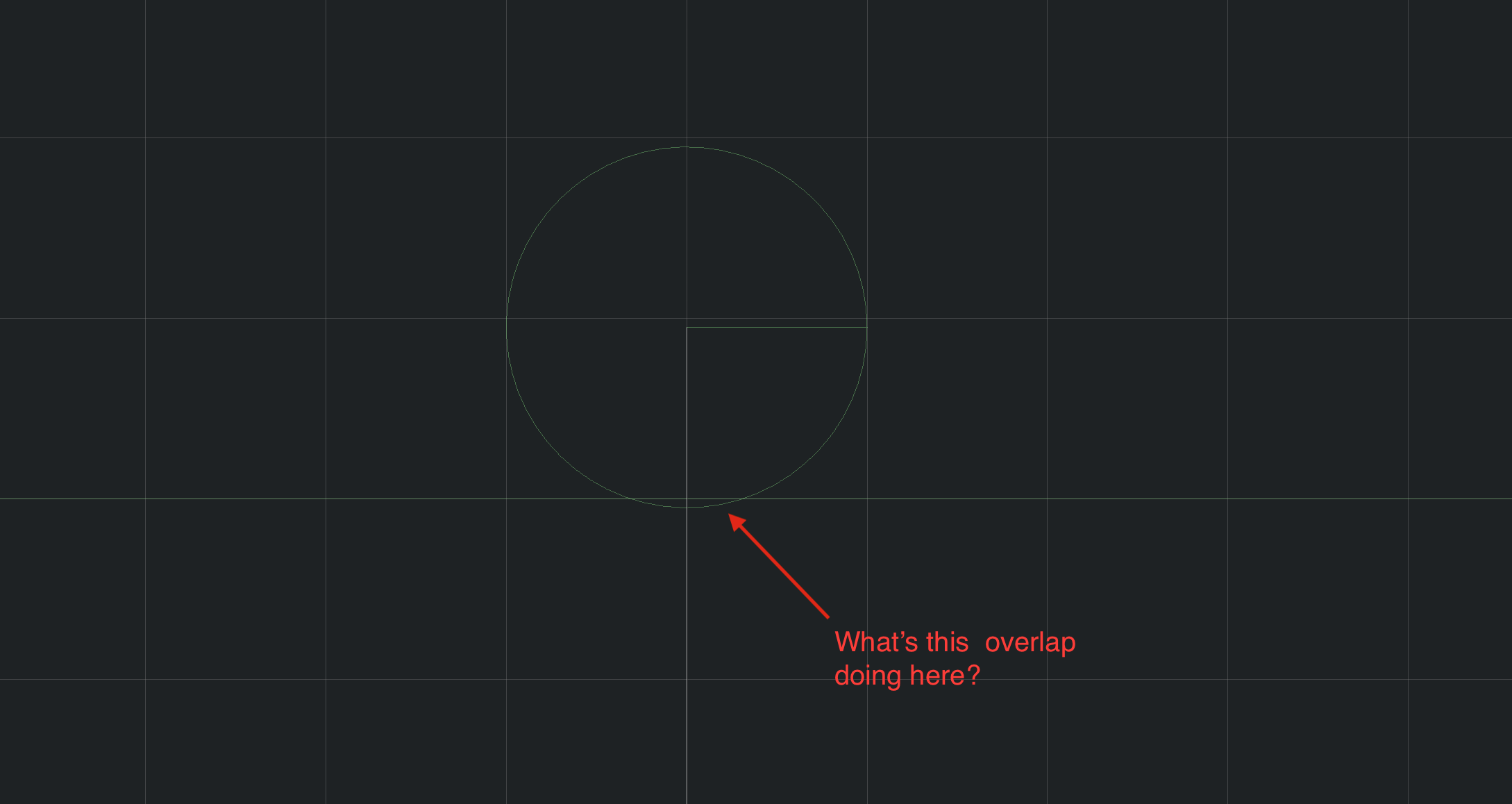
I'm trying to move a kinematic 2D physics object using Ridgidbody2D.Cast. When a collision is detected, the distance given by the RaycastHit2D seems incorrect because the collider never ends up flush with the collider that was hit.

alt text


I've made a sample project. If you hit play and watch both colliders in the scene view of the editor, you can see that the CircleCollider2D of the falling "ball" object goes a little ways into the BoxCollider2D of the "Quad" object.


Github Project


Here's the script that handles movement:


 using System.Collections;
 using System.Collections.Generic;
 using UnityEngine;
 
 [RequireComponent(typeof(Rigidbody2D))]
 [RequireComponent(typeof(Collider2D))]
 public class Actor : MonoBehaviour {
 
     [SerializeField]
     private Collider2D otherCollider;
 
     private Rigidbody2D rb2d;
     private Collider2D collider;
     private RaycastHit2D[] hitBuffer = new RaycastHit2D[8];
     private ContactFilter2D contactFilter;
     
     void Awake() {
         rb2d = GetComponent<Rigidbody2D>();
         collider = GetComponent<Collider2D>();
 
         contactFilter = new ContactFilter2D();
         contactFilter.useTriggers = false;
         contactFilter.SetLayerMask(Physics2D.GetLayerCollisionMask(gameObject.layer));
     }
 
     public void Move(Vector2 move) {
         float distance = move.magnitude;
         Vector2 direction = move.normalized;
         float searchDistance = distance;
 
         int count = rb2d.Cast(direction, hitBuffer, searchDistance);
         if (count > 0) {
             distance = hitBuffer[0].distance;
         }
 
         // transform.Translate((Vector3)direction * distance);
         rb2d.MovePosition(rb2d.position + direction * distance);
 
         ColliderDistance2D colDistance = collider.Distance(otherCollider);
         Debug.Log(string.Format("Cast distance: {0}, Overlap distance: {1}", distance, colDistance.distance));
     }
 }


And here's the script that causes downward movement using the above script:


 using System.Collections;
 using System.Collections.Generic;
 using UnityEngine;
 
 [RequireComponent(typeof(Actor))]
 public class SimpleBallController : MonoBehaviour {
 
     private Actor actor;
 
     void Awake() {
         actor = GetComponent<Actor>();
     }
 
     void FixedUpdate() {
         actor.Move(Vector2.down * Time.fixedDeltaTime);
     }
 }


screen-shot-2018-11-03-at-112528-am.png (83.1 kB)
Comment
Add comment
10 |3000 characters needed characters left characters exceeded
▼
  • Viewable by all users
  • Viewable by moderators
  • Viewable by moderators and the original poster
  • Advanced visibility
Viewable by all users

1 Reply

· Add your reply
  • Sort: 
avatar image
0

Answer by kreso · Nov 04, 2018 at 06:13 AM

The physics uses ticks (moments in time) for simulation. It is unlikely that a collision will happen exactly at the same time as the tick. If object A is moving 10 units per tick and object B is 5 units away (and static). Physics engine won't know that collision happened until next tick happens (and now the object A will be 5 units 'inside' the collided object B).

With a little bit of math you can calculate actual position of object A after the collision. But again, do not expect it to be on the boundary with object B; but actually outside of the collided object B because some time passed (maybe half a tick) since the collision (and object A probably bounced off a bit, if it has any bounce).

Comment
Add comment · Show 3 · Share
10 |3000 characters needed characters left characters exceeded
▼
  • Viewable by all users
  • Viewable by moderators
  • Viewable by moderators and the original poster
  • Advanced visibility
Viewable by all users
avatar image Drewtooroo · Nov 04, 2018 at 07:23 AM 0
Share

For collisions resulting from the physics simulation that makes sense. It gets moved, I find the overlap if it's collided, and then I adjust the position.


I neglected to say that the moving ball's ridgidbody2D is set to kinematic, though, so it doesn't actually participate in the physics simulation and only moves when I tell it to via script. I'll edit the question.


Since I'm using raycasting I believe I'm kind of doing the opposite: finding the distance and then moving the ridigidbody2D. Since this should be completely under my control it's all the more confusing to me.

avatar image kreso Drewtooroo · Nov 04, 2018 at 04:36 PM 0
Share

You are absolutely right. Still, Unity uses some kind of iteration method for raycasting (when using rigidbody2d.Cast method). We don't really know what it is (I tried going through the source code, couldn't find much for Cast method).

If you are trying to do something in particular, perhaps there is a better approach than using Unity's helper physics functions (and write your own).

I had fun experimenting with your project, l learned about 'Default Contact offset'. Here is a little GIF I made with your project (slowed down the movement). The thin yellowish lines are AABB's of colliders. Notice the Box has almost like an edge to it. This is due to contact offset in Physics2D Unity settings. If bumped down to 0.0001 it is almost perfect (but never perfect of course).

Also, notice that collision does indeed register (the normal's arrow appears). However, the Cast method does not register until somewhere between when distance was '-0.01361971' and '-0.01367971'.

Debug collision

avatar image Drewtooroo kreso · Nov 05, 2018 at 01:59 AM 0
Share

I didn't know about the 'Default Contact Offset', thanks! I noticed that objects under the physics simulation never quite lie flush with things they collide into, and this explains it.

Your answer

Hint: You can notify a user about this post by typing @username

Up to 2 attachments (including images) can be used with a maximum of 524.3 kB each and 1.0 MB total.

Follow this Question

Answers Answers and Comments

159 People are following this question.

avatar image avatar image avatar image avatar image avatar image avatar image avatar image avatar image avatar image avatar image avatar image avatar image avatar image avatar image avatar image avatar image avatar image avatar image avatar image avatar image avatar image avatar image avatar image avatar image avatar image avatar image avatar image avatar image avatar image avatar image avatar image avatar image avatar image avatar image avatar image avatar image avatar image avatar image avatar image avatar image avatar image avatar image avatar image avatar image avatar image avatar image avatar image avatar image avatar image avatar image avatar image avatar image avatar image avatar image avatar image avatar image avatar image avatar image avatar image avatar image avatar image avatar image avatar image avatar image avatar image avatar image avatar image avatar image avatar image avatar image avatar image avatar image avatar image avatar image avatar image avatar image avatar image avatar image avatar image avatar image avatar image avatar image avatar image avatar image avatar image avatar image avatar image avatar image avatar image avatar image avatar image avatar image avatar image avatar image avatar image avatar image avatar image avatar image avatar image avatar image avatar image avatar image avatar image avatar image avatar image avatar image avatar image avatar image avatar image avatar image avatar image avatar image avatar image avatar image avatar image avatar image avatar image avatar image avatar image avatar image avatar image avatar image avatar image avatar image avatar image avatar image avatar image avatar image avatar image avatar image avatar image avatar image avatar image avatar image avatar image avatar image avatar image avatar image avatar image avatar image avatar image avatar image avatar image avatar image avatar image avatar image avatar image avatar image avatar image avatar image avatar image avatar image avatar image avatar image avatar image avatar image avatar image avatar image avatar image

Related Questions

Hookshot in Unity 2D not working,Hookshot 2D not working 0 Answers

Raycast not detecting bullet 0 Answers

Reduce distance between two Vectors 1 Answer

How do I properly do a 2D raycast to avoid problem with pause button? 0 Answers

One 2D Raycast Not Stopping Even Though Others Do? 0 Answers


Enterprise
Social Q&A

Social
Subscribe on YouTube social-youtube Follow on LinkedIn social-linkedin Follow on Twitter social-twitter Follow on Facebook social-facebook Follow on Instagram social-instagram

Footer

  • Purchase
    • Products
    • Subscription
    • Asset Store
    • Unity Gear
    • Resellers
  • Education
    • Students
    • Educators
    • Certification
    • Learn
    • Center of Excellence
  • Download
    • Unity
    • Beta Program
  • Unity Labs
    • Labs
    • Publications
  • Resources
    • Learn platform
    • Community
    • Documentation
    • Unity QA
    • FAQ
    • Services Status
    • Connect
  • About Unity
    • About Us
    • Blog
    • Events
    • Careers
    • Contact
    • Press
    • Partners
    • Affiliates
    • Security
Copyright © 2020 Unity Technologies
  • Legal
  • Privacy Policy
  • Cookies
  • Do Not Sell My Personal Information
  • Cookies Settings
"Unity", Unity logos, and other Unity trademarks are trademarks or registered trademarks of Unity Technologies or its affiliates in the U.S. and elsewhere (more info here). Other names or brands are trademarks of their respective owners.
  • Anonymous
  • Sign in
  • Create
  • Ask a question
  • Spaces
  • Default
  • Help Room
  • META
  • Moderators
  • Explore
  • Topics
  • Questions
  • Users
  • Badges
