
Wayback Machinekoobas.hobune.stream
May JUN Jul
Previous capture 13 Next capture
2021 2022 2023
1 capture
13 Jun 22 - 13 Jun 22
sparklines
Close Help
  • Products
  • Solutions
  • Made with Unity
  • Learning
  • Support & Services
  • Community
  • Asset Store
  • Get Unity

UNITY ACCOUNT

You need a Unity Account to shop in the Online and Asset Stores, participate in the Unity Community and manage your license portfolio. Login Create account
  • Blog
  • Forums
  • Answers
  • Evangelists
  • User Groups
  • Beta Program
  • Advisory Panel

Navigation

  • Home
  • Products
  • Solutions
  • Made with Unity
  • Learning
  • Support & Services
  • Community
    • Blog
    • Forums
    • Answers
    • Evangelists
    • User Groups
    • Beta Program
    • Advisory Panel

Unity account

You need a Unity Account to shop in the Online and Asset Stores, participate in the Unity Community and manage your license portfolio. Login Create account

Language

  • Chinese
  • Spanish
  • Japanese
  • Korean
  • Portuguese
  • Ask a question
  • Spaces
    • Default
    • Help Room
    • META
    • Moderators
    • Topics
    • Questions
    • Users
    • Badges
  • Home /
avatar image
0
Question by The Ghost · Aug 10, 2013 at 02:39 AM · loopinventorynguishopindexoutofrangeexception

Why wont inventory wont update after or more purchases from in-game shop?

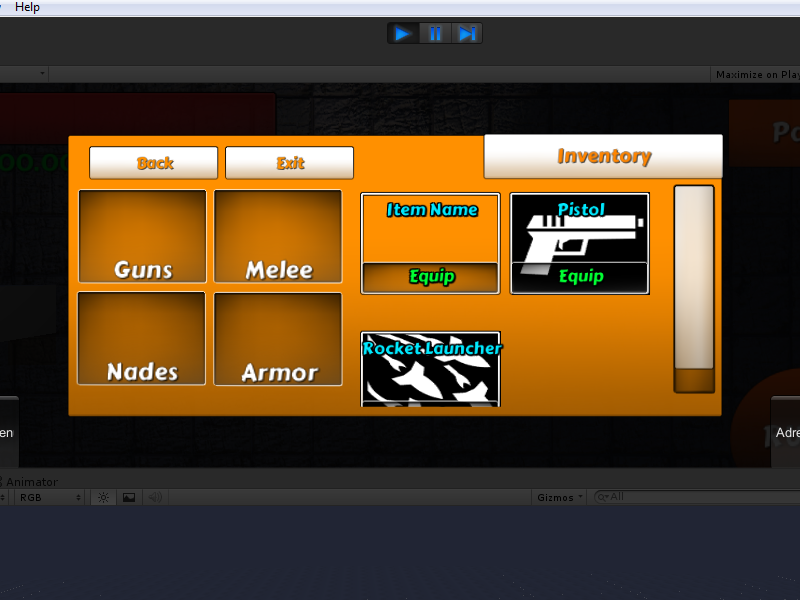
The problem: When I purchase 3 more items from the shop, one item will be be left blank. I have to go to the inventory then go back to the shop every 2 purchases or else one of the items wont show.

Here's the scripts:

 public void BuildInventory()
     {
         for(loopInt = 0; loopInt <= inventoryContents.Count; loopInt++)
         {
             if(targetPath.transform.childCount >= inventoryContents.Count)
             {
                 if(inventoryItems.Count >= 0)
                 {
                     
                 }
             }
             else
             {
                 NGUITools.AddChild(targetPath, itemPrefab);
                 foreach(Transform child in targetPath.transform) 
                 {
                     if(child.gameObject.tag == "Item" && inventoryItems.Count <= inventoryContents.Count)
                     {
                         inventoryItems.Add(child.gameObject);
                     }
                 }
                 inventoryItems[loopInt].name = inventoryContents[loopInt].itemName;
                 inventoryItems[loopInt].GetComponent<InventoryItem>().item.itemName = inventoryContents[loopInt].itemName;
                 inventoryItems[loopInt].GetComponent<InventoryItem>().item.icon = inventoryContents[loopInt].icon;
                 inventoryItems[loopInt].GetComponent<InventoryItem>().UpdateInfo();
                 gridControlScript.Reposition();
             }
         }
         Debug.Log("Inventory contains " + inventoryContents.Count + " items");
         Debug.Log("Building inventory");
     }

     public void UpdateInfo()
     {
         itemNameTag = transform.Find("Item Text");
         itemNameTag.GetComponent<UILabel>().text = item.itemName;
         itemIcon = transform.Find("Texture");
         itemIcon.GetComponent<UITexture>().material = item.icon;
     }

And a screen shot: alt text
Comment
Add comment · Show 2
10 |3000 characters needed characters left characters exceeded
▼
  • Viewable by all users
  • Viewable by moderators
  • Viewable by moderators and the original poster
  • Advanced visibility
Viewable by all users
avatar image cdrandin · Aug 10, 2013 at 09:08 AM 0
Share

Double check it is in fact your inventory at fault. SO you can deter$$anonymous$$e if it is a GUI displaying problem or simply your inventory management.

avatar image The Ghost · Aug 10, 2013 at 11:44 PM 0
Share

The inventory list shows up correctly in the inspector, and when I click the blank item, the info is blank too. So it's definitely a problem with my code.

1 Reply

· Add your reply
  • Sort: 
avatar image
0

Answer by Elroyman · Aug 11, 2013 at 12:47 AM

Just spit ballin here as I don't see quite how all the details are worked out outside of this but it seems to me that your first nested loop is being performed rather than kicking into the else statement there.

I suspect that this is due to the foreach loop reiterating through the list without having been cleared at the beginning. The first time it runs your foreach adds 1 to the list, then it adds 2 to the list on the second trip in through the parent loop. This means that on the third trip around, your inventoryContents.Count is 3 and so is the count on your inventoryitems (1 for the first time through, and then twice for the second time through, which counts 1 item twice).

I would set up a dummy list in the lower scope, then set that equal to the inventory items at the end or you else statement.

 .
 .
 .
 else
 {
 NGUITools.AddChild(targetpath, itemprefab);
 [ListType] dummylist = new [ListType]();
  foreach(Transform child in targetPath.transform)
 {
 if(child.gameObject.tag == "Item" && dummylist.Count <= inventoryContents.Count)
 {
 dummylist.Add(child.gameObject);
 }
 }
 inventoryItem = dummylist;

That should get you a fresh count every time, rather than adding 1, then 2, then 3, then 4, etc. Which will keep you out of the top if statement until you reach your inventoryContents limit.

Comment
Add comment · Show 3 · Share
10 |3000 characters needed characters left characters exceeded
▼
  • Viewable by all users
  • Viewable by moderators
  • Viewable by moderators and the original poster
  • Advanced visibility
Viewable by all users
avatar image The Ghost · Aug 11, 2013 at 02:07 AM 0
Share

Hmm, this isn't working either, 1 more item shows up blank now.

avatar image Elroyman · Aug 11, 2013 at 02:47 AM 0
Share

ah i missed an edit...the if statement there in the middle should count the dummylist, not inventoryItems

avatar image The Ghost · Aug 11, 2013 at 03:03 AM 0
Share

Unfortunately it still has the same effect :( I'm not sure what to do at this point.

Your answer

Hint: You can notify a user about this post by typing @username

Up to 2 attachments (including images) can be used with a maximum of 524.3 kB each and 1.0 MB total.

Follow this Question

Answers Answers and Comments

16 People are following this question.

avatar image avatar image avatar image avatar image avatar image avatar image avatar image avatar image avatar image avatar image avatar image avatar image avatar image avatar image avatar image avatar image

Related Questions

How to make a for loop display inventory correctly? 0 Answers

Help with Shop Script C# 0 Answers

Array index is out of range? 1 Answer

How to Show 'buy' button relevant to character selected ? 1 Answer

How do you make an Inventory screen with NGUI 0 Answers


Enterprise
Social Q&A

Social
Subscribe on YouTube social-youtube Follow on LinkedIn social-linkedin Follow on Twitter social-twitter Follow on Facebook social-facebook Follow on Instagram social-instagram

Footer

  • Purchase
    • Products
    • Subscription
    • Asset Store
    • Unity Gear
    • Resellers
  • Education
    • Students
    • Educators
    • Certification
    • Learn
    • Center of Excellence
  • Download
    • Unity
    • Beta Program
  • Unity Labs
    • Labs
    • Publications
  • Resources
    • Learn platform
    • Community
    • Documentation
    • Unity QA
    • FAQ
    • Services Status
    • Connect
  • About Unity
    • About Us
    • Blog
    • Events
    • Careers
    • Contact
    • Press
    • Partners
    • Affiliates
    • Security
Copyright © 2020 Unity Technologies
  • Legal
  • Privacy Policy
  • Cookies
  • Do Not Sell My Personal Information
  • Cookies Settings
"Unity", Unity logos, and other Unity trademarks are trademarks or registered trademarks of Unity Technologies or its affiliates in the U.S. and elsewhere (more info here). Other names or brands are trademarks of their respective owners.
  • Anonymous
  • Sign in
  • Create
  • Ask a question
  • Spaces
  • Default
  • Help Room
  • META
  • Moderators
  • Explore
  • Topics
  • Questions
  • Users
  • Badges
