
Wayback Machinekoobas.hobune.stream
May JUN Jul
Previous capture 12 Next capture
2021 2022 2023
1 capture
12 Jun 22 - 12 Jun 22
sparklines
Close Help
  • Products
  • Solutions
  • Made with Unity
  • Learning
  • Support & Services
  • Community
  • Asset Store
  • Get Unity

UNITY ACCOUNT

You need a Unity Account to shop in the Online and Asset Stores, participate in the Unity Community and manage your license portfolio. Login Create account
  • Blog
  • Forums
  • Answers
  • Evangelists
  • User Groups
  • Beta Program
  • Advisory Panel

Navigation

  • Home
  • Products
  • Solutions
  • Made with Unity
  • Learning
  • Support & Services
  • Community
    • Blog
    • Forums
    • Answers
    • Evangelists
    • User Groups
    • Beta Program
    • Advisory Panel

Unity account

You need a Unity Account to shop in the Online and Asset Stores, participate in the Unity Community and manage your license portfolio. Login Create account

Language

  • Chinese
  • Spanish
  • Japanese
  • Korean
  • Portuguese
  • Ask a question
  • Spaces
    • Default
    • Help Room
    • META
    • Moderators
    • Topics
    • Questions
    • Users
    • Badges
  • Home /
  • Help Room /
avatar image
4
Question by Addyarb · Dec 23, 2016 at 04:20 PM · mobileoptimizationoverheat

Phone getting too hot! Profiler shows nothing

Hi, and thanks for taking the time to read.

Firstly let me say that I've been reading optimization documentation for a few days now - and I still can't figure out what the cause of this issue is. I've tested on 6 different devices (iOS/Android) - each of which produce this issue.

I've found many threads highlighting this issue - but none that were conclusively answered - just vague suggestions that usually only go as far as "check the profiler to see what's going on, and then fix it." Although I understand you can only be so specific without seeing the project.

I have a relatively basic 2D game that uses Input.acceleration as an input. I have a dozen or so canvas elements (images, buttons), and a bit of networking using Photon.

The profiler shows absolutely nothing out of the ordinary - but after running the app for ~5 minutes, the phone gets significantly warmer. After 10+ minutes it gets hot, and a bit longer after that I can see that the phone is starting to limit the app's processes by lowering the frame rate.

Things I've tried:

  • Enabling/Disabling VSync

  • Setting target frame rate

  • Texture compression

  • Lowering quality settings to "Fastest"

  • Testing on several different devices

  • Checking memory allocation (it's around 114mb on iOS)

  • Lowering the increment at which I'm polling the accelerometer

  • Deep profiling from the device and editor

Thanks for the help!

Addyarb

Comment
Add comment · Show 1
10 |3000 characters needed characters left characters exceeded
▼
  • Viewable by all users
  • Viewable by moderators
  • Viewable by moderators and the original poster
  • Advanced visibility
Viewable by all users
avatar image ETech-Studios · Dec 24, 2016 at 04:41 AM 0
Share

Have you tried capping the framerate?

4 Replies

· Add your reply
  • Sort: 
avatar image
6

Answer by cakeslice · Dec 23, 2016 at 08:09 PM

Don't forget that Unity will be rendering whatever you are doing on the highest resolution the phone has and most phones nowadays have very high resolution screens.

Try this on the Start() function with VSync on:

Screen.SetResolution(1280, 720, true);

Comment
Add comment · Show 5 · Share
10 |3000 characters needed characters left characters exceeded
▼
  • Viewable by all users
  • Viewable by moderators
  • Viewable by moderators and the original poster
  • Advanced visibility
Viewable by all users
avatar image Pengocat · Dec 23, 2016 at 11:29 PM 0
Share

Yes this is most likely the reason. Lowering the resolution will lower the power consumption a great deal.

avatar image Trungdv · Jan 16, 2017 at 05:14 PM 0
Share

It did not work. I called Screen.SetResolution(1280, 720, true); but then the screen resolution is not changed at all.

avatar image Trungdv · Jan 16, 2017 at 06:19 PM 0
Share

Sorry, it was Unity's bug. I updated the lastest version and it worked.

avatar image sd_trent · Apr 08, 2019 at 02:42 PM 0
Share

This worked for me on iPhone X! Thanks

avatar image Fillebuster · Aug 09, 2020 at 11:30 AM 0
Share

Wow, this really helped me. Tried optimizing a ton of other stuff - to no avail, and this did the trick. Well, I guess I have a far better optimized game now overall :D

avatar image
0

Answer by mateo4632 · Dec 23, 2016 at 06:09 PM

You could have to much going on every frame. Check all your scripts and see what is going on in each of the updates. Also if the script doesn't need the update function just delete as it still does get called every frame regardless. If you are constantly instantiating objects and destroying objects I would suggest you object pool, if you need a script for object pooling please let me know. Another problem could be to many rigidbodies in the scene at once.

Comment
Add comment · Show 6 · Share
10 |3000 characters needed characters left characters exceeded
▼
  • Viewable by all users
  • Viewable by moderators
  • Viewable by moderators and the original poster
  • Advanced visibility
Viewable by all users
avatar image Addyarb · Dec 23, 2016 at 06:40 PM 0
Share

Thanks for the suggestion. I have completely disabled my Update method, and the phone still gets warm after ~5 $$anonymous$$utes, although not nearly as warm/hot as it was before.

Attached is my profiler screenshot. During this build I completely removed the Update method. It seems GraphicsPresentAndSync is taking up quite a bit - but that may be normal. I'm only rendering 8 UI elements in this scene - so I can't imagine why it'd be heating up.

Are there any resources that actually define what I'm seeing in the profiler, or is it best just to google them one by one? alt text
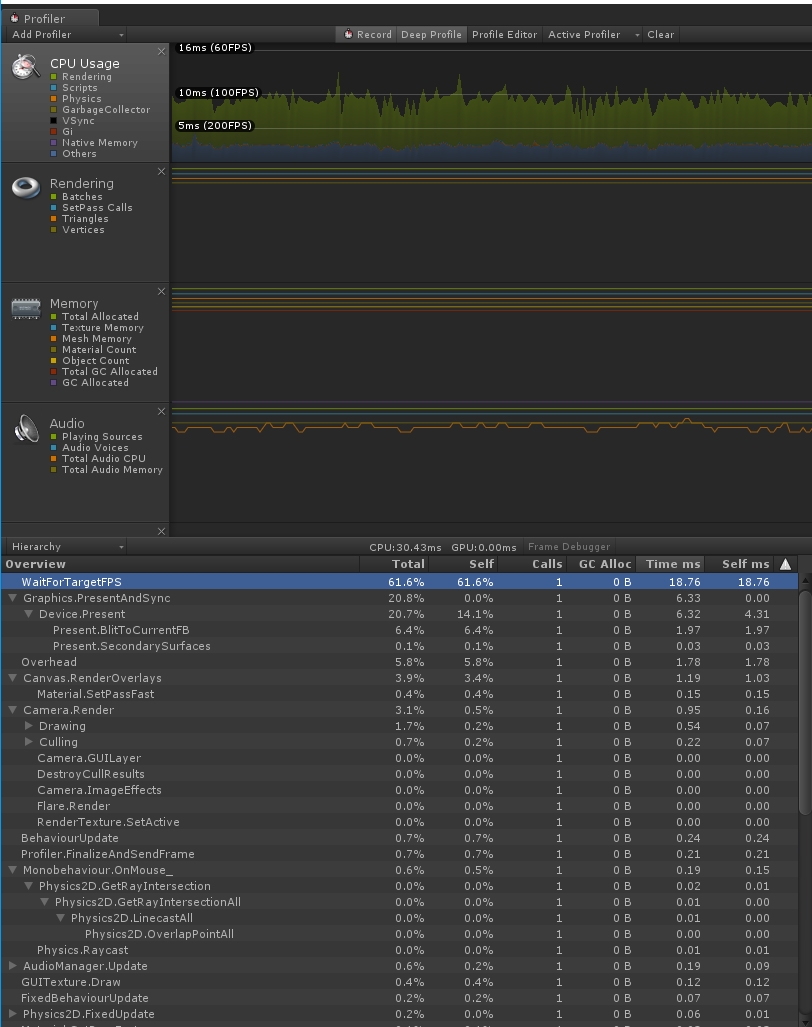
profilerlog.jpg (332.2 kB)
avatar image Addyarb · Dec 23, 2016 at 07:27 PM 0
Share

After some more testing, I've run into something very strange..

I created a new, empty scene in my app and added one Canvas with one Panel (Image that overlays the screen).

After building, putting it to 'Fastest' quality setting, disabling VSync, and deselecting the profiler / debug build - I launched the app and let it sit for 5 $$anonymous$$utes.

It ended up being just as warm as it was when I disabled the Update method.

What is going on here? Is this an inherent optimization issue with the Unity engine? I can't think of a more stripped down scene.

I tested this on a Samsung S5 and S6.

avatar image mateo4632 Addyarb · Dec 23, 2016 at 07:36 PM 0
Share

That is very strange. I did run into this problem awhile ago, but never really found a fix. But I decided not to worry about it yet and just keep testing the gameplay part, and eventually I magically fixed and my phone would no longer get really hot. Now I'm still very unsure as to what I did to make it stop my phone from overheating but maybe with some time and you update your game it might go away as it did for me.

avatar image Addyarb mateo4632 · Dec 23, 2016 at 07:44 PM 0
Share

Do you regularly update your Unity version? I'm on the latest version right now (5.5.0f3).

There's not much left for me to go on. I do know of plenty of games built with Unity (2D and 3D) that don't exhibit any excessive heating issues, and have loads more going on. I wish there was a baseline app (or baseline values) I could test against in situations like this.

Anyhow, I appreciate you taking the time to offer your thoughts. Thanks!

avatar image Wolfram Addyarb · Jan 09, 2017 at 12:31 PM 0
Share

The magic keyword here is "VSync". You wrote you DISABLED VSync - which has the opposite effect of what you want to do: With vsync off, Unity will render AS FAS AS POSSIBLE, even if there is "nothing to do", or the screen elements are static. So you DEFINITELY want to enable vsync, or even set Application.targetFrameRate to something smaller manually, for example to 30 (=fps).

avatar image mateo4632 · Dec 23, 2016 at 07:30 PM 0
Share

@addyarb I compared my cpu usage to yours on a game I have been working on, and wow your Rendering seems to be really high and abnormal. Could you send a screenshot of your scene view?

avatar image
0

Answer by Dionysos1111 · Dec 24, 2016 at 11:38 PM

Try turning off pixel perfect in the canvas settings(If you don't already have done this), can't imagine anything else.

Btw, thanks cakeslice i think you have just solved my problem ^^

Comment
Add comment · Share
10 |3000 characters needed characters left characters exceeded
▼
  • Viewable by all users
  • Viewable by moderators
  • Viewable by moderators and the original poster
  • Advanced visibility
Viewable by all users
avatar image
0

Answer by JonPQ · Jun 02, 2021 at 08:50 PM

you can also reduce fixed time step, if you are running physics. make sure its not running faster than the fps ( unless it really has to )

Comment
Add comment · Share
10 |3000 characters needed characters left characters exceeded
▼
  • Viewable by all users
  • Viewable by moderators
  • Viewable by moderators and the original poster
  • Advanced visibility
Viewable by all users

Your answer

Hint: You can notify a user about this post by typing @username

Up to 2 attachments (including images) can be used with a maximum of 524.3 kB each and 1.0 MB total.

Follow this Question

Answers Answers and Comments

88 People are following this question.

avatar image avatar image avatar image avatar image avatar image avatar image avatar image avatar image avatar image avatar image avatar image avatar image avatar image avatar image avatar image avatar image avatar image avatar image avatar image avatar image avatar image avatar image avatar image avatar image avatar image avatar image avatar image avatar image avatar image avatar image avatar image avatar image avatar image avatar image avatar image avatar image avatar image avatar image avatar image avatar image avatar image avatar image avatar image avatar image avatar image avatar image avatar image avatar image avatar image avatar image avatar image avatar image avatar image avatar image avatar image avatar image avatar image avatar image avatar image avatar image avatar image avatar image avatar image avatar image avatar image avatar image avatar image avatar image avatar image avatar image avatar image avatar image avatar image avatar image avatar image avatar image avatar image avatar image avatar image avatar image avatar image avatar image avatar image avatar image avatar image avatar image avatar image avatar image

Related Questions

Mobile Optimization question 1 Answer

Choosing best mobile performance solutions 1 Answer

Low FPS on barebones scene (Android) 0 Answers

Physics2D Optimize 1 Answer

Best way to spawn objects randomly on only x-axis on Mobile 0 Answers


Enterprise
Social Q&A

Social
Subscribe on YouTube social-youtube Follow on LinkedIn social-linkedin Follow on Twitter social-twitter Follow on Facebook social-facebook Follow on Instagram social-instagram

Footer

  • Purchase
    • Products
    • Subscription
    • Asset Store
    • Unity Gear
    • Resellers
  • Education
    • Students
    • Educators
    • Certification
    • Learn
    • Center of Excellence
  • Download
    • Unity
    • Beta Program
  • Unity Labs
    • Labs
    • Publications
  • Resources
    • Learn platform
    • Community
    • Documentation
    • Unity QA
    • FAQ
    • Services Status
    • Connect
  • About Unity
    • About Us
    • Blog
    • Events
    • Careers
    • Contact
    • Press
    • Partners
    • Affiliates
    • Security
Copyright © 2020 Unity Technologies
  • Legal
  • Privacy Policy
  • Cookies
  • Do Not Sell My Personal Information
  • Cookies Settings
"Unity", Unity logos, and other Unity trademarks are trademarks or registered trademarks of Unity Technologies or its affiliates in the U.S. and elsewhere (more info here). Other names or brands are trademarks of their respective owners.
  • Anonymous
  • Sign in
  • Create
  • Ask a question
  • Spaces
  • Default
  • Help Room
  • META
  • Moderators
  • Explore
  • Topics
  • Questions
  • Users
  • Badges
