
Wayback Machinekoobas.hobune.stream
May JUN Jul
Previous capture 12 Next capture
2021 2022 2023
1 capture
12 Jun 22 - 12 Jun 22
sparklines
Close Help
  • Products
  • Solutions
  • Made with Unity
  • Learning
  • Support & Services
  • Community
  • Asset Store
  • Get Unity

UNITY ACCOUNT

You need a Unity Account to shop in the Online and Asset Stores, participate in the Unity Community and manage your license portfolio. Login Create account
  • Blog
  • Forums
  • Answers
  • Evangelists
  • User Groups
  • Beta Program
  • Advisory Panel

Navigation

  • Home
  • Products
  • Solutions
  • Made with Unity
  • Learning
  • Support & Services
  • Community
    • Blog
    • Forums
    • Answers
    • Evangelists
    • User Groups
    • Beta Program
    • Advisory Panel

Unity account

You need a Unity Account to shop in the Online and Asset Stores, participate in the Unity Community and manage your license portfolio. Login Create account

Language

  • Chinese
  • Spanish
  • Japanese
  • Korean
  • Portuguese
  • Ask a question
  • Spaces
    • Default
    • Help Room
    • META
    • Moderators
    • Topics
    • Questions
    • Users
    • Badges
  • Home /
avatar image
0
Question by aditya · Mar 14, 2016 at 10:50 AM · androidwebcamtexturestretch

WebcamTexture stretching too much

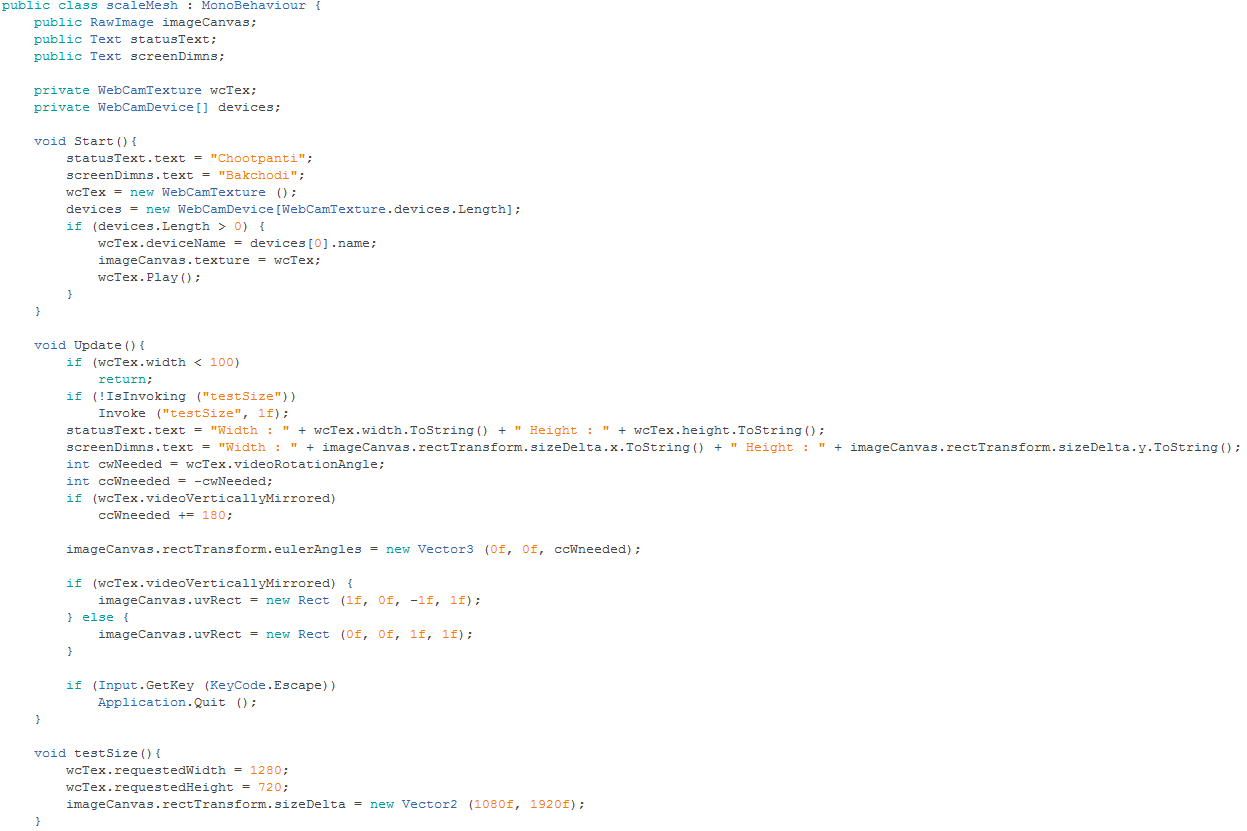
in my app i m trying to render webcamtexture on to a raw image, but it is always stretching no matter how i code, plus the requstedHeight and requestedWidth are not affecting this problem in any way, plus this is the first time im working with webcamtexture... below is the current code
alt text

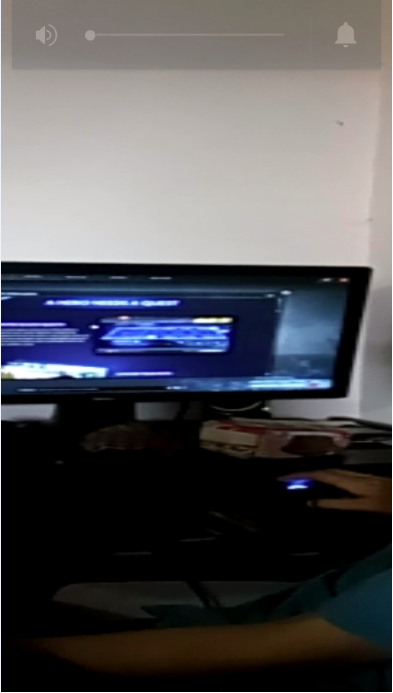
below is what i m getting when i run it on my android phone
alt text

untitled.png (55.0 kB)
screenshot.png (272.1 kB)
Comment
Add comment · Show 4
10 |3000 characters needed characters left characters exceeded
▼
  • Viewable by all users
  • Viewable by moderators
  • Viewable by moderators and the original poster
  • Advanced visibility
Viewable by all users
avatar image Fattie · Mar 14, 2016 at 01:02 PM 0
Share

Hi, try this

http://answers.unity3d.com/answers/910020/view.html

and follow through the link there I edited in for the ratio/etc

hope it works!

avatar image aditya Fattie · Mar 15, 2016 at 07:44 AM 0
Share

@Fattie sir i did exactly the same as mentioned above but now i m facing a weird problem, actually my webcamtexture is not using the resolution i m trying to set, for instance if i m setting 1280*720, then i m getting something like 1440*1080, basically i m always getting a resolution which is stretching my texture same as in above image

avatar image saschandroid aditya · Mar 15, 2016 at 08:20 AM 0
Share

I guess the problem is that the camera supports only an aspect ration of 4:3 (for example), but you are requesting an aspect ratio of 16:9. So requestedWidth and requestedHeight gives you the closest resolution (of 1280x720) that the camera supports (1280 to 1440 and 720 to 1080, 16:9 to 4:3).

Show more comments

1 Reply

· Add your reply
  • Sort: 
avatar image
0

Answer by Fattie · Mar 15, 2016 at 12:47 PM

requestWidth and requestHeight

simply do not work on mobile!!!

that's all there is to it

Comment
Add comment · Show 3 · Share
10 |3000 characters needed characters left characters exceeded
▼
  • Viewable by all users
  • Viewable by moderators
  • Viewable by moderators and the original poster
  • Advanced visibility
Viewable by all users
avatar image saschandroid · Mar 15, 2016 at 02:22 PM 0
Share

$$anonymous$$mh, it could be that I'm completely wrong here ... and I don't know if this is the intended behavior of requestWidth and requestHeight, but I can use it like this:

  1. I have a RawImage to display the webcam texture

  2. I want it's size to be around square (for example 600x600)

  3. so I do a requestWidth and requestHeight with this values

  4. the WebCamTexture.width and WebCamTexture.height is now as close as possible to this (that is the 'resolution' the webcam can give me - in this example it's 640x480)

  5. now I set the size of the RawImage RectTransform to these values (640x480), which results in a non-stretched video being displayed

Did I miss something obvious?

EDIT: Ah ok, you edited your answer ('on mobile') ... I didn't test that. Sorry for any confusion.

avatar image Fattie · Mar 15, 2016 at 02:28 PM 0
Share

I beg your pardon, they do not work on mobile! :)

on certain desktop platforms they sometimes work, right.

NOTE points (1) and (2) in huge type,

http://answers.unity3d.com/answers/1148424/view.html

avatar image saschandroid Fattie · Mar 15, 2016 at 02:54 PM 0
Share

Weird ... it works on my Xperia Z1 just like on my Desktop (except it delivers some strange resolutions ... but still displaying correctly, no stretches).

Your answer

Hint: You can notify a user about this post by typing @username

Up to 2 attachments (including images) can be used with a maximum of 524.3 kB each and 1.0 MB total.

Follow this Question

Answers Answers and Comments

56 People are following this question.

avatar image avatar image avatar image avatar image avatar image avatar image avatar image avatar image avatar image avatar image avatar image avatar image avatar image avatar image avatar image avatar image avatar image avatar image avatar image avatar image avatar image avatar image avatar image avatar image avatar image avatar image avatar image avatar image avatar image avatar image avatar image avatar image avatar image avatar image avatar image avatar image avatar image avatar image avatar image avatar image avatar image avatar image avatar image avatar image avatar image avatar image avatar image avatar image avatar image avatar image avatar image avatar image avatar image avatar image avatar image avatar image

Related Questions

Cam texture stopped working in Unity 5/Android Lollipop 0 Answers

problem accessing webcamtexture.videorotation angle on windows phone 8 0 Answers

OpenCVForUnity Core.Flip function not working in Unity Android Build 0 Answers

WebCamTexture resolution and cropping problem on Android 0 Answers

WebCamTexture crashes on android 0 Answers


Enterprise
Social Q&A

Social
Subscribe on YouTube social-youtube Follow on LinkedIn social-linkedin Follow on Twitter social-twitter Follow on Facebook social-facebook Follow on Instagram social-instagram

Footer

  • Purchase
    • Products
    • Subscription
    • Asset Store
    • Unity Gear
    • Resellers
  • Education
    • Students
    • Educators
    • Certification
    • Learn
    • Center of Excellence
  • Download
    • Unity
    • Beta Program
  • Unity Labs
    • Labs
    • Publications
  • Resources
    • Learn platform
    • Community
    • Documentation
    • Unity QA
    • FAQ
    • Services Status
    • Connect
  • About Unity
    • About Us
    • Blog
    • Events
    • Careers
    • Contact
    • Press
    • Partners
    • Affiliates
    • Security
Copyright © 2020 Unity Technologies
  • Legal
  • Privacy Policy
  • Cookies
  • Do Not Sell My Personal Information
  • Cookies Settings
"Unity", Unity logos, and other Unity trademarks are trademarks or registered trademarks of Unity Technologies or its affiliates in the U.S. and elsewhere (more info here). Other names or brands are trademarks of their respective owners.
  • Anonymous
  • Sign in
  • Create
  • Ask a question
  • Spaces
  • Default
  • Help Room
  • META
  • Moderators
  • Explore
  • Topics
  • Questions
  • Users
  • Badges
