
Wayback Machinekoobas.hobune.stream
May JUN Jul
Previous capture 13 Next capture
2021 2022 2023
1 capture
13 Jun 22 - 13 Jun 22
sparklines
Close Help
  • Products
  • Solutions
  • Made with Unity
  • Learning
  • Support & Services
  • Community
  • Asset Store
  • Get Unity

UNITY ACCOUNT

You need a Unity Account to shop in the Online and Asset Stores, participate in the Unity Community and manage your license portfolio. Login Create account
  • Blog
  • Forums
  • Answers
  • Evangelists
  • User Groups
  • Beta Program
  • Advisory Panel

Navigation

  • Home
  • Products
  • Solutions
  • Made with Unity
  • Learning
  • Support & Services
  • Community
    • Blog
    • Forums
    • Answers
    • Evangelists
    • User Groups
    • Beta Program
    • Advisory Panel

Unity account

You need a Unity Account to shop in the Online and Asset Stores, participate in the Unity Community and manage your license portfolio. Login Create account

Language

  • Chinese
  • Spanish
  • Japanese
  • Korean
  • Portuguese
  • Ask a question
  • Spaces
    • Default
    • Help Room
    • META
    • Moderators
    • Topics
    • Questions
    • Users
    • Badges
  • Home /
avatar image
0
Question by petediddy · Apr 02, 2015 at 10:37 AM · unity5shadow

Unwanted lines - maybe shadows?

When I play my game on an iOS device, there is an undesirable line showing. It looks like the line begins on the left side of the player (the sphere) and runs vertically down from the player. The line follows the player around the scene as I play the game. My first thought was that it's a shadow... but I have turned off shadows on my directional light and in the Project Quality settings. Interestingly, the line does not show up in the Unity Editor, only when playing the app on the device. Any ideas?alt text
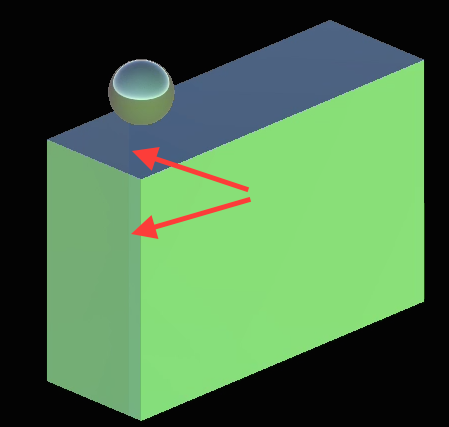
EDIT: So it looks like there is also a light shadow being cast from the camera (I think - it's casting down onto the floor below the sphere player when playing...) ... which also follows the player around the scene. Any ideas would be much appreciated!

unwanted-shadows.png (50.2 kB)
Comment
Add comment · Show 4
10 |3000 characters needed characters left characters exceeded
▼
  • Viewable by all users
  • Viewable by moderators
  • Viewable by moderators and the original poster
  • Advanced visibility
Viewable by all users
avatar image petediddy · Apr 03, 2015 at 01:00 AM 0
Share

I made a short slow-mo video of my issue - https://youtu.be/dBxBVcgTYSg

There are 2 shadows that appear - #1 is very large and obvious in the video, it appears to be a shadow cast from some large object (the camera or something else? I'm not sure... that's the only thing I'm aware of that is in that position) behind the player sphere. #2 is a smaller vertical line (visible in the image posted above with the red arrows) that goes up and down from the player sphere and follows the player sphere. I've disabled one of the two directional lights - the remaining directional light is set at rotations x=0 y=300 z=0 (the camera is also rotated on the y-axis at 315*). I've turned shadows off in the Quality Settings and in the Light component in the editor. The issue does NOT occur in the Unity Editor window when I play... only on iOS devices.

I've tried so many things trying to figure this out... probably something stupid that I am missing... help?

-pete

avatar image jcv8000 · Apr 04, 2015 at 03:16 AM 1
Share

To me it looks like the materials are metallic and smooth.

Are the metallicness or smoothness settings above 0 on your materials?

avatar image petediddy · Apr 04, 2015 at 04:24 AM 0
Share

Yes, the materials are metallic and smooth... why this would cause the lines/shadows though?

avatar image petediddy · Apr 04, 2015 at 04:38 AM 1
Share

After turning off both metallic and smoothness settings, the issue is completely gone.

Thank you Crafterguy3x3!

1 Reply

· Add your reply
  • Sort: 
avatar image
1

Answer by mtdrume · Nov 24, 2016 at 05:28 AM

A bit late with an answer. But adjusting the bias of the light source will resolve this problem. ie. directional light that is acting as the sun.

Comment
Add comment · Show 1 · Share
10 |3000 characters needed characters left characters exceeded
▼
  • Viewable by all users
  • Viewable by moderators
  • Viewable by moderators and the original poster
  • Advanced visibility
Viewable by all users
avatar image mtdrume · Nov 24, 2016 at 05:29 AM 0
Share

to clarify, you can keep both smoothness and metallic in your materials while still fixing the "line" issue.

Your answer

Hint: You can notify a user about this post by typing @username

Up to 2 attachments (including images) can be used with a maximum of 524.3 kB each and 1.0 MB total.

Follow this Question

Answers Answers and Comments

5 People are following this question.

avatar image avatar image avatar image avatar image avatar image

Related Questions

how to stop real time shadows in Unity5 from blinking flickering and fritzing 4 Answers

No realtime shadows in webplayer build? 0 Answers

Why don't shadows appear in my built .exe? Unity 5 4 Answers

Soft shadows problem. Big black circle on the scene. 0 Answers

Huge unknown shadow in scene [android] 1 Answer


Enterprise
Social Q&A

Social
Subscribe on YouTube social-youtube Follow on LinkedIn social-linkedin Follow on Twitter social-twitter Follow on Facebook social-facebook Follow on Instagram social-instagram

Footer

  • Purchase
    • Products
    • Subscription
    • Asset Store
    • Unity Gear
    • Resellers
  • Education
    • Students
    • Educators
    • Certification
    • Learn
    • Center of Excellence
  • Download
    • Unity
    • Beta Program
  • Unity Labs
    • Labs
    • Publications
  • Resources
    • Learn platform
    • Community
    • Documentation
    • Unity QA
    • FAQ
    • Services Status
    • Connect
  • About Unity
    • About Us
    • Blog
    • Events
    • Careers
    • Contact
    • Press
    • Partners
    • Affiliates
    • Security
Copyright © 2020 Unity Technologies
  • Legal
  • Privacy Policy
  • Cookies
  • Do Not Sell My Personal Information
  • Cookies Settings
"Unity", Unity logos, and other Unity trademarks are trademarks or registered trademarks of Unity Technologies or its affiliates in the U.S. and elsewhere (more info here). Other names or brands are trademarks of their respective owners.
  • Anonymous
  • Sign in
  • Create
  • Ask a question
  • Spaces
  • Default
  • Help Room
  • META
  • Moderators
  • Explore
  • Topics
  • Questions
  • Users
  • Badges