
Wayback Machinekoobas.hobune.stream
May JUN Jul
Previous capture 13 Next capture
2021 2022 2023
1 capture
13 Jun 22 - 13 Jun 22
sparklines
Close Help
  • Products
  • Solutions
  • Made with Unity
  • Learning
  • Support & Services
  • Community
  • Asset Store
  • Get Unity

UNITY ACCOUNT

You need a Unity Account to shop in the Online and Asset Stores, participate in the Unity Community and manage your license portfolio. Login Create account
  • Blog
  • Forums
  • Answers
  • Evangelists
  • User Groups
  • Beta Program
  • Advisory Panel

Navigation

  • Home
  • Products
  • Solutions
  • Made with Unity
  • Learning
  • Support & Services
  • Community
    • Blog
    • Forums
    • Answers
    • Evangelists
    • User Groups
    • Beta Program
    • Advisory Panel

Unity account

You need a Unity Account to shop in the Online and Asset Stores, participate in the Unity Community and manage your license portfolio. Login Create account

Language

  • Chinese
  • Spanish
  • Japanese
  • Korean
  • Portuguese
  • Ask a question
  • Spaces
    • Default
    • Help Room
    • META
    • Moderators
    • Topics
    • Questions
    • Users
    • Badges
  • Home /
avatar image
0
Question by simejanko · Aug 01, 2014 at 09:27 AM · physicscollidermesh collidertrailtron

Assigning new sharedMesh to mesh collider every frame doesn't work?

So i am making a tron like game and i am trying to collide my bike trail against other colliders. I used TronTrail script from unity procedural examples. I simply added a Mesh Collider and at the end of every update assign current trail mesh to sharedMesh of mesh collider. When i try to collide my bike against it, it doesnt work. My layer setup is correct, my bike doesnt use Mesh Colliders and isnt kinematic. Any ideas?

ScreenShot from paused game: alt text
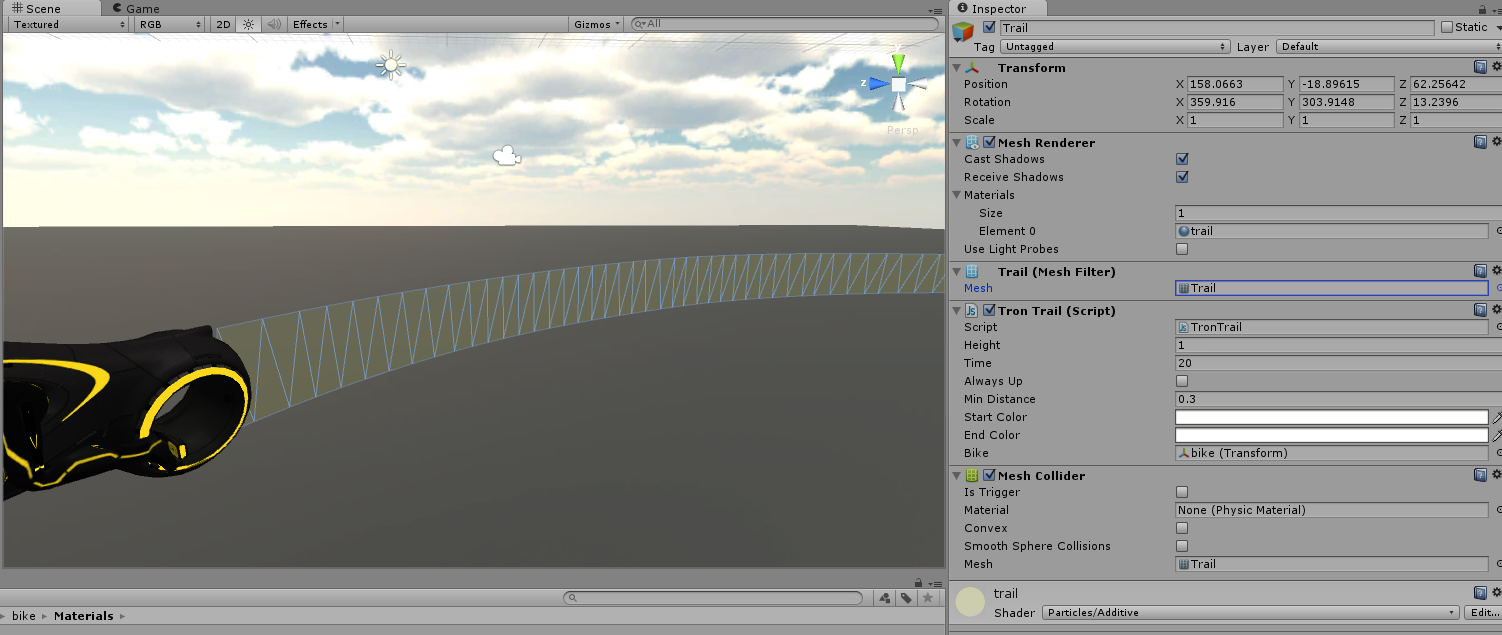
trailcollide.png (327.2 kB)
Comment
Add comment · Show 2
10 |3000 characters needed characters left characters exceeded
▼
  • Viewable by all users
  • Viewable by moderators
  • Viewable by moderators and the original poster
  • Advanced visibility
Viewable by all users
avatar image rutter · Aug 01, 2014 at 09:28 AM 0
Share

What type of collider does the bike have? As per the manual, Unity is a little bit picky about which mesh colliders can or can't actually collide with each other (for performance reasons).

Also, what's the thickness of that mesh collider? I don't have experience using 0-thickness mesh colliders, but some of the others don't handle that well.

avatar image simejanko · Aug 01, 2014 at 09:39 AM 0
Share

Bike has 2 wheel colliders and a box collider. No mesh colliders. Yes trail has 0 thickness. But i tried the same thing using extrusion demo in the same unity package. $$anonymous$$ade a base mesh for extrusion and same as here applied new mesh(non zero thickness) to shared$$anonymous$$esh of the collider every frame. Same result.

1 Reply

· Add your reply
  • Sort: 
avatar image
0
Best Answer

Answer by simejanko · Aug 09, 2014 at 10:04 AM

I figured it out. I only called meshCollider.sharedMesh = mesh; every frame. I added meshCollider.sharedMesh = null; a line before that and it works.

Comment
Add comment · Show 1 · Share
10 |3000 characters needed characters left characters exceeded
▼
  • Viewable by all users
  • Viewable by moderators
  • Viewable by moderators and the original poster
  • Advanced visibility
Viewable by all users
avatar image Symo7 · Jul 05, 2016 at 08:44 PM 0
Share

This isn't working for me (Unity 5.3.2.f1 Personal). I've tried adding the $$anonymous$$eshCollider at runtime, setting it to null first and a combination of the two. It is very strange as the mesh collider will snap to the parent object if I move it in the Scene view. If I do a transform.Translate in script it doesn't trigger the 'snap'. Note the origin of the gameobject is in a weird place before the update:

alt text

Code:

             $$anonymous$$eshCollider mc = gameObject.AddComponent<$$anonymous$$eshCollider>();
             mc.shared$$anonymous$$esh = null;
             mc.shared$$anonymous$$esh = poly.mesh;


EDIT: I fixed this by creating the collider after setting the $$anonymous$$eshFilter to 'poly' (I was doing it the other way round before...)

Your answer

Hint: You can notify a user about this post by typing @username

Up to 2 attachments (including images) can be used with a maximum of 524.3 kB each and 1.0 MB total.

Follow this Question

Answers Answers and Comments

4 People are following this question.

avatar image avatar image avatar image avatar image

Related Questions

Cant fix my collider problem on an object, help me up :) 1 Answer

Preventing Convex Mesh Colliders from Interpenetrating 2 Answers

Problems with mesh collider 0 Answers

Mesh collider and jitter 1 Answer

OnCollisionEnter isn't working between two RigidBodies 1 Answer


Enterprise
Social Q&A

Social
Subscribe on YouTube social-youtube Follow on LinkedIn social-linkedin Follow on Twitter social-twitter Follow on Facebook social-facebook Follow on Instagram social-instagram

Footer

  • Purchase
    • Products
    • Subscription
    • Asset Store
    • Unity Gear
    • Resellers
  • Education
    • Students
    • Educators
    • Certification
    • Learn
    • Center of Excellence
  • Download
    • Unity
    • Beta Program
  • Unity Labs
    • Labs
    • Publications
  • Resources
    • Learn platform
    • Community
    • Documentation
    • Unity QA
    • FAQ
    • Services Status
    • Connect
  • About Unity
    • About Us
    • Blog
    • Events
    • Careers
    • Contact
    • Press
    • Partners
    • Affiliates
    • Security
Copyright © 2020 Unity Technologies
  • Legal
  • Privacy Policy
  • Cookies
  • Do Not Sell My Personal Information
  • Cookies Settings
"Unity", Unity logos, and other Unity trademarks are trademarks or registered trademarks of Unity Technologies or its affiliates in the U.S. and elsewhere (more info here). Other names or brands are trademarks of their respective owners.
  • Anonymous
  • Sign in
  • Create
  • Ask a question
  • Spaces
  • Default
  • Help Room
  • META
  • Moderators
  • Explore
  • Topics
  • Questions
  • Users
  • Badges
