 koobas.hobune.stream


MouseDown Triggered by Another GameObject
I have bomb and brick game objects. Sometimes, when i click a brick, the mousedown() event of bomb object is called for no reason. The mouseDown() event of the Brick does not being called.I am pretty sure that the script is attached to only the Bomb object. And this does not happen always.
 public class Bomb : MonoBehaviour
 {
 //this function is being triggered when another GameObject is clicked, and the onClick function of the right object is not being triggered. this not happens always.
     private void OnMouseDown()
     {
        // do stuff()
     }
 }
Video: https://youtu.be/exOrb72Od_w As you can see, when a brick is clicked, the nearby bricks with the same color will be eliminated. When the bomb element is clicked, nearby elements (with 1 distance) is being destroyed, regardless of their color. But in the 00:12, I clicked the green brick object, but the onMouseDown() of bomb object is being triggered.
And the bomb prefab's size look OK. 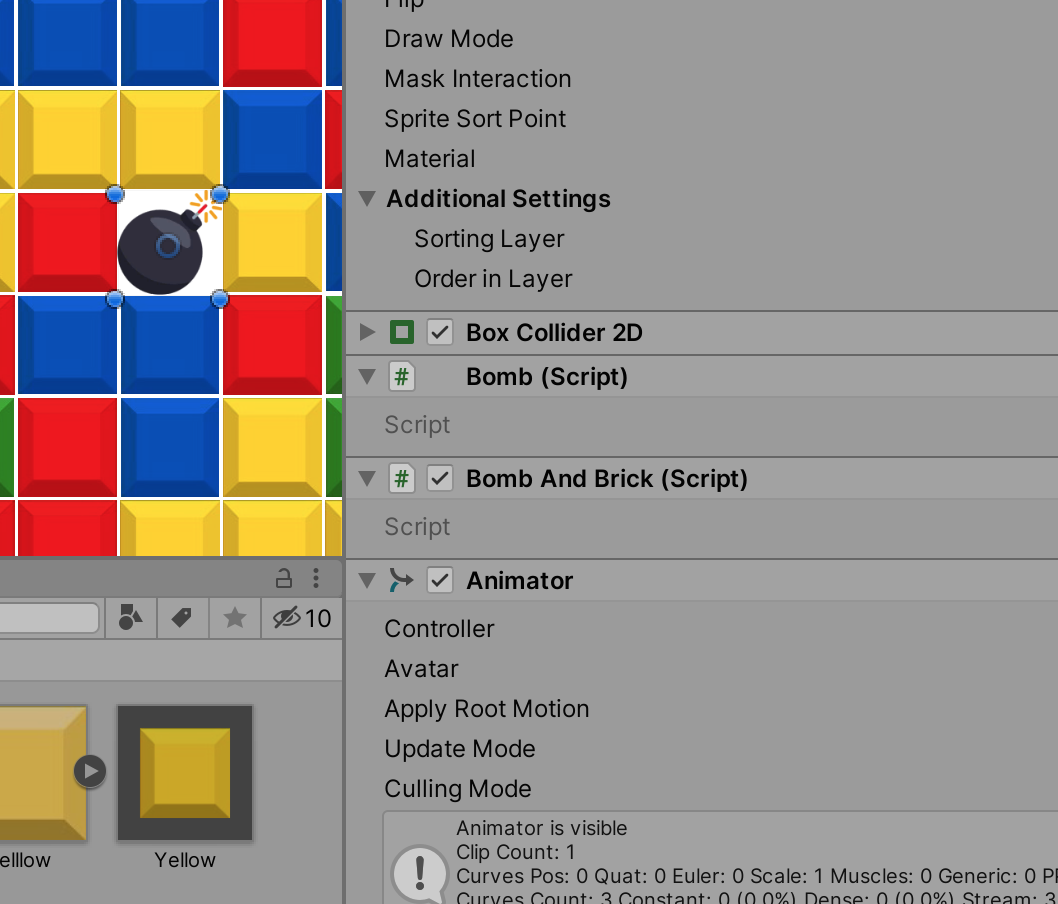

hi @XraZerTR Sorry I misunderstood the question.
have you tried tweaking the colliders of the prefab it might be a bit large?

I don't get it. I'm using Unity's On$$anonymous$$ouseDown() function on a script that only attached to Bomb objects.

Thats the problem, the engine sets the function true irrespective of where you are unless you tell it to
$$anonymous$$y friend I know you're trying to help but that's not the issue. In the video guy uses Input.get$$anonymous$$ouseDown() function to capture clicks and uses Raycast to figure out which object is clicked. However, I use on$$anonymous$$ouseDown() function described here https://docs.unity3d.com/ScriptReference/$$anonymous$$onoBehaviour.On$$anonymous$$ouseDown.html the function is triggered whenever the gameObject attached to script is clicked.
@JustAbhi yeah i thought about too but the bomb's size looks OK, i've uploaded a picture in the question.
Yeah, I found it. I don't know why, but my bomb object's box collider's width and height set to 5.12, setting them to 1 solved the issue.



