
Wayback Machinekoobas.hobune.stream
May JUN Jul
Previous capture 12 Next capture
2021 2022 2023
1 capture
12 Jun 22 - 12 Jun 22
sparklines
Close Help
  • Products
  • Solutions
  • Made with Unity
  • Learning
  • Support & Services
  • Community
  • Asset Store
  • Get Unity

UNITY ACCOUNT

You need a Unity Account to shop in the Online and Asset Stores, participate in the Unity Community and manage your license portfolio. Login Create account
  • Blog
  • Forums
  • Answers
  • Evangelists
  • User Groups
  • Beta Program
  • Advisory Panel

Navigation

  • Home
  • Products
  • Solutions
  • Made with Unity
  • Learning
  • Support & Services
  • Community
    • Blog
    • Forums
    • Answers
    • Evangelists
    • User Groups
    • Beta Program
    • Advisory Panel

Unity account

You need a Unity Account to shop in the Online and Asset Stores, participate in the Unity Community and manage your license portfolio. Login Create account

Language

  • Chinese
  • Spanish
  • Japanese
  • Korean
  • Portuguese
  • Ask a question
  • Spaces
    • Default
    • Help Room
    • META
    • Moderators
    • Topics
    • Questions
    • Users
    • Badges
  • Home /
  • Help Room /
avatar image
0
Question by Hide_pixel · Jun 21, 2018 at 11:20 AM · spriteinspectorrendererspriterendererjapanese

the image set on the inspector is not displayed. I am a beginner

I read the book for beginners and constructed the following script. When the main character (Uta) is hit, the hero disappears, an alternative sprite is displayed, and it is an action of being pulled upward.

Although it operates, the image specified by will not be displayed. The main character disappears and becomes inactive, and it is seen that the enemy is going away on top. However, the image set on the inspector is not displayed.

Advice please.

 using System.Collections;
 using System.Collections.Generic;
 using UnityEngine;
 
 public class BruburuScript : MonoBehaviour {
 
     public Sprite BruSprite;
    
     bool isBru = false;
 
     // Use this for initialization
     void Start () {
 
         Vector3 pos = this.transform.position;
         pos.y = Random.value * 4 + 1;
         this.transform.position = pos;
         
     }
 
     
     // Update is called once per frame
     void Update () {
         if(isBru){
             Vector3 pos = this.transform.position;
             pos.y += Time.deltaTime * 6;
             this.transform.position = pos;
         }
         
     }
 void OnTriggerEnter2D (Collider2D col)
     {
         if(!col .gameObject.name.Equals("Uta")){
             return;
         }
 
         col.gameObject.SetActive(false);
 
        this.GetComponent<SpriteRenderer>().sprite = BruSprite;
 
         isBru = true;
         
     }
 }
 

Comment
Add comment · Show 2
10 |3000 characters needed characters left characters exceeded
▼
  • Viewable by all users
  • Viewable by moderators
  • Viewable by moderators and the original poster
  • Advanced visibility
Viewable by all users
avatar image Hellium · Jun 21, 2018 at 10:18 AM 0
Share

Please, edit your question to provide the english translation. Unity Answers is an English-speaking website, used by thousands of developpers. Not all of them speak your native language.

avatar image tormentoarmagedoom · Jun 21, 2018 at 10:24 AM 0
Share

Good day.

This is an international forum, please remake your question in english so we can understand you and you can get an answer....

Bye.

2 Replies

· Add your reply
  • Sort: 
avatar image
0

Answer by tormentoarmagedoom · Jun 21, 2018 at 03:55 PM

Good day.

Is possible you have a Space here?

if(!col .gameObject.name.Equals("Uta")){

right after .gameobject?

General Tips: As you say you are a begginer, take note:

If want to ferear the object that contains this script, use "gameObject" (minusc "g") , not "this" like here:

gameObject.transform.position = pos;

[is the object who have a transform, not the script]

[...]

or...

gameObject.GetComponent().sprite = BruSprite;

[is the gameObject who have components. The script is a Component of the gameObject also]

Bye!

Comment
Add comment · Share
10 |3000 characters needed characters left characters exceeded
▼
  • Viewable by all users
  • Viewable by moderators
  • Viewable by moderators and the original poster
  • Advanced visibility
Viewable by all users
avatar image
0

Answer by Hide_pixel · Jun 21, 2018 at 11:58 PM

tormentoarmagedoom

Thank you! But... No picture appears like the picture.!
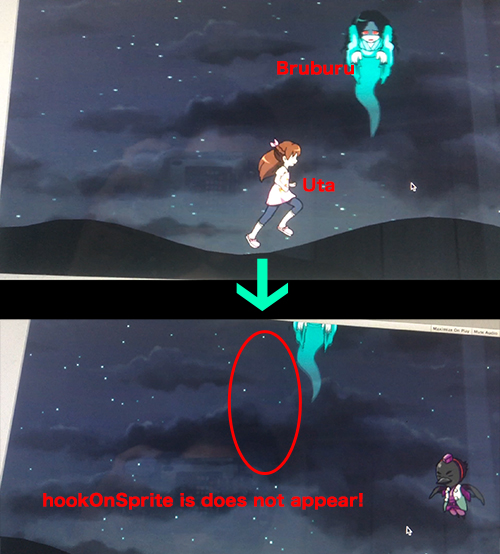

alt text


[I changed "BruSprite" to the same name "hookOnSprite" as book. Copy & pasete]

I changed the code as follows. Thanking you in advance.


 using System.Collections;
 using System.Collections.Generic;
 using UnityEngine;
 
 public class BruburuScript : MonoBehaviour
 {
 
 
     public Sprite hookOnSprite;
 
     bool isHook = false;
 
 
     void Start()
     {
 
         Vector3 pos = this.transform.position;
         pos.y = Random.value * 4 + 1;
         this.transform.position = pos;
     }
 
 
     void Update()
     {
         
 
         if (isHook)
         {
             Vector3 pos = this.transform.position;
             pos.y += Time.deltaTime * 6;
             this.transform.position = pos;
         }
     }
 
 
     void OnTriggerEnter2D(Collider2D col)
     {
 
         if (!col.gameObject.name.Equals("Uta"))
         {
             return;
         }
 
 
         col.gameObject.SetActive(false);
 
         GetComponent<SpriteRenderer>().sprite=hookOnSprite;
 
         isHook = true;
     }


 }


sprite.jpg (208.1 kB)
Comment
Add comment · Share
10 |3000 characters needed characters left characters exceeded
▼
  • Viewable by all users
  • Viewable by moderators
  • Viewable by moderators and the original poster
  • Advanced visibility
Viewable by all users

Your answer

Hint: You can notify a user about this post by typing @username

Up to 2 attachments (including images) can be used with a maximum of 524.3 kB each and 1.0 MB total.

Follow this Question

Answers Answers and Comments

173 People are following this question.

avatar image avatar image avatar image avatar image avatar image avatar image avatar image avatar image avatar image avatar image avatar image avatar image avatar image avatar image avatar image avatar image avatar image avatar image avatar image avatar image avatar image avatar image avatar image avatar image avatar image avatar image avatar image avatar image avatar image avatar image avatar image avatar image avatar image avatar image avatar image avatar image avatar image avatar image avatar image avatar image avatar image avatar image avatar image avatar image avatar image avatar image avatar image avatar image avatar image avatar image avatar image avatar image avatar image avatar image avatar image avatar image avatar image avatar image avatar image avatar image avatar image avatar image avatar image avatar image avatar image avatar image avatar image avatar image avatar image avatar image avatar image avatar image avatar image avatar image avatar image avatar image avatar image avatar image avatar image avatar image avatar image avatar image avatar image avatar image avatar image avatar image avatar image avatar image avatar image avatar image avatar image avatar image avatar image avatar image avatar image avatar image avatar image avatar image avatar image avatar image avatar image avatar image avatar image avatar image avatar image avatar image avatar image avatar image avatar image avatar image avatar image avatar image avatar image avatar image avatar image avatar image avatar image avatar image avatar image avatar image avatar image avatar image avatar image avatar image avatar image avatar image avatar image avatar image avatar image avatar image avatar image avatar image avatar image avatar image avatar image avatar image avatar image avatar image avatar image avatar image avatar image avatar image avatar image avatar image avatar image avatar image avatar image avatar image avatar image avatar image avatar image avatar image avatar image avatar image avatar image avatar image avatar image avatar image avatar image avatar image avatar image avatar image avatar image avatar image avatar image avatar image avatar image avatar image avatar image avatar image avatar image avatar image avatar image

Related Questions

Get sprite size and position 0 Answers

Setting Sprite renderer mask property to 'visible inside mask' makes the Sprite image dissappear regardless of a mask. 1 Answer

Sprite not properly updating color 0 Answers

Is it possible to merge two sprites? 0 Answers

Instantiate prefab with its component c# 0 Answers


Enterprise
Social Q&A

Social
Subscribe on YouTube social-youtube Follow on LinkedIn social-linkedin Follow on Twitter social-twitter Follow on Facebook social-facebook Follow on Instagram social-instagram

Footer

  • Purchase
    • Products
    • Subscription
    • Asset Store
    • Unity Gear
    • Resellers
  • Education
    • Students
    • Educators
    • Certification
    • Learn
    • Center of Excellence
  • Download
    • Unity
    • Beta Program
  • Unity Labs
    • Labs
    • Publications
  • Resources
    • Learn platform
    • Community
    • Documentation
    • Unity QA
    • FAQ
    • Services Status
    • Connect
  • About Unity
    • About Us
    • Blog
    • Events
    • Careers
    • Contact
    • Press
    • Partners
    • Affiliates
    • Security
Copyright © 2020 Unity Technologies
  • Legal
  • Privacy Policy
  • Cookies
  • Do Not Sell My Personal Information
  • Cookies Settings
"Unity", Unity logos, and other Unity trademarks are trademarks or registered trademarks of Unity Technologies or its affiliates in the U.S. and elsewhere (more info here). Other names or brands are trademarks of their respective owners.
  • Anonymous
  • Sign in
  • Create
  • Ask a question
  • Spaces
  • Default
  • Help Room
  • META
  • Moderators
  • Explore
  • Topics
  • Questions
  • Users
  • Badges
