Wayback Machinekoobas.hobune.stream
May JUN Jul
Previous capture 13 Next capture
2021 2022 2023
1 capture
13 Jun 22 - 13 Jun 22
sparklines
Close Help
  • Products
  • Solutions
  • Made with Unity
  • Learning
  • Support & Services
  • Community
  • Asset Store
  • Get Unity

UNITY ACCOUNT

You need a Unity Account to shop in the Online and Asset Stores, participate in the Unity Community and manage your license portfolio. Login Create account
  • Blog
  • Forums
  • Answers
  • Evangelists
  • User Groups
  • Beta Program
  • Advisory Panel

Navigation

  • Home
  • Products
  • Solutions
  • Made with Unity
  • Learning
  • Support & Services
  • Community
    • Blog
    • Forums
    • Answers
    • Evangelists
    • User Groups
    • Beta Program
    • Advisory Panel

Unity account

You need a Unity Account to shop in the Online and Asset Stores, participate in the Unity Community and manage your license portfolio. Login Create account

Language

  • Chinese
  • Spanish
  • Japanese
  • Korean
  • Portuguese
  • Ask a question
  • Spaces
    • Default
    • Help Room
    • META
    • Moderators
    • Topics
    • Questions
    • Users
    • Badges
  • Home /
avatar image
0
Question by Bonifatius GK · Dec 03, 2012 at 03:59 PM · c#raycastmiss

Raycast missing collider target

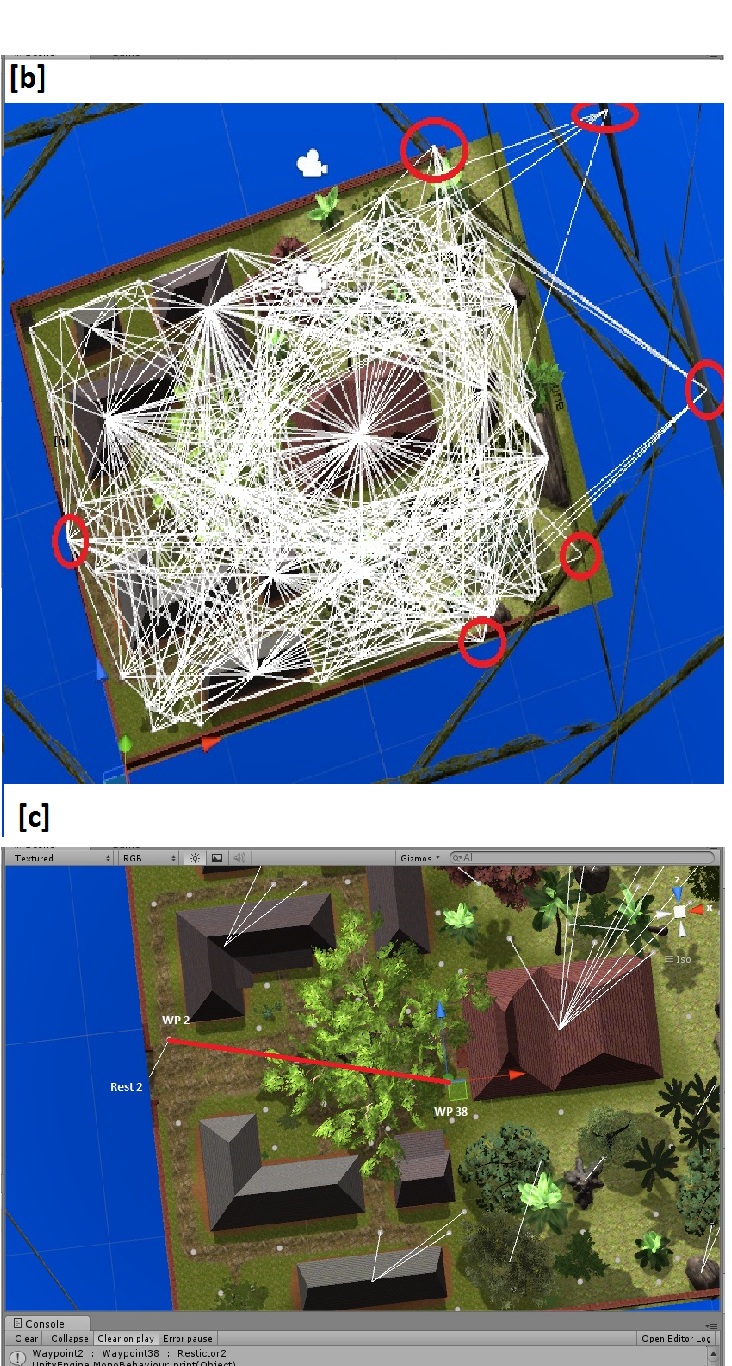
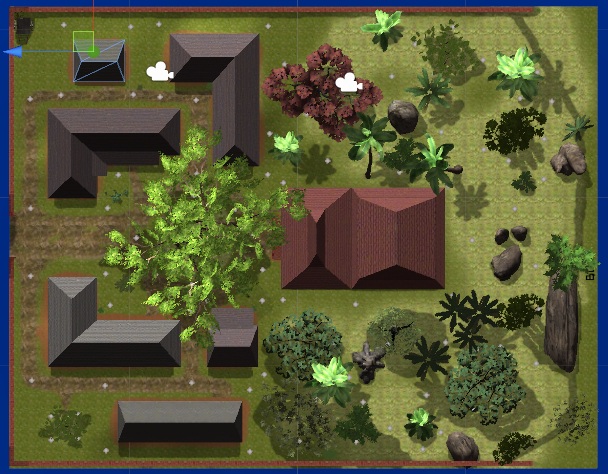
i have a code to get some closest neighbour of node with waypoints and raycast. the "a" picture is the picture of waypoints location(the grey dot) that supposed to cast a raycast to each waypoints and the "b" is an image of raycast results, it's miss on several spot(red circled). it has at about 89 waypoints, and each waypoints location is right. this is a part of my code

  for(flag = 0; flag< wayPoints.WPList.Length; flag++) // iteration to seek neighbour nodes
         {   
             for (flagNeigh = 0; flagNeigh < wayPoints.WPList.Length; flagNeigh++)
             {                
                 if (wayPoints.WPList[flag].loc != wayPoints.WPList[flagNeigh].loc) // dump its own node location
                 {
                     if (Physics.Raycast(wayPoints.WPList[flag].loc.position, wayPoints.WPList[flagNeigh].loc.position, out hitted, Vector3.Distance(wayPoints.WPList[flag].loc.position, wayPoints.WPList[flagNeigh].loc.position))) // raycasting to each node else its self
                     {
                         Debug.DrawLine(wayPoints.WPList[flag].loc.position, hitted.collider.gameObject.transform.position);
                     }
                 }
             } 
         }

Edit : X.X.loc is location which is in Transform.

i put this part of function in Start().

The y posisition of each waypoints is the same at 2, the x and z position difeerent as in the picture "a".

am i missing something ?

[a]. waypoints location
alt text

[b]. raycast results

alt text

[3]: /storage/temp/5480-b.jpg

a.jpg (138.8 kB)
bc.jpg (454.1 kB)
Comment
Add comment · Show 5
10 |3000 characters needed characters left characters exceeded
▼
  • Viewable by all users
  • Viewable by moderators
  • Viewable by moderators and the original poster
  • Advanced visibility
Viewable by all users
avatar image danilonishimura · Dec 03, 2012 at 04:21 PM 0
Share

Hi Bonifatius,

To be honest, seems like your rays are being fired from different locations if compared to the image [a]. Can you repeat this test with fewer points and check out if they're working as intended? If/When they're O$$anonymous$$, then you add the whole set.

avatar image whydoidoit · Dec 03, 2012 at 05:03 PM 0
Share

Are some of your waypoints up in the air?

avatar image Bonifatius GK · Dec 03, 2012 at 05:11 PM 0
Share

@daniloshimura : i've tried to $$anonymous$$imize the second iteration to a round iteration, but still, one error happens, teh raycast supposed to cast a waypoint in the middle, but the resul it's cought at the left side

@whydoidoit no, no waypoints outside the terrain or behind the crossing object at the right side...

avatar image Owen-Reynolds · Dec 03, 2012 at 05:16 PM 0
Share

DrawLine isn't going to where the hit occurred (`hitted.point`) but ins$$anonymous$$d is going to the center position of the object hit. That's why all those lines go to the center of the red house, or to the center of the "border" colliders.

avatar image Bonifatius GK · Dec 03, 2012 at 05:25 PM 0
Share

it's true, but i just try to show where i set the source and destination of the raycast, and draw line is just to show the results of my raycast..

1 Reply

· Add your reply
  • Sort: 
avatar image
0

Answer by Bonifatius GK · Dec 03, 2012 at 05:12 PM

not an answer

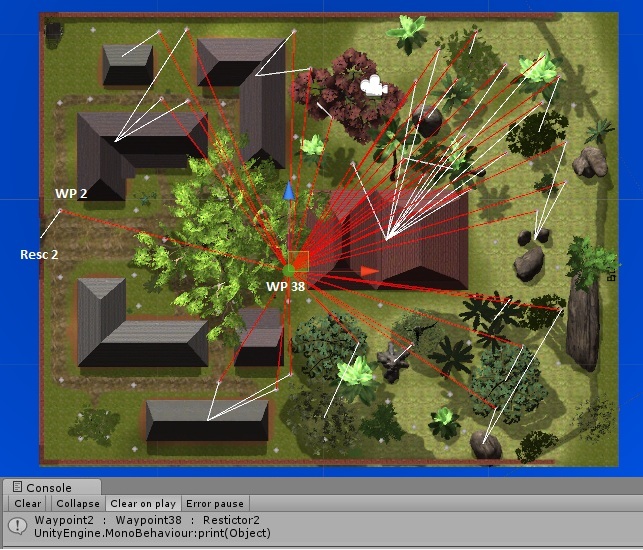
sorry to add some update on answer, because only 2 max attachment i can use. this is an image after i change the second iteration 1 time. it shown on the console that the waypoint 2 should use waypoint 38 as target, but the result, it cought in retrictor 2

the red lines is the raycast supposed to do, the white lines is the result of raycast.. thx
alt text

[1]: /storage/temp/5489-d.jpg


d.jpg (170.0 kB)
Comment
Add comment · Show 5 · Share
10 |3000 characters needed characters left characters exceeded
▼
  • Viewable by all users
  • Viewable by moderators
  • Viewable by moderators and the original poster
  • Advanced visibility
Viewable by all users
avatar image danilonishimura · Dec 03, 2012 at 06:00 PM 0
Share

Hi Bonifatus,

Debug.DrawLine draws a line between point 1 and point 2. The Ray stores a point of origin and a direction. So, in this image"d", seems like your're drawing a line between the point and the direction vector, which should be something near Vector3.zero, which is the center of the world. If you're trying to draw a line using the Ray data, you'll want to do something like this:

Debug.DrawLine(ray.origin, (ray.origin + ray.direction) * distance);

avatar image danilonishimura · Dec 03, 2012 at 06:18 PM 0
Share

Oh sorry, now I've read the post again and I misunderstood what you asked for. If you read your code you'll see that there's a problem with your ray cast.

Physics.Raycast(wayPoints.WPList[flag].loc.position, wayPoints.WPList[flagNeigh].loc.position)

The second argument is a direction, not a world position.

avatar image Bonifatius GK · Dec 04, 2012 at 01:47 AM 0
Share

ah... I see, this is just my miss understanding to the function, thanks a lot..... cause it's said that the direction is Vector3, so i thought that it's the world location of the target..

avatar image Owen-Reynolds · Dec 04, 2012 at 01:24 PM 0
Share

Finally!! The first time the OP asked this question, they got the same answer "2nd input is a direction," but wasn't ready to understand it.

avatar image Bonifatius GK · Dec 04, 2012 at 06:05 PM 0
Share

the direction (the second parameter) is (targetPosition - sourcePosition).normalized

Your answer

Hint: You can notify a user about this post by typing @username

Up to 2 attachments (including images) can be used with a maximum of 524.3 kB each and 1.0 MB total.

Follow this Question

Answers Answers and Comments

12 People are following this question.

avatar image avatar image avatar image avatar image avatar image avatar image avatar image avatar image avatar image avatar image avatar image avatar image

Related Questions

Multiple Cars not working 1 Answer

Distribute terrain in zones 3 Answers

Physics.Raycast to Physics2D.Raycast? 1 Answer

C# raycast shooting script broken 1 Answer

Raycasting in 2D is not working 0 Answers


Enterprise
Social Q&A

Social
Subscribe on YouTube social-youtube Follow on LinkedIn social-linkedin Follow on Twitter social-twitter Follow on Facebook social-facebook Follow on Instagram social-instagram

Footer

  • Purchase
    • Products
    • Subscription
    • Asset Store
    • Unity Gear
    • Resellers
  • Education
    • Students
    • Educators
    • Certification
    • Learn
    • Center of Excellence
  • Download
    • Unity
    • Beta Program
  • Unity Labs
    • Labs
    • Publications
  • Resources
    • Learn platform
    • Community
    • Documentation
    • Unity QA
    • FAQ
    • Services Status
    • Connect
  • About Unity
    • About Us
    • Blog
    • Events
    • Careers
    • Contact
    • Press
    • Partners
    • Affiliates
    • Security
Copyright © 2020 Unity Technologies
  • Legal
  • Privacy Policy
  • Cookies
  • Do Not Sell My Personal Information
  • Cookies Settings
"Unity", Unity logos, and other Unity trademarks are trademarks or registered trademarks of Unity Technologies or its affiliates in the U.S. and elsewhere (more info here). Other names or brands are trademarks of their respective owners.
  • Anonymous
  • Sign in
  • Create
  • Ask a question
  • Spaces
  • Default
  • Help Room
  • META
  • Moderators
  • Explore
  • Topics
  • Questions
  • Users
  • Badges