
Wayback Machinekoobas.hobune.stream
May JUN Jul
Previous capture 12 Next capture
2021 2022 2023
1 capture
12 Jun 22 - 12 Jun 22
sparklines
Close Help
  • Products
  • Solutions
  • Made with Unity
  • Learning
  • Support & Services
  • Community
  • Asset Store
  • Get Unity

UNITY ACCOUNT

You need a Unity Account to shop in the Online and Asset Stores, participate in the Unity Community and manage your license portfolio. Login Create account
  • Blog
  • Forums
  • Answers
  • Evangelists
  • User Groups
  • Beta Program
  • Advisory Panel

Navigation

  • Home
  • Products
  • Solutions
  • Made with Unity
  • Learning
  • Support & Services
  • Community
    • Blog
    • Forums
    • Answers
    • Evangelists
    • User Groups
    • Beta Program
    • Advisory Panel

Unity account

You need a Unity Account to shop in the Online and Asset Stores, participate in the Unity Community and manage your license portfolio. Login Create account

Language

  • Chinese
  • Spanish
  • Japanese
  • Korean
  • Portuguese
  • Ask a question
  • Spaces
    • Default
    • Help Room
    • META
    • Moderators
    • Topics
    • Questions
    • Users
    • Badges
  • Home /
avatar image
1
Question by Bullet93 · Jan 06, 2017 at 09:54 AM · unity 5shadersmaterialshairdaz3d

IClone character hair issue

Hi!

I'h having issues at importing an IClone character into Unity using an fbx export from 3dxchange. I know this topic has been discussed several times, but none of the answers I found were able to solve my issue. So moving on to the problem. After importing a character from IClone, the eyes, lashes and hair are messed up. Previously I've used Genesis 3 from daz3D and I've experienced the same issues. Thus far I managed to solve the lashes and eyes, but the hair is still a mystery. Below you can see a picture of the issue (the scalp is visible through the hair and the hair is slightly transparent). alt text From what I read by now, it's due to the materials opacity getting messed up after importing it to unity and using unity's standard shader.
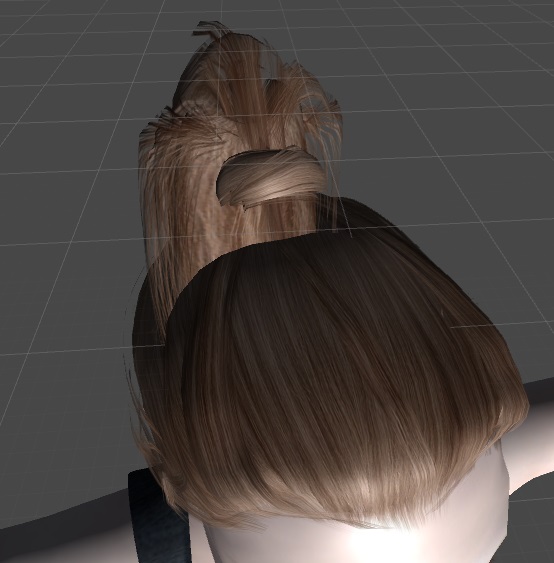
Can someone please give me a slightly in depth explanation or tutorial on how to fix this issue? I've been struggling with it and ignoring it for a few weeks now, but at this point it's really important.

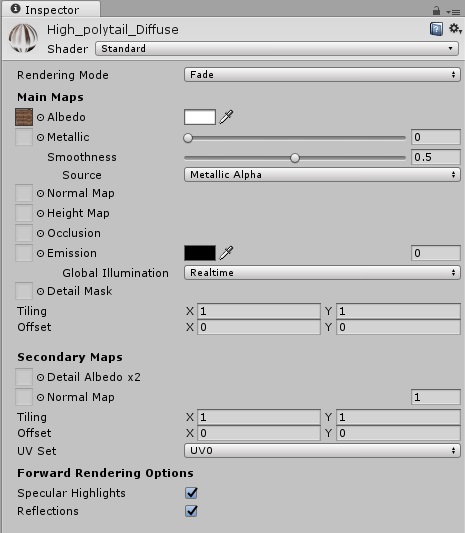
Edit: I added a picture of the settings I use for the hair. alt text
hair.jpg (64.8 kB)
hair2.jpg (58.0 kB)
Comment
Add comment
10 |3000 characters needed characters left characters exceeded
▼
  • Viewable by all users
  • Viewable by moderators
  • Viewable by moderators and the original poster
  • Advanced visibility
Viewable by all users

2 Replies

· Add your reply
  • Sort: 
avatar image
0

Answer by cgarossi · Jan 06, 2017 at 05:02 PM

This is a Z-Order issue with the shaders. They are of the same priority in the hair materials so they fight each other in order to render.

You can fix this issue by changing the render order. Click on the material in question, and in the inspector window, right click the tab at the top and click Debug.

You can then specify the render order. Higher is first, down to lowest. So for hair, mark the most visible parts with high priority. Set the scalp as the lowest priority.

I had this issue with Daz characters and this usually fixes the problem.

Comment
Add comment · Show 2 · Share
10 |3000 characters needed characters left characters exceeded
▼
  • Viewable by all users
  • Viewable by moderators
  • Viewable by moderators and the original poster
  • Advanced visibility
Viewable by all users
avatar image Bullet93 · Jan 09, 2017 at 02:59 PM 0
Share

Hi @cgarossi ! Thank you for your answer! I'm not sure if I completely understood how to change the render priority. I used the Custom Render Queue option and increased it on the hair, and also reduced it on the scalp to 0. This reduced the weirdness of it by a bit but the hair is still transparent. I edited my question by adding a few pictures of the settings for the hair. Can you tell me if I did it right or any other ideas would be greatly praised!

avatar image cgarossi · Jan 09, 2017 at 03:10 PM 0
Share

@Bullet93

I can't see your edit for some reason.

Have you tried using double sided shaders? It's possible the hair normals are single direction (as they are normally) so the back of the mesh is not rendering. If you visit the asset store you can download $$anonymous$$orph3D Lite models for free which come with a set of double sided shaders. Try those out first.

If you still get issues, export the hair mesh separately and split the mesh up by material in blender then parent it to an empty. I do this with Daz3D hair. Export the model then in blender split the hair mesh by material then unsubdivide by 1 to reduce the poly count (this doesn't break the UV). When you reimport into Unity you then have more control over how the hair geometry renders. Unity 5.5 adds the ability to prioritise by geometry Z order, which solves most issues. You can access this via the material debug menu.

If you're stuck I can help via Skype OldSkoolHC92@hotmail.com

avatar image
0

Answer by GXMark · Dec 13, 2021 at 08:09 PM

Wanted to share a CC3 hair demo from the Virtuoso HDRP Hair Shader.

The shader uses a combination of a VCC_LitAlpha base, VCC_Hair for the main hair strands. To provide the thickness effect it eliminates the transparency issues using a custom hair cap rig with an applied alpha brush touch up such that it conforms to the hair style. The alpha brush allow for direct touch ups in the unity editor using the VCC Character Creator product.

link text

Here it shows the hair shader operating with a transparent object behind it. It works find with shader sorting priorities.

link text

Comment
Add comment · Share
10 |3000 characters needed characters left characters exceeded
▼
  • Viewable by all users
  • Viewable by moderators
  • Viewable by moderators and the original poster
  • Advanced visibility
Viewable by all users

Your answer

Hint: You can notify a user about this post by typing @username

Up to 2 attachments (including images) can be used with a maximum of 524.3 kB each and 1.0 MB total.

Follow this Question

Answers Answers and Comments

6 People are following this question.

avatar image avatar image avatar image avatar image avatar image avatar image

Related Questions

Send large array of world positions to Shader (or any other way of sending a large ammount of Vector3s to shader) 1 Answer

Unity 5.0.0f4 freezes at "Building assets for scene 0" 0 Answers

Lightweight shader doesn't properly apply to blender imported GameObjects 1 Answer

Using different UV for multiple model copies 2 Answers

Edge Detection script [Legacy Image Effect] - NOT working on mobile (iOS, Android) 0 Answers


Enterprise
Social Q&A

Social
Subscribe on YouTube social-youtube Follow on LinkedIn social-linkedin Follow on Twitter social-twitter Follow on Facebook social-facebook Follow on Instagram social-instagram

Footer

  • Purchase
    • Products
    • Subscription
    • Asset Store
    • Unity Gear
    • Resellers
  • Education
    • Students
    • Educators
    • Certification
    • Learn
    • Center of Excellence
  • Download
    • Unity
    • Beta Program
  • Unity Labs
    • Labs
    • Publications
  • Resources
    • Learn platform
    • Community
    • Documentation
    • Unity QA
    • FAQ
    • Services Status
    • Connect
  • About Unity
    • About Us
    • Blog
    • Events
    • Careers
    • Contact
    • Press
    • Partners
    • Affiliates
    • Security
Copyright © 2020 Unity Technologies
  • Legal
  • Privacy Policy
  • Cookies
  • Do Not Sell My Personal Information
  • Cookies Settings
"Unity", Unity logos, and other Unity trademarks are trademarks or registered trademarks of Unity Technologies or its affiliates in the U.S. and elsewhere (more info here). Other names or brands are trademarks of their respective owners.
  • Anonymous
  • Sign in
  • Create
  • Ask a question
  • Spaces
  • Default
  • Help Room
  • META
  • Moderators
  • Explore
  • Topics
  • Questions
  • Users
  • Badges
