Wayback Machinekoobas.hobune.stream
May JUN Jul
Previous capture 13 Next capture
2021 2022 2023
1 capture
13 Jun 22 - 13 Jun 22
sparklines
Close Help
  • Products
  • Solutions
  • Made with Unity
  • Learning
  • Support & Services
  • Community
  • Asset Store
  • Get Unity

UNITY ACCOUNT

You need a Unity Account to shop in the Online and Asset Stores, participate in the Unity Community and manage your license portfolio. Login Create account
  • Blog
  • Forums
  • Answers
  • Evangelists
  • User Groups
  • Beta Program
  • Advisory Panel

Navigation

  • Home
  • Products
  • Solutions
  • Made with Unity
  • Learning
  • Support & Services
  • Community
    • Blog
    • Forums
    • Answers
    • Evangelists
    • User Groups
    • Beta Program
    • Advisory Panel

Unity account

You need a Unity Account to shop in the Online and Asset Stores, participate in the Unity Community and manage your license portfolio. Login Create account

Language

  • Chinese
  • Spanish
  • Japanese
  • Korean
  • Portuguese
  • Ask a question
  • Spaces
    • Default
    • Help Room
    • META
    • Moderators
    • Topics
    • Questions
    • Users
    • Badges
  • Home /
This question was closed Jun 10, 2014 at 04:09 PM by qwee for the following reason:

The question is answered, right answer was accepted

avatar image
0
Question by qwee · Mar 23, 2014 at 11:10 AM · animationclipcurvetangent

Weird Animation clip curves tangents

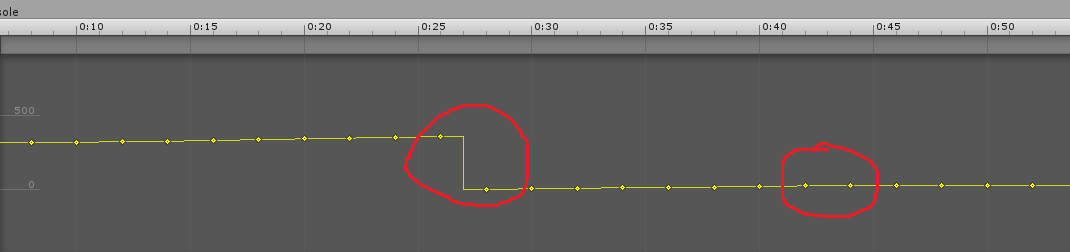
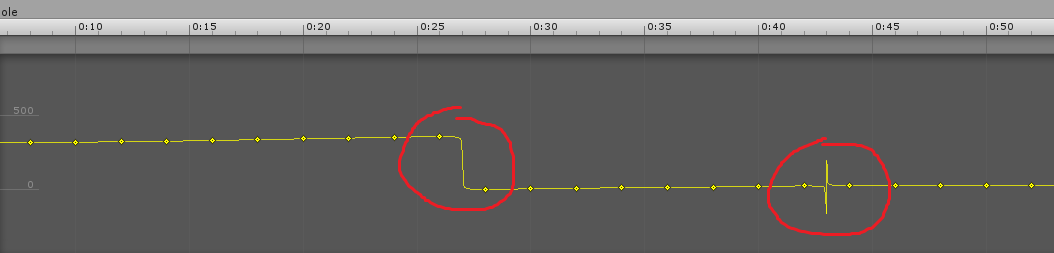
When i create an animation curve with custom keyframes in C#, the result curve has strange tangents. Here's an image which rapresents the problem:
alt text

The final result show be: alt text

I want to know how can i solve this problem... Thanks for your replies...

EDIT:

This is a piece of code:

 currKeyframe = -frameStep; nextKeyframe();
 Keyframe[] keysPosX = new Keyframe[totalFrames], keysPosY = new Keyframe[totalFrames], keysPosZ = new Keyframe[totalFrames];
 Keyframe[] keysRotX = new Keyframe[totalFrames], keysRotY = new Keyframe[totalFrames], keysRotZ = new Keyframe[totalFrames], keysRotW = new Keyframe[totalFrames];
 float frameRate = animation.clip.frameRate;
 for(int k = 0; k < totalFrames; k++)
 {
     keysPosX[k] = new Keyframe(frameStep * k / frameRate, currTransform.localPosition.x);
     keysPosY[k] = new Keyframe(frameStep * k / frameRate, currTransform.localPosition.y);
     keysPosZ[k] = new Keyframe(frameStep * k / frameRate, currTransform.localPosition.z);
     keysRotX[k] = new Keyframe(frameStep * k / frameRate, currTransform.localRotation.x);
     keysRotY[k] = new Keyframe(frameStep * k / frameRate, currTransform.localRotation.y);
     keysRotZ[k] = new Keyframe(frameStep * k / frameRate, currTransform.localRotation.z);
     keysRotW[k] = new Keyframe(frameStep * k / frameRate, currTransform.localRotation.w);
     nextKeyframe();
 }
 
 AnimationCurve cPosX = new AnimationCurve(keysPosX), cPosY = new AnimationCurve(keysPosY), cPosZ = new AnimationCurve(keysPosZ), cRotX = new AnimationCurve(keysRotX), cRotY = new AnimationCurve(keysRotY), cRotZ = new AnimationCurve(keysRotZ), cRotW = new AnimationCurve(keysRotW); 

 animation.clip.SetCurve(AnimationUtility.CalculateTransformPath(currTransform, transform), typeof(Transform), "localPosition.x", cPosX);
 animation.clip.SetCurve(AnimationUtility.CalculateTransformPath(currTransform, transform), typeof(Transform), "localPosition.y", cPosY);
 animation.clip.SetCurve(AnimationUtility.CalculateTransformPath(currTransform, transform), typeof(Transform), "localPosition.z", cPosZ);
 animation.clip.SetCurve(AnimationUtility.CalculateTransformPath(currTransform, transform), typeof(Transform), "localRotation.x", cRotX);
 animation.clip.SetCurve(AnimationUtility.CalculateTransformPath(currTransform, transform), typeof(Transform), "localRotation.y", cRotY);
 animation.clip.SetCurve(AnimationUtility.CalculateTransformPath(currTransform, transform), typeof(Transform), "localRotation.z", cRotZ);
 animation.clip.SetCurve(AnimationUtility.CalculateTransformPath(currTransform, transform), typeof(Transform), "localRotation.w", cRotW);

image2.png (11.4 kB)
image.png (12.1 kB)
Comment
Add comment · Show 4
10 |3000 characters needed characters left characters exceeded
▼
  • Viewable by all users
  • Viewable by moderators
  • Viewable by moderators and the original poster
  • Advanced visibility
Viewable by all users
avatar image Dave-Hampson ♦♦ · Mar 26, 2014 at 10:49 AM 0
Share

Can you post your C# code? There isn't much to go on here.

avatar image qwee · Mar 31, 2014 at 09:30 PM 0
Share

I had posted the code, any help?

avatar image Dave-Hampson ♦♦ · Apr 01, 2014 at 08:47 AM 0
Share

For the problem on the left, can the curve actually change instantly like you want it to, without extra control points there?

For the problem on the right, I would try printing out the values you are passing in and looking in particular at those two points to the left and right of the glitch. Is there something strange about them?

avatar image qwee · Apr 01, 2014 at 12:19 PM 0
Share

I think that animation is written as well without any problem... i can say this because when i try to re-set manually a keyframe of weird animation with same value, it reupdates the animation with correct tangents... this happens only with the rotation curve (the position curve works well) and would be an interpolation problem or a unity bug... thanks for your patience

1 Reply

  • Sort: 
avatar image
0
Best Answer

Answer by qwee · Apr 25, 2014 at 03:08 PM

Finally i have found the solution i had to implement the function EnsureQuaternionContinuity in the code (at the end):

 animation.clip.EnsureQuaternionContinuity();

And then save assets:

 AssetDatabase.SaveAssets();

This worked for me, i hope it can helps someone!!! :)

Comment
Add comment · Share
10 |3000 characters needed characters left characters exceeded
▼
  • Viewable by all users
  • Viewable by moderators
  • Viewable by moderators and the original poster
  • Advanced visibility
Viewable by all users

Follow this Question

Answers Answers and Comments

22 People are following this question.

avatar image avatar image avatar image avatar image avatar image avatar image avatar image avatar image avatar image avatar image avatar image avatar image avatar image avatar image avatar image avatar image avatar image avatar image avatar image avatar image avatar image avatar image

Related Questions

Parameterized Animation Clip 0 Answers

Tangent for 5th order Bezier curve 2 Answers

Calculate quaternion animation curve's tangents from a euler animation curve 2 Answers

What is the math behind AnimationCurve.Evaluate? 5 Answers

Extending tangents in Animation window 0 Answers


Enterprise
Social Q&A

Social
Subscribe on YouTube social-youtube Follow on LinkedIn social-linkedin Follow on Twitter social-twitter Follow on Facebook social-facebook Follow on Instagram social-instagram

Footer

  • Purchase
    • Products
    • Subscription
    • Asset Store
    • Unity Gear
    • Resellers
  • Education
    • Students
    • Educators
    • Certification
    • Learn
    • Center of Excellence
  • Download
    • Unity
    • Beta Program
  • Unity Labs
    • Labs
    • Publications
  • Resources
    • Learn platform
    • Community
    • Documentation
    • Unity QA
    • FAQ
    • Services Status
    • Connect
  • About Unity
    • About Us
    • Blog
    • Events
    • Careers
    • Contact
    • Press
    • Partners
    • Affiliates
    • Security
Copyright © 2020 Unity Technologies
  • Legal
  • Privacy Policy
  • Cookies
  • Do Not Sell My Personal Information
  • Cookies Settings
"Unity", Unity logos, and other Unity trademarks are trademarks or registered trademarks of Unity Technologies or its affiliates in the U.S. and elsewhere (more info here). Other names or brands are trademarks of their respective owners.
  • Anonymous
  • Sign in
  • Create
  • Ask a question
  • Spaces
  • Default
  • Help Room
  • META
  • Moderators
  • Explore
  • Topics
  • Questions
  • Users
  • Badges