 koobas.hobune.stream


Moving Slingshot touch Help Needed
 using UnityEngine;
 using System.Collections;

 public class slingShot_Mechanics : MonoBehaviour
 {

     public Transform fruitPos;
     public Transform player;

     public  GameObject orangeFruitPrefab;
     private GameObject orangeFruitClone;

     private Vector3 throwStartPos;
     private Vector3 throwMovPos;


     void Update()
     {

         if(Input.touchCount==1)
         {
             Touch touch = Input.GetTouch(0);

             if(touch.position.x< Screen.width/3)
             {
                 if(touch.phase == TouchPhase.Began)
                 {
                     orangeFruitClone = Instantiate(orangeFruitPrefab,fruitPos.position,fruitPos.transform.rotation)as GameObject;
                     orangeFruitClone.transform.parent = player.transform;
                     throwStartPos = Camera.main.ScreenToWorldPoint(touch.position);
                 }

                 else if(touch.phase == TouchPhase.Moved)
                 {
                     throwMovPos =  Camera.main.ScreenToWorldPoint(touch.position);

                     float temp = Mathf.Clamp( (Vector3.Distance(throwMovPos , throwStartPos )),-0.3f,0.3f );
                     Vector3 differenceVector = (Vector3.Normalize(throwStartPos - throwMovPos))*temp;

                     orangeFruitClone.transform.position = fruitPos.transform.position - differenceVector;
                     orangeFruitClone.GetComponent<Rigidbody2D>().isKinematic = true;
                 }


                 else if(touch.phase == TouchPhase.Ended ||touch.phase == TouchPhase.Canceled)
                 {
                     orangeFruitClone.GetComponent<Rigidbody2D>().isKinematic = false;
                     orangeFruitClone.GetComponent<Rigidbody2D>().AddForce(-throwMovPos*800.0f);
                 }
             }
         }


     }


 }
This is a slingshot script, It is a 2D Game in which the object will be moving up and down [Y Axis]. Currently am able to shoot the fruits prefab clone. However it is not working the way I want.
Am not sure how to update the position correctly, currently am able to pull back the slingshot and throw fruits. However, it is not correctly updating according to the moved position. I have another script which will make the object move up and down, So once the object moved in Y axis to a new touch position the fruit should be thrown from that position. Currently the velocity is not accurate it is not updating from the touch position correctly.
Any help would be appreciated. Thanks for your time. Let me know if you need more explanation.

Please explain your objects hierarchy. Is this fruit a child of the player? Your gameplay is not clear, too. Do you shoot your fruits from the players character? In your description you are using a term 'object' for something that is moving up or down. What is this object? Player? Fruit? A screenshot of the unwanted behavior would be nice too.

Thanks for your quick response.
1.fruit is the not the child of the Player. It is a seperate prefab. 2. I will shoot the fruits by touching and dragging from the public Transform fruitPos; It is nothing to do with player. 3. The object I meant is the player. [I have referenced its position as public Transform player;] 4. Fruits will be instantiated as public GameObject orangeFruitPrefab;
The player is moved by a simple script up and down. If that something that is related to this explanation.
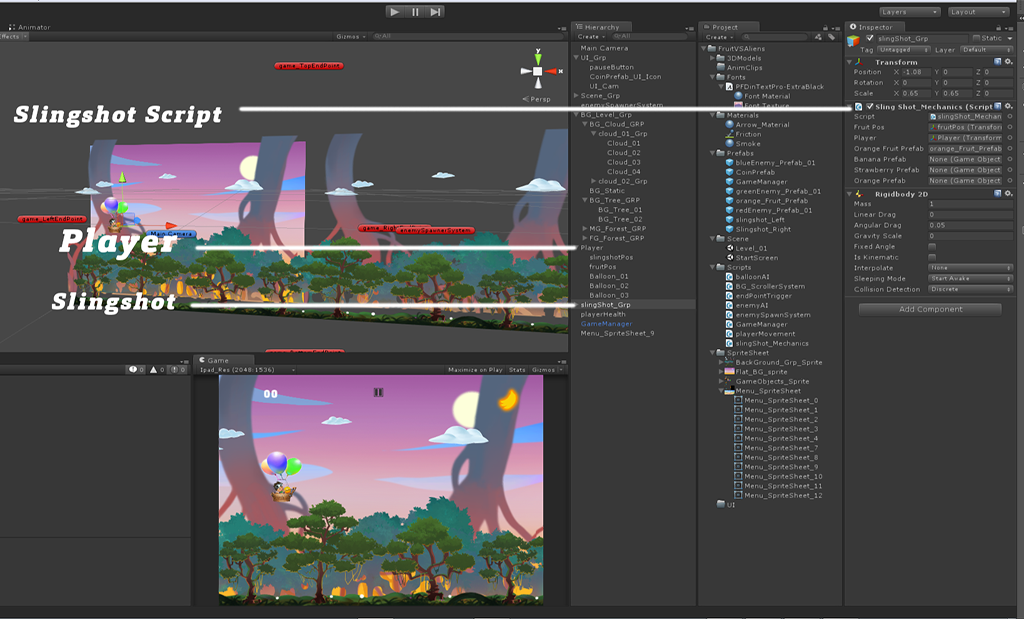
Also, you might want to avoid setting the is$$anonymous$$inematic value every time your are in processing $$anonymous$$oved touch event. Set is$$anonymous$$inematic to true in prefab and remove that line 43. For performance reasons.
Thanks. Still it is not accurate. Am not sure what am doing wrong.
         if(Input.touchCount==1)
         {
             Touch touch = Input.GetTouch(0);

             if(touch.position.x< Screen.width/3)
             {
                 if(touch.phase == TouchPhase.Began)
                 {
                     orangeFruitClone = Instantiate(orangeFruitPrefab,fruitPos.position,fruitPos.transform.rotation)as GameObject;
                     orangeFruitClone.transform.parent = player.transform;
                     throwStartPos = Camera.main.ScreenToWorldPoint(touch.position);
                 }

                 else if(touch.phase == TouchPhase.$$anonymous$$oved)
                 {
                     throw$$anonymous$$ovPos =  Camera.main.ScreenToWorldPoint(touch.position);

                     float temp = $$anonymous$$athf.Clamp( (Vector3.Distance(throw$$anonymous$$ovPos , throwStartPos )),-0.3f,0.3f );
                     Vector3 differenceVector = (Vector3.Normalize(throwStartPos - throw$$anonymous$$ovPos))*temp;

                     orangeFruitClone.transform.position = fruitPos.transform.position - differenceVector;
                     orangeFruitClone.GetComponent<Rigidbody2D>().is$$anonymous$$inematic = true;
                 }


                 else if(touch.phase == TouchPhase.Ended ||touch.phase == TouchPhase.Canceled)
                 {

                     touchReleasePos =  Camera.main.ScreenToWorldPoint(touch.position);
                     newReleasePos = fruitPos.transform.position - touchReleasePos;

                     orangeFruitClone.GetComponent<Rigidbody2D>().is$$anonymous$$inematic = false;
                     orangeFruitClone.GetComponent<Rigidbody2D>().AddForce(newReleasePos*1000.0f);
                 }
             }
         }

Okay, now I have a clearer picture of what is the problem. On touch release, you are launching the fruit in the direction opposite to throwMovPos. That value is not to be used. That is just a representation of your touch position in 3d world. That has nothing to do with the direction you would like to launch your projectile to. Your direction should be a vector from your touch release position (A) toward the position where you spawn your fruits, fruitPos (B). And you want to use the current position of (B), not the position calculated when the touch began. You get that vector by subtracting (B-A). Make sure you are using the values from the same coordinate system. So, before you calculate the vector, either project your fruitPos in Screen coordinates or project your touch.position into World. You have methods for that on your Camera.main object.
Thanks. I figured out another way to do it. Anyway, thanks for your answer.

hi, @jakovd may I ask you a question? I'm doing a game similar to angry birds. but, why isn't my catapult working in unity? It cannot be stretch or pulled. I've checked the code and it is correct. Before I proceed to designing of the game, everything seems okay. It works well but sometimes, it cannot be stretch or whatsoever too. But after I improved on the design wise, it cannot be stretch. Do you know why?



